ImageToText
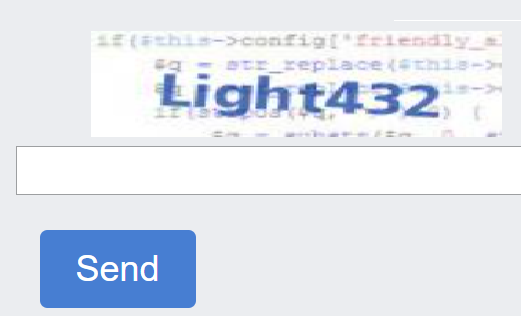
这是常规验证码,即包含文本的图片,需要输入相应的文本。
此任务无需使用代理服务器。
请求参数
重要提示:请在创建任务前立即获取图像的 base64,以避免在解决过程中出现错误(见下方 CAPTCHA 图像 base64 获取示例)。
type<string>requiredImageToTextTask
body<string>required以 base64* 编码的验证码文件内容。请确保该值以单行形式发送,不包含换行。
capMonsterModule<string>optional模块名称,例如 “yandex”。传递模块名称的替代方式以及所有可用模块的列表可在此处查看。
示例:yandex、special 等。
recognizingThreshold<integer>optional验证码识别阈值,可取 0 到 100。例如,如果向系统发送的值为 90,而任务解决置信度为 80,则不会扣除解决费用。在这种情况下,用户将收到 ERROR_CAPTCHA_UNSOLVABLE 响应。设置扣费阈值的另一种方法请参阅文章。
case<boolean>optional解决时是否区分大小写。可选值:true、false
numeric<integer>optional1 - 如果验证码仅由数字组成。
可选值:0、1
math<boolean>optionalfalse — 默认未设置;
true — 验证码要求执行数学运算(例如验证码 2 + 6 将返回值 8)。
重要: 对于 captcha_math 模块,请勿使用参数 math: true。
Base64 是一种数据编码方法,允许将二进制数据表示为文本。以下是使用开发者工具中的控制台获取验证码图像的 base64 格式的示例:
const captchaUrl = 'https://example.com/captcha.jpg';

function loadAndEncodeCaptchaToBase64(url) {
    fetch(url)
        .then(response => response.blob())
        .then(blob => {
            const reader = new FileReader();
            reader.readAsDataURL(blob);

            reader.onloadend = function() {
                const base64Data = reader.result;
                console.log('Base64 编码的验证码:, base64Data);

                          };
        })
        .catch(error => {
            console.error('加载或编码验证码时出错:', error);
        });
}

loadAndEncodeCaptchaToBase64(captchaUrl);
创建任务方法
https://api.capmonster.cloud/createTask
请求示例
{
  "clientKey": "API_KEY",
  "task": {
    "type": "ImageToTextTask",
    "body": "BASE64_BODY_HERE!"
  }
}
响应示例
{
  "errorId":0,
  "taskId":407533072
}
获取任务结果方法
使用getTaskResult方法获取验证码的解决方案。根据系统负载,您将在300毫秒到6秒的时间范围内收到答案。
https://api.capmonster.cloud/getTaskResult
请求示例
{
  "clientKey":"API_KEY",
  "taskId": 407533072
}
响应示例
{
  "errorId": 0,
  "cost": 0.0003,
  "status": "ready",
  "solution": {
    "text": "answer"
  }
}
| 属性 | 类型 | 描述 |
|---|---|---|
| text | String | 验证码答案 |
如何查找任务创建所需的所有参数
手动方式
- 请在浏览器中访问您的网站,该网站包含验证码功能。
- 右键点击验证码元素,选择 检查(Inspect)。
base64
在 DOM 树中找到所需的元素并将鼠标悬停在其上——base64 编码的图片会直接显示在元素的属性中:

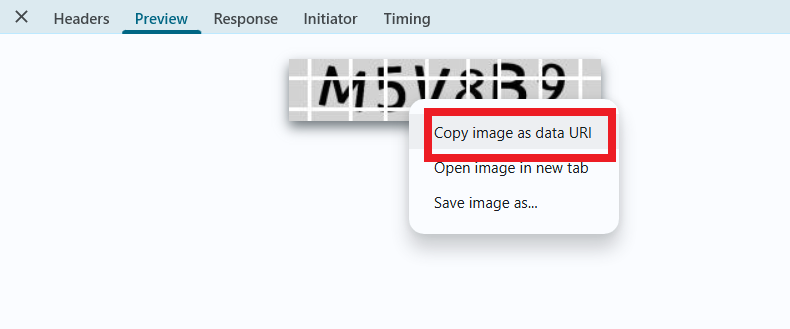
如果图片引用的是外部 URL,而不是包含 base64 编码的数据,你可以在网络请求(Network)中找到它。右键点击相关请求,选择 复制图片为数据 URI。这会将 base64 编码的图片数据复制到剪贴板。
自动方法
为了自动化获取所需参数,可以通过 浏览器(普通模式或 headless 模式,例如使用 Playwright)进行提取,或直接从 HTTP 请求中获取。由于动态参数的有效时间较短,建议在获取后尽快使用。
所提供的代码片段仅作为获取必要参数的基础示例。具体实现方式取决于包含验证码的网站、本身的页面结构,以及所使用的 HTML 元素和选择器。
- JavaScript
- Python
- C#
- Rust
显示代码(浏览器端)
(async () => {
  const img = document.querySelector('img'); // 示例选择器

  const imageUrl = img.src;

  const response = await fetch(imageUrl);

  if (!response.ok) {
    throw new Error("加载图片失败");
  }

  const buffer = await response.arrayBuffer();

  // 将二进制数据转换为 base64
  const base64Image = btoa(String.fromCharCode(...new Uint8Array(buffer)));

  console.log(base64Image);
})();
显示代码(Node.js)
(async () => {
  const imageUrl = "https://example/img/.jpg"; // 图片 URL

  const response = await fetch(imageUrl);

  if (!response.ok) {
    throw new Error("加载图片失败");
  }

  const buffer = await response.arrayBuffer();

  // 转换数据为 base64
  const base64Image = Buffer.from(buffer).toString("base64");

  console.log(base64Image);
})();
显示代码
import requests
import base64

# 图片 URL
image_url = "https://example/img.jpg"

response = requests.get(image_url)

if response.status_code == 200:
    # 将图片二进制数据转换为 base64
    base64_image = base64.b64encode(response.content).decode('utf-8')

    print(base64_image)
else:
    print("加载图片失败")
显示代码
using System;
using System.Net.Http;
using System.Threading.Tasks;

class Program
{
    static async Task Main(string[] args)
    {
        // 图片 URL
        string imageUrl = "https://example/img.jpg";

        using (HttpClient client = new HttpClient())
        {
            try
            {
                byte[] imageBytes = await client.GetByteArrayAsync(imageUrl);

                // 将图片二进制数据转换为 base64
                string base64Image = Convert.ToBase64String(imageBytes);

                Console.WriteLine(base64Image);
            }
            catch (Exception ex)
            {
                Console.WriteLine("加载图片失败: " + ex.Message);
            }
        }
    }
}
显示代码
// https://github.com/CapMonsterCloud/capmonster-rust-captcha-solver
// 本示例使用直接的 HTTP 请求(reqwest)。
// 请在 Cargo.toml 中添加:reqwest, tokio, base64.

use base64::{engine::general_purpose::STANDARD, Engine};

#[tokio::main]
async fn main() -> Result<(), Box<dyn std::error::Error>> {
    // 图片链接
    let image_url = "https://example/img.jpg";

    let response = reqwest::get(image_url).await?;
    if response.status().is_success() {
        let bytes = response.bytes().await?;
        // 将图片二进制数据转换为 base64
        let base64_image = STANDARD.encode(&bytes);
        println!("{base64_image}");
    } else {
        println!("图片加载失败");
    }
    Ok(())

}
使用 SDK 库
- JavaScript / TypeScript
- Python
- C#
- Rust
- Go
- PHP
显示代码(浏览器)
// https://github.com/CapMonsterCloud/capmonster-nodejs-captcha-solver

import {
  CapMonsterCloudClientFactory,
  ClientOptions,
  ImageToTextRequest,
  // 如果需要特定模块,请导入 CapMonsterModules
  CapMonsterModules
} from "@zennolab_com/capmonstercloud-client";

document.addEventListener("DOMContentLoaded", async () => {

  const API_KEY = "YOUR_API_KEY"; // 请指定您的 CapMonster Cloud API 密钥

  const client = CapMonsterCloudClientFactory.Create(
    new ClientOptions({ clientKey: API_KEY })
  );

  // ImageToTextRequest 不需要代理
  const imageToTextRequest = new ImageToTextRequest({
    body: "your_image_base64",

    // 如有需要,请指定其他参数
    CapMonsterModule: CapMonsterModules.Yandex,
    recognizingThreshold: 80,
    Case: true,
    numeric: 0,
    math: false,
  });

  // 如有需要,可以检查余额
  const balance = await client.getBalance();
  console.log("Balance:", balance);

  const result = await client.Solve(imageToTextRequest);
  console.log("Solution:", result.solution);
});
显示代码(Node.js)
// https://github.com/CapMonsterCloud/capmonster-nodejs-captcha-solver

const {
  CapMonsterCloudClientFactory,
  ClientOptions,
  ImageToTextRequest,
  // 如果需要特定模块,请导入 CapMonsterModules
  CapMonsterModules,
} = require("@zennolab_com/capmonstercloud-client");

const API_KEY = "YOUR_API_KEY"; // 请指定您的 CapMonster Cloud API 密钥

async function solveImageToText() {
  const client = CapMonsterCloudClientFactory.Create(
    new ClientOptions({ clientKey: API_KEY }),
  );

  // ImageToTextRequest 不需要代理
  const imageToTextRequest = new ImageToTextRequest({
    body: "your_image_base64",
    // 如有需要,请指定其他参数
    CapMonsterModule: CapMonsterModules.Yandex,
    recognizingThreshold: 80,
    Case: true,
    numeric: 0,
    math: false,
  });

  // 如有需要,可以检查余额
  const balance = await client.getBalance();
  console.log("Balance:", balance);

  const result = await client.Solve(imageToTextRequest);
  console.log("Solution:", result.solution);
}

solveImageToText().catch(console.error);
显示代码
# https://github.com/CapMonsterCloud/capmonster-python-captcha-solver

import asyncio
import base64

from capmonstercloudclient import CapMonsterClient, ClientOptions
from capmonstercloudclient.requests import ImageToTextRequest
# 如果需要特定模块,请导入 TextModules
from capmonstercloudclient.requests.enums import TextModules

API_KEY = "YOUR_API_KEY"  # 请指定您的 CapMonster Cloud API 密钥


async def solve_image_to_text():
    client = CapMonsterClient(
        options=ClientOptions(api_key=API_KEY)
    )

    # ImageToTextRequest 不需要代理
    base64_body = "your_image_base64"

    image_to_text_request = ImageToTextRequest(
        image_bytes=base64.b64decode(base64_body),

        # 如有需要,请指定其他参数
        module_name=TextModules.yandex_captcha.value,
        threshold=80,
        case=True,
        numeric=0,
        math=False,
    )

    # 如有需要,可以检查余额
    balance = await client.get_balance()
    print("Balance:", balance)

    result = await client.solve_captcha(image_to_text_request)
    print("Solution:", result)


asyncio.run(solve_image_to_text())
显示代码
// https://github.com/CapMonsterCloud/capmonster-dotnet-captcha-solver

using System;
using System.Threading.Tasks;
using Zennolab.CapMonsterCloud;
using Zennolab.CapMonsterCloud.Requests;

class Program
{
    static async Task Main(string[] args)
    {
        // 请指定您的 CapMonster Cloud API 密钥
        var clientOptions = new ClientOptions
        {
            ClientKey = "YOUR_API_KEY"
        };

        var cmCloudClient = CapMonsterCloudClientFactory.Create(clientOptions);

        // ImageToTextRequest 不需要代理
        var imageToTextRequest = new ImageToTextRequest
        {
            Body = "your_image_base64",

            // 如有需要,请指定其他参数
            CapMonsterModule = "Yandex",
            RecognizingThreshold = 80,
            CaseSensitive = true,
            Numeric = false,
            Math = false
        };

        // 如有需要,可以检查余额
        var balance = await cmCloudClient.GetBalanceAsync();
        Console.WriteLine("Balance: " + balance);

        var imageToTextResult =
            await cmCloudClient.SolveAsync(imageToTextRequest);

        Console.WriteLine("Solution: " + imageToTextResult.Solution.Value);
    }
}
显示代码
Rust 请使用官方 SDK:crates.io 和 Github。
// https://github.com/CapMonsterCloud/capmonster-rust-captcha-solver

use capmonstercloud_client::requests::{ImageToTextRequest, TextModule};
use capmonstercloud_client::{CapMonsterClient, ClientOptions};

#[tokio::main]
async fn main() -> capmonstercloud_client::Result<()> {
    // 请填写您的 CapMonster Cloud API 密钥
    let client = CapMonsterClient::new(ClientOptions::new("YOUR_API_KEY"))?;

    // 请填写验证码图片文件的路径
    let image_bytes = std::fs::read("image.png").expect("无法读取图片");

    let request = ImageToTextRequest::new(image_bytes)
    // 如有需要请指定额外参数
    .with_module_name(TextModule::Yandex)
    .with_threshold(80)
    .with_case(true)
    .with_numeric(false)
    .with_math(false);

    let solution = client.solve_captcha(&request).await?;
    println!("解决方案:{solution}");
    Ok(())
}
显示代码
Go 请使用官方 SDK:Github。
// https://github.com/CapMonsterCloud/capmonster-go-captcha-solver

package main

import (
	"context"
	"fmt"
	"log"

	capmonster "github.com/CapMonsterCloud/capmonster-go-captcha-solver/v2"
)

func main() {
	ctx := context.Background()

	// 指定您的 CapMonster Cloud API 密钥
	client := capmonster.New("YOUR_API_KEY")

	// ImageToTextRequest 不需要代理
	// 请填写验证码图片文件的路径
	imageToTextRequest, err := capmonster.ImageToTextFromFile("image.png")
	if err != nil {
		log.Fatal(err)
	}

	// 如有需要,请指定其他参数
	imageToTextRequest.CapMonsterModule = capmonster.ModuleGoogle
	imageToTextRequest.RecognizingThreshold = capmonster.Int(80)
	imageToTextRequest.Case = capmonster.Bool(true)
	imageToTextRequest.Numeric = capmonster.Bool(false)
	imageToTextRequest.Math = capmonster.Bool(false)

	// 如有需要,可以检查余额
	balance, err := client.GetBalance(ctx)
	if err != nil {
		log.Fatal(err)
	}
	fmt.Println("Balance:", balance)

	solution, err := client.Solve(ctx, imageToTextRequest)
	if err != nil {
		log.Fatal(err)
	}
	fmt.Println("Solution:", string(solution))
}
显示代码
PHP 请使用官方 SDK:Github。需要 PHP 8.1+,并启用 curl 和 json 扩展。使用 Composer 安装:composer require capmonstercloud/capmonster-client。
<?php

// https://github.com/CapMonsterCloud/capmonster-php-captcha-solver

require 'vendor/autoload.php';

use CapMonsterCloud\CapMonsterClient;
use CapMonsterCloud\ClientOptions;
use CapMonsterCloud\Requests\ImageToTextRequest;
// 如果需要特定模块,请导入 TextModule
use CapMonsterCloud\Requests\TextModule;

// 请指定您的 CapMonster Cloud API 密钥
$client = new CapMonsterClient(new ClientOptions('YOUR_API_KEY'));

// ImageToTextRequest 不需要代理
$request = new ImageToTextRequest(
    'your_image_base64',

    // 如有需要,请指定其他参数
    capMonsterModule: TextModule::YANDEX,
    recognizingThreshold: 80,
    case: true,
    numeric: false,
    math: false,
);

$solution = $client->solve($request);
print_r($solution);