Alibaba Cloud Captcha
任务示例
以下是当前 CapMonster Cloud 服务支持的 Alibaba CAPTCHA 任务类型示例:
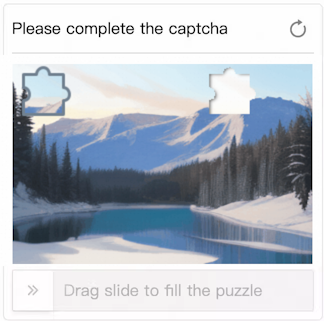
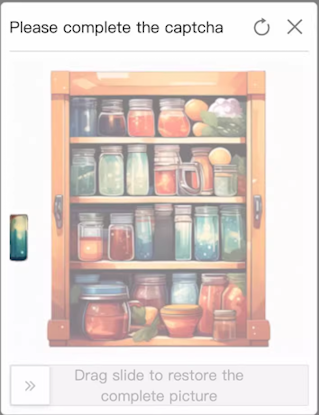
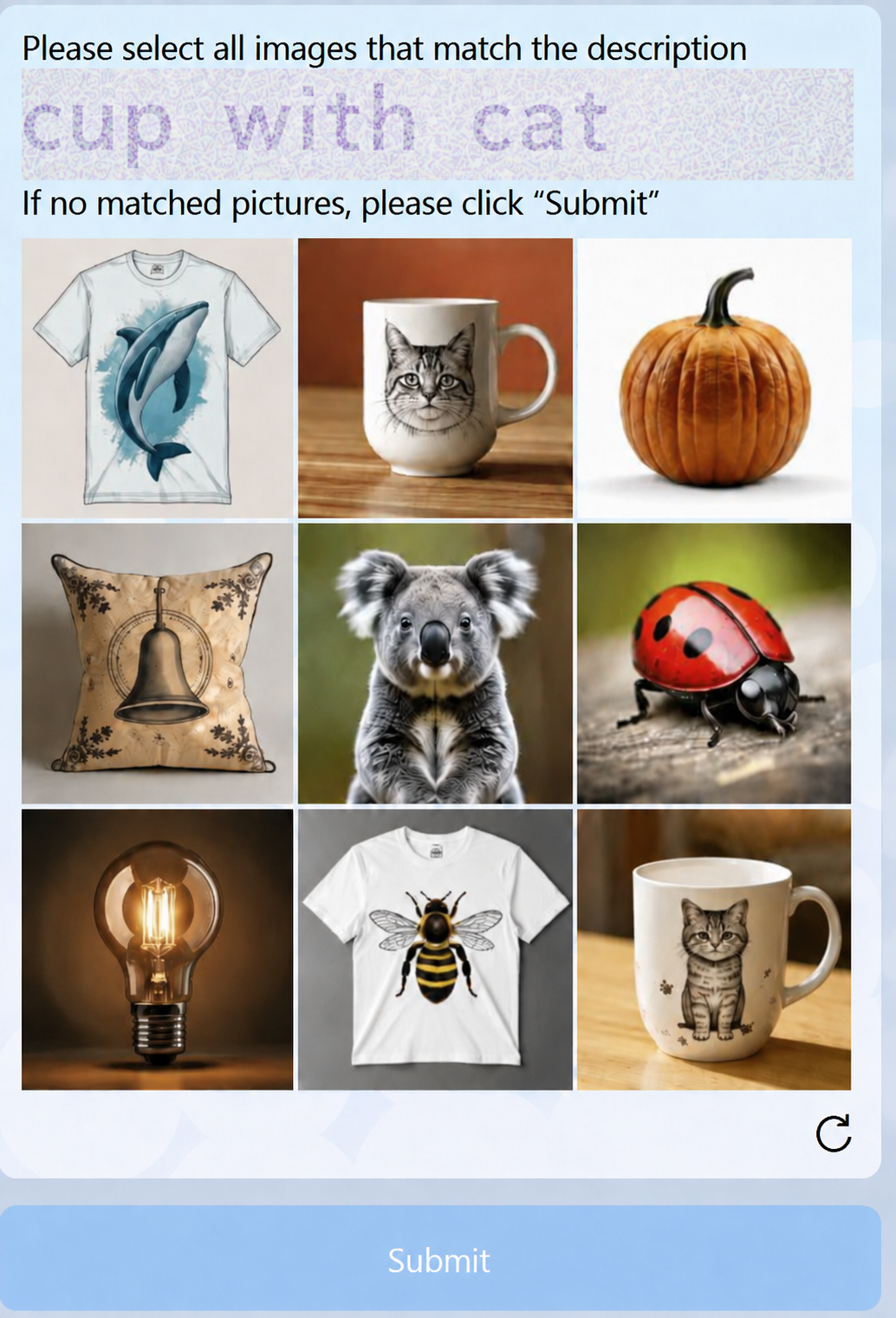


TRACELESS — 无感验证
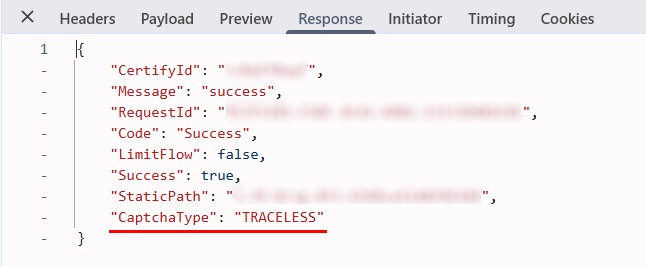
CapMonster Cloud 还支持 Alibaba CAPTCHA TRACELESS,这是一种不显示验证任务的后台验证方式,通过分析浏览器、设备数据和用户行为进行验证。
在浏览器开发者工具的 Network 选项卡中,查看加载 CAPTCHA 的请求响应,即可通过 "CaptchaType": "TRACELESS" 识别此类型。
CapMonster Cloud 默认通过内置代理工作——这些代理已包含在费用内。仅当网站不接受令牌或对内置服务的访问受限时,才需要指定您自己的代理。
如果代理按 IP 授权,请将地址 65.21.190.34 加入白名单。
请求参数
type<string>requiredCustomTask
class<string>requiredalibaba
websiteURL<string>required包含验证码的页面完整 URL。
sceneId(位于 metadata 中)<string>required验证码场景标识符,按以下格式传递:"sceneId":"1ww7426c4"– 该值仅作为示例。
请使用您自己的值——获取该值的说明请参阅相应章节
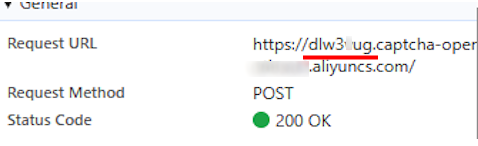
prefix(位于 metadata 中)<string>required验证码初始化参数,通过用于在页面上加载任务文本的请求 URL 传递。
例如,如果 URL 为:https://dlw3kug.captcha-open.example.aliyuncs.com/,则 prefix 参数的值对应子域名——dlw3kug。
某些网站需要传递额外参数:
仅当网站中存在这些参数时才指定它们(详情请参阅使用包含扩展参数的网站章节)。
userId(位于 metadata 中)<string>optional网站端的唯一用户或会话标识符。
示例:HpadJlQnz2zSKcSmjXBaqQvjYUvP4jMJIk/ZwGNDNiM=
userUserId(位于 metadata 中)<string>optional额外的(次级)用户标识符。
示例:/uSXKkVFuuwxXA21/MpXGxpLStWBEup1B3jjlMUWwNE=
verifyType(位于 metadata 中)<string>optional验证码验证机制的版本或类型。
示例:1.0
region(位于 metadata 中)<string>optional处理验证码所使用的服务器或数据中心区域。
示例:sgp
重要: region 的值会影响返回的 token 类型:当 region: cn 时,返回 WEB# 类型的 token(VOVCI2);当 region: sgp 时,返回 SG_WEB# 类型的 token(U0dfV0VCIZ)。
UserCertifyId(位于 metadata 中)<string>optional与当前验证码会话关联的唯一验证 ID。
示例:0a03e59417757735511105780e2a5e
apiGetLib(位于 metadata 中)<string>optional网站使用的验证码 JS 库链接。该值在客户端生成,并可能在每次页面渲染时动态生成。
示例:https://o.example.com/captcha-frontend/aliyunCaptcha/AliyunCaptcha.js?t=2041
punishUrl(位于 metadata 中)<string>optional从目标网站获取的验证页面完整 URL。
该参数适用于 Alibaba 返回单独的 /punish URL 进行验证的网站。请完整传递该 URL,包括查询参数。
示例:https://example.com:443//api/example/testlogin/_____tmd_____/punish?x5secdata=xgf6888e6c4d5d8115ka6bba95967ab87aa13767f97ccadf409d1782833032a-388365139a1244837524abakc3dafclick33ba7696f04104647438bcba5be532d2833__bx__example.com:443/api/example/testlogin/&x5step=2&action=captchaclick&pureCaptcha=
有关获取 URL 的说明,请参阅 如何查找创建任务所需的全部参数 → punishUrl。
cookieRequired(位于 metadata 中)<boolean>optional与 CAPTCHA 识别结果一起返回 cookies。
如果网站使用 Alibaba WAF,并且成功完成验证后需要获取 cookies,请将该参数设置为 true。
存在 ssxmod_itna 和 ssxmod_itna2 cookies 表明该网站使用的是 Alibaba WAF,而不是普通验证码。
详情请参阅如何区分 Alibaba WAF 与 Alibaba CAPTCHA。
默认情况下不使用此参数。
userAgent<string>optional浏览器 User-Agent。请使用 CapMonster Cloud 当前支持的值:userAgentPlaceholder
可通过以下地址获取最新值:https://capmonster.cloud/api/useragent/actual。
proxyType<string>optionalhttp - 普通 http/https 代理;
https - 仅当“http”不起作用时尝试此选项(某些自定义代理需要);
socks4 - socks4 代理;
socks5 - socks5 代理。
proxyAddress<string>optionalIPv4/IPv6 代理 IP 地址。不允许:
- 使用透明代理(可看到客户端 IP 的代理);
- 使用本地计算机上的代理。
proxyPort<integer>optional代理端口。
proxyLogin<string>optional代理服务器登录名。
proxyPassword<string>optional代理服务器密码。
如何区分 Alibaba WAF 与 Alibaba CAPTCHA
存在 ssxmod_itna 和 ssxmod_itna2 cookies 表明网站使用了 Alibaba WAF。使用普通 Alibaba CAPTCHA 时,不会存在这些 cookies。
要检查这些 cookies 是否存在,请打开开发者工具 → Application → Cookies,然后选择网站域名。
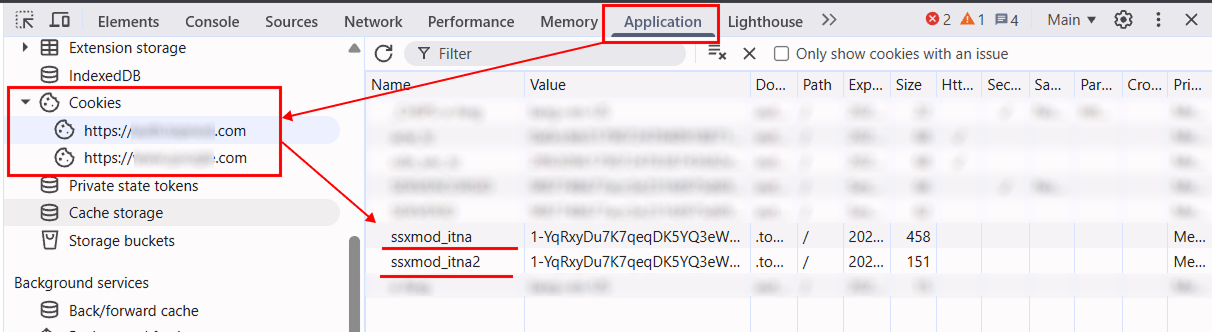
如果网站使用 Alibaba WAF,且后续请求需要 cookies,请在创建任务时,在 metadata 对象中传递 cookieRequired: true。
创建任务的方法
普通版本(无附加参数)
- CustomTask(无代理)
- CustomTask(使用代理)
https://api.capmonster.cloud/createTask
请求示例
{
  "clientKey": "API_KEY",
  "task": {
    "type": "CustomTask",
    "class": "alibaba",
    "websiteURL": "https://www.example.com",
    "userAgent": "userAgentPlaceholder",
    "metadata": {
      "sceneId": "your-scene-id",
      "prefix": "your-prefix"
    }
  }
}
响应示例
{
  "errorId": 0,
  "taskId": 407533077
}
https://api.capmonster.cloud/createTask
请求示例
{
  "clientKey": "API_KEY",
  "task": {
    "type": "CustomTask",
    "class": "alibaba",
    "websiteURL": "https://www.example.com",
    "userAgent": "userAgentPlaceholder",
    "metadata": {
      "sceneId": "your-scene-id",
      "prefix": "your-prefix"
    },
    "proxyType": "your-proxy-type",
    "proxyAddress": "your-proxy-address",
    "proxyPort": 1234,
    "proxyLogin": "your-proxy-login",
    "proxyPassword": "your-proxy-password"
  }
}
响应示例
{
  "errorId": 0,
  "taskId": 407533077
}
使用扩展参数的方案(userId、userUserId、verifyType 等):
- CustomTask(无代理)
- CustomTask(使用代理)
https://api.capmonster.cloud/createTask
请求示例
{
  "clientKey": "API_KEY",
  "task": {
    "type": "CustomTask",
    "class": "alibaba",
    "websiteURL": "https://www.example.com",
    "userAgent": "userAgentPlaceholder",
    "metadata": {
      "sceneId": "your-scene-id",
      "prefix": "your-prefix",
      "userId": "your-user-id",
      "userUserId": "your-user-user-id",
      "verifyType": "your-verify-type",
      "region": "your-region",
      "UserCertifyId": "your-user-certify-id",
      "apiGetLib": "https://o.example.com/captcha-frontend/aliyunCaptcha/AliyunCaptcha.js?t=2041"
    }
  }
}
响应示例
{
  "errorId": 0,
  "taskId": 407533077
}
https://api.capmonster.cloud/createTask
请求示例
{
  "clientKey": "API_KEY",
  "task": {
    "type": "CustomTask",
    "class": "alibaba",
    "websiteURL": "https://www.example.com",
    "userAgent": "userAgentPlaceholder",
    "metadata": {
      "sceneId": "your-scene-id",
      "prefix": "your-prefix",
      "userId": "your-user-id",
      "userUserId": "your-user-user-id",
      "verifyType": "your-verify-type",
      "region": "your-region",
      "UserCertifyId": "your-user-certify-id",
      "apiGetLib": "https://o.example.com/captcha-frontend/aliyunCaptcha/AliyunCaptcha.js?t=2041"
    },
    "proxyType": "your-proxy-type",
    "proxyAddress": "your-proxy-address",
    "proxyPort": 1234,
    "proxyLogin": "your-proxy-login",
    "proxyPassword": "your-proxy-password"
  }
}
响应示例
{
  "errorId": 0,
  "taskId": 407533077
}
使用 punishUrl 的方案
在某些受 Alibaba 保护的网站上,验证会通过单独的 /punish URL 触发。在这种情况下,请将获取到的 URL 传入 punishUrl 参数(位于 metadata 中)。
Alibaba Punish 可能使用选择匹配图片或滑块等验证方式。
- CustomTask(无代理)
- CustomTask(使用代理)
https://api.capmonster.cloud/createTask
请求示例
{
  "clientKey": "API_KEY",
  "task": {
    "type": "CustomTask",
    "class": "alibaba",
    "websiteURL": "https://www.example.com",
    "userAgent": "userAgentPlaceholder",
    "metadata": {
      "punishUrl": "https://example.com/_____tmd_____/punish?x5secdata=your-x5secdata&x5step=2"
    }
  }
}
响应示例
{
  "errorId": 0,
  "taskId": 407533077
}
https://api.capmonster.cloud/createTask
请求示例
{
  "clientKey": "API_KEY",
  "task": {
    "type": "CustomTask",
    "class": "alibaba",
    "websiteURL": "https://www.example.com",
    "userAgent": "userAgentPlaceholder",
    "metadata": {
      "punishUrl": "https://example.com/_____tmd_____/punish?x5secdata=your-x5secdata&x5step=2"
    },
    "proxyType": "your-proxy-type",
    "proxyAddress": "your-proxy-address",
    "proxyPort": 1234,
    "proxyLogin": "your-proxy-login",
    "proxyPassword": "your-proxy-password"
  }
}
响应示例
{
  "errorId": 0,
  "taskId": 407533077
}
返回 cookies 的选项(cookieRequired)
对于某些使用 Alibaba WAF 的网站,成功完成 CAPTCHA 识别后还需要获取 cookies,以便在后续请求中使用。
为此,请在 metadata 对象中添加以下参数:
{
  "cookieRequired": true
}
- CustomTask(无代理)
- CustomTask(使用代理)
https://api.capmonster.cloud/createTask
请求示例
{
  "clientKey": "API_KEY",
  "task": {
    "type": "CustomTask",
    "class": "alibaba",
    "websiteURL": "https://example.com",
    "userAgent": "userAgentPlaceholder",
    "metadata": {
      "prefix": "your-prefix",
      "sceneId": "your-scene-id",
      "userId": "your-user-id",
      "userUserId": "your-user-user-id",
      "verifyType": "1.0",
      "region": "your-region",
      "UserCertifyId": "your-user-certify-id",
      "apiGetLib": "https://o.example.com/captcha-frontend/aliyunCaptcha/AliyunCaptcha.js?t=2041",
      "cookieRequired": true
    }
  }
}
响应示例
{
  "errorId": 0,
  "taskId": 407533077
}
https://api.capmonster.cloud/createTask
请求示例
{
  "clientKey": "API_KEY",
  "task": {
    "type": "CustomTask",
    "class": "alibaba",
    "websiteURL": "https://example.com",
    "userAgent": "userAgentPlaceholder",
    "metadata": {
      "prefix": "your-prefix",
      "sceneId": "your-scene-id",
      "userId": "your-user-id",
      "userUserId": "your-user-user-id",
      "verifyType": "1.0",
      "region": "your-region",
      "UserCertifyId": "your-user-certify-id",
      "apiGetLib": "https://o.example.com/captcha-frontend/aliyunCaptcha/AliyunCaptcha.js?t=2041",
      "cookieRequired": true
    },
    "proxyType": "your-proxy-type",
    "proxyAddress": "your-proxy-address",
    "proxyPort": 1234,
    "proxyLogin": "your-proxy-login",
    "proxyPassword": "your-proxy-password"
  }
}
响应示例
{
  "errorId": 0,
  "taskId": 407533077
}
获取任务结果的方法
使用 getTaskResult 方法获取 Alibaba CAPTCHA 的解决结果。
https://api.capmonster.cloud/getTaskResult
请求示例
{
  "clientKey": "API_KEY",
  "taskId": 407533077
}
响应示例
{
  "errorId": 0,
  "errorCode": null,
  "errorDescription": null,
  "status": "ready",
  "solution": {
    "data": {
      "tokens": "{\"sceneId\":\"1ww7426c4\",\"certifyId\":\"kBjCxX2W2c\",\"deviceToken\":\"U0dfV0VCIzM3...wOGJkMjY=\",\"data\":\"JRMnX3B...EUQdCpLkqSj7THYNf3dn\"}"
    }
  }
}
创建任务时在 metadata 中传递的 region 值会影响返回的 deviceToken 格式:
region: cn– 返回WEB#类型的 token(VOVCI2);region: sgp– 返回SG_WEB#类型的 token(U0dfV0VCIZ)。
如果请求中指定了 "cookieRequired": true,响应还会包含按域名分组的 cookies。这同样适用于包含 punishUrl 的任务。请将 solution.domains 对象中的 cookies 与 CAPTCHA 解决结果一起用于向相应域名发送的后续请求。
响应示例
{
  "errorId": 0,
  "errorCode": null,
  "errorDescription": null,
  "status": "ready",
  "solution": {
    "domains": {
      "example.com": {
        "cookies": {
          "arms_uid": "23906d34-14da-4ddb-b651-b4d72d5376e1",
          "sca": "ec12103d",
          "atpsida": "b8cd8cc0185b...1196_1",
          "cna": "vJsNIxNBKGMCAax0zMDiXVu1",
          "cbc": "T2gAde24vOm4...wkkwYA=",
          "x5sec": "7b2274223a...227d",
          "tfstk": "gPEnRZi0vyuB...ECvCA."
        }
      }
    }
  }
}
如何查找创建任务所需的全部参数
sceneId
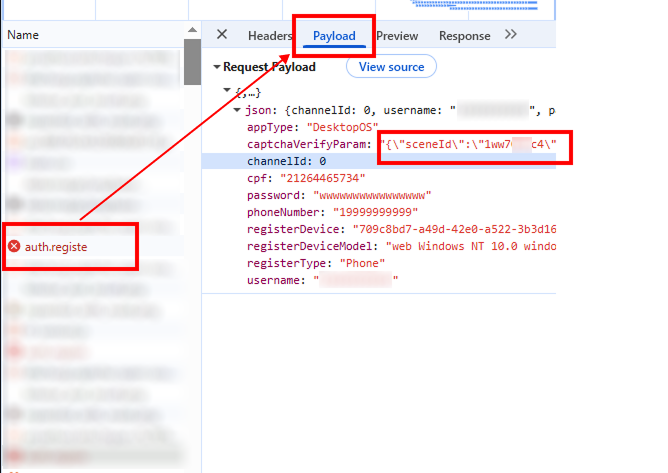
可在成功完成一次验证码后获取:
- 在网站上手动完成验证码。
- 打开 DevTools → Network 选项卡。
- 查找成功解决后发送的请求(例如:verify、check、validate)。
- 在 Payload 或 Response 中查找
sceneId参数(CaptchaSceneId或sId)。
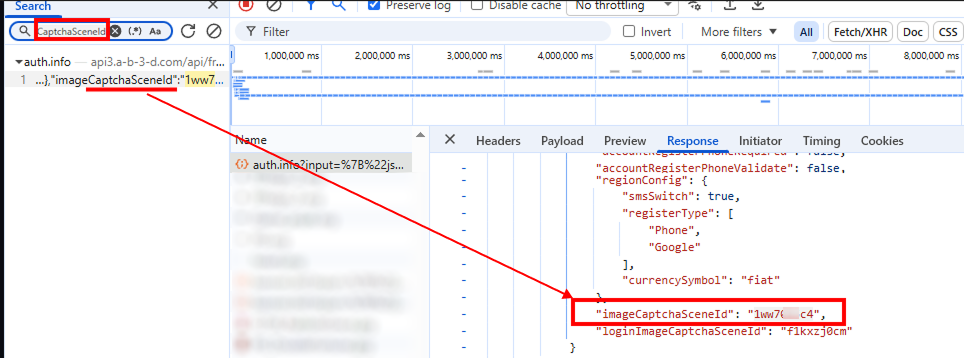
也可以通过搜索网络请求来查找此参数:
- 打开包含验证码的页面,进入 DevTools → Network 选项卡。
- 使用关键字
sceneId或CaptchaSceneId进行搜索(Ctrl + F)。
prefix
可从网站用于传递验证码任务文本的请求 URL 中获取:
- 打开包含验证码的页面。
- 查找与加载任务相关的请求(通常通过 DevTools → Network)。
punishUrl
punishUrl 是目标网站触发保护时返回的 Alibaba 验证 URL。
通常可以从响应中包含以下错误的网络请求中获取该 URL:
FAIL_SYS_USER_VALIDATE
通过 DevTools 获取
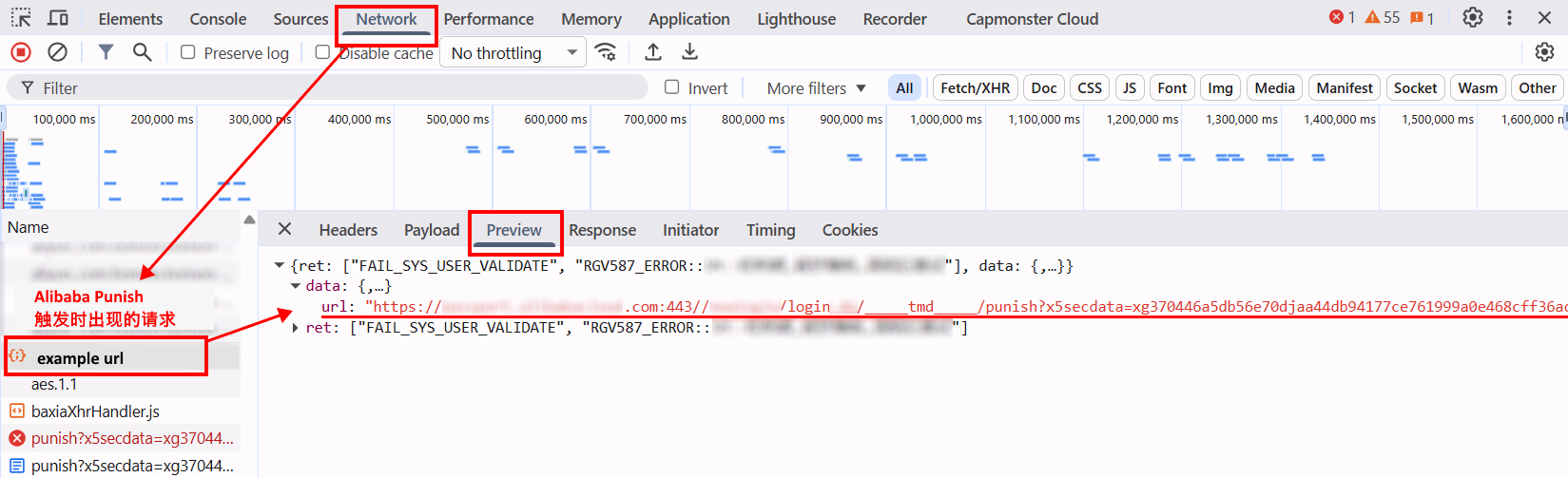
- 打开目标页面,并执行会触发 Alibaba 验证的操作。
- 打开 DevTools → Network。
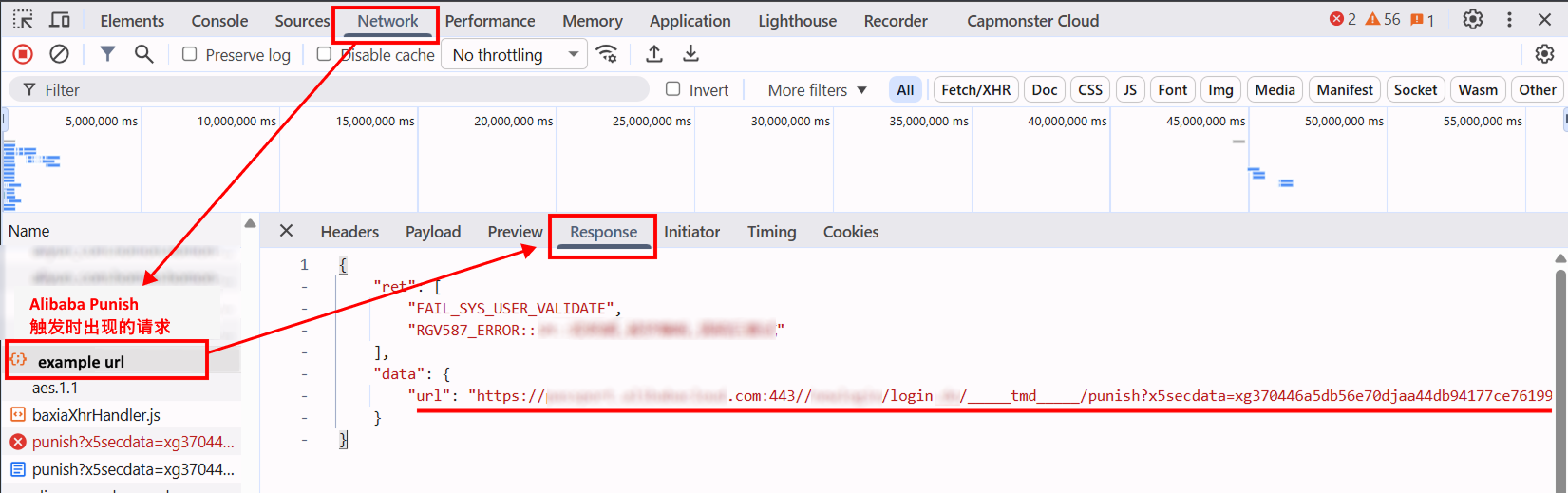
- 找到保护触发时发送的请求。可通过响应中包含的
FAIL_SYS_USER_VALIDATE错误进行定位。 - 打开该请求并切换到 Preview 选项卡。在响应中找到
data字段,其中包含应作为punishUrl使用的验证 URL。
- 也可以在 Response 选项卡中找到目标 URL。
- 完整复制该 URL,并在创建任务时将其传入
punishUrl参数(位于metadata中)。
最终 URL 必须包含端口(例如 443)、_____tmd_____/punish 路径,以及 x5secdata、x5step、action 和 pureCaptcha 参数。
URL 格式:
https://example.com:443//api/example/testlogin/_____tmd_____/punish?x5secdata=xgf6888e6c4d5d8115ka6bba95967ab87aa13767f97ccadf409d1782833032a-388365139a1244837524abakc3dafclick33ba7696f04104647438bcba5be532d2833__bx__example.com:443/api/example/testlogin/&x5step=2&action=captchaclick&pureCaptcha=
自动获取 punishUrl
也可以通过以下方式以编程方式获取 punishUrl:
- 通过 HTTP 请求——如果已知 API URL、请求方法、headers 以及其他请求参数;
- 通过 Playwright——如果需要直接在浏览器中跟踪请求。
在某些情况下,会先返回包含 x5secdata 和 x5step 的中间 URL,处理该 URL 后,再返回包含 action 和 pureCaptcha 参数的最终 punishUrl。
对于 HTTP 请求,请使用目标网站实际请求的参数。在浏览器场景中,请指定所需页面并执行触发 Alibaba Punish 的操作。
以下示例展示获取 punishUrl 的通用方法。请将 URL、headers 和其他值替换为目标网站的实际数据。
- JavaScript (Node.js)
- Python
显示代码(通过 HTTP 请求)
const USER_AGENT =
"userAgentPlaceholder";
const TIMEOUT = 30000;
/* ================= 请求设置 ================= */
// 以下所有值仅作为示例
// 请指定目标网站实际请求的参数
// 如有需要,请添加 origin、referer、accept-language 等其他 headers
const REQUEST_CONFIG = {
pageUrl: "https://example.com/login",
url: "https://api.example.com/login?fromSite=example&appName=example-app",
method: "POST",
// 请求的 query 参数,例如:login、email、
// 电话号码或其他值
params: {
value: "example"
},
headers: {
accept: "application/json, text/plain, */*",
"content-type": "application/json",
"user-agent": USER_AGENT,
origin: "https://example.com",
referer: "https://example.com/login",
},
};
/* ================= 通用逻辑 ================= */
function isPunishUrl(url) {
return typeof url === "string" && url.includes("_____tmd_____/punish");
}
function hasParam(url, name) {
try {
return new URL(url).searchParams.has(name);
} catch {
return false;
}
}
function isFinalPunishUrl(url) {
return (
isPunishUrl(url) &&
["x5secdata", "x5step", "action", "pureCaptcha"].every((name) =>
hasParam(url, name),
)
);
}
function cookiesToHeader(cookies = {}) {
return Object.entries(cookies)
.map(([name, value]) => `${name}=${value}`)
.join("; ");
}
function extractFromHtml(html, baseUrl) {
const match = html.match(
/(?:["']url["']\s*:\s*["']([^"']+)["'])|(https?:\/\/[^\s"'<>]+\/_____tmd_____\/punish\?[^\s"'<>]+)/i,
);
if (!match) {
return null;
}
const value = (match[1] || match[2])
.replace(/\\\//g, "/")
.replace(/&/g, "&")
.replace(/=|=/gi, "=");
try {
const url = new URL(value, baseUrl).href;
return isPunishUrl(url) ? url : null;
} catch {
return null;
}
}
async function extractPunishUrl(response) {
const text = await response.text();
try {
const url = JSON.parse(text)?.data?.url;
if (isPunishUrl(url)) {
return url;
}
} catch {}
return extractFromHtml(text, response.url);
}
async function sendRequest(config) {
const url = new URL(config.url);
for (const [name, value] of Object.entries(config.params || {})) {
if (value != null) {
url.searchParams.set(name, value);
}
}
const headers = {
...(config.headers || {}),
};
const cookie = cookiesToHeader(config.cookies);
if (cookie) {
headers.cookie = cookie;
}
const method = (config.method || "GET").toUpperCase();
const options = {
method,
headers,
signal: AbortSignal.timeout(TIMEOUT),
};
if (method !== "GET" && method !== "HEAD") {
if (config.json != null) {
options.body = JSON.stringify(config.json);
} else if (config.data != null) {
options.body = config.data;
}
}
const response = await fetch(url, options);
if (!response.ok) {
throw new Error(`HTTP ${response.status} ${response.statusText}`);
}
return response;
}
async function resolvePunishUrl(response, config, maxSteps = 3) {
const visited = new Set();
for (let step = 0; step < maxSteps; step++) {
const punishUrl = await extractPunishUrl(response);
if (!punishUrl) {
throw new Error("响应中未找到 punishUrl");
}
if (visited.has(punishUrl)) {
throw new Error("检测到重复的 punishUrl");
}
visited.add(punishUrl);
if (isFinalPunishUrl(punishUrl)) {
return punishUrl;
}
const headers = {
accept: "text/html,application/xhtml+xml,application/xml;q=0.9,*/*;q=0.8",
"user-agent": USER_AGENT,
referer: config.pageUrl,
};
const cookie = cookiesToHeader(config.cookies);
if (cookie) {
headers.cookie = cookie;
}
response = await fetch(punishUrl, {
headers,
signal: AbortSignal.timeout(TIMEOUT),
});
if (!response.ok) {
throw new Error(`HTTP ${response.status} ${response.statusText}`);
}
}
throw new Error("无法获取最终 punishUrl");
}
async function main() {
try {
const response = await sendRequest(REQUEST_CONFIG);
const punishUrl = await resolvePunishUrl(response, REQUEST_CONFIG);
console.log("最终 punishUrl:");
console.log(punishUrl);
} catch (error) {
console.error("获取 punishUrl 失败:");
console.error(error.message);
}
}
main();
显示代码(通过 Playwright)
const { chromium } = require("playwright");

// 使用 Alibaba Punish 的页面
const PAGE_URL = "https://example.com/";

const TIMEOUT = 180000;

function isPunishUrl(url) {
  return (
    typeof url === "string" &&
    url.includes("_____tmd_____/punish")
  );
}

function hasParam(url, name) {
  try {
    return new URL(url).searchParams.has(name);
  } catch {
    return false;
  }
}

function isFinalPunishUrl(url) {
  return (
    isPunishUrl(url) &&
    hasParam(url, "x5secdata") &&
    hasParam(url, "x5step") &&
    hasParam(url, "action") &&
    hasParam(url, "pureCaptcha")
  );
}

function addHttpsPort(url) {
  if (
    typeof url !== "string" ||
    !url.startsWith("https://")
  ) {
    return url;
  }

  if (/^https:\/\/[^/]+:\d+(?:\/|$)/i.test(url)) {
    return url;
  }

  return url.replace(
    /^https:\/\/([^/]+)/i,
    "https://$1:443"
  );
}

function waitForPunishUrl(page) {
  return new Promise((resolve, reject) => {
    let finalPunishUrl = null;

    const timer = setTimeout(() => {
      cleanup();

      reject(
        new Error(
          "未找到最终 punishUrl"
        )
      );
    }, TIMEOUT);

    function cleanup() {
      clearTimeout(timer);

      page.off("request", onRequest);
      page.off("response", onResponse);
    }

    function processUrl(url) {
      if (
        finalPunishUrl ||
        !isFinalPunishUrl(url)
      ) {
        return;
      }

      finalPunishUrl =
        addHttpsPort(url);

      cleanup();
      resolve(finalPunishUrl);
    }

    function onRequest(request) {
      processUrl(
        request.url()
      );
    }

    function onResponse(response) {
      processUrl(
        response.url()
      );
    }

    page.on("request", onRequest);
    page.on("response", onResponse);
  });
}

async function main() {
  const browser = await chromium.launch({
    headless: false,
  });

  const context =
    await browser.newContext();

  const page =
    await context.newPage();

  const punishUrlPromise =
    waitForPunishUrl(page);

  await page.goto(
    PAGE_URL,
    {
      waitUntil: "domcontentloaded",
    }
  );

  console.log(
    "请在页面上执行触发 Alibaba 验证的操作"
  );

  try {
    const punishUrl =
      await punishUrlPromise;

    console.log(
      "最终 punishUrl:"
    );

    console.log(punishUrl);
  } catch (error) {
    console.error(
      "获取 punishUrl 失败:"
    );

    console.error(
      error.message
    );
  }

  await browser.close();
}

main().catch(console.error);
显示代码(通过 HTTP 请求)
import re
from urllib.parse import urljoin
import requests
USER_AGENT = "userAgentPlaceholder"
TIMEOUT = 30
# ================= 请求设置 =================
# 以下所有值仅作为示例
# 请指定目标网站实际请求的参数
# 如有需要,请添加 origin、referer、accept-language 等其他 headers
REQUEST_CONFIG = {
"page_url": "https://example.com/login",
"url": "https://api.example.com/login?fromSite=example&appName=example-app",
"method": "POST",
# 请求的 query 参数,例如:login、email、
# 电话号码或其他值
"params": {
"value": "example",
},
"headers": {
"accept": "application/json, text/plain, */*",
"content-type": "application/json",
"user-agent": USER_AGENT,
"origin": "https://example.com",
"referer": "https://example.com/login",
},
}
# ================= 通用逻辑 =================
def is_punish_url(url):
return (
isinstance(url, str)
and "_____tmd_____/punish" in url
)
def has_param(url, name):
return bool(
isinstance(url, str)
and re.search(
rf"(?:[?&]){re.escape(name)}(?:=|&|$)",
url,
)
)
def is_final_punish_url(url):
return (
is_punish_url(url)
and all(
has_param(url, name)
for name in (
"x5secdata",
"x5step",
"action",
"pureCaptcha",
)
)
)
def cookies_to_header(cookies=None):
return "; ".join(
f"{name}={value}"
for name, value in (cookies or {}).items()
)
def extract_from_html(html, base_url):
match = re.search(
r'''(?:["']url["']\s*:\s*["']([^"']+)["'])'''
r'''|(https?://[^\s"'<>]+/_____tmd_____/punish\?[^\s"'<>]+)''',
html,
flags=re.IGNORECASE,
)
if not match:
return None
value = (
(match.group(1) or match.group(2))
.replace("\\/", "/")
.replace("&", "&")
.replace("=", "=")
.replace("=", "=")
)
url = urljoin(base_url, value)
return url if is_punish_url(url) else None
def extract_punish_url(response):
text = response.text
try:
data = response.json()
url = data.get("data", {}).get("url")
if is_punish_url(url):
return url
except (ValueError, AttributeError):
pass
return extract_from_html(
text,
response.url,
)
def send_request(config):
headers = dict(
config.get("headers", {})
)
cookie = cookies_to_header(
config.get("cookies")
)
if cookie:
headers["cookie"] = cookie
response = requests.request(
method=config.get("method", "GET"),
url=config["url"],
params=config.get("params"),
headers=headers,
json=config.get("json"),
data=config.get("data"),
timeout=TIMEOUT,
)
response.raise_for_status()
return response
def resolve_punish_url(
response,
config,
max_steps=3,
):
visited = set()
for _ in range(max_steps):
punish_url = extract_punish_url(
response
)
if not punish_url:
raise RuntimeError(
"响应中未找到 punishUrl"
)
if punish_url in visited:
raise RuntimeError(
"检测到重复的 punishUrl"
)
visited.add(punish_url)
if is_final_punish_url(punish_url):
return punish_url
headers = {
"accept": (
"text/html,application/xhtml+xml,"
"application/xml;q=0.9,*/*;q=0.8"
),
"user-agent": USER_AGENT,
"referer": config["page_url"],
}
cookie = cookies_to_header(
config.get("cookies")
)
if cookie:
headers["cookie"] = cookie
response = requests.get(
punish_url,
headers=headers,
timeout=TIMEOUT,
)
response.raise_for_status()
raise RuntimeError(
"无法获取最终 punishUrl"
)
def main():
try:
response = send_request(
REQUEST_CONFIG
)
punish_url = resolve_punish_url(
response,
REQUEST_CONFIG,
)
print("最终 punishUrl:")
print(punish_url)
except Exception as error:
print("获取 punishUrl 失败:")
print(error)
if __name__ == "__main__":
main()
显示代码(通过 Playwright)
import re
import time
from playwright.sync_api import sync_playwright

# 使用 Alibaba Punish 的页面
PAGE_URL = "https://example.com/"

TIMEOUT = 180

def is_punish_url(url):
    return (
        isinstance(url, str)
        and "_____tmd_____/punish" in url
    )

def has_param(url, name):
    return bool(
        isinstance(url, str)
        and re.search(
            rf"(?:[?&]){re.escape(name)}(?:=|&|$)",
            url,
        )
    )

def is_final_punish_url(url):
    return (
        is_punish_url(url)
        and has_param(url, "x5secdata")
        and has_param(url, "x5step")
        and has_param(url, "action")
        and has_param(url, "pureCaptcha")
    )

def find_punish_url(data):
    if isinstance(data, str):
        return data if is_final_punish_url(data) else None

    if isinstance(data, dict):
        for value in data.values():
            url = find_punish_url(value)
            if url:
                return url

    if isinstance(data, list):
        for value in data:
            url = find_punish_url(value)
            if url:
                return url

    return None

def main():
    with sync_playwright() as playwright:
        browser = playwright.chromium.launch(
            headless=False
        )

        context = browser.new_context()
        page = context.new_page()

        final_punish_url = {"value": None}

        def process_url(url):
            if (
                not final_punish_url["value"]
                and is_final_punish_url(url)
            ):
                final_punish_url["value"] = url

        def process_response(response):
            process_url(response.url)

            if final_punish_url["value"]:
                return

            try:
                url = find_punish_url(
                    response.json()
                )

                if url:
                    final_punish_url["value"] = url
            except:
                pass

        context.on(
            "request",
            lambda request: process_url(request.url),
        )

        context.on(
            "response",
            process_response,
        )

        page.goto(
            PAGE_URL,
            wait_until="domcontentloaded",
        )

        print(
            "Perform the action on the page "
            "that triggers Alibaba verification"
        )

        start = time.time()

        while (
            not final_punish_url["value"]
            and time.time() - start < TIMEOUT
        ):
            page.wait_for_timeout(500)

        if final_punish_url["value"]:
            print("最终 punishUrl:")
            print(final_punish_url["value"])
        else:
            print("未找到最终 punishUrl")

        browser.close()

if __name__ == "__main__":
    main()
使用包含扩展参数的网站
提取和准备验证码参数
本节说明提取所需参数、解决验证码以及在目标网站上重新执行授权的通用流程。
- 初始授权请求:
POST https://example.com/api/v2/auths/signin
发送用户数据:
{
"password": "hashed_password"
}
请求头示例请参阅验证码自动解决示例章节。
- 判断服务器响应。服务器可能返回两种类型的响应:
- 2.1 普通 JSON(无验证码):
{
  "success": false,
  "data": {
    "code": "Bad_Request",
    "details": "The email or password provided is incorrect..."
  }
}
这表示不需要验证码,请求已按标准方式处理。
- 2.2 带验证码的响应(服务器返回 HTML 页面而不是 JSON):
<!doctype html>
<meta charset="UTF-8">
<meta name="aliyun_waf_aa" content="...">
<meta name="aliyun_waf_bb" content="...">
...
- 页面内包含一个具有以下数据的对象:
var requestInfo = {
  data,
  region,
  sceneId,
  token,
  traceid,
  type,
  userId,
  userUserId
}
需要从该对象中提取以下用于解决验证码的参数:
userIduserUserIdverifyType(对应type)regionUserCertifyId(对应traceid)
重要: 还必须保存授权参数
token和traceid的值。它们将在后续授权请求中分别作为u_atoken和u_asig使用。
- 生成验证码 JS 链接的示例:
this.currentDate = new Date()

this.AliyunGeneratedDynamicJS =
  `https://o.example.com/captcha-frontend/aliyunCaptcha/AliyunCaptcha.js?t=${
    this.currentDate.getFullYear() +
    (this.currentDate.getMonth() + 1) +
    this.currentDate.getDate() +
    this.currentDate.getHours()
  }`
- 构建用于解决验证码的
metadata和请求。
这些数据会传递给我们的服务以解决验证码:
重要: 所有指定值仅作为示例。使用前请将其替换为您项目的实际数据。
{
    "metadata": {
      "sceneId": "1ww7426c4",
      "prefix": "dlw3kug",
      "userId": "HpadJlQnz2zSKcSmjXBaqQvjYUvP4jMJIk/ZwGNDNiM=",
      "userUserId": "/uSXKkVFuuwxXA21/MpXGxpLStWBEup1B3jjlMUWwNE=",
      "verifyType": "1.0",
      "region": "your-region",
      "UserCertifyId": "0a03e59417757735511105780e2a5e",
      "apiGetLib": "https://o.example.com/captcha-frontend/aliyunCaptcha/AliyunCaptcha.js?t=2041"
    }
  }
}
- 获取验证码解决结果,并使用之前保存的
u_atoken和u_asig参数重新发送授权请求:
POST https://example.com/api/v2/auths/signin?u_atoken=...&u_asig=...&u_aref=undefined
验证码成功完成后,服务器将返回授权结果(参见第 2.1 项)。
验证码自动解决示例
这些示例仅用于演示,展示与使用 Alibaba Cloud Captcha 保护的网站交互的一般逻辑。在实际项目中,代码可能需要根据具体网站、其请求和请求头进行调整。
建议将重要数据(API 密钥、代理设置等)存储在 .env 或环境变量中。
- JavaScript
- Python
显示代码(Node.js)
import "dotenv/config";
import fs from "fs";
import { gotScraping } from "got-scraping";
function parse(text, start, end, isJson = true) {
const startIndex = text.indexOf(start);
if (startIndex === -1) return null;
const contentStart = startIndex + start.length;
const endIndex = text.indexOf(end, contentStart);
if (endIndex === -1) return null;
let extracted = text.substring(contentStart, endIndex).trim();
extracted = extracted.replace(/\n/g, "").trim();
let jsonStr = extracted
.replace(/(['"])?([a-zA-Z0-9_]+)(['"])?:/g, '"$2":')
.replace(/'/g, '"');
try {
return isJson ? JSON.parse(jsonStr) : jsonStr;
} catch (err) {
console.error("无法解析 JSON:", err.message);
console.error("尝试解析:", jsonStr);
return null;
}
}
function buildProxyLine(proxyUrl) {
if (!proxyUrl) return undefined;
const parts = proxyUrl.split(":");
// 处理 protocol:ip:port 格式(3 个部分)
if (parts.length === 3) {
const [protocol, ip, port] = parts;
return { proxyLine: `${protocol}://${ip}:${port}`, protocol, ip, port };
}
// 处理 protocol:username:password:ip:port 格式(5 个部分)
if (parts.length === 5) {
const [protocol, username, password, ip, port] = parts;
return {
proxyLine: `${protocol}://${username}:${password}@${ip}:${port}`,
protocol,
ip,
port,
username,
password,
};
}
// 格式不正确
return undefined;
}
const proxyUrl =
process.env.proxyUrl || "http:username:password:127.0.0.1:9029"; // 替换为您的代理参数,或在 .env 文件中设置
const proxyLine = buildProxyLine(proxyUrl);
const delay = (ms) => new Promise((res) => setTimeout(res, ms));
class Worker {
constructor() {
this.providerVendorSolverUrl = "https://api.capmonster.cloud";
this.API_KEY = process.env.apiKey || "YOUR_API_KEY"; // 替换为您的 CapMonster Cloud API 密钥
this.currentDate = new Date();
// 此处生成验证码 JS 的动态链接
this.AliyunGeneratedDynamicJS = `https://o.example.com/captcha-frontend/aliyunCaptcha/AliyunCaptcha.js?t=${this.currentDate.getFullYear() + (this.currentDate.getMonth() + 1) + this.currentDate.getDate() + this.currentDate.getHours()}`;
this.websiteUrl = "https://example.com/auth"; // 替换为包含验证码的页面 URL
this.userAgent =
"userAgentPlaceholder";
}
async executor() {
console.log(`正在获取验证码参数....`);
const RequireAuthorizationResponses =
await this.getAuthorizationResponses();
console.log("已成功获取包含验证码的页面");
const requireParamsCaptchas = await this.requireParamsCaptchasData(
RequireAuthorizationResponses,
);
console.log(`验证码参数:`, requireParamsCaptchas);
const AlibabaSolvedResult = await this.requireAlibabaSolverResponse(
requireParamsCaptchas,
);
console.log(
`验证码解决结果:`,
AlibabaSolvedResult?.solution?.data?.tokens,
);
const RequireAuthorizationResponsesAfterCaptchaBypass =
await this.sendAuthrozationsRequest();
console.log(RequireAuthorizationResponsesAfterCaptchaBypass);
}
async sendAuthrozationsRequest() {
const response = await gotScraping.post(
`https://example.com/api/v2/auths/signin?u_atoken=${this.AuthorizationParams.u_atoken}&u_asig=${this.AuthorizationParams.u_asig}&u_aref=undefined`,
{
body: JSON.stringify({
password:
"e2577eeb61dc2197dfe94816d731f2941ccd0b66de8dc97aacb377bfe8476970",
}),
headers: {
Accept: "application/json, text/plain, */*",
"Accept-Encoding": "gzip, deflate, br, zstd",
"Accept-Language": "en-US,en;q=0.9",
"Content-Type": "application/json",
Origin: "https://example.com",
Pragma: "no-cache",
Referer: "https://example.com/auth",
Timezone: "Thu Apr 09 2026 23:29:23 GMT+0300",
"User-Agent":
"userAgentPlaceholder",
Version: "0.2.36",
"X-Request-Id": "2b4a7a52-d273-4049-a826-156aae856fe5",
"bx-v": "2.5.36",
"sec-ch-ua":
'"Chromium";v="155", "Not-A.Brand";v="24", "Google Chrome";v="155"',
"sec-ch-ua-mobile": "?0",
"sec-ch-ua-platform": '"Windows"',
source: "web",
},
},
);
return response.body;
}
async getAuthorizationResponses() {
const response = await gotScraping.post(
`https://example.com/api/v2/auths/signin`, // 替换为触发验证码的网站当前有效授权 URL
{
body: JSON.stringify({
password:
"e2577eeb61dc2197dfe94816d731f2941ccd0b66de8dc97aacb377bfe8476970",
}),
headers: {
Accept: "application/json, text/plain, */*",
"Accept-Encoding": "gzip, deflate, br, zstd",
"Accept-Language": "en-US,en;q=0.9",
"Content-Type": "application/json",
Origin: "https://example.com", // 替换为网站当前有效的 Origin
Pragma: "no-cache",
Referer: "https://example.com/auth", // 替换为网站当前有效的 Referer
Timezone: "Thu Apr 09 2026 23:29:23 GMT+0300",
"User-Agent":
"userAgentPlaceholder",
Version: "0.2.36",
"X-Request-Id": "2b4a7a52-d273-4049-a826-156aae856fe5",
"bx-v": "2.5.36",
"sec-ch-ua":
'"Chromium";v="155", "Not-A.Brand";v="24", "Google Chrome";v="155"',
"sec-ch-ua-mobile": "?0",
"sec-ch-ua-platform": '"Windows"',
source: "web",
},
},
);
if (response.body.includes("requestInfo")) {
console.log("已成功获取带验证码的响应:");
fs.writeFileSync("./baseResponse.txt", response.body);
console.log(response.body.substring(0, 150));
return response.body;
}
console.log(response.body);
return await this.getAuthorizationResponses();
}
async requireAlibabaSolverResponse(captchaMetadataParams) {
let cmReqData = {
type: "CustomTask",
class: "alibaba",
websiteURL: this.websiteUrl,
websiteKey: "customTask",
userAgent: this.userAgent,
};
if (captchaMetadataParams) {
cmReqData.metadata = captchaMetadataParams;
}
const response = await gotScraping.post(
`${this.providerVendorSolverUrl}/createTask`,
{
body: JSON.stringify({ clientKey: this.API_KEY, task: cmReqData }),
headers: {
"Content-Type": "application/json",
},
},
);
let JSON_responseData = JSON.parse(response.body);
if (JSON_responseData.errorId) throw new Error("JSON.TaskId.error");
let taskId = JSON_responseData.taskId;
let responseData;
while (true) {
let cmTaskRes = { clientKey: this.API_KEY, taskId: taskId };
let task_response = await gotScraping.post(
`${this.providerVendorSolverUrl}/getTaskResult`,
{
body: JSON.stringify(cmTaskRes),
headers: {
"Content-Type": "application/json",
},
},
);
let JSON_responseDataTaskResponse = JSON.parse(task_response.body);
if (JSON_responseDataTaskResponse.status !== "processing") {
responseData = JSON_responseDataTaskResponse;
break;
}
await delay(5000);
}
return responseData;
}
async requireParamsCaptchasData(responsesCaptchaPage) {
const JsonData = parse(
responsesCaptchaPage,
':none">var requestInfo = ',
";",
true,
);
// 保存授权参数,以便之后重新发送授权请求时使用
this.AuthorizationParams = {
u_atoken: JsonData.token,
u_asig: JsonData.traceid,
};
return {
prefix: "57d98d02303c01e7d2f7814c75224396",
sceneId: JsonData.sceneId,
userId: JsonData.userId,
userUserId: JsonData.userUserId,
verifyType: "1.0",
region: JsonData.region,
UserCertifyId: JsonData.traceid,
apiGetLib: this.AliyunGeneratedDynamicJS,
};
}
}
new Worker().executor();
显示代码
import os
import json
import time
import re
import requests
from datetime import datetime
def parse(text, start, end, is_json=True):
start_index = text.find(start)
if start_index == -1:
return None
content_start = start_index + len(start)
end_index = text.find(end, content_start)
if end_index == -1:
return None
extracted = text[content_start:end_index].strip()
extracted = extracted.replace("\n", "").strip()
json_str = re.sub(r"(['\"])?([a-zA-Z0-9_]+)(['\"])?:", r'"\2":', extracted)
json_str = json_str.replace("'", '"')
try:
return json.loads(json_str) if is_json else json_str
except Exception as e:
print("无法解析 JSON:", str(e))
print("尝试解析:", json_str)
return None
def build_proxy(proxy_url: str):
"""
支持:
protocol:ip:port
protocol:username:password:ip:port
"""
if not proxy_url:
return None
parts = proxy_url.split(":")
if len(parts) == 3:
protocol, ip, port = parts
proxy_line = f"{protocol}://{ip}:{port}"
return {
"http": proxy_line,
"https": proxy_line,
}
if len(parts) == 5:
protocol, username, password, ip, port = parts
proxy_line = f"{protocol}://{username}:{password}@{ip}:{port}"
return {
"http": proxy_line,
"https": proxy_line,
}
return None
class Worker:
def __init__(self):
self.provider_vendor_solver_url = "https://api.capmonster.cloud"
self.api_key = os.getenv("API_KEY", "YOUR_API_KEY") # 替换为您的 CapMonster Cloud API 密钥
now = datetime.now()
self.aliyun_generated_dynamic_js = (
# 此处生成验证码 JS 的动态链接
"https://o.example.com/captcha-frontend/aliyunCaptcha/AliyunCaptcha.js?"
f"t={now.year}{now.month}{now.day}{now.hour}"
)
self.website_url = "https://example.com/auth" # 替换为包含验证码的页面 URL
self.user_agent = (
"userAgentPlaceholder"
)
self.authorization_params = {}
# ===================== PROXY =====================
proxy_url = os.getenv(
"proxyUrl",
"http:username:password:127.0.0.1:9029" # 替换为您的代理参数,或在 .env 文件中设置
)
self.proxies = build_proxy(proxy_url)
self.session = requests.Session()
# 将代理连接到 session(重要)
if self.proxies:
self.session.proxies.update(self.proxies)
self.headers = {
"Accept": "application/json, text/plain, */*",
"Accept-Encoding": "gzip, deflate, br, zstd",
"Accept-Language": "en-US,en;q=0.9",
"Content-Type": "application/json",
"Origin": "https://example.com", # 替换为网站当前有效的 Origin
"Pragma": "no-cache",
"Referer": "https://example.com/auth", # 替换为网站当前有效的 Referer
"Timezone": "Thu Apr 09 2026 23:29:23 GMT+0300",
"User-Agent": self.user_agent,
"Version": "0.2.36",
"X-Request-Id": "2b4a7a52-d273-4049-a826-156aae856fe5",
"bx-v": "2.5.36",
"sec-ch-ua": '"Chromium";v="155", "Not-A.Brand";v="24", "Google Chrome";v="155"',
"sec-ch-ua-mobile": "?0",
"sec-ch-ua-platform": '"Windows"',
"source": "web",
}
def executor(self):
print("正在获取验证码参数....")
captcha_page = self.get_authorization_responses()
print("已成功获取包含验证码的页面")
captcha_params = self.require_params_captchas_data(captcha_page)
print("验证码参数:", captcha_params)
solved = self.require_alibaba_solver_response(captcha_params)
print("验证码解决结果:", solved)
final_response = self.send_authorization_request()
print(final_response)
def get_authorization_responses(self):
url = "https://example.com/api/v2/auths/signin" # 替换为触发验证码的网站当前有效授权 URL
payload = {
"password": "e2577eeb61dc2197dfe94816d731f2941ccd0b66de8dc97aacb377bfe8476970",
}
while True:
response = self.session.post(
url,
headers=self.headers,
data=json.dumps(payload),
)
text = response.text
if "requestInfo" in text:
print("已成功获取带验证码的响应")
with open("baseResponse.txt", "w", encoding="utf-8") as f:
f.write(text)
print(text[:150])
return text
print("no captcha -> retry")
def require_params_captchas_data(self, html):
json_data = parse(html, ':none">var requestInfo = ', ";", True)
# 保存授权参数,以便之后重新发送授权请求时使用
self.authorization_params = {
"u_atoken": json_data["token"],
"u_asig": json_data["traceid"],
}
return {
"prefix": "57d98d02303c01e7d2f7814c75224396",
"sceneId": json_data["sceneId"],
"userId": json_data["userId"],
"userUserId": json_data["userUserId"],
"verifyType": "1.0",
"region": json_data["region"],
"UserCertifyId": json_data["traceid"],
"apiGetLib": self.aliyun_generated_dynamic_js,
}
def require_alibaba_solver_response(self, metadata):
task_payload = {
"clientKey": self.api_key,
"task": {
"type": "CustomTask",
"class": "alibaba",
"websiteURL": self.website_url,
"websiteKey": "customTask",
"userAgent": self.user_agent,
"metadata": metadata,
},
}
response = requests.post(
f"{self.provider_vendor_solver_url}/createTask",
json=task_payload,
)
data = response.json()
if data.get("errorId"):
raise Exception("创建任务时出错")
task_id = data["taskId"]
while True:
result = requests.post(
f"{self.provider_vendor_solver_url}/getTaskResult",
json={"clientKey": self.api_key, "taskId": task_id},
).json()
if result["status"] != "processing":
return result
time.sleep(5)
def send_authorization_request(self):
url = (
"https://example.com/api/v2/auths/signin"
f"?u_atoken={self.authorization_params['u_atoken']}"
f"&u_asig={self.authorization_params['u_asig']}"
"&u_aref=undefined"
)
payload = {
"password": "e2577eeb61dc2197dfe94816d731f2941ccd0b66de8dc97aacb377bfe8476970",
}
response = self.session.post(
url,
headers=self.headers,
data=json.dumps(payload),
)
return response.text
if __name__ == "__main__":
Worker().executor()
使用 SDK 库
- JavaScript
- Python
- C#
显示代码(浏览器)
// https://github.com/CapMonsterCloud/capmonster-nodejs-captcha-solver

import {
  CapMonsterCloudClientFactory,
  ClientOptions,
  AlibabaRequest
} from "@zennolab_com/capmonstercloud-client";

document.addEventListener("DOMContentLoaded", async () => {

  const API_KEY = "YOUR_API_KEY"; // 请填写您的 CapMonster Cloud API 密钥

  const client = CapMonsterCloudClientFactory.Create(
    new ClientOptions({ clientKey: API_KEY })
  );

  // 不使用代理的基本示例
  // CapMonster Cloud 会自动使用自己的代理
  let alibabaRequest = new AlibabaRequest({
    websiteURL: "https://yourwebsite.com/page-with-alibaba",
    userAgent: "userAgentPlaceholder",
    metadata: {
      sceneId: "your-scene-id",
      prefix: "your-prefix",
    },
  });

  // 使用您自己的代理的示例
  // 如果您想使用自己的代理,请取消此代码块的注释
  /*
  const proxy = {
    proxyType: "http",
    proxyAddress: "123.45.67.89",
    proxyPort: 8080,
    proxyLogin: "username",
    proxyPassword: "password",
  };

  alibabaRequest = new AlibabaRequest({
    websiteURL: "https://yourwebsite.com/page-with-alibaba",
    userAgent: "userAgentPlaceholder",
    metadata: {
      sceneId: "your-scene-id",
      prefix: "your-prefix",
    },
    proxy,
  });
  */

  // 如有需要,可以检查余额
  const balance = await client.getBalance();
  console.log("Balance:", balance);

  const result = await client.Solve(alibabaRequest);
  console.log("Solution:", result.solution);
});
显示代码(Node.js)
// https://github.com/CapMonsterCloud/capmonster-nodejs-captcha-solver

const {
  CapMonsterCloudClientFactory,
  ClientOptions,
  AlibabaRequest,
} = require("@zennolab_com/capmonstercloud-client");

const API_KEY = "YOUR_API_KEY"; // 请填写您的 CapMonster Cloud API 密钥

async function solveAlibaba() {
  const client = CapMonsterCloudClientFactory.Create(
    new ClientOptions({ clientKey: API_KEY }),
  );

  // 不使用代理的基本示例
  // CapMonster Cloud 会自动使用自己的代理
  let alibabaRequest = new AlibabaRequest({
    websiteURL: "https://yourwebsite.com/page-with-alibaba",
    userAgent: "userAgentPlaceholder",
    metadata: {
      sceneId: "your-scene-id",
      prefix: "your-prefix",
    },
  });

  // 使用您自己的代理的示例
  // 如果您想使用自己的代理,请取消此代码块的注释
  /*
  const proxy = {
    proxyType: "http",
    proxyAddress: "123.45.67.89",
    proxyPort: 8080,
    proxyLogin: "username",
    proxyPassword: "password",
  };

  alibabaRequest = new AlibabaRequest({
    websiteURL: "https://yourwebsite.com/page-with-alibaba",
    userAgent: "userAgentPlaceholder",
    metadata: {
      sceneId: "your-scene-id",
      prefix: "your-prefix",
    },
    proxy,
  });
  */

  // 如有需要,可以检查余额
  const balance = await client.getBalance();
  console.log("Balance:", balance);

  const result = await client.Solve(alibabaRequest);
  console.log("Solution:", result.solution);
}

solveAlibaba().catch(console.error);
显示代码
# https://github.com/CapMonsterCloud/capmonster-python-captcha-solver

import asyncio

from capmonstercloudclient import CapMonsterClient, ClientOptions
from capmonstercloudclient.requests import AlibabaCustomTaskRequest
# 如果您计划使用自己的代理,请导入 ProxyInfo
from capmonstercloudclient.requests.proxy_info import ProxyInfo

API_KEY = "YOUR_API_KEY"  # 请填写您的 CapMonster Cloud API 密钥


async def solve_alibaba():
    client = CapMonsterClient(
        options=ClientOptions(api_key=API_KEY)
    )

    # 不使用代理的基本示例
    # CapMonster Cloud 会自动使用自己的代理
    alibaba_request = AlibabaCustomTaskRequest(
        websiteUrl="https://yourwebsite.com/page-with-alibaba",
        userAgent="userAgentPlaceholder",
        metadata={
            "sceneId": "your-scene-id",
            "prefix": "your-prefix",
        },
    )

    # 使用您自己的代理的示例
    # 如果您想使用自己的代理,请取消此代码块的注释
    """
    proxy = ProxyInfo(
        proxyType="http",
        proxyAddress="123.45.67.89",
        proxyPort=8080,
        proxyLogin="username",
        proxyPassword="password",
    )

    alibaba_request = AlibabaCustomTaskRequest(
        websiteUrl="https://yourwebsite.com/page-with-alibaba",
        userAgent="userAgentPlaceholder",
        metadata={
            "sceneId": "your-scene-id",
            "prefix": "your-prefix",
        },
        proxy=proxy,
    )
    """

    # 如有需要,可以检查余额
    balance = await client.get_balance()
    print("Balance:", balance)

    result = await client.solve_captcha(alibaba_request)
    print("Solution:", result)


asyncio.run(solve_alibaba())
显示代码
// https://github.com/CapMonsterCloud/capmonster-dotnet-captcha-solver

using System;
using System.Threading.Tasks;
using Newtonsoft.Json;
using Zennolab.CapMonsterCloud;
using Zennolab.CapMonsterCloud.Requests;

class Program
{
    static async Task Main(string[] args)
    {
        // 请填写您的 CapMonster Cloud API 密钥
        var clientOptions = new ClientOptions
        {
            ClientKey = "YOUR_API_KEY"
        };

        var cmCloudClient = CapMonsterCloudClientFactory.Create(clientOptions);

        // 不使用代理的基本示例
        // CapMonster Cloud 会自动使用自己的代理
        var alibabaRequest = new AlibabaCustomTaskRequest(
            "your-scene-id",
            "your-prefix"
        )
        {
            WebsiteUrl = "https://yourwebsite.com/page-with-alibaba",
            UserAgent = "userAgentPlaceholder"
        };

        // 使用您自己的代理的示例
        // 如果您想使用自己的代理,请取消此代码块的注释
        /*
        alibabaRequest = new AlibabaCustomTaskRequest(
            "your-scene-id",
            "your-prefix"
        )
        {
            WebsiteUrl = "https://yourwebsite.com/page-with-alibaba",
            UserAgent = "userAgentPlaceholder",

            Proxy = new ProxyContainer(
                "123.45.67.89",
                8080,
                ProxyType.Http,
                "username",
                "password"
            )
        };
        */

        // 如有需要,可以检查余额
        var balance = await cmCloudClient.GetBalanceAsync();
        Console.WriteLine("Balance: " + balance);

        var alibabaResult = await cmCloudClient.SolveAsync(alibabaRequest);

        Console.WriteLine("Solution:");
        Console.WriteLine(
            JsonConvert.SerializeObject(
                alibabaResult.Solution,
                Formatting.Indented
            )
        );
    }
}