reCAPTCHA v3 Enterprise

任务通过我们的自有代理服务器执行。您无需为代理支付额外费用 —— 它们的使用已包含在价格中。
本节介绍了用于解决 Google reCAPTCHA v3 Enterprise 的任务说明。
请求参数
您也可以使用 reCAPTCHA v3 任务类型,并通过指定 isEnterprise 参数来解决 reCAPTCHA v3 Enterprise (参见 reCAPTCHA v3 部分)。
type<string>requiredRecaptchaV3EnterpriseTask
websiteURL<string>required进行验证码验证的页面地址
websiteKey<string>required目标页面上的 ReCaptcha v3 标识密钥。
https://www.google.com/recaptcha/enterprise.js?render=THIS_ONE
大致格式如下:6Le0xVgUAAAAAIt20XEB4rVhYOODgTl00d4TuRTE
minScore<double>optional可取值范围为 0.1 到 0.9
pageAction<string>optionalReCaptcha 小部件传递给 Google 的 action 参数值,网站所有者在服务器端后续验证时可以看到该值。如果该值不同于默认值 verify,请指定此参数。
html 示例:
grecaptcha.execute('site_key', {action:'login_test'}).
创建任务方法
https://api.capmonster.cloud/createTask
请求示例
{
  "clientKey": "API_KEY",
  "task": {
    "type": "RecaptchaV3EnterpriseTask",
    "websiteURL": "https://mydomain.com/page-with-recaptcha-enterprise",
    "websiteKey": "your-website-key",
    "minScore": 0.7
  }
}
响应示例
{
  "errorId":0,
  "taskId":407533072
}
获取任务结果的方法
在某些网站上,UserAgent 必须与解决验证码时使用的 UserAgent 一致。因此,如果 CapMonster Cloud 与令牌一起返回 UserAgent,则在提交表单或在目标页面确认解决结果时,务必使用该 UserAgent。
使用 getTaskResult 方法获取 ReCaptcha3 的解决结果。根据系统负载,您将在 10 秒到 30 秒内收到响应。
https://api.capmonster.cloud/getTaskResult
请求示例
{
  "clientKey":"API_KEY",
  "taskId": 407533072
}
响应示例
{
  "errorId": 0,
  "status": "ready",
  "solution": {
    "gRecaptchaResponse": "3AHJ_VuvYIBNBW5yyv0zRYJ75VkOKvhKj9_xGBJKnQimF72rfoq3Iy-DyGHMwLAo6a3"
  }
}
对于某些网站,响应可能大致如下。确认解决结果时,必须使用响应中获得的 UserAgent,即使它与浏览器当前的 UserAgent 不同。
{
  "errorId": 0,
  "status": "ready",
  "solution": {
    "gRecaptchaResponse": "3AHJ_VuvYIBNBW5yyv0zRYJ75VkOKvhKj9_xGBJKnQimF72rfoq3Iy-DyGHMwLAo6a3",
    "userAgent": "Mozilla/5.0 (Macintosh; Intel Mac OS X 10_15_7) AppleWebKit/537.36 (KHTML, like Gecko) Chrome/138.0.0.0 Safari/537.36"
  }
}
| 属性 | 类型 | 说明 |
|---|---|---|
| gRecaptchaResponse | String | 需要填入 ReCaptcha3 表单中 <textarea id="g-recaptcha-response" ></textarea> 的哈希值。长度为 500 到 2190 字节。 |
reCAPTCHA v3 Enterprise 与普通 reCAPTCHA v3 的区别
| 特征 | reCAPTCHA v3 | reCAPTCHA v3 Enterprise |
|---|---|---|
| 脚本 URL | https://www.google.com/recaptcha/api.js?render=site_key | https://www.google.com/recaptcha/enterprise.js?render=site_key |
| 网站上的识别方式 | iframe 和脚本使用标准 v3 URL | iframe 和脚本在 URL 中使用 enterprise(/enterprise.js、/enterprise/anchor、/enterprise/reload) |
实际判断方法:
-
打开包含验证码的页面,并启用 DevTools > Network。
-
找到 reCAPTCHA 脚本:
- 如果 URL 包含
/enterprise.js,则为 v3 Enterprise。 - 如果 URL 包含
/api.js,则为普通 v3。
- 如果 URL 包含
-
还可以查看 reCAPTCHA 的
iframe:Enterprise 的 iframe URL 包含/enterprise/anchor,而普通 v3 包含/anchor。
如何获取用于创建解题任务的 websiteKey
手动方式
-
打开您网站上显示验证码的页面。
-
在浏览器中打开开发者工具,并转到 **Network(网络)**选项卡。
-
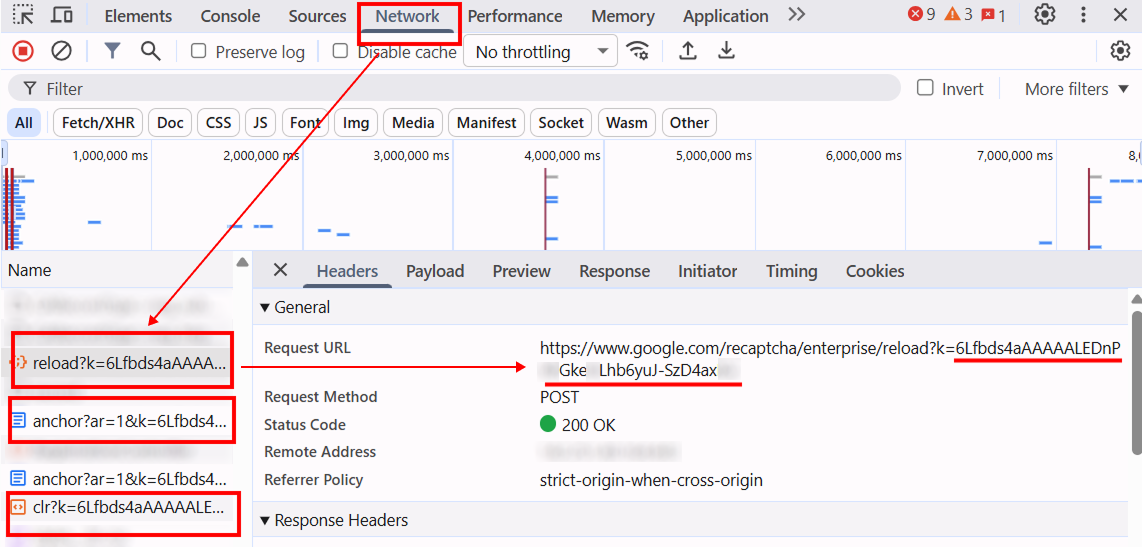
重新加载页面,并注意以下请求,例如:
https://www.google.com/recaptcha/enterprise/anchor?ar=1&k=https://www.google.com/recaptcha/enterprise.js?render=https://www.google.com/recaptcha/enterprise/reload?k=https://www.google.com/recaptcha/enterprise/clr?k=
-
这些 URL 中的参数 k 对应 websiteKey 的值。
自动方式
为了自动化获取所需参数,可以通过 浏览器(普通模式或 headless 模式,例如使用 Playwright)进行提取,或直接从 HTTP 请求中获取。由于动态参数的有效时间较短,建议在获取后尽快使用。
所提供的代码片段仅作为获取必要参数的基础示例。具体实现方式取决于包含验证码的网站、本身的页面结构,以及所使用的 HTML 元素和选择器。
- JavaScript
- Python
- C#
显示代码(用于浏览器控制台)
const iframe = document.querySelector('iframe[src*="recaptcha"]');

if (iframe) {
  const src = iframe.src;
  const k = new URL(src).searchParams.get('k');
  console.log('Site key:', k);
} else {
  console.log('未找到 reCAPTCHA iframe');
}
显示代码(Node.js)
// 本示例中使用 Playwright

const { chromium } = require("playwright");

(async () => {
  const browser = await chromium.launch({ headless: false });
  const page = await browser.newPage();

  // 请替换为目标 URL
  await page.goto("https://example.com/", {
    waitUntil: "load",
  });

  await page.waitForSelector('iframe[src*="recaptcha"]', { timeout: 10000 });

  const k = await page.evaluate(() => {
    const iframe = document.querySelector('iframe[src*="recaptcha"]');
    if (!iframe) return null;
    return new URL(iframe.src).searchParams.get("k");
  });

  console.log("Site key:", k);

  await browser.close();
})();
显示代码
# 本示例中使用 Playwright

from playwright.sync_api import sync_playwright

with sync_playwright() as p:
    browser = p.chromium.launch(headless=False)
    page = browser.new_page()

    # 请替换为目标 URL
    page.goto("https://www.example.com/", wait_until="load")

    page.wait_for_selector('iframe[src*="recaptcha"]', timeout=10000)

    k = page.evaluate("""
    () => {
        const iframe = document.querySelector('iframe[src*="recaptcha"]');
        if (!iframe) return null;
        return new URL(iframe.src).searchParams.get("k");
    }
    """)

    print("Site key:", k)
    browser.close()
显示代码
// 本示例中使用 Playwright

using Microsoft.Playwright;
using System;
using System.Threading.Tasks;

class Program
{
    public static async Task Main()
    {
        using var playwright = await Playwright.CreateAsync();
        await using var browser = await playwright.Chromium.LaunchAsync(new BrowserTypeLaunchOptions { Headless = false });
        var page = await browser.NewPageAsync();

        // 请替换为目标 URL
        await page.GotoAsync("https://example.com/", new PageGotoOptions { WaitUntil = WaitUntilState.Load });

        await page.WaitForSelectorAsync("iframe[src*='recaptcha']", new PageWaitForSelectorOptions { Timeout = 10000 });

        var k = await page.EvaluateAsync<string>(@"() => {
            const iframe = document.querySelector('iframe[src*=""recaptcha""]');
            if (!iframe) return null;
            return new URL(iframe.src).searchParams.get('k');
        }");

        Console.WriteLine("Site key: " + k);
        await browser.CloseAsync();
    }
}
使用 SDK 库
- JavaScript / TypeScript
- Python
显示代码(浏览器)
// https://github.com/CapMonsterCloud/capmonster-nodejs-captcha-solver

import {
  CapMonsterCloudClientFactory,
  ClientOptions,
  RecaptchaV3EnterpriseRequest
} from "@zennolab_com/capmonstercloud-client";

document.addEventListener("DOMContentLoaded", async () => {

  const API_KEY = "YOUR_API_KEY"; // 请指定您的 CapMonster Cloud API 密钥

  const client = CapMonsterCloudClientFactory.Create(
    new ClientOptions({ clientKey: API_KEY })
  );

  // RecaptchaV3EnterpriseRequest 不需要代理
  const recaptcha3EnterpriseRequest = new RecaptchaV3EnterpriseRequest({
    websiteURL: "https://yourwebsite.com/page-with-recaptcha",
    websiteKey: "your-website-key",
    minScore: 0.7,
    pageAction: "your-page-action",
  });

  // 如有需要,可以检查余额
  const balance = await client.getBalance();
  console.log("Balance:", balance);

  const result = await client.Solve(recaptcha3EnterpriseRequest);
  console.log("Solution:", result.solution);
});
显示代码(Node.js)
// https://github.com/CapMonsterCloud/capmonster-nodejs-captcha-solver

const {
  CapMonsterCloudClientFactory,
  ClientOptions,
  RecaptchaV3EnterpriseRequest,
} = require("@zennolab_com/capmonstercloud-client");

const API_KEY = "YOUR_API_KEY"; // 请指定您的 CapMonster Cloud API 密钥

async function solveRecaptchaV3Enterprise() {
  const client = CapMonsterCloudClientFactory.Create(
    new ClientOptions({ clientKey: API_KEY }),
  );

  // RecaptchaV3EnterpriseRequest 不需要代理
  const recaptcha3EnterpriseRequest = new RecaptchaV3EnterpriseRequest({
    websiteURL: "https://yourwebsite.com/page-with-recaptcha",
    websiteKey: "your-website-key",
    minScore: 0.7,
    pageAction: "your-page-action",
  });

  // 如有需要,可以检查余额
  const balance = await client.getBalance();
  console.log("Balance:", balance);

  const result = await client.Solve(recaptcha3EnterpriseRequest);
  console.log("Solution:", result.solution);
}

solveRecaptchaV3Enterprise().catch(console.error);
显示代码
# https://github.com/CapMonsterCloud/capmonster-python-captcha-solver

import asyncio

from capmonstercloudclient import CapMonsterClient, ClientOptions
from capmonstercloudclient.requests import RecaptchaV3EnterpriseRequest

API_KEY = "YOUR_API_KEY"  # 请指定您的 CapMonster Cloud API 密钥


async def solve_recaptcha_v3_enterprise():
    client = CapMonsterClient(
        options=ClientOptions(api_key=API_KEY)
    )

    # RecaptchaV3EnterpriseRequest 不需要代理
    recaptcha3_enterprise_request = RecaptchaV3EnterpriseRequest(
        websiteUrl="https://yourwebsite.com/page-with-recaptcha",
        websiteKey="your-website-key",
        minScore=0.7,
        pageAction="your-page-action",
    )

    # 如有需要,可以检查余额
    balance = await client.get_balance()
    print("Balance:", balance)

    result = await client.solve_captcha(recaptcha3_enterprise_request)
    print("Solution:", result)


asyncio.run(solve_recaptcha_v3_enterprise())