Cloudflare Waiting Room
CapMonster Cloud MCP
还可以使用 CapMonster Cloud MCP 检测并解决 CAPTCHA
这是 Cloudflare 的一种新防护机制:用户在访问资源前平均需要等待约 3 分钟:
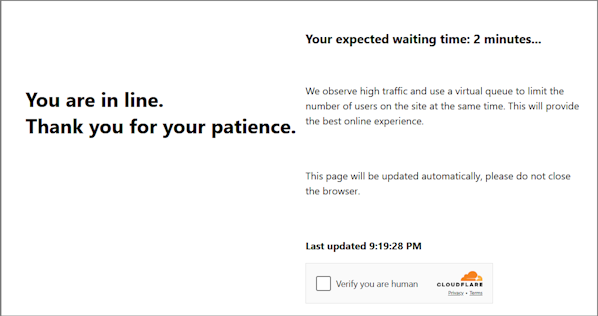
你也可以通过页面头部识别这种 Cloudflare 类型:

更多相关内容,请访问我们的博客
更多相关内容,请访问我们的博客
注意!
-
对此任务请使用 自定义代理。
-
解决后,你将收到 特殊 cookies,需添加到浏览器。
请求参数
重要:请在创建任务之前立即获取 htmlPageBase64,以避免在求解过程中出现错误(请参见下方获取 htmlPageBase64 的示例)。
type<string>requiredTurnstileTask
websiteURL<string>required包含检查的页面 URL
websiteKey<string>requiredCloudflare 密钥。可以传递任意字符串,例如:xxxxxx。
cloudflareTaskType<string>requiredwait_room
htmlPageBase64<string>required包含标题 <title>Waiting Room powered by Cloudflare</title> 的 HTML 页面,其内容采用 base64 格式。
获取 htmlPageBase64 字符串的示例:
var serializer = new XMLSerializer();
var fullHtml = serializer.serializeToString(document);

var htmlBase64 = btoa(unescape(encodeURIComponent(fullHtml)));
console.log(htmlBase64);
userAgent<string>required浏览器 User-Agent。请使用 CapMonster Cloud 当前支持的值:userAgentPlaceholder
可通过以下地址获取最新值:https://capmonster.cloud/api/useragent/actual。
proxyType<string>requiredhttp - 常规 HTTP/HTTPS 代理;
https - 当 http 不可用时使用(某些自定义代理必填);
socks4 - SOCKS4 代理;
socks5 - SOCKS5 代理。
proxyAddress<string>required代理 IP 地址(IPv4/IPv6)。禁止使用:
- 透明代理
- 本地机器代理
proxyPort<integer>required代理端口
proxyLogin<string>required代理登录名
proxyPassword<string>required代理密码
创建任务方法
POST
https://api.capmonster.cloud/createTask
请求示例
{
  "clientKey": "API_KEY",
  "task": {
    "type": "TurnstileTask",
    "websiteURL": "https://yourwebsite.com/page-with-cf-waitroom",
    "websiteKey": "xxxxxxxxxx",
    "cloudflareTaskType": "wait_room",
    "htmlPageBase64": "PCFET0NUWVBFIGh0...vYm9keT48L2h0bWw+",
    "userAgent": "userAgentPlaceholder",
    "proxyType": "your-proxy-type",
    "proxyAddress": "your-proxy-address",
    "proxyPort": 1234,
    "proxyLogin": "your-proxy-login",
    "proxyPassword": "your-proxy-password"
  }
}
响应示例
{
  "errorId":0,
  "taskId":407533072
}
获取任务结果方法
使用 getTaskResult 方法来获取等待室解决方案。根据系统负载,响应可能需要 5 到 20 秒。
POST
https://api.capmonster.cloud/getTaskResult
请求示例
{
  "clientKey": "API_KEY",
  "taskId": 407533072
}
响应示例
{
  "errorId": 0,
  "status": "ready",
  "solution": {
    "cf_clearance": "1tarGvbY2_ZhQdYxpSBloao.FoOn9VtcJtmb_IQ_hCE-1761217338-1.2.1.1-vyVPoLYIGX0VCJomVuLjF7n0kdM0PXaPjpDsRcohxGr7hb2CE7WfcHpmQZ70goqEjdWxPsDhSVaKNTz9opxWguiNdWEEq_.SceWXIqfP7tnEb69f3bP0mixNqcWy_5P_9INpoAEqr1k7aYU0r45PT4gPr5pwHxedVySyLRdoBXIJasdTE52YOQ3NPdGWTwQ_3h2n_wYqqIvf0kCSAvimRrmsgZxomlyejwqPI6ZHi.w"
  }
}
| 属性 | 类型 | 说明 |
|---|---|---|
| cf_clearance | String | 可添加到浏览器中的 Cloudflare 专用 Cookie |
使用 SDK 库
- JavaScript / TypeScript
- Python
- C#
显示代码(浏览器)
// https://github.com/CapMonsterCloud/capmonster-nodejs-captcha-solver

import {
CapMonsterCloudClientFactory,
ClientOptions,
TurnstileRequest
} from "@zennolab_com/capmonstercloud-client";

document.addEventListener("DOMContentLoaded", async () => {

const API_KEY = "YOUR_API_KEY"; // 请指定您的 CapMonster Cloud API 密钥

const client = CapMonsterCloudClientFactory.Create(
  new ClientOptions({ clientKey: API_KEY })
);

// Cloudflare Waiting Room 只能使用您自己的代理进行解决
const proxy = {
  proxyType: "http",
  proxyAddress: "123.45.67.89",
  proxyPort: 8080,
  proxyLogin: "username",
  proxyPassword: "password",
};

const turnstileRequest = new TurnstileRequest({
  websiteURL: "https://yourwebsite.com/page-with-waiting-room",
  websiteKey: "xxxxxxxxxx",
  cloudflareTaskType: "wait_room",
  proxy,
  htmlPageBase64: "your_html_page_base64",
  userAgent: "userAgentPlaceholder",
});

// 如有需要,可以检查余额
const balance = await client.getBalance();
console.log("Balance:", balance);

const result = await client.Solve(turnstileRequest);
console.log("Solution:", result.solution);
});
显示代码(Node.js)
// https://github.com/CapMonsterCloud/capmonster-nodejs-captcha-solver

const {
  CapMonsterCloudClientFactory,
  ClientOptions,
  TurnstileRequest,
} = require("@zennolab_com/capmonstercloud-client");

const API_KEY = "YOUR_API_KEY"; // 请指定您的 CapMonster Cloud API 密钥

async function solveTurnstileWaitRoom() {
  const client = CapMonsterCloudClientFactory.Create(
    new ClientOptions({ clientKey: API_KEY }),
  );

  // Cloudflare Waiting Room 只能使用您自己的代理进行解决
  const proxy = {
    proxyType: "http",
    proxyAddress: "123.45.67.89",
    proxyPort: 8080,
    proxyLogin: "username",
    proxyPassword: "password",
  };

  const turnstileRequest = new TurnstileRequest({
    websiteURL: "https://yourwebsite.com/page-with-waiting-room",
    websiteKey: "xxxxxxxxxx",
    cloudflareTaskType: "wait_room",
    proxy,
    htmlPageBase64: "your_html_page_base64",
    userAgent: "userAgentPlaceholder",
  });

  // 如有需要,可以检查余额
  const balance = await client.getBalance();
  console.log("Balance:", balance);

  const result = await client.Solve(turnstileRequest);
  console.log("Solution:", result.solution);
}

solveTurnstileWaitRoom().catch(console.error);
显示代码
# https://github.com/CapMonsterCloud/capmonster-python-captcha-solver

import asyncio

from capmonstercloudclient import CapMonsterClient, ClientOptions
from capmonstercloudclient.requests import TurnstileRequest
from capmonstercloudclient.requests.proxy_info import ProxyInfo

API_KEY = "YOUR_API_KEY"  # 请指定您的 CapMonster Cloud API 密钥


async def main():
    client = CapMonsterClient(
        options=ClientOptions(api_key=API_KEY)
    )

    # Cloudflare wait_room 只能使用您自己的代理进行解决
    proxy = ProxyInfo(
        proxyType="http",
        proxyAddress="123.45.67.89",
        proxyPort=8080,
        proxyLogin="username",
        proxyPassword="password",
    )

    turnstile_request = TurnstileRequest(
        websiteURL="https://yourwebsite.com/page-with-waiting-room",
        websiteKey="xxxxxxxx",
        cloudflareTaskType="wait_room",
        proxy=proxy,
        htmlPageBase64="your_html_page_base64",
        userAgent="userAgentPlaceholder",
    )

    # 如有需要,可以检查余额
    balance = await client.get_balance()
    print("Balance:", balance)

    result = await client.solve_captcha(turnstile_request)
    print("Solution:", result)


asyncio.run(main())
显示代码
// https://github.com/CapMonsterCloud/capmonster-dotnet-captcha-solver

using System;
using System.Threading.Tasks;
using Zennolab.CapMonsterCloud;
using Zennolab.CapMonsterCloud.Requests;

class Program
{
    static async Task Main(string[] args)
    {
        // 请指定您的 CapMonster Cloud API 密钥
        var clientOptions = new ClientOptions
        {
            ClientKey = "YOUR_API_KEY"
        };

        var cmCloudClient = CapMonsterCloudClientFactory.Create(clientOptions);

        // Cloudflare Waiting Room 只能使用您自己的代理进行解决
        var turnstileRequest = new TurnstileRequest
        {
            WebsiteUrl = "https://yourwebsite.com/page-with-waiting-room",
            WebsiteKey = "xxxxxxxx",
            CloudflareTaskType = "wait_room",
            HtmlPageBase64 = "your_html_page_base64",
            UserAgent = "userAgentPlaceholder",

            Proxy = new ProxyContainer(
                "123.45.67.89",
                8080,
                ProxyType.Http,
                "username",
                "password"
            )
        };

        // 如有需要,可以检查余额
        var balance = await cmCloudClient.GetBalanceAsync();
        Console.WriteLine("Balance: " + balance);

        var turnstileResult = await cmCloudClient.SolveAsync(turnstileRequest);
        Console.WriteLine("Solution: " + turnstileResult.Solution.Clearance);
    }
}