Altcha - Alternative CAPTCHA
任务示例
下面展示了 CapMonster Cloud 当前支持的 Altcha 验证类型示例:

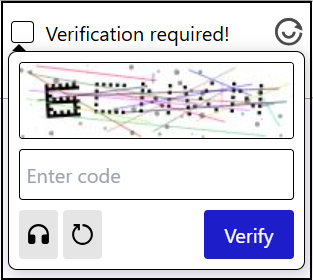
此外,还支持 隐形验证码(Invisible Captcha),它不会在页面上显示界面,也无需用户执行任何操作,验证会在后台自动完成。
CapMonster Cloud 默认通过内置代理工作——这些代理已包含在费用内。仅当网站不接受令牌或对内置服务的访问受限时,才需要指定您自己的代理。
如果代理按 IP 授权,请将地址 65.21.190.34 加入白名单。
请求参数
重要提示:某些参数的值是动态的 — 它们会在每次渲染包含 Altcha 的页面时发生变化。
请在创建任务前立即提取这些参数,以避免在解决过程中出现错误。
参数提取示例请参见章节 如何获取创建任务所需的所有参数。
type<string>requiredCustomTask
class<string>requiredaltcha
websiteURL<string>required包含 altcha 的主页面地址。
websiteKey<string>required对于此任务,可以发送空字符串。
challenge(位于 metadata 中)<string>required从网页获取的唯一任务标识符。
示例:3dd28253be6cc0c54d95f7f98c517e68744597cc6e66109619d1ac975c39181c
iterations(位于 metadata 中)<string>required迭代次数或用于计算的最大数值。
重要: 参数
iterations对应于maxnumber的值!
示例:5000
salt(位于 metadata 中)<string>required从网站获取并用于生成哈希的 salt。
重要: 请完整发送
salt字段的值! 例如,如果网站发送以下值:
"salt":"46d5b1c8871e5152d902ee3f?edk=1493462145de1ce33a52fb569b27a364&codeChallenge=464Cjs7PbiJJhJZ_ReJ-y9UGGDndcpsnP6vS8x1nEJyTkhjQkJyL2jcnYEuMKcrG&expires=1761048664"
— 请按原样复制并在请求中传递,包括所有字符和参数(edk、codeChallenge 等)。
signature(位于 metadata 中)<string>required请求的数字签名。
示例:4b1cf0e0be0f4e5247e50b0f9a449830f1fbca44c32ff94bc080146815f31a18
userAgent<string>optional浏览器 User-Agent。请使用 CapMonster Cloud 当前支持的值:userAgentPlaceholder
可通过以下地址获取最新值:https://capmonster.cloud/api/useragent/actual。
proxyType<string>optionalhttp - 常规 http/https 代理;
https - 仅当 "http" 无效时使用(某些自定义代理需要);
socks4 - socks4 代理;
socks5 - socks5 代理。
proxyAddress<string>optional代理 IPv4/IPv6 地址。禁止:
- 使用透明代理(可看到客户端 IP);
- 使用本地机器代理。
proxyPort<integer>optional代理端口。
proxyLogin<string>optional代理服务器登录名。
proxyPassword<string>optional代理服务器密码。
创建任务的方法
- Altcha CustomTask(无代理)
- Altcha CustomTask(使用代理)
https://api.capmonster.cloud/createTask
请求示例
{
  "clientKey": "API_KEY",
  "task": {
    "type": "CustomTask",
    "class": "altcha",
    "websiteURL": "https://example.com",
    "websiteKey": "",
    "userAgent": "userAgentPlaceholder",
    "metadata": {
      "challenge": "your-challenge",
      "iterations": "your-iterations",
      "salt":"your-salt",
      "signature": "your-signature"
    }
  }
}
响应示例
{
  "errorId": 0,
  "taskId": 407533072
}
https://api.capmonster.cloud/createTask
请求示例
{
  "clientKey": "API_KEY",
  "task": {
    "type": "CustomTask",
    "class": "altcha",
    "websiteURL": "https://example.com",
    "websiteKey": "",
    "userAgent": "userAgentPlaceholder",
    "metadata": {
      "challenge": "your-challenge",
      "iterations": "your-iterations",
      "salt":"your-salt",
      "signature": "your-signature"
    },
    "proxyType":"your-proxy-type",
    "proxyAddress":"your-proxy-address",
    "proxyPort": 1234,
    "proxyLogin":"your-proxy-login",
    "proxyPassword":"your-proxy-password"
  }
}
响应示例
{
  "errorId": 0,
  "taskId": 407533072
}
获取任务结果的方法
使用 getTaskResult 方法获取 Altcha 的解决结果。
https://api.capmonster.cloud/getTaskResult
请求示例
{
  "clientKey": "API_KEY",
  "taskId": 407533072
}
响应示例
{
  "errorId": 0,
  "cost": 0.0008,
  "status": "ready",
  "solution": {
    "data": {
      "token": "eyJhbGdvcml...Ljc2MDEzM30=",
      "number": 44619
    }
  }
}
如何查找创建任务所需的全部参数
以下是提取 Altcha 参数的示例,这些参数是将任务发送到 CapMonster Cloud 进行解决所必需的。请注意,不同网站上的验证码实现可能有所不同,因此获取参数的方法也可能有所差异。
-
在浏览器中打开包含 Altcha 的页面,启动 DevTools(F12 或 Ctrl+Shift+I),然后转到 Network 选项卡。
-
单击验证码复选框并手动完成验证。在 Network 的搜索框中输入任意参数名称(例如 "algorithm")。
-
在找到的项目中,查找包含参数 JSON 的请求。
-
单击该请求,并在需要时转到 Response 选项卡,以查看服务器返回的数据。
-
复制这些参数——创建 CapMonster Cloud 任务时需要使用这些值。
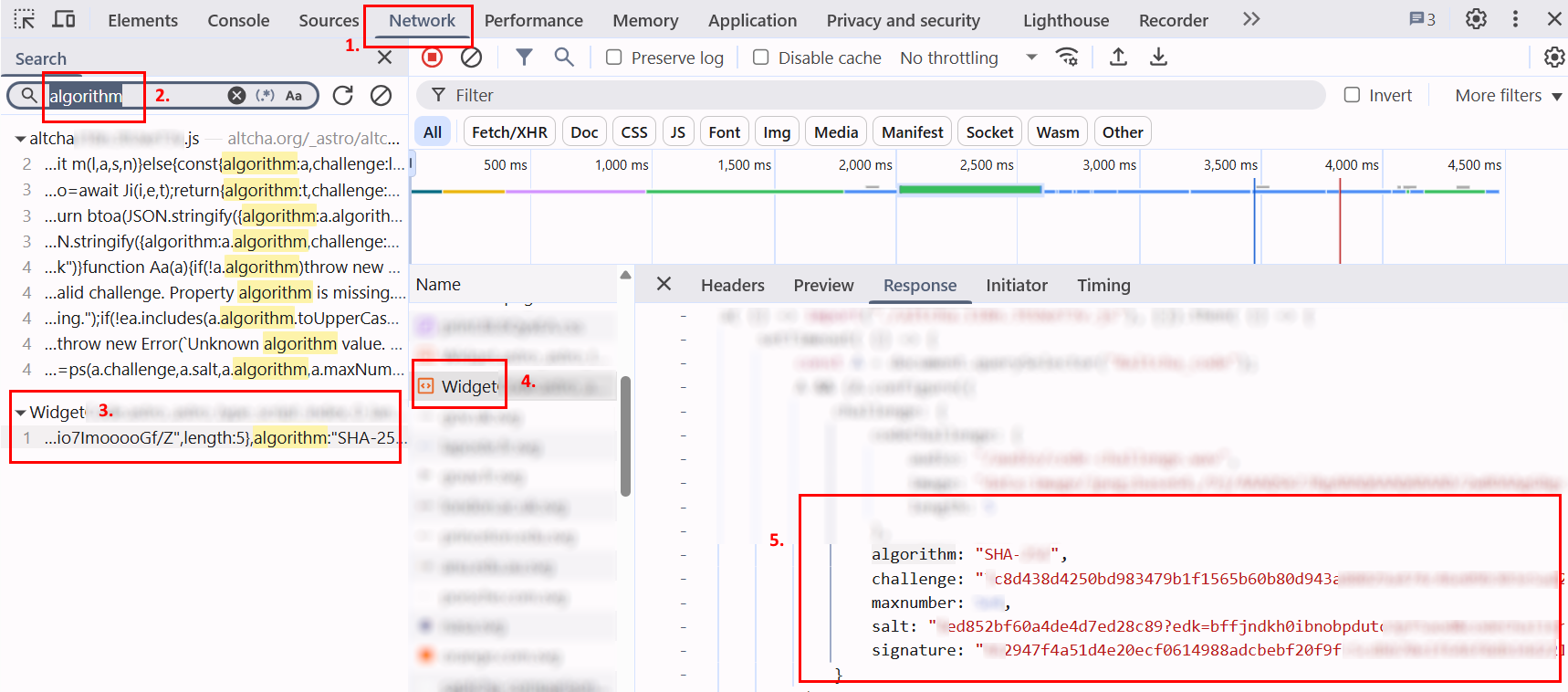
总体而言,在页面上激活验证码后,需要分析网络请求,并识别与其运行相关的所有交互。这些操作对于确定参数和理解验证流程是必要的。例如,下面的截图展示了一个名为
altcha的请求,其中包含所有关键参数:
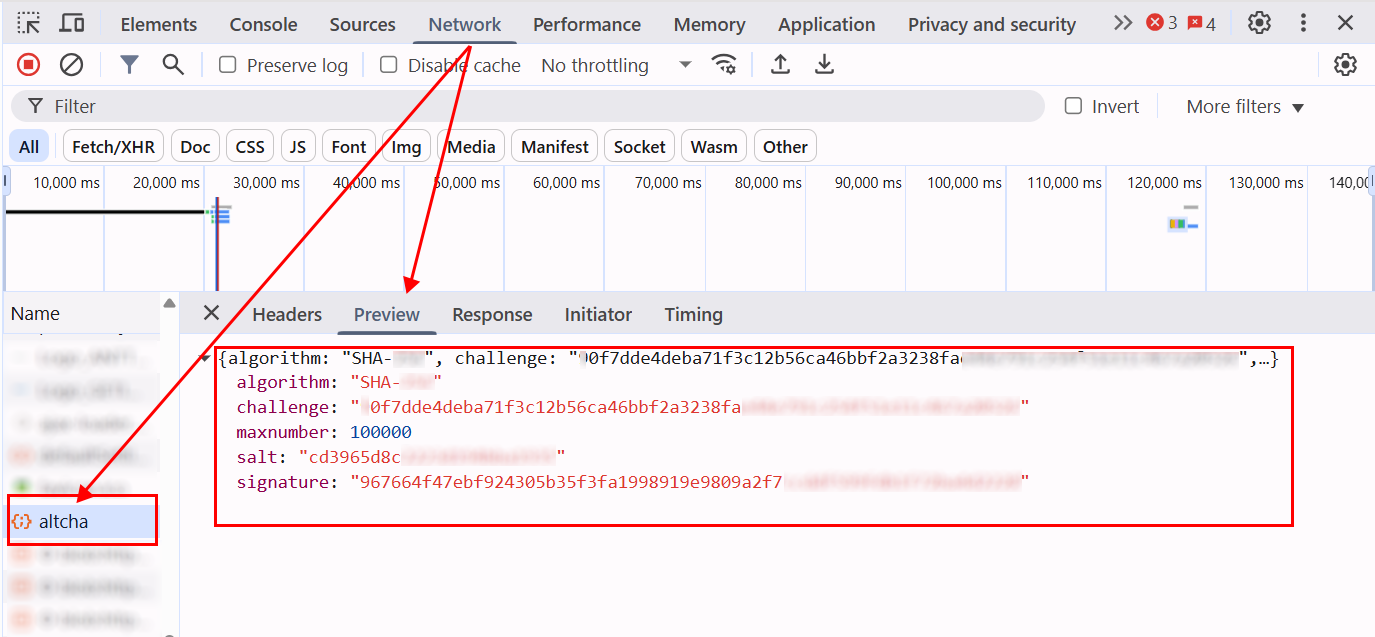
获取所需参数后,在 CapMonster Cloud 中创建任务时,需要将它们传递到 metadata 对象中。结构示例:
metadata: {
  challenge: "<challenge 的值>",
  iterations: "<maxnumber 的值>", // 与其他参数一样,必须使用引号
  salt: "<salt 的值>",
  signature: "<signature 的值>",
}
也可以使用以下代码示例来获取所有参数:
GET 请求示例
向指定 URL 发出 HTTP GET 请求,并将收到的响应输出到控制台。
const url = 'https://example-portal.mysite.rs.gov.br/Altcha/Example'; // 用于提取验证码参数的 API 端点

fetch(url, { method: 'GET' })
  .then(res => res.text())
  .then(data => console.log('Response:', data))
  .catch(err => console.error(err));
拦截参数
该浏览器脚本会重写 fetch 和 XMLHttpRequest,以自动跟踪网络请求并提取 Altcha 验证码的关键参数。在包含验证码的页面上,将此脚本粘贴到浏览器控制台并激活验证码——所需参数将自动输出到控制台。
(function() {
  const keywords = ['algorithm','challenge','maxnumber','salt','signature'];
  const foundParams = {};

  const intercept = (url, body, text) => {
    keywords.forEach(key => {
      if ((url && url.includes(key)) || (body && body.includes(key)) || (text && text.includes(key))) {
        foundParams[key] = foundParams[key] || [];
        if (url?.includes(key)) foundParams[key].push(url);
        if (body?.includes(key)) foundParams[key].push(body);
        if (text?.includes(key)) foundParams[key].push(text);
      }
    });
    if (Object.keys(foundParams).length) console.log('Found parameters:', foundParams);
  };

  const originalFetch = window.fetch;
  window.fetch = async (...args) => {
    const [resource, config] = args;
    const url = typeof resource === 'string' ? resource : resource.url;
    const body = config?.body;
    const response = await originalFetch.apply(this, args);
    try {
      const text = await response.clone().text();
      intercept(url, body, text);
    } catch {}
    return response;
  };

  const originalOpen = XMLHttpRequest.prototype.open;
  const originalSend = XMLHttpRequest.prototype.send;

  XMLHttpRequest.prototype.open = function(method, url, ...rest) {
    this._url = url;
    return originalOpen.call(this, method, url, ...rest);
  };

  XMLHttpRequest.prototype.send = function(body) {
    this.addEventListener('load', () => intercept(this._url, body, this.responseText));
    return originalSend.call(this, body);
  };
})();
Altcha 自动化解决示例 — Node.js 与 Playwright
在某些情况下,仅发送 number 参数即可确认解决方案。但有时网站要求 所有参数,以 base64 格式加密。
例如:
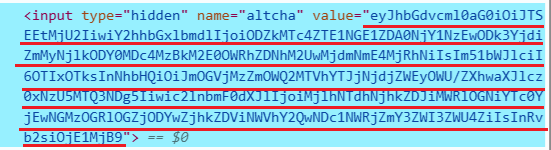
解码该值后,会生成一个包含验证码验证所需数据的 JSON 对象。
示例:
{
  "algorithm": "SHA-256",
  "challenge": "86d178e154a5d04665710897b7bfc269d86407830d3a49dad3a3e027f6a824a6",
  "number": 92199,
  "salt": "f8ec36f9d615aa2c67c7ea29e?expires=1759147489",
  "signature": "29a57a68dd2b1de8cba74b104c38de8fc860f8dd5b5eacd04755dcff7eb7ee8f",
  "took": 1520
}
CapMonster Cloud 的响应会分别返回 number,以及已经编码为 base64 的完整参数集(包括 number)。
在下面的示例中,通过 token 确认解决方案,该 token 包含完整的参数集。
如果您只需要发送 number,则需要相应地调整确认逻辑。
显示代码示例
const { chromium } = require("playwright");

// 替换为您自己的值:
// - API_KEY → 您的 CapMonster Cloud 密钥
// - ALTCHA_PAGE → 包含 Altcha 的页面地址
const API_KEY = "your_capmonster_cloud_api_key";
const ALTCHA_PAGE = "https://url_with_altcha";

(async () => {
  const browser = await chromium.launch({ headless: false, devtools: true });
  const context = await browser.newContext();
  const page = await context.newPage();

  await page.route("**/*", (route) => {
    const url = route.request().url();
    if (url.includes("api.capmonster.cloud")) return route.abort();
    return route.continue();
  });

  let challengeResp = null; // 用于存储 Altcha challenge 的变量
  page.on("response", async (response) => {
    try {
      if (response.url().includes("/Altcha/GerarDesafio")) {
        challengeResp = await response.json(); // 获取包含 challenge 参数的 JSON
        console.log("Captured /Altcha/GerarDesafio:", challengeResp);
      }
    } catch {}
  });

  await page.goto(ALTCHA_PAGE, { waitUntil: "networkidle" }); // 转到包含 Altcha 的页面

  try {
    await page.waitForSelector("altcha-widget input[type='checkbox']", { timeout: 10000 });
    await page.click("altcha-widget input[type='checkbox']");
  } catch {
    const widgetHandle = await page.$("altcha-widget");
    if (widgetHandle) await widgetHandle.click(); // 如果未找到标准选择器
  }

  // 等待获取 challenge
  const start = Date.now();
  while (!challengeResp && Date.now() - start < 30000) {
    await new Promise((r) => setTimeout(r, 300));
  }
  if (!challengeResp) {
    console.error("无法捕获 /Altcha/GerarDesafio。");
    await browser.close();
    return;
  }

  const { challenge, salt, signature, maxnumbers } = challengeResp;

  // 构建用于创建 CapMonster Cloud 任务的请求体
  const createTaskBody = {
    clientKey: API_KEY,
    task: {
      type: "CustomTask",
      class: "altcha",
      websiteURL: ALTCHA_PAGE,
      websiteKey: "",
      userAgent:
        "userAgentPlaceholder",
      metadata: {
        challenge,
        iterations: maxnumbers,
        salt,
        signature,
      },
    },
  };

  // 在 CapMonster Cloud 上创建任务
  const taskResp = await fetch("https://api.capmonster.cloud/createTask", {
    method: "POST",
    headers: { "Content-Type": "application/json" },
    body: JSON.stringify(createTaskBody),
  }).then((r) => r.json());

  console.log("CreateTask response:", taskResp);
  if (!taskResp || !taskResp.taskId) {
    console.error("创建任务失败:", taskResp);
    await browser.close();
    return;
  }

  const taskId = taskResp.taskId;

  // 等待任务解决
  let fullSolution = null;
  const maxPollMs = 120000;
  const pollStart = Date.now();
  while (Date.now() - pollStart < maxPollMs) {
    const res = await fetch("https://api.capmonster.cloud/getTaskResult", {
      method: "POST",
      headers: { "Content-Type": "application/json" },
      body: JSON.stringify({ clientKey: API_KEY, taskId }),
    }).then((r) => r.json());

    if (res.status === "ready") {
      fullSolution = res.solution;
      console.log("CapMonster Cloud 完整解决方案:", fullSolution);
      break;
    }
    await new Promise((r) => setTimeout(r, 3000));
  }

  if (!fullSolution) {
    console.error("在指定时间内未收到解决方案。");
    await browser.close();
    return;
  }

  // 提取 token
  const token =
    (fullSolution && fullSolution.data && fullSolution.data.token) ||
    fullSolution.token ||
    (fullSolution && fullSolution.data) ||
    null;

  if (!token) {
    console.error("CapMonster 响应中未找到 token:", fullSolution);
    await browser.close();
    return;
  }

  // 将 token 注入页面
  await page.evaluate((tokenValue) => {
    const cpv = document.querySelector("#captchaParaValidar");
    if (cpv) {
      cpv.value = tokenValue;
    } else {
      const created = document.createElement("input");
      created.type = "hidden";
      created.id = "captchaParaValidar";
      created.name = "captchaParaValidar";
      created.value = tokenValue;
      (document.querySelector("form") || document.body).appendChild(created);
    }

    let alt = document.querySelector('input[name="altcha"]');
    if (alt) {
      alt.value = tokenValue;
    } else {
      const created2 = document.createElement("input");
      created2.type = "hidden";
      created2.name = "altcha";
      created2.value = tokenValue;
      (document.querySelector("form") || document.body).appendChild(created2);
    }

    const widget = document.querySelector("altcha-widget");
    if (widget) {
      widget.setAttribute("data-state", "verified");
      const checkbox = widget.querySelector("input[type='checkbox']");
      if (checkbox) {
        checkbox.checked = true;
        checkbox.dispatchEvent(new Event("change", { bubbles: true }));
      }
      const label = widget.querySelector(".altcha-label");
      if (label) label.textContent = "Verified";
    }
  }, token);

  console.log("Token 已注入:", token);
})();
使用 SDK 库
- JavaScript / TypeScript
- Python
- C#
- Rust
显示代码(浏览器)
// https://github.com/CapMonsterCloud/capmonster-nodejs-captcha-solver

import {
  CapMonsterCloudClientFactory,
  ClientOptions,
  AltchaRequest
} from "@zennolab_com/capmonstercloud-client";

document.addEventListener("DOMContentLoaded", async () => {

  const API_KEY = "YOUR_API_KEY"; // 请指定您的 CapMonster Cloud API 密钥

  const client = CapMonsterCloudClientFactory.Create(
    new ClientOptions({ clientKey: API_KEY })
  );

  // 不使用代理的基础示例
  // CapMonster Cloud 会自动使用自己的代理
  let altchaRequest = new AltchaRequest({
    websiteURL: "https://yourwebsite.com/page-with-altcha",
    websiteKey: "",
    userAgent: "userAgentPlaceholder",
    metadata: {
      challenge: "your-challenge",
      iterations: "your-iterations",
      salt: "your-salt",
      signature: "your-signature",
    },
  });

  // 使用您自己的代理的示例
  // 如果您想使用自己的代理,请取消注释此代码块
  /*
  const proxy = {
    proxyType: "http",
    proxyAddress: "123.45.67.89",
    proxyPort: 8080,
    proxyLogin: "username",
    proxyPassword: "password",
  };

  altchaRequest = new AltchaRequest({
    websiteURL: "https://yourwebsite.com/page-with-altcha",
    websiteKey: "",
    proxy,
    userAgent: "userAgentPlaceholder",
    metadata: {
      challenge: "your-challenge",
      iterations: "your-iterations",
      salt: "your-salt",
      signature: "your-signature",
    },
  });
  */

  // 如有需要,可以检查余额
  const balance = await client.getBalance();
  console.log("Balance:", balance);

  const result = await client.Solve(altchaRequest);
  console.log("Solution:", result.solution);
});
显示代码(Node.js)
// https://github.com/CapMonsterCloud/capmonster-nodejs-captcha-solver

const {
  CapMonsterCloudClientFactory,
  ClientOptions,
  AltchaRequest,
} = require("@zennolab_com/capmonstercloud-client");

const API_KEY = "YOUR_API_KEY"; // 请指定您的 CapMonster Cloud API 密钥

async function solveAltchaRequest() {
  const client = CapMonsterCloudClientFactory.Create(
    new ClientOptions({ clientKey: API_KEY }),
  );

  // 不使用代理的基础示例
  // CapMonster Cloud 会自动使用自己的代理
  let altchaRequest = new AltchaRequest({
    websiteURL: "https://yourwebsite.com/page-with-altcha",
    websiteKey: "",
    userAgent: "userAgentPlaceholder",
    metadata: {
      challenge: "your-challenge",
      iterations: "your-iterations",
      salt: "your-salt",
      signature: "your-signature",
    },
  });

  // 使用您自己的代理的示例
  // 如果您想使用自己的代理,请取消注释此代码块
  /*
  const proxy = {
    proxyType: "http",
    proxyAddress: "123.45.67.89",
    proxyPort: 8080,
    proxyLogin: "username",
    proxyPassword: "password",
  };

  altchaRequest = new AltchaRequest({
    websiteURL: "https://yourwebsite.com/page-with-altcha",
    websiteKey: "",
    proxy,
    userAgent: "userAgentPlaceholder",
    metadata: {
      challenge: "your-challenge",
      iterations: "your-iterations",
      salt: "your-salt",
      signature: "your-signature",
    },
  });
  */

  // 如有需要,可以检查余额
  const balance = await client.getBalance();
  console.log("Balance:", balance);

  const result = await client.Solve(altchaRequest);
  console.log("Solution:", result.solution);
}

solveAltchaRequest().catch(console.error);
显示代码
# https://github.com/CapMonsterCloud/capmonster-python-captcha-solver

import asyncio

from capmonstercloudclient import CapMonsterClient, ClientOptions
from capmonstercloudclient.requests import AltchaCustomTaskRequest
# 如果您计划使用自己的代理,请导入 ProxyInfo
from capmonstercloudclient.requests.proxy_info import ProxyInfo

API_KEY = "YOUR_API_KEY"  # 请指定您的 CapMonster Cloud API 密钥


async def solve_altcha():
    client = CapMonsterClient(
        options=ClientOptions(api_key=API_KEY)
    )

    # 不使用代理的基础示例
    # CapMonster Cloud 会自动使用自己的代理
    altcha_request = AltchaCustomTaskRequest(
        websiteUrl="https://yourwebsite.com/page-with-altcha",
        websiteKey="",
        userAgent="userAgentPlaceholder",
        metadata={
            "challenge": "your-challenge",
            "iterations": "your-iterations",
            "salt": "your-salt",
            "signature": "your-signature",
        },
    )

    # 使用您自己的代理的示例
    # 如果您想使用自己的代理,请取消注释此代码块
    """
    proxy = ProxyInfo(
        proxyType="http",
        proxyAddress="123.45.67.89",
        proxyPort=8080,
        proxyLogin="username",
        proxyPassword="password",
    )

    altcha_request = AltchaCustomTaskRequest(
        websiteUrl="https://yourwebsite.com/page-with-altcha",
        websiteKey="",
        userAgent="userAgentPlaceholder",
        metadata={
            "challenge": "your-challenge",
            "iterations": "your-iterations",
            "salt": "your-salt",
            "signature": "your-signature",
        },
        proxy=proxy,
    )
    """

    # 如有需要,可以检查余额
    balance = await client.get_balance()
    print("Balance:", balance)

    result = await client.solve_captcha(altcha_request)
    print("Solution:", result)


asyncio.run(solve_altcha())
显示代码
// https://github.com/CapMonsterCloud/capmonster-dotnet-captcha-solver

using System;
using System.Threading.Tasks;
using Newtonsoft.Json;
using Zennolab.CapMonsterCloud;
using Zennolab.CapMonsterCloud.Requests;

class Program
{
    static async Task Main(string[] args)
    {
        // 请指定您的 CapMonster Cloud API 密钥
        var clientOptions = new ClientOptions
        {
            ClientKey = "YOUR_API_KEY"
        };

        var cmCloudClient = CapMonsterCloudClientFactory.Create(clientOptions);

        // 不使用代理的基础示例
        // CapMonster Cloud 会自动使用自己的代理
        var altchaRequest = new AltchaCustomTaskRequest(
            "your-challenge",
            "your-iterations",
            "your-salt",
            "your-signature"
        )
        {
            WebsiteUrl = "https://yourwebsite.com/page-with-altcha",
            WebsiteKey = "",
            UserAgent = "userAgentPlaceholder"
        };

        // 使用您自己的代理的示例
        // 如果您想使用自己的代理,请取消注释此代码块
        /*
        altchaRequest = new AltchaCustomTaskRequest(
            "your-challenge",
            "your-iterations",
            "your-salt",
            "your-signature"
        )
        {
            WebsiteUrl = "https://yourwebsite.com/page-with-altcha",
            WebsiteKey = "",
            UserAgent = "userAgentPlaceholder",

            Proxy = new ProxyContainer(
                "123.45.67.89",
                8080,
                ProxyType.Http,
                "username",
                "password"
            )
        };
        */

        // 如有需要,可以检查余额
        var balance = await cmCloudClient.GetBalanceAsync();
        Console.WriteLine("Balance: " + balance);

        var altchaResult = await cmCloudClient.SolveAsync(altchaRequest);

        Console.WriteLine("Solution:");
        Console.WriteLine(
            JsonConvert.SerializeObject(
                altchaResult.Solution,
                Formatting.Indented
            )
        );
    }
}
显示代码
Rust 请使用官方 SDK:crates.io 和 Github。
// https://github.com/CapMonsterCloud/capmonster-rust-captcha-solver

use capmonstercloud_client::requests::{AltchaCustomTaskRequest, AltchaMetadata};
use capmonstercloud_client::{CapMonsterClient, ClientOptions};

#[tokio::main]
async fn main() -> capmonstercloud_client::Result<()> {
    // 请填写您的 CapMonster Cloud API 密钥
    let client = CapMonsterClient::new(ClientOptions::new("YOUR_API_KEY"))?;

    let metadata = AltchaMetadata {
        challenge: "your-challenge".into(),
        iterations: "your-iterations".into(),
        salt: "your-salt".into(),
        signature: "your-signature".into(),
    };

    let request = AltchaCustomTaskRequest::new(
        "https://yourwebsite.com/page-with-altcha",
        "",
        metadata,
    )
    .with_user_agent("userAgentPlaceholder");

    let solution = client.solve_captcha(&request).await?;
    println!("解决方案:{solution}");
    Ok(())
}