Yidun - NECaptcha
任务示例
以下是 CapMonster Cloud 当前支持的 Yidun 任务类型示例:
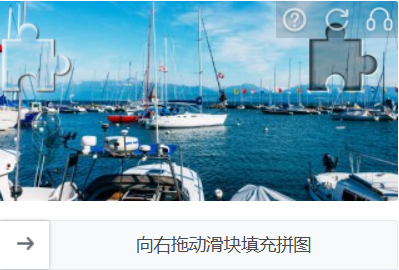
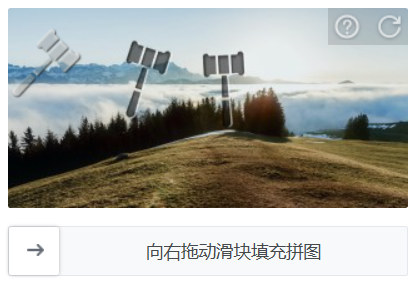
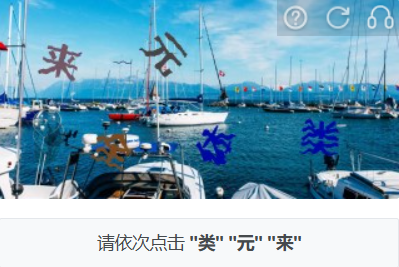

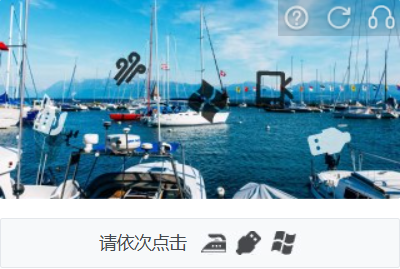
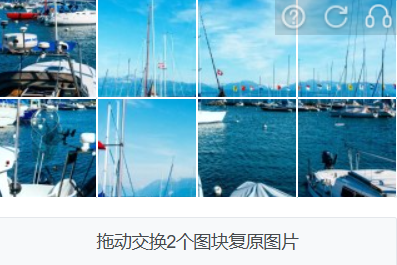

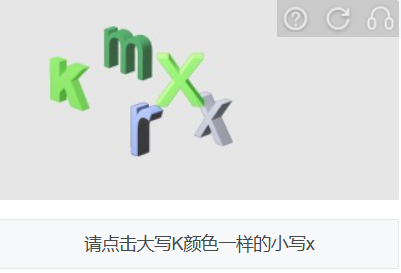
CapMonster Cloud 默认通过内置代理工作——这些代理已包含在费用内。仅当网站不接受令牌或对内置服务的访问受限时,才需要指定您自己的代理。
如果代理按 IP 授权,请将地址 65.21.190.34 加入白名单。
请求参数
重要:某些参数的值是动态的——它们会在包含 Yidun 的页面每次渲染时发生变化。
请在创建任务之前立即提取这些参数,以避免在求解过程中出现错误。
有关参数提取的示例,请参阅如何获取所有必要的参数。
type<string>requiredYidunTask
websiteURL<string>required包含验证码页面的完整 URL。
websiteKey<string>required在页面上找到的 siteKey 参数值(参见下方查找示例)。
userAgent<string>optional浏览器 User-Agent。请使用 CapMonster Cloud 当前支持的值:userAgentPlaceholder
可通过以下地址获取最新值:https://capmonster.cloud/api/useragent/actual。
yidunGetLib<string>optional用于在页面上加载验证码的 JavaScript 文件路径。
重要:请指定完整链接(https://...)。
如果网站上存在 challenge、hcg、hct 字段,建议使用此参数。
yidunApiServerSubdomain<string>optionalYidun API 服务器的子域名。
重要:必须不同于标准域名 c.dun.163.com 和 c-v6.dun.163.com。
仅指定域名,不包含 https:// 前缀。
如果使用自定义服务器,则此参数为必填项(Enterprise 版本中经常出现)。
challenge<string>optional当前验证码的唯一标识符。
通常在初始化或显示验证码时通过网络请求传递。
Enterprise 验证码的特征。
hcg<string>optional验证码哈希值,用于构建请求。
可与 challenge 一起获取。
hct<integer>optionalEnterprise 版本验证时使用的数字时间标识符/时间戳。
proxyType<string>optionalhttp - 普通 http/https 代理;
https - 如果 http 不工作,可以尝试此选项(部分自定义代理要求);
socks4 - socks4 代理;
socks5 - socks5 代理。
proxyAddress<string>optional代理的 IPv4 或 IPv6 地址。禁止以下情况:
- 使用透明代理(即暴露真实客户端 IP);
- 使用本地代理地址。
proxyPort<integer>optional代理端口。
proxyLogin<string>optional代理用户名。
proxyPassword<string>optional代理密码。
创建任务的方法
- YidunTask(无代理)
- YidunTask(使用代理)
https://api.capmonster.cloud/createTask
请求示例
{
  "clientKey": "API_KEY",
  "task": {
    "type": "YidunTask",
    "websiteURL": "https://yourwebsite.com/page-with-yidun",
    "websiteKey": "your-website-key",
    "userAgent": "userAgentPlaceholder"
  }
}
响应示例
{
  "errorId": 0,
  "taskId": 407533077
}
https://api.capmonster.cloud/createTask
请求示例
{
  "clientKey": "API_KEY",
  "task": {
    "type": "YidunTask",
    "websiteURL": "https://yourwebsite.com/page-with-yidun",
    "websiteKey": "your-website-key",
    "userAgent": "userAgentPlaceholder",
    "proxyType": "your-proxy-type",
    "proxyAddress": "your-proxy-address",
    "proxyPort": 1234,
    "proxyLogin": "your-proxy-login",
    "proxyPassword": "your-proxy-password"
  }
}
响应示例
{
  "errorId": 0,
  "taskId": 407533077
}
获取结果的方法
使用方法 getTaskResult 获取 Yidun 验证码的解决结果。
https://api.capmonster.cloud/getTaskResult
请求示例
{
  "clientKey": "API_KEY",
  "taskId": 407533077
}
响应示例
{
  "errorId": 0,
  "errorCode": null,
  "errorDescription": null,
  "solution": {
    "token": "CN31_9AwsPmaYcJameP_09rA0vkVMQsPij...RXTlFJFc3"
  },
  "cost": 0.001,
  "status": "ready"
}
何时需要传递 yidunGetLib 和 yidunApiServerSubdomain?
如果您在开发者工具的 Network 标签中发现 challenge、hcg 或 hct 字段,则说明该网站使用的是 Enterprise(或 Business)版本的 Yidun,此时需额外传递 yidunGetLib 和 yidunApiServerSubdomain 参数,以便正确解决。
任务示例
重要:所列参数值仅作为示例。使用前,请将其替换为您项目的当前有效数据。
{
  "type": "YidunTask",
  "websiteURL": "https://id7.cloud.example.com/IframeLogin.html",
  "websiteKey": "0f123r2a6am56431yg17n8rz6grz0ym6",
  "userAgent": "userAgentPlaceholder",
  "yidunGetLib": "https://example.com/captcha/b/v3//static/load.min.js",
  "yidunApiServerSubdomain": "csc-captcha-example.com",
  "challenge": "abc55382321547556267884cc3ba57c3d8a7c14f541fd9c6a7f1ce3173d3b9a1",
  "hcg": "9a217825f3dcfac3d34e551e93819d610dec931e5e2a2236edf0e1f3f320c191",
  "hct": 1751469954806
}
如何获取所有必要的参数
websiteURL 和 websiteKey
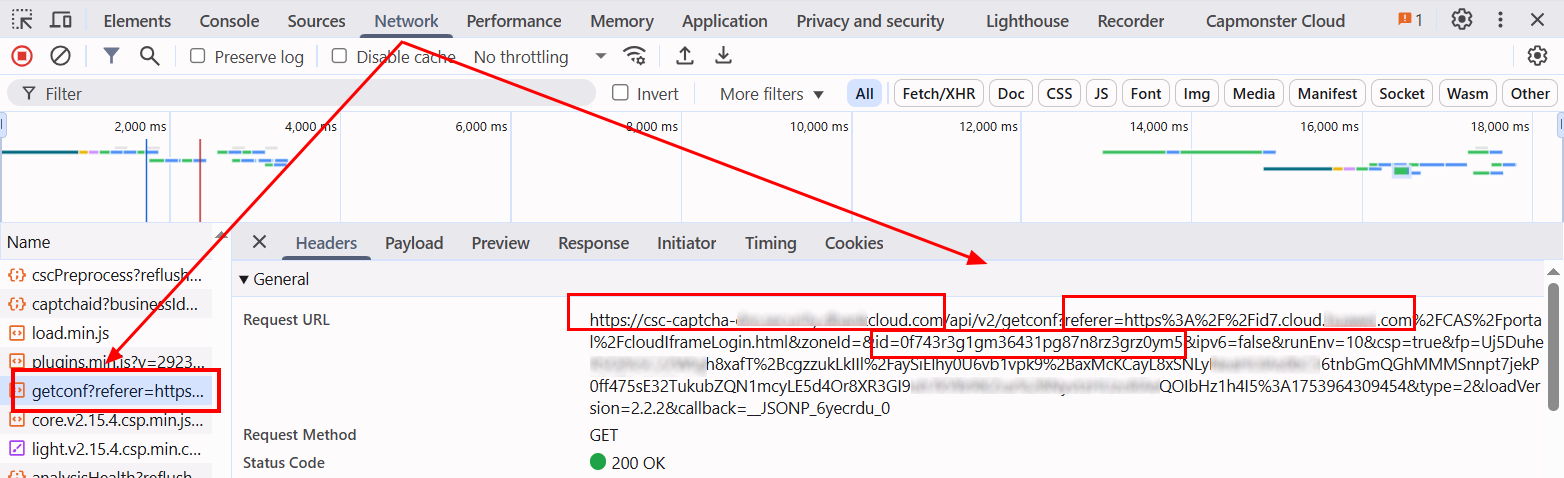
打开开发者工具,触发验证码,转到 Network 选项卡,并在请求中找到以 get?referer= 或 check?referer= 开头的请求。referer 的值即为 websiteURL。

有时 URL 中的 referer 会经过编码,例如:https%3A%2F%2Fid.example.com%2F。要获得可读地址,需要对其进行解码,例如使用浏览器控制台:

id 的值即为 websiteKey。

对于 Yidun Enterprise:
与普通 Yidun 验证码类似,可以在以 get?referer= 或 check?referer= 开头的请求中找到 websiteURL、websiteKey 和 yidunApiServerSubdomain。
yidunGetLib
负责在页面上加载验证码的 JavaScript 文件路径通常可以在网络请求中找到。其名称通常类似于 load.min.js。

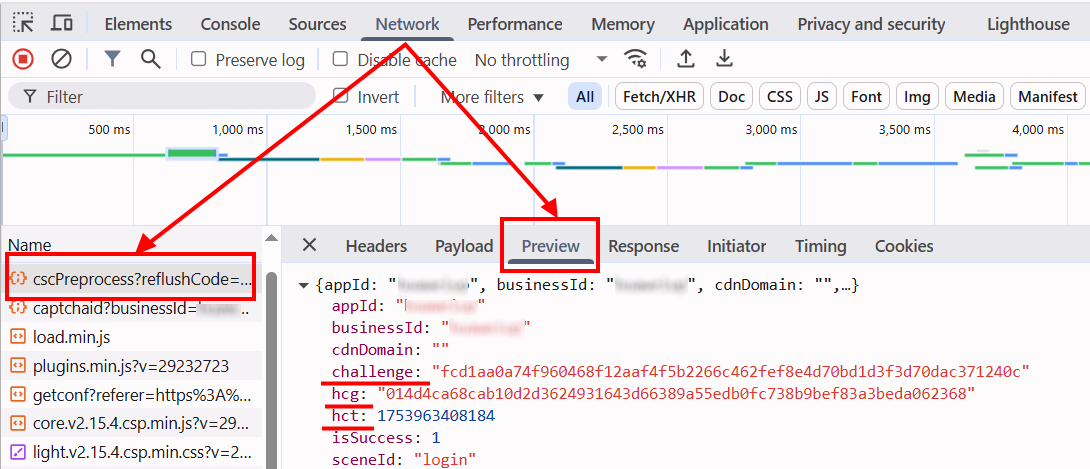
challenge, hcg, hct
所有这些参数都可以在网络请求中找到。相应请求通常以 cscPreprocess?reflushCode= 开头。
使用 SDK 库
- JavaScript / TypeScript
- Python
- C#
- Rust
显示代码(浏览器)
// https://github.com/CapMonsterCloud/capmonster-nodejs-captcha-solver

import {
  CapMonsterCloudClientFactory,
  ClientOptions,
  YidunRequest
} from "@zennolab_com/capmonstercloud-client";

document.addEventListener("DOMContentLoaded", async () => {

  const API_KEY = "YOUR_API_KEY"; // 请指定您的 CapMonster Cloud API 密钥

  const client = CapMonsterCloudClientFactory.Create(
    new ClientOptions({ clientKey: API_KEY })
  );

  // 不使用代理的基础示例
  // CapMonster Cloud 会自动使用自己的代理
  let yidunRequest = new YidunRequest({
    websiteURL: "https://yourwebsite.com/page-with-yidun",
    websiteKey: "your-website-key",
    userAgent: "userAgentPlaceholder",
  });

  // 使用您自己的代理的示例
  // 如果您想使用自己的代理,请取消注释此代码块
  /*
  const proxy = {
    proxyType: "http",
    proxyAddress: "123.45.67.89",
    proxyPort: 8080,
    proxyLogin: "username",
    proxyPassword: "password",
  };

  yidunRequest = new YidunRequest({
    websiteURL: "https://yourwebsite.com/page-with-yidun",
    websiteKey: "your-website-key",
    userAgent: "userAgentPlaceholder",
    proxy,
  });
  */

  // 如有需要,可以检查余额
  const balance = await client.getBalance();
  console.log("Balance:", balance);

  const result = await client.Solve(yidunRequest);
  console.log("Solution:", result.solution);
});
显示代码(Node.js)
// https://github.com/CapMonsterCloud/capmonster-nodejs-captcha-solver

const {
  CapMonsterCloudClientFactory,
  ClientOptions,
  YidunRequest,
} = require("@zennolab_com/capmonstercloud-client");

const API_KEY = "YOUR_API_KEY"; // 请指定您的 CapMonster Cloud API 密钥

async function solveYidun() {
  const client = CapMonsterCloudClientFactory.Create(
    new ClientOptions({ clientKey: API_KEY }),
  );

  // 不使用代理的基础示例
  // CapMonster Cloud 会自动使用自己的代理
  let yidunRequest = new YidunRequest({
    websiteURL: "https://yourwebsite.com/page-with-yidun",
    websiteKey: "your-website-key",
    userAgent: "userAgentPlaceholder",
  });

  // 使用您自己的代理的示例
  // 如果您想使用自己的代理,请取消注释此代码块
  /*
  const proxy = {
    proxyType: "http",
    proxyAddress: "123.45.67.89",
    proxyPort: 8080,
    proxyLogin: "username",
    proxyPassword: "password",
  };

  yidunRequest = new YidunRequest({
    websiteURL: "https://yourwebsite.com/page-with-yidun",
    websiteKey: "your-website-key",
    userAgent: "userAgentPlaceholder",
    proxy,
  });
  */

  // 如有需要,可以检查余额
  const balance = await client.getBalance();
  console.log("Balance:", balance);

  const result = await client.Solve(yidunRequest);
  console.log("Solution:", result.solution);
}

solveYidun().catch(console.error);
显示代码
# https://github.com/CapMonsterCloud/capmonster-python-captcha-solver

import asyncio

from capmonstercloudclient import CapMonsterClient, ClientOptions
from capmonstercloudclient.requests import YidunRequest
# 如果您计划使用自己的代理,请导入 ProxyInfo
from capmonstercloudclient.requests.proxy_info import ProxyInfo

API_KEY = "YOUR_API_KEY"  # 请指定您的 CapMonster Cloud API 密钥


async def solve_yidun():
    client = CapMonsterClient(
        options=ClientOptions(api_key=API_KEY)
    )

    # 不使用代理的基础示例
    # CapMonster Cloud 会自动使用自己的代理
    yidun_request = YidunRequest(
        websiteUrl="https://yourwebsite.com/page-with-yidun",
        websiteKey="your-website-key",
        userAgent="userAgentPlaceholder",
    )

    # 使用您自己的代理的示例
    # 如果您想使用自己的代理,请取消注释此代码块
    """
    proxy = ProxyInfo(
        proxyType="http",
        proxyAddress="123.45.67.89",
        proxyPort=8080,
        proxyLogin="username",
        proxyPassword="password",
    )

    yidun_request = YidunRequest(
        websiteUrl="https://yourwebsite.com/page-with-yidun",
        websiteKey="your-website-key",
        userAgent="userAgentPlaceholder",
        proxy=proxy,
    )
    """

    # 如有需要,可以检查余额
    balance = await client.get_balance()
    print("Balance:", balance)

    result = await client.solve_captcha(yidun_request)
    print("Solution:", result)


asyncio.run(solve_yidun())
显示代码
// https://github.com/CapMonsterCloud/capmonster-dotnet-captcha-solver

using System;
using System.Threading.Tasks;
using Zennolab.CapMonsterCloud;
using Zennolab.CapMonsterCloud.Requests;

class Program
{
    static async Task Main(string[] args)
    {
        // 请指定您的 CapMonster Cloud API 密钥
        var clientOptions = new ClientOptions
        {
            ClientKey = "YOUR_API_KEY"
        };

        var cmCloudClient = CapMonsterCloudClientFactory.Create(clientOptions);

        // 不使用代理的基础示例
        // CapMonster Cloud 会自动使用自己的代理
        var yidunRequest = new YidunTaskRequest
        {
            WebsiteUrl = "https://yourwebsite.com/page-with-yidun",
            WebsiteKey = "your-website-key",
            UserAgent = "userAgentPlaceholder"
        };

        // 使用您自己的代理的示例
        // 如果您想使用自己的代理,请取消注释此代码块
        /*
        yidunRequest = new YidunTaskRequest
        {
            WebsiteUrl = "https://yourwebsite.com/page-with-yidun",
            WebsiteKey = "your-website-key",
            UserAgent = "userAgentPlaceholder",

            Proxy = new ProxyContainer(
                "123.45.67.89",
                8080,
                ProxyType.Http,
                "username",
                "password"
            )
        };
        */

        // 如有需要,可以检查余额
        var balance = await cmCloudClient.GetBalanceAsync();
        Console.WriteLine("Balance: " + balance);

        var yidunResult = await cmCloudClient.SolveAsync(yidunRequest);
        Console.WriteLine("Solution: " + yidunResult.Solution.Value);
    }
}
显示代码
Rust 请使用官方 SDK:crates.io 和 Github。
// https://github.com/CapMonsterCloud/capmonster-rust-captcha-solver

use capmonstercloud_client::requests::{YidunRequest};
use capmonstercloud_client::{CapMonsterClient, ClientOptions};

#[tokio::main]
async fn main() -> capmonstercloud_client::Result<()> {
    // 请填写您的 CapMonster Cloud API 密钥
    let client = CapMonsterClient::new(ClientOptions::new("YOUR_API_KEY"))?;

    let request = YidunRequest::new(
        "https://yourwebsite.com/page-with-yidun",
        "your-website-key",
    )
    .with_user_agent("userAgentPlaceholder");

    let solution = client.solve_captcha(&request).await?;
    println!("解决方案:{solution}");
    Ok(())
}