Cloudflare Challenge
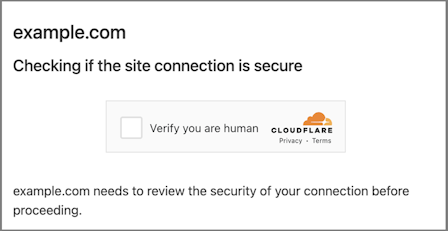
CapMonster Cloud 可以返回解决方案结果为 token 或 cf_clearance cookie。在开始之前,请先了解这两种选项,并选择最适合您使用场景的方式。
请求参数
重要:某些参数的值是动态的——它们会在包含 Cloudflare Challenge 的页面每次渲染时发生变化。
请在创建任务之前立即提取这些参数,以避免在求解过程中出现错误。
有关自动提取参数的示例,请参阅如何获取创建任务所需的所有参数。
选项 1. Challenge(token)
-
CapMonster Cloud 默认使用内置代理 —— 费用已包含在服务中。仅在网站不接受 token 或访问内置服务受限时,才需要指定自己的代理。
-
如果您使用 IP 授权的代理,请确保将地址 65.21.190.34 列入白名单。
-
完成验证后,您将收到一个 token 用于确认验证码已完成。
type<string>requiredTurnstileTask
websiteURL<string>required解决验证码的页面地址
websiteKey<string>requiredCloudflare Challenge 密钥(参见如何查找创建任务所需的全部参数章节)
大致格式如下:0x4AAAAAAABUYP0XeMJF0xoy
cloudflareTaskType<string>requiredtoken
pageAction<string>required可在加载验证码的 callback 函数中找到 action 字段。如果使用 cloudflareTaskType,则 action 通常为 “managed” 或 “non-interactive”。
userAgent<string>required浏览器 User-Agent。请使用 CapMonster Cloud 当前支持的值:userAgentPlaceholder
可通过以下地址获取最新值:https://capmonster.cloud/api/useragent/actual。
data<string>requireddata 字段的值可从 cData 参数中获取。
示例:874291f4retD1366
pageData<string>requiredpageData 字段的值可从 chlPageData 参数中获取。
示例:HUHDWUHuhuwfiweh32..uh2uhuhyugYUG=
apiJsUrl<string>optional包含验证码脚本链接的字符串。
proxyType<string>optionalhttp - 标准 http/https 代理;
https - 如果 "http" 不工作可尝试此类型(某些自定义代理需要);
socks4 - socks4 代理;
socks5 - socks5 代理
proxyAddress<string>optional代理的 IP 地址 (IPv4/IPv6)。禁止:
- 使用透明代理(会暴露客户端 IP);
- 使用本机代理。
proxyPort<integer>optional代理端口
proxyLogin<string>optional代理登录名
proxyPassword<string>optional代理密码
这些参数在创建验证码时传给 window.turnstile.render(el, paramsObj) 的对象中。你可以通过在加载其他脚本之前执行 JavaScript 来获取它们,例如:
(function () {
  const obj = {
    render: function () {
      const { action, cData, chlPageData } = arguments[1];
        const params = [
          ["action", action],
          ["data", cData],
          ["pageData", chlPageData],
        ];
        console.table(params)
    }
  };

  Object.defineProperty(window, "turnstile", {
    get: () => {
      return obj;
    },
  });
})();
当 window.turnstile.render(el, paramsObj) 被调用时,验证码会加载到页面上,成功完成后,callback 函数会传递解决方案信息。
window.turnstile.render(el, paramsObj):
el:插入验证码的 DOM 元素paramsObj:包含验证码信息和解决指令的对象,通常包括 sitekey、action、cData、chlPageData、callbackcallback:验证码成功解决后调用的函数
选项 2. Challenge(cookie)
-
本任务必须使用 自有代理。
-
完成后,你将收到 特殊的 cookie,需添加到浏览器中。
type<string>requiredTurnstileTask
websiteURL<string>required验证码所在页面的 URL
websiteKey<string>requiredCloudflare Challenge 密钥。可以传递任意字符串,例如:xxxxxx。
cloudflareTaskType<string>requiredcf_clearance
htmlPageBase64<string>requiredBase64 编码的 HTML 页面,显示 403 响应时的 “Just a moment” 页面。
获取 htmlPageBase64 示例:
fetch('https://example.com')
  .then(res => res.arrayBuffer())
  .then(buf => {
    const base64 = btoa(String.fromCharCode(...new Uint8Array(buf)));
    console.log(base64);
  });
userAgent<string>required浏览器 User-Agent。请使用 CapMonster Cloud 当前支持的值:userAgentPlaceholder
可通过以下地址获取最新值:https://capmonster.cloud/api/useragent/actual。
proxyType<string>requiredhttp - 常规 HTTP/HTTPS 代理;
https - 如果 http 不可用使用(某些自定义代理需要);
socks4 - SOCKS4 代理;
socks5 - SOCKS5 代理
proxyAddress<string>required代理 IP 地址 (IPv4/IPv6)。禁止:
- 透明代理
- 本机代理
proxyPort<integer>required代理端口
proxyLogin<string>required代理登录名
proxyPassword<string>required代理密码
创建任务方法
选项 1. Challenge(token)
- TurnstileTask(无代理)
- TurnstileTask(使用代理)
https://api.capmonster.cloud/createTask
请求示例
{
  "clientKey": "API_KEY",
  "task": {
    "type": "TurnstileTask",
    "websiteURL": "https://yourwebsite.com/page-with-cf-challenge",
    "websiteKey": "your-website-key",
    "cloudflareTaskType": "token",
    "userAgent": "userAgentPlaceholder",
    "pageAction": "your-page-action",
    "pageData": "your-page-data",
    "data": "your-data"
  }
}
响应示例
{
  "errorId": 0,
  "taskId": 407533072
}
https://api.capmonster.cloud/createTask
请求示例
{
  "clientKey": "API_KEY",
  "task": {
    "type": "TurnstileTask",
    "websiteURL": "https://yourwebsite.com/page-with-cf-challenge",
    "websiteKey": "your-website-key",
    "cloudflareTaskType": "token",
    "userAgent": "userAgentPlaceholder",
    "pageAction": "your-page-action",
    "pageData": "your-page-data",
    "data": "your-data",
    "proxyType": "your-proxy-type",
    "proxyAddress": "your-proxy-address",
    "proxyPort": 1234,
    "proxyLogin": "your-proxy-login",
    "proxyPassword": "your-proxy-password"
  }
}
响应示例
{
  "errorId": 0,
  "taskId": 407533072
}
选项 2. Challenge(cookie)
https://api.capmonster.cloud/createTask
请求示例
{
  "clientKey": "API_KEY",
  "task": {
    "type": "TurnstileTask",
    "websiteURL": "https://yourwebsite.com/page-with-cf-challenge",
    "websiteKey": "xxxxxxxxxx",
    "cloudflareTaskType": "cf_clearance",
    "htmlPageBase64": "PCFET0NUWVBFIGh0...vYm9keT48L2h0bWw+",
    "userAgent": "userAgentPlaceholder",
    "proxyType": "your-proxy-type",
    "proxyAddress": "your-proxy-address",
    "proxyPort": 1234,
    "proxyLogin": "your-proxy-login",
    "proxyPassword": "your-proxy-password"
  }
}
响应示例
{
  "errorId":0,
  "taskId":407533072
}
获取任务结果方法
选项 1. Challenge(token)
https://api.capmonster.cloud/getTaskResult
请求示例
{
  "clientKey": "API_KEY",
  "taskId": 407533072
}
响应示例
{
  "errorId": 0,
  "status": "ready",
  "solution": {
    "userAgent": "userAgentPlaceholder",
    "token": "0.iGX3xsyFCkbGePM3jP4P4khLo6TrLukt8ZzBvwuQOvbC...f61f3082"
  }
}
| 属性 | 类型 | 说明 |
|---|---|---|
| token | String | 调用 callback 函数时使用此令牌 |
选项 2. Challenge(cookie)
https://api.capmonster.cloud/getTaskResult
请求示例
{
  "clientKey": "API_KEY",
  "taskId": 407533072
}
响应示例
{
  "errorId": 0,
  "status": "ready",
  "solution": {
    "cf_clearance": "1tarGvbY2_ZhQdYxpSBloao.FoOn9VtcJtmb_IQ_hCE-1761217338-1.2.1.1-vyVPoLYIGX0VCJomVuLjF7n0kdM0PXaPjpDsRcohxGr7hb2CE7WfcHpmQZ70goqEjdWxPsDhSVaKNTz9opxWguiNdWEEq_.SceWXIqfP7tnEb69f3bP0mixNqcWy_5P_9INpoAEqr1k7aYU0r45PT4gPr5pwHxedVySyLRdoBXIJasdTE52YOQ3NPdGWTwQ_3h2n_wYqqIvf0kCSAvimRrmsgZxomlyejwqPI6ZHi.w"
  }
}
| 属性 | 类型 | 说明 |
|---|---|---|
| cf_clearance | String | 可添加到浏览器中的 Cloudflare 专用 Cookie |
如何区分 Challenge 与 Turnstile
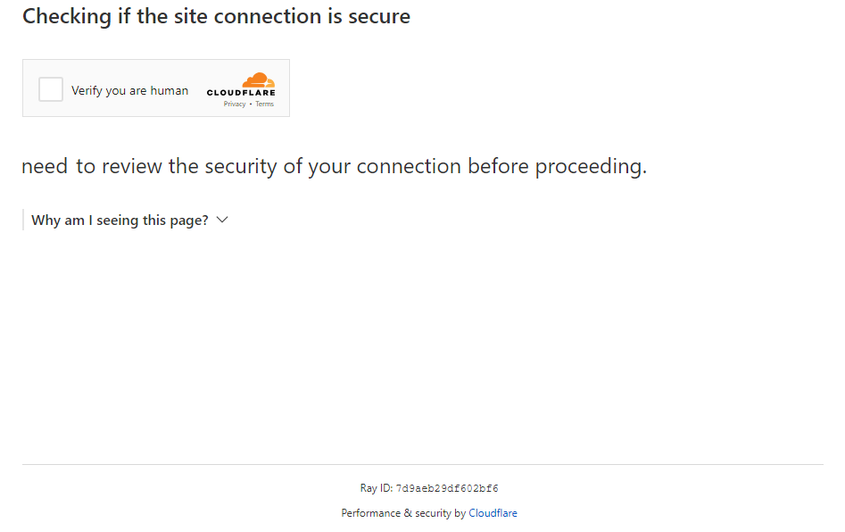
Challenge 与 Turnstile 的区别
Cloudflare 的验证类型可能会以不同形式出现。
标准 Turnstile:
样式化变体:
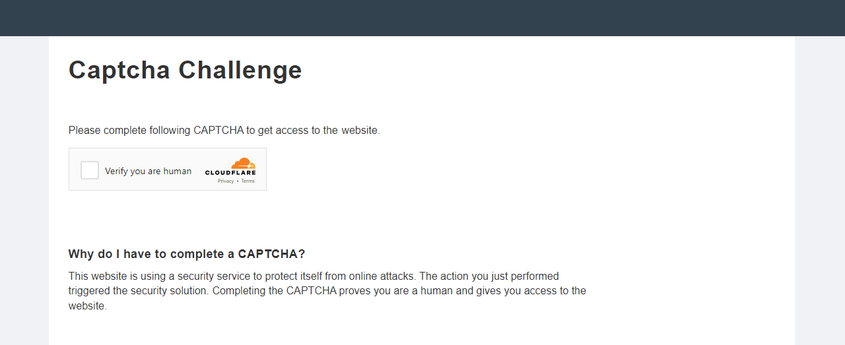

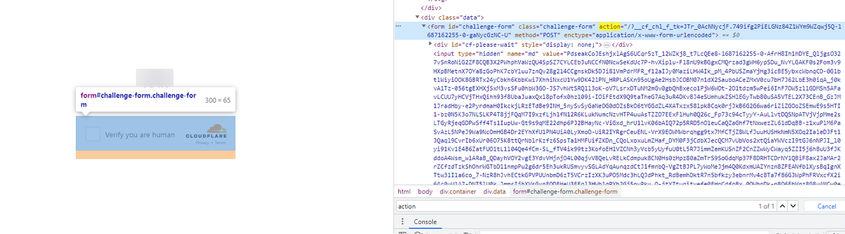
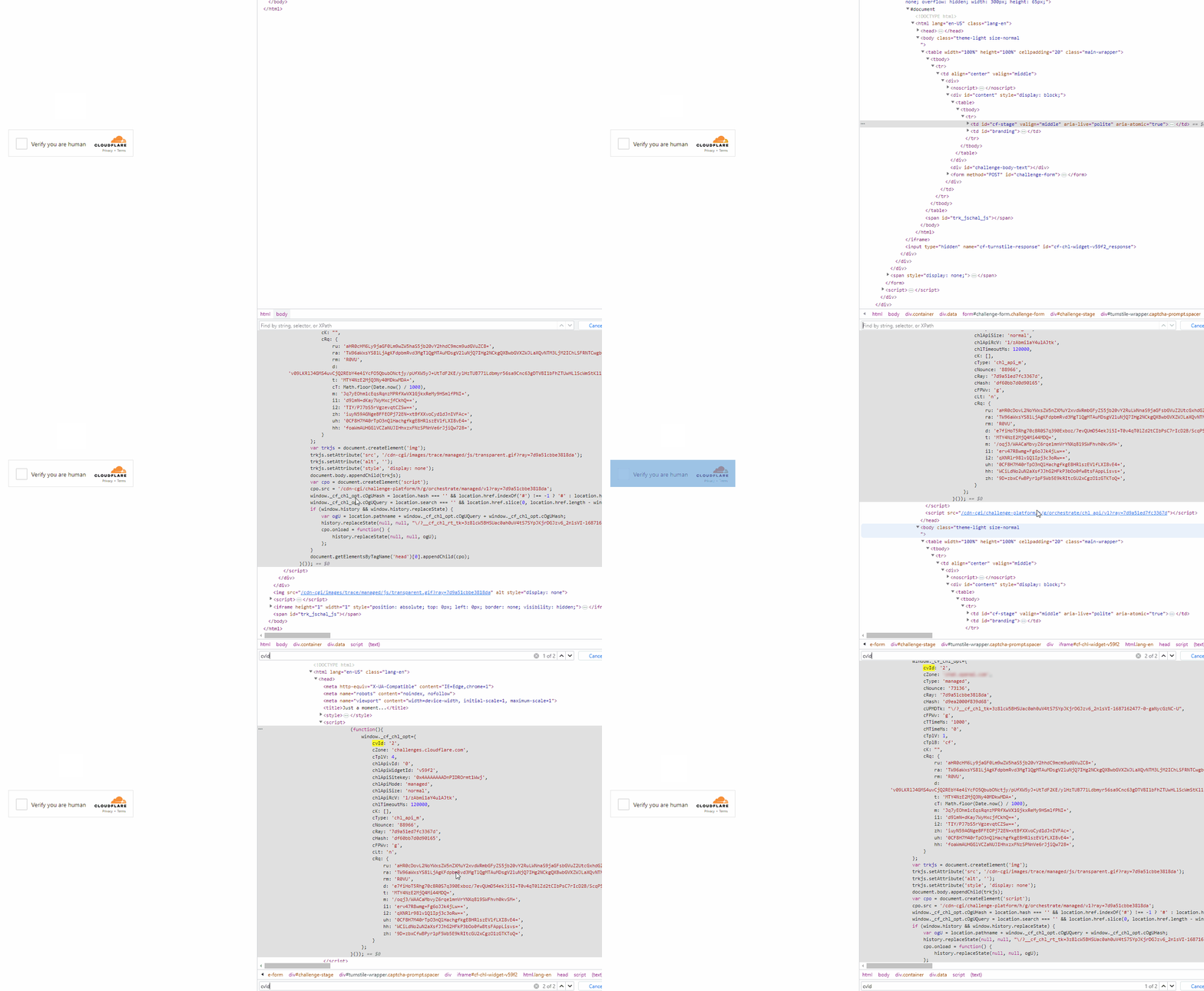
要确认是否为 Challenge,可以打开开发者工具,检查网络流量,并查看页面源码中的典型标志:
- 第一次请求站点时返回 403 状态码:
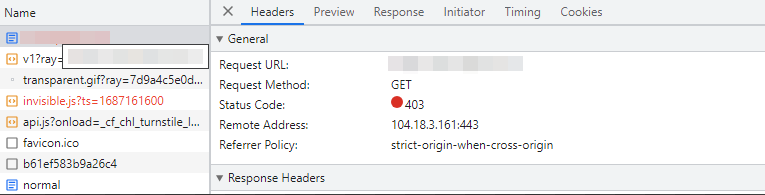
- id 为 challenge-form 的表单,其 action 属性(不要与 Turnstile 的 action 混淆)包含参数
__cf_chl_f_tk=:
- 页面包含两个类似的
<script>标签,在window对象中创建新的值:
如何获取创建任务所需的所有参数
自动化获取
要自动提取参数,可以通过 浏览器(普通或无头,例如使用 Playwright)或直接从 HTTP 请求 获取。由于动态参数有效期较短,建议在获取后立即使用。
提供的代码片段仅作为学习如何提取所需参数的基础示例。具体实现将取决于你的验证码页面、页面结构以及使用的 HTML 元素和选择器。
- JavaScript
- Python
- C#
选项 1:Challenge(token)– Node.js
import { chromium } from "playwright";

    (async () => {
      const browser = await chromium.launch({ headless: false });
      const page = await browser.newPage();

  let params = null;

  try {
    while (!params) {
      await page.goto("https://example.com");

      await page.evaluate(() => {
        window.turnstile = new Proxy(window.turnstile, {
          get(target, prop) {
            if (prop === "render") {
              return function (a, b) {
                const p = {
                  websiteKey: b.sitekey,
                  websiteURL: window.location.href,
                  data: b.cData,
                  pagedata: b.chlPageData,
                  action: b.action,
                  userAgent: navigator.userAgent,
                };
                window.params = p;
                return target.render.apply(this, arguments);
              };
            }
            return target[prop];
          },
        });
      });

      params = await page.evaluate(() => {
        return new Promise((resolve) => {
          setTimeout(() => resolve(window.params || null), 5000);
        });
      });

      if (!params) {
        await page.waitForTimeout(3000);
      }
    }

    console.log("Turnstile Params:", params);
  } finally {
    await browser.close();
  }
})();
选项 2:Challenge(cookie cf_clearance)– Node.js
import { chromium } from "playwright";
import { Buffer } from "buffer";

(async () => {
  const browser = await chromium.launch({ headless: false });
  const page = await browser.newPage();

  let websiteKey = null;

  while (!websiteKey) {
    await page.goto("https://example.com");

    await page.evaluate(() => {
      window.turnstile = new Proxy(window.turnstile, {
        get(target, prop) {
          if (prop === "render") {
            return function (a, b) {
              // 保存 sitekey 到全局变量
              window.websiteKey = b.sitekey;
              return target.render.apply(this, arguments);
            };
          }
          return target[prop];
        },
      });
    });

    websiteKey = await page.evaluate(() => {
      return new Promise((resolve) => {
        setTimeout(() => resolve(window.websiteKey || null), 5000);
      });
    });

    if (!websiteKey) {
      await page.waitForTimeout(3000);
    }
  }

  // 获取页面 HTML 并转换为 Base64
  const html = await page.content();
  const htmlPageBase64 = Buffer.from(html).toString("base64");

  const result = {
    websiteKey,
    htmlPageBase64,
  };

  console.log(result);

  await browser.close();
})();
选项 1:Challenge(token)
import asyncio
from playwright.async_api import async_playwright

async def extract_turnstile_params():
    async with async_playwright() as p:
        browser = await p.chromium.launch(headless=False)
        page = await browser.new_page()

        params = None

        while not params:
            await page.goto("https://example.com")

            await page.evaluate("""
                window.turnstile = new Proxy(window.turnstile, {
                  get(target, prop) {
                    if prop === "render":
                      # 保存参数到全局变量
                      return function(a, b) {
                        const p = {
                          websiteKey: b.sitekey,
                          websiteURL: window.location.href,
                          data: b.cData,
                          pagedata: b.chlPageData,
                          action: b.action,
                          userAgent: navigator.userAgent
                        };
                        window.params = p;
                        return target.render.apply(this, arguments);
                      };
                    return target[prop];
                  }
                });
            """)

            await page.wait_for_timeout(5000)

            params = await page.evaluate("window.params || null")

            if not params:
                await page.wait_for_timeout(3000)

        print("Turnstile Params:", params)

        await browser.close()

asyncio.run(extract_turnstile_params())
选项 2:Challenge(cookie cf_clearance)
import asyncio
import base64
from playwright.async_api import async_playwright

async def main():
    async with async_playwright() as p:
        browser = await p.chromium.launch(headless=False)
        page = await browser.new_page()

        website_key = None

        while not website_key:
            await page.goto("https://example.com")

            await page.evaluate("""
                () => {
                    # 拦截 window.turnstile.render 调用以提取 sitekey
                    window.turnstile = new Proxy(window.turnstile, {
                        get(target, prop) {
                            if prop === 'render':
                                return function(a, b) {
                                    window.websiteKey = b.sitekey;
                                    return target.render.apply(this, arguments);
                                };
                            return target[prop];
                        }
                    });
                }
            """)

            website_key = await page.evaluate("""
                () => new Promise(resolve => {
                    setTimeout(() => resolve(window.websiteKey || null), 5000);
                })
            """)

            if not website_key:
                await page.wait_for_timeout(3000)

        # 获取页面 HTML 并编码为 Base64
        html = await page.content()
        html_base64 = base64.b64encode(html.encode("utf-8")).decode("utf-8")

        result = {
            "websiteKey": website_key,
            "htmlPageBase64": html_base64
        }

        print(result)

        await browser.close()

asyncio.run(main())
选项 1:Challenge(token)
using Microsoft.Playwright;
using System.Text.Json;

class Program
{
    public static async Task Main()
    {
        using var playwright = await Playwright.CreateAsync();
        var browser = await playwright.Chromium.LaunchAsync(new BrowserTypeLaunchOptions
        {
            Headless = false
        });

        var page = await browser.NewPageAsync();
        object? parameters = null;

        while (parameters == null)
        {
            await page.GotoAsync("https://example.com");

            await page.EvaluateAsync(@"() => {
                // 拦截 window.turnstile.render 调用以提取参数
                window.turnstile = new Proxy(window.turnstile, {
                    get(target, prop) {
                        if (prop === 'render') {
                            return function(a, b) {
                                const p = {
                                    websiteKey: b.sitekey,
                                    websiteURL: window.location.href,
                                    data: b.cData,
                                    pagedata: b.chlPageData,
                                    action: b.action,
                                    userAgent: navigator.userAgent
                                };
                                window.params = p;
                                return target.render.apply(this, arguments);
                            };
                        }
                        return target[prop];
                    }
                });
            }");

            parameters = await page.EvaluateAsync(@"() => new Promise(resolve => {
                setTimeout(() => resolve(window.params || null), 5000);
            })");

            if (parameters == null)
            {
                await page.WaitForTimeoutAsync(3000);
            }
        }

        Console.WriteLine("Turnstile Params:");
        Console.WriteLine(JsonSerializer.Serialize(parameters, new JsonSerializerOptions { WriteIndented = true }));

        await browser.CloseAsync();
    }
}
选项 2:Challenge(cookie cf_clearance)
using System;
using System.Text;
using System.Threading.Tasks;
using Microsoft.Playwright;

class Program
{
    public static async Task Main()
    {
        using var playwright = await Playwright.CreateAsync();
        var browser = await playwright.Chromium.LaunchAsync(
          new BrowserTypeLaunchOptions { Headless = false });
        var page = await browser.NewPageAsync();

        string websiteKey = null;

        while (websiteKey == null)
        {
            await page.GotoAsync("https://example.com");

            await page.EvaluateAsync(@"() => {
                // 拦截 window.turnstile.render 调用以提取 websiteKey
                window.turnstile = new Proxy(window.turnstile, {
                    get(target, prop) {
                        if (prop === 'render') {
                            return function(a, b) {
                                window.websiteKey = b.sitekey;
                                return target.render.apply(this, arguments);
                            };
                        }
                        return target[prop];
                    }
                });
            }");

            websiteKey = await page.EvaluateAsync<string>(@"() =>
            new Promise(resolve => {
                setTimeout(() => resolve(window.websiteKey || null), 5000);
            })");

            if (websiteKey == null)
            {
                await page.WaitForTimeoutAsync(3000);
            }
        }

        // 将 HTML 页面内容编码为 Base64
        var html = await page.ContentAsync();
        var htmlBase64 = Convert.ToBase64String(Encoding.UTF8.GetBytes(html));

        Console.WriteLine($"websiteKey: {websiteKey}");
        Console.WriteLine($"htmlPageBase64: {htmlBase64}");

        await browser.CloseAsync();
    }
}
使用 SDK 库
- JavaScript / TypeScript
- Node.js
- Python
- C#
方案 1. Challenge(token)
// https://github.com/CapMonsterCloud/capmonster-nodejs-captcha-solver

import {
  CapMonsterCloudClientFactory,
  ClientOptions,
  TurnstileRequest
} from "@zennolab_com/capmonstercloud-client";

document.addEventListener("DOMContentLoaded", async () => {

  const API_KEY = "YOUR_API_KEY"; // 请指定您的 CapMonster Cloud API 密钥

  const client = CapMonsterCloudClientFactory.Create(
    new ClientOptions({ clientKey: API_KEY })
  );

  // 不使用代理的基础示例
  // CapMonster Cloud 会自动使用自己的代理
  let turnstileRequest = new TurnstileRequest({
    websiteURL: "https://yourwebsite.com/page-with-cf-challenge",
    websiteKey: "your-website-key",
    data: "your-data",
    pageAction: "managed",
    cloudflareTaskType: "token",
    pageData: "your-page-data",
    userAgent: "userAgentPlaceholder",
  });

  // 使用您自己的代理的示例
  // 如果您想使用自己的代理,请取消注释此代码块
  /*
  const proxy = {
    proxyType: "http",
    proxyAddress: "123.45.67.89",
    proxyPort: 8080,
    proxyLogin: "username",
    proxyPassword: "password",
  };

  turnstileRequest = new TurnstileRequest({
    websiteURL: "https://yourwebsite.com/page-with-cf-challenge",
    websiteKey: "your-website-key",
    proxy,
    data: "your-data",
    pageAction: "managed",
    cloudflareTaskType: "token",
    pageData: "your-page-data",
    userAgent: "userAgentPlaceholder",
  });
  */

  // 如有需要,可以检查余额
  const balance = await client.getBalance();
  console.log("Balance:", balance);

  const result = await client.Solve(turnstileRequest);
  console.log("Solution:", result.solution);
});
方案 2. Challenge(cookie cf_clearance)
// https://github.com/CapMonsterCloud/capmonster-nodejs-captcha-solver

import {
  CapMonsterCloudClientFactory,
  ClientOptions,
  TurnstileRequest
} from "@zennolab_com/capmonstercloud-client";

document.addEventListener("DOMContentLoaded", async () => {

  const API_KEY = "YOUR_API_KEY"; // 请指定您的 CapMonster Cloud API 密钥

  const client = CapMonsterCloudClientFactory.Create(
    new ClientOptions({ clientKey: API_KEY })
  );

  // Cloudflare cf_clearance 只能使用您自己的代理进行解决
  const proxy = {
    proxyType: "http",
    proxyAddress: "123.45.67.89",
    proxyPort: 8080,
    proxyLogin: "username",
    proxyPassword: "password",
  };

  const turnstileRequest = new TurnstileRequest({
    websiteURL: "https://yourwebsite.com/page-with-cf-challenge",
    websiteKey: "xxxxxxx",
    cloudflareTaskType: "cf_clearance",
    proxy,
    htmlPageBase64: "your_html_page_base64",
    userAgent: "userAgentPlaceholder",
  });

  // 如有需要,可以检查余额
  const balance = await client.getBalance();
  console.log("Balance:", balance);

  const result = await client.Solve(turnstileRequest);
  console.log("Solution:", result.solution);
});
方案 1. Challenge(token)
// https://github.com/CapMonsterCloud/capmonster-nodejs-captcha-solver

const {
  CapMonsterCloudClientFactory,
  ClientOptions,
  TurnstileRequest,
} = require("@zennolab_com/capmonstercloud-client");

const API_KEY = "YOUR_API_KEY"; // 请指定您的 CapMonster Cloud API 密钥

(async () => {
  const client = CapMonsterCloudClientFactory.Create(
    new ClientOptions({ clientKey: API_KEY }),
  );

  // 不使用代理的基础示例
  // CapMonster Cloud 会自动使用自己的代理
  let turnstileRequest = new TurnstileRequest({
    websiteURL: "https://yourwebsite.com/page-with-cf-challenge",
    websiteKey: "your-website-key",
    data: "your-data",
    pageAction: "managed",
    cloudflareTaskType: "token",
    pageData: "your-page-data",
    userAgent: "userAgentPlaceholder",
  });

  // 使用您自己的代理的示例
  // 如果您想使用自己的代理,请取消注释此代码块
  /*
  const proxy = {
    proxyType: "http",
    proxyAddress: "123.45.67.89",
    proxyPort: 8080,
    proxyLogin: "username",
    proxyPassword: "password",
  };

  turnstileRequest = new TurnstileRequest({
    websiteURL: "https://yourwebsite.com/page-with-cf-challenge",
    websiteKey: "your-website-key",
    proxy,
    data: "your-data",
    pageAction: "managed",
    cloudflareTaskType: "token",
    pageData: "your-page-data",
    userAgent: "userAgentPlaceholder",
  });
  */

  // 如有需要,可以检查余额
  const balance = await client.getBalance();
  console.log("Balance:", balance);

  const result = await client.Solve(turnstileRequest);
  console.log("Solution:", result.solution);
})();
方案 2. Challenge(cookie cf_clearance)
// https://github.com/CapMonsterCloud/capmonster-nodejs-captcha-solver

const {
  CapMonsterCloudClientFactory,
  ClientOptions,
  TurnstileRequest,
} = require("@zennolab_com/capmonstercloud-client");

const API_KEY = "YOUR_API_KEY"; // 请指定您的 CapMonster Cloud API 密钥

async function solveTurnstileCfClearance() {
  const client = CapMonsterCloudClientFactory.Create(
    new ClientOptions({ clientKey: API_KEY }),
  );

  // Cloudflare cf_clearance 只能使用您自己的代理进行解决
  const proxy = {
    proxyType: "http",
    proxyAddress: "123.45.67.89",
    proxyPort: 8080,
    proxyLogin: "username",
    proxyPassword: "password",
  };

  const turnstileRequest = new TurnstileRequest({
    websiteURL: "https://yourwebsite.com/page-with-cf-challenge",
    websiteKey: "xxxxxxx",
    cloudflareTaskType: "cf_clearance",
    proxy,
    htmlPageBase64: "your_html_page_base64",
    userAgent: "userAgentPlaceholder",
  });

  // 如有需要,可以检查余额
  const balance = await client.getBalance();
  console.log("Balance:", balance);

  const result = await client.Solve(turnstileRequest);
  console.log("Solution:", result.solution);
}

solveTurnstileCfClearance().catch(console.error);
方案 1. Challenge(token)
# https://github.com/CapMonsterCloud/capmonster-python-captcha-solver

import asyncio

from capmonstercloudclient import CapMonsterClient, ClientOptions
from capmonstercloudclient.requests import TurnstileRequest
# 如果您计划使用自己的代理,请导入 ProxyInfo
from capmonstercloudclient.requests.proxy_info import ProxyInfo

API_KEY = "YOUR_API_KEY"  # 请指定您的 CapMonster Cloud API 密钥


async def solve_turnstile_challenge():
    client = CapMonsterClient(
        options=ClientOptions(api_key=API_KEY)
    )

    # 不使用代理的基础示例
    # CapMonster Cloud 会自动使用自己的代理
    turnstile_request = TurnstileRequest(
        websiteURL="https://yourwebsite.com/page-with-cf-challenge",
        websiteKey="your-website-key",
        data="your-data",
        pageAction="managed",
        cloudflareTaskType="token",
        pageData="your-page-data",
        userAgent="userAgentPlaceholder",
    )

    # 使用您自己的代理的示例
    # 如果您想使用自己的代理,请取消注释此代码块
    """
    proxy = ProxyInfo(
        proxyType="http",
        proxyAddress="123.45.67.89",
        proxyPort=8080,
        proxyLogin="username",
        proxyPassword="password",
    )

    turnstile_request = TurnstileRequest(
        websiteURL="https://yourwebsite.com/page-with-cf-challenge",
        websiteKey="your-website-key",
        data="your-data",
        pageAction="managed",
        cloudflareTaskType="token",
        pageData="your-page-data",
        userAgent="userAgentPlaceholder",
        proxy=proxy,
    )
    """

    # 如有需要,可以检查余额
    balance = await client.get_balance()
    print("Balance:", balance)

    result = await client.solve_captcha(turnstile_request)
    print("Solution:", result)


asyncio.run(solve_turnstile_challenge())
方案 2. Challenge(cookie cf_clearance)
# https://github.com/CapMonsterCloud/capmonster-python-captcha-solver

import asyncio

from capmonstercloudclient import CapMonsterClient, ClientOptions
from capmonstercloudclient.requests import TurnstileRequest
from capmonstercloudclient.requests.proxy_info import ProxyInfo

API_KEY = "YOUR_API_KEY"  # 请指定您的 CapMonster Cloud API 密钥


async def main():
    client = CapMonsterClient(
        options=ClientOptions(api_key=API_KEY)
    )

    # Cloudflare cf_clearance 只能使用您自己的代理进行解决
    proxy = ProxyInfo(
        proxyType="http",
        proxyAddress="123.45.67.89",
        proxyPort=8080,
        proxyLogin="username",
        proxyPassword="password",
    )

    turnstile_request = TurnstileRequest(
        websiteURL="https://yourwebsite.com/page-with-cf-challenge",
        websiteKey="your-website-key",
        cloudflareTaskType="cf_clearance",
        proxy=proxy,
        htmlPageBase64="your_html_page_base64",
        userAgent="userAgentPlaceholder",
    )

    # 如有需要,可以检查余额
    balance = await client.get_balance()
    print("Balance:", balance)

    result = await client.solve_captcha(turnstile_request)
    print("Solution:", result)


asyncio.run(main())
方案 1. Challenge(token)
// https://github.com/CapMonsterCloud/capmonster-dotnet-captcha-solver

using System;
using System.Threading.Tasks;
using Zennolab.CapMonsterCloud;
using Zennolab.CapMonsterCloud.Requests;

class Program
{
    static async Task Main(string[] args)
    {
        // 请指定您的 CapMonster Cloud API 密钥
        var clientOptions = new ClientOptions
        {
            ClientKey = "YOUR_API_KEY"
        };

        var cmCloudClient = CapMonsterCloudClientFactory.Create(clientOptions);

        // 不使用代理的基础示例
        // CapMonster Cloud 会自动使用自己的代理
        var turnstileRequest = new TurnstileRequest
        {
            WebsiteUrl = "https://yourwebsite.com/page-with-cf-challenge",
            WebsiteKey = "your-website-key",
            Data = "your-data",
            PageAction = "managed",
            CloudflareTaskType = "token",
            PageData = "your-page-data",
            UserAgent = "userAgentPlaceholder"
        };

        // 使用您自己的代理的示例
        // 如果您想使用自己的代理,请取消注释此代码块
        /*
        turnstileRequest = new TurnstileRequest
        {
            WebsiteUrl = "https://yourwebsite.com/page-with-cf-challenge",
            WebsiteKey = "your-website-key",
            Data = "your-data",
            PageAction = "managed",
            CloudflareTaskType = "token",
            PageData = "your-page-data",
            UserAgent = "userAgentPlaceholder",

            Proxy = new ProxyContainer(
                "123.45.67.89",
                8080,
                ProxyType.Http,
                "username",
                "password"
            )
        };
        */

        // 如有需要,可以检查余额
        var balance = await cmCloudClient.GetBalanceAsync();
        Console.WriteLine("Balance: " + balance);

        var turnstileResult = await cmCloudClient.SolveAsync(turnstileRequest);
        Console.WriteLine("Solution: " + turnstileResult.Solution.Value);
    }
}
方案 2. Challenge(cookie cf_clearance)
// https://github.com/CapMonsterCloud/capmonster-dotnet-captcha-solver

using System;
using System.Threading.Tasks;
using Zennolab.CapMonsterCloud;
using Zennolab.CapMonsterCloud.Requests;

class Program
{
    static async Task Main(string[] args)
    {
        // 请指定您的 CapMonster Cloud API 密钥
        var clientOptions = new ClientOptions
        {
            ClientKey = "YOUR_API_KEY"
        };

        var cmCloudClient = CapMonsterCloudClientFactory.Create(clientOptions);

        // Cloudflare cf_clearance 只能使用您自己的代理进行解决
        var turnstileRequest = new TurnstileRequest
        {
            WebsiteUrl = "https://yourwebsite.com/page-with-cf-challenge",
            WebsiteKey = "your-website-key",
            CloudflareTaskType = "cf_clearance",
            HtmlPageBase64 = "your_html_page_base64",
            UserAgent = "userAgentPlaceholder",

            Proxy = new ProxyContainer(
                "123.45.67.89",
                8080,
                ProxyType.Http,
                "username",
                "password"
            )
        };

        // 如有需要,可以检查余额
        var balance = await cmCloudClient.GetBalanceAsync();
        Console.WriteLine("Balance: " + balance);

        var turnstileResult = await cmCloudClient.SolveAsync(turnstileRequest);
        Console.WriteLine("Solution: " + turnstileResult.Solution.Clearance);
    }
}
Cloudflare Challenge (cf_clearance) 自动解决示例
这些示例展示了处理 Cloudflare Challenge 的基本流程:获取所需参数、在 CapMonster Cloud 中创建任务,以及在后续请求中使用 cf_clearance Cookie。您可以使用官方 SDK 或直接调用 API,根据您的集成需求选择合适的方式。
- Node.js
- Python
- C#
显示代码
import { ProxyAgent, setGlobalDispatcher } from "undici";

// ================= 配置(或使用 .ENV) =================

const API_KEY = "YOUR_API_KEY"; // 替换为您的 CapMonster Cloud API 密钥

const URL = "https://www.example.com"; // 替换为目标 URL
const SITEKEY = "xxxxxx";

const UA =
  "userAgentPlaceholder";

// ================= 代理(替换为您的代理信息) =================

const PROXY_HOST = "PROXY_HOST";
const PROXY_PORT = 1234;
const PROXY_USER = "PROXY_USER";
const PROXY_PASS = "PROXY_PASS";

const proxy = new ProxyAgent(
  `http://${PROXY_USER}:${PROXY_PASS}@${PROXY_HOST}:${PROXY_PORT}`,
);

setGlobalDispatcher(proxy);

// ================= 会话 =================

let cookieHeader = "";

const headers = {
  "User-Agent": UA,
  Accept:
    "text/html,application/xhtml+xml,application/xml;q=0.9,image/avif,image/webp,*/*;q=0.8",
  "Accept-Language": "en-US,en;q=0.9",
  "Accept-Encoding": "gzip, deflate, br",
  Connection: "keep-alive",
  "Upgrade-Insecure-Requests": "1",
  "Sec-Fetch-Dest": "document",
  "Sec-Fetch-Mode": "navigate",
  "Sec-Fetch-Site": "none",
  "Sec-Fetch-User": "?1",
  "sec-ch-ua":
    '"Chromium";v="155", "Google Chrome";v="155", "Not:A-Brand";v="99"',
  "sec-ch-ua-mobile": "?0",
  "sec-ch-ua-platform": '"Windows"',
};

// ================= 获取页面 =================

async function fetchPage(url) {
  const response = await fetch(url, {
    method: "GET",
    headers: {
      ...headers,
      ...(cookieHeader && {
        Cookie: cookieHeader,
      }),
    },
  });

  const buffer = Buffer.from(await response.arrayBuffer());

  return {
    status: response.status,
    body: buffer,
  };
}

// ================= 带 JSON 的 POST 请求 =================

async function postJson(url, data) {
  const response = await fetch(url, {
    method: "POST",
    headers: {
      "Content-Type": "application/json",
    },
    body: JSON.stringify(data),
  });

  return await response.json();
}

// ================= 解决 =================

async function solveTurnstile(htmlBase64) {
  const create = await postJson("https://api.capmonster.cloud/createTask", {
    clientKey: API_KEY,
    task: {
      type: "TurnstileTask",
      websiteURL: URL,
      websiteKey: SITEKEY,
      cloudflareTaskType: "cf_clearance",
      htmlPageBase64: htmlBase64,
      userAgent: UA,

      proxyType: "http",
      proxyAddress: PROXY_HOST,
      proxyPort: PROXY_PORT,
      proxyLogin: PROXY_USER,
      proxyPassword: PROXY_PASS,
    },
  });

  if (create.errorId) {
    throw new Error(JSON.stringify(create));
  }

  const taskId = create.taskId;

  console.log("任务 ID:", taskId);

  while (true) {
    await new Promise((resolve) => setTimeout(resolve, 5000));

    const result = await postJson(
      "https://api.capmonster.cloud/getTaskResult",
      {
        clientKey: API_KEY,
        taskId,
      },
    );

    if (result.errorId) {
      throw new Error(JSON.stringify(result));
    }

    if (result.status === "ready") {
      return result.solution.cf_clearance;
    }

    console.log("等待中...");
  }
}

// ================= 主函数 =================

async function main() {
  // 第一次请求

  const first = await fetchPage(URL);

  console.log("初始状态:", first.status);

  console.log(first.body.toString("utf8").substring(0, 800));

  // 解决

  const htmlBase64 = first.body.toString("base64");

  const cfClearance = await solveTurnstile(htmlBase64);

  console.log("cf_clearance:", cfClearance);

  cookieHeader = `cf_clearance=${cfClearance}`;

  // 第二次请求

  const second = await fetchPage(URL);

  console.log("最终状态:", second.status);

  console.log(second.body.toString("utf8").substring(0, 800));
}

main().catch(console.error);
显示代码 (SDK)
import { ProxyAgent, setGlobalDispatcher } from "undici";
import {
  CapMonsterCloudClientFactory,
  ClientOptions,
  TurnstileRequest,
} from "@zennolab_com/capmonstercloud-client";

// ================= 配置(或使用 .ENV) =================

const API_KEY = "YOUR_API_KEY"; // 替换为您的 CapMonster Cloud API 密钥

const URL = "https://www.example.com"; // 替换为您的 URL
const SITEKEY = "xxxxxx";

const UA =
  "userAgentPlaceholder";

// ================= 代理(替换为您的代理数据) =================

const PROXY_HOST = "PROXY_HOST";
const PROXY_PORT = 1234;
const PROXY_USER = "PROXY_USER";
const PROXY_PASS = "PROXY_PASSWORD";

const proxy = new ProxyAgent(
  `http://${PROXY_USER}:${PROXY_PASS}@${PROXY_HOST}:${PROXY_PORT}`,
);

setGlobalDispatcher(proxy);

// ================= 初始化 CAPMONSTER CLOUD SDK =================

const cmcClient = CapMonsterCloudClientFactory.Create(
  new ClientOptions({ clientKey: API_KEY }),
);

// ================= 会话 =================

let cookieHeader = "";

const headers = {
  "User-Agent": UA,
  Accept:
    "text/html,application/xhtml+xml,application/xml;q=0.9,image/avif,image/webp,*/*;q=0.8",
  "Accept-Language": "en-US,en;q=0.9",
  "Accept-Encoding": "gzip, deflate, br",
  Connection: "keep-alive",
  "Upgrade-Insecure-Requests": "1",
  "Sec-Fetch-Dest": "document",
  "Sec-Fetch-Mode": "navigate",
  "Sec-Fetch-Site": "none",
  "Sec-Fetch-User": "?1",
  "sec-ch-ua":
    '"Chromium";v="155", "Google Chrome";v="155", "Not:A-Brand";v="99"',
  "sec-ch-ua-mobile": "?0",
  "sec-ch-ua-platform": '"Windows"',
};

// ================= 获取页面 =================

async function fetchPage(url) {
  const response = await fetch(url, {
    method: "GET",
    headers: {
      ...headers,
      ...(cookieHeader && {
        Cookie: cookieHeader,
      }),
    },
  });

  const buffer = Buffer.from(await response.arrayBuffer());

  return {
    status: response.status,
    body: buffer,
  };
}

// ================= 通过 SDK 解决 =================

async function solveTurnstile(htmlBase64) {
  try {
    // 检查余额(可选)
    const balance = await cmcClient.getBalance();
    console.log("余额:", balance);

    // 创建解决请求
    const turnstileRequest = new TurnstileRequest({
      websiteURL: URL,
      websiteKey: SITEKEY,
      cloudflareTaskType: "cf_clearance",
      htmlPageBase64: htmlBase64,
      userAgent: UA,
      proxy: {
        proxyType: "http",
        proxyAddress: PROXY_HOST,
        proxyPort: PROXY_PORT,
        proxyLogin: PROXY_USER,
        proxyPassword: PROXY_PASS,
      },
    });

    console.log("正在发送解决任务...");
    const result = await cmcClient.Solve(turnstileRequest);

    console.log("任务已解决!");
    return result.solution.cf_clearance;
  } catch (error) {
    throw new Error(`CapMonster Cloud SDK 错误: ${error.message}`);
  }
}

// ================= 主函数 =================

async function main() {
  // 第一次请求

  const first = await fetchPage(URL);

  console.log("初始状态:", first.status);

  console.log(first.body.toString("utf8").substring(0, 800));

  // 解决

  const htmlBase64 = first.body.toString("base64");

  const cfClearance = await solveTurnstile(htmlBase64);

  console.log("cf_clearance:", cfClearance);

  cookieHeader = `cf_clearance=${cfClearance}`;

  // 第二次请求

  const second = await fetchPage(URL);

  console.log("最终状态:", second.status);

  console.log(second.body.toString("utf8").substring(0, 800));
}

main().catch(console.error);
显示代码
import time, base64, requests

# ================= 配置(或使用 .ENV) =================

API_KEY = "YOUR_API_KEY" # 替换为您的 CapMonster Cloud API 密钥
URL = "https://www.example.com" # 替换为目标 URL
SITEKEY = "xxxxxx"

UA = "userAgentPlaceholder"

# ================= 代理(替换为您的代理数据) =================

PROXY_HOST = "PROXY_HOST"
PROXY_PORT = 1234
PROXY_USER = "PROXY_USER"
PROXY_PASS = "PROXY_PASSWORD"

PROXY_URL = f"http://{PROXY_USER}:{PROXY_PASS}@{PROXY_HOST}:{PROXY_PORT}"

PROXY = {
    "http": PROXY_URL,
    "https": PROXY_URL
}

# ================= 会话 =================

session = requests.Session()
session.proxies.update(PROXY)

session.headers.update({
    "User-Agent": UA,
    "Accept": "text/html,application/xhtml+xml,application/xml;q=0.9,image/avif,image/webp,*/*;q=0.8",
    "Accept-Language": "en-US,en;q=0.9",
    "Accept-Encoding": "gzip, deflate, br",
    "Connection": "keep-alive",
    "Upgrade-Insecure-Requests": "1",
    "Sec-Fetch-Dest": "document",
    "Sec-Fetch-Mode": "navigate",
    "Sec-Fetch-Site": "none",
    "Sec-Fetch-User": "?1",
    "sec-ch-ua": '"Chromium";v="155", "Google Chrome";v="155", "Not:A-Brand";v="99"',
    "sec-ch-ua-mobile": "?0",
    "sec-ch-ua-platform": '"Windows"'
})


# ================= 获取页面 =================

def fetch(url):
    return session.get(url, verify=True, timeout=30)


# ================= POST JSON 请求 =================

def solve_turnstile(html):
    task = {
        "clientKey": API_KEY,
        "task": {
            "type": "TurnstileTask",
            "websiteURL": URL,
            "websiteKey": SITEKEY,
            "cloudflareTaskType": "cf_clearance",
            "htmlPageBase64": html,
            "userAgent": UA,

            "proxyType": "http",
            "proxyAddress": PROXY_HOST,
            "proxyPort": PROXY_PORT,
            "proxyLogin": PROXY_USER,
            "proxyPassword": PROXY_PASS
        }
    }

    create = requests.post(
        "https://api.capmonster.cloud/createTask",
        json=task
    ).json()

    if create.get("errorId"):
        raise Exception(create)

    task_id = create["taskId"]

    print("任务 ID:", task_id)

    while True:
        time.sleep(5)

        result = requests.post(
            "https://api.capmonster.cloud/getTaskResult",
            json={
                "clientKey": API_KEY,
                "taskId": task_id
            }
        ).json()

        if result.get("errorId"):
            raise Exception(result)

        if result.get("status") == "ready":
            return result["solution"]["cf_clearance"]

        print("等待中...")


# ================= 主函数 =================

# 第一次请求

resp = fetch(URL)

print("初始状态:", resp.status_code)

print("\n--- 初始页面片段 ---")
print(resp.text[:800])
print("\n----------------------------------\n")


# 解决

cookie = solve_turnstile(
    base64.b64encode(resp.content).decode()
)

print("cf_clearance:", cookie)


session.cookies.set(
    "cf_clearance",
    cookie
)


# 第二次请求

resp2 = fetch(URL)

print("最终状态:", resp2.status_code)

print("\n--- 最终页面片段 ---")
print(resp2.text[:800])
显示代码 (SDK)
import base64, requests
import asyncio
from capmonstercloudclient import CapMonsterClient, ClientOptions
from capmonstercloudclient.requests import TurnstileRequest
from capmonstercloudclient.requests.baseRequestWithProxy import ProxyInfo

# ================= 配置(或使用 .ENV) =================

API_KEY = "YOUR_API_KEY" # 替换为您的 CapMonster Cloud API 密钥
URL = "https://www.example.com" # 替换为目标 URL
SITEKEY = "xxxxxx"

UA = "userAgentPlaceholder"

# ================= 代理(替换为您的代理数据) =================

PROXY_HOST = "PROXY_HOST"
PROXY_PORT = 1234
PROXY_USER = "PROXY_USER"
PROXY_PASS = "PROXY_PASSWORD"

PROXY_URL = f"http://{PROXY_USER}:{PROXY_PASS}@{PROXY_HOST}:{PROXY_PORT}"

PROXY = {
    "http": PROXY_URL,
    "https": PROXY_URL
}

# ================= 会话 =================

session = requests.Session()
session.proxies.update(PROXY)

session.headers.update({
    "User-Agent": UA,
    "Accept": "text/html,application/xhtml+xml,application/xml;q=0.9,image/avif,image/webp,*/*;q=0.8",
    "Accept-Language": "en-US,en;q=0.9",
    "Accept-Encoding": "gzip, deflate, br",
    "Connection": "keep-alive",
    "Upgrade-Insecure-Requests": "1",
    "Sec-Fetch-Dest": "document",
    "Sec-Fetch-Mode": "navigate",
    "Sec-Fetch-Site": "none",
    "Sec-Fetch-User": "?1",
    "sec-ch-ua": '"Chromium";v="155", "Google Chrome";v="155", "Not:A-Brand";v="99"',
    "sec-ch-ua-mobile": "?0",
    "sec-ch-ua-platform": '"Windows"'
})

# ================= 获取页面 =================

def fetch(url):
    return session.get(url, verify=True, timeout=30)

# ================= 通过 SDK 解决 =================

async def solve_turnstile(html_base64):
    # 使用 API 密钥初始化 CapMonster Cloud 客户端
    client_options = ClientOptions(api_key=API_KEY)
    cap_monster_client = CapMonsterClient(options=client_options)

    # 检查余额(可选)
    try:
        balance = await cap_monster_client.get_balance()
        print(f"余额: {balance}")
    except Exception as e:
        print(f"无法获取余额:{e}")

    # 为 CapMonster Cloud 设置代理
    proxy = ProxyInfo(
        proxyType="http",
        proxyAddress=PROXY_HOST,
        proxyPort=PROXY_PORT,
        proxyLogin=PROXY_USER,
        proxyPassword=PROXY_PASS
    )

    # 创建解决请求
    turnstile_request = TurnstileRequest(
        websiteURL=URL,
        websiteKey=SITEKEY,
        cloudflareTaskType="cf_clearance",
        htmlPageBase64=html_base64,
        userAgent=UA,
        proxy=proxy
    )

    print("正在发送解决任务...")
    result = await cap_monster_client.solve_captcha(turnstile_request)
    print("任务已解决!")

    # 从结果中提取 cf_clearance
    return result.get('cf_clearance')


# ================= 主函数 =================

async def main():
    # 第一次请求
    resp = fetch(URL)
    print("初始状态:", resp.status_code)

    print("\n--- 初始页面片段 ---")
    print(resp.text[:800])
    print("\n----------------------------------\n")

    # 通过 SDK 解决
    html_base64 = base64.b64encode(resp.content).decode()
    cf_clearance = await solve_turnstile(html_base64)

    print("cf_clearance:", cf_clearance)

    # 设置会话 Cookie
    if cf_clearance:
        session.cookies.set("cf_clearance", str(cf_clearance))
    else:
        print("错误: 未能获取 cf_clearance")
        return

    # 第二次请求
    resp2 = fetch(URL)
    print("最终状态:", resp2.status_code)

    print("\n--- 最终页面片段 ---")
    print(resp2.text[:800])

# ================= 启动 =================

if __name__ == "__main__":
    asyncio.run(main())
显示代码
using System.Net;
using System.Text;
using System.Text.Json;
using System.Text.Json.Nodes;

class Program
{
    // ================= 配置(或使用 .ENV) =================

    const string API_KEY = "YOUR_API_KEY";

    const string URL = "https://www.example.com";
    const string SITEKEY = "xxxxxx";

    const string UA =
        "userAgentPlaceholder";


    // ================= 代理(替换为您的代理数据) =================

    const string PROXY_HOST = "PROXY_HOST";
    const int PROXY_PORT = 1234;
    const string PROXY_USER = "PROXY_USER";
    const string PROXY_PASS = "PROXY_PASSWORD";


    // ================= 会话 =================

    static readonly CookieContainer Cookies = new();
    static readonly HttpClient Client;
    static readonly HttpClient Api = new();


    static Program()
    {
        var handler = new HttpClientHandler
        {
            Proxy = new WebProxy(PROXY_HOST, PROXY_PORT)
            {
                Credentials = new NetworkCredential(PROXY_USER, PROXY_PASS)
            },
            UseProxy = true,
            CookieContainer = Cookies,
            AutomaticDecompression =
                DecompressionMethods.GZip |
                DecompressionMethods.Deflate
        };


        Client = new HttpClient(handler)
        {
            Timeout = TimeSpan.FromSeconds(30)
        };


        Client.DefaultRequestHeaders.TryAddWithoutValidation("User-Agent", UA);
        Client.DefaultRequestHeaders.TryAddWithoutValidation("Accept",
            "text/html,application/xhtml+xml,application/xml;q=0.9,image/avif,image/webp,*/*;q=0.8");
        Client.DefaultRequestHeaders.TryAddWithoutValidation("Accept-Language", "en-US,en;q=0.9");
        Client.DefaultRequestHeaders.TryAddWithoutValidation("Upgrade-Insecure-Requests", "1");
        Client.DefaultRequestHeaders.TryAddWithoutValidation("Sec-Fetch-Dest", "document");
        Client.DefaultRequestHeaders.TryAddWithoutValidation("Sec-Fetch-Mode", "navigate");
        Client.DefaultRequestHeaders.TryAddWithoutValidation("Sec-Fetch-Site", "none");
        Client.DefaultRequestHeaders.TryAddWithoutValidation("Sec-Fetch-User", "?1");
        Client.DefaultRequestHeaders.TryAddWithoutValidation("sec-ch-ua",
            "\"Chromium\";v=\"155\", \"Google Chrome\";v=\"155\", \"Not:A-Brand\";v=\"99\"");
        Client.DefaultRequestHeaders.TryAddWithoutValidation("sec-ch-ua-mobile", "?0");
        Client.DefaultRequestHeaders.TryAddWithoutValidation("sec-ch-ua-platform",
            "\"Windows\"");
    }


    // ================= 获取页面 =================

    static async Task<(HttpStatusCode Status, byte[] Body)> Fetch()
    {
        var response = await Client.GetAsync(URL);

        return (
            response.StatusCode,
            await response.Content.ReadAsByteArrayAsync()
        );
    }


    // ================= POST JSON 请求 =================

    static async Task<JsonNode> PostJson(string url, object body)
    {
        var response = await Api.PostAsync(
            url,
            new StringContent(
                JsonSerializer.Serialize(body),
                Encoding.UTF8,
                "application/json"));


        var json = await response.Content.ReadAsStringAsync();

        return JsonNode.Parse(json)!;
    }


    static async Task<string> SolveTurnstile(string html)
    {
        var task = new
        {
            clientKey = API_KEY,
            task = new
            {
                type = "TurnstileTask",
                websiteURL = URL,
                websiteKey = SITEKEY,
                cloudflareTaskType = "cf_clearance",
                htmlPageBase64 = html,
                userAgent = UA,

                proxyType = "http",
                proxyAddress = PROXY_HOST,
                proxyPort = PROXY_PORT,
                proxyLogin = PROXY_USER,
                proxyPassword = PROXY_PASS
            }
        };


        var create = await PostJson(
            "https://api.capmonster.cloud/createTask",
            task);


        if (create["errorId"] != null)
            throw new Exception(create.ToString());


        int taskId = create["taskId"]!.GetValue<int>();


        Console.WriteLine("任务 ID: " + taskId);


        while (true)
        {
            await Task.Delay(5000);


            var result = await PostJson(
                "https://api.capmonster.cloud/getTaskResult",
                new
                {
                    clientKey = API_KEY,
                    taskId
                });


            if (result["errorId"] != null)
                throw new Exception(result.ToString());


            if (result["status"]!.GetValue<string>() == "ready")
            {
                return result["solution"]!["cf_clearance"]!
                    .GetValue<string>();
            }


            Console.WriteLine("等待中...");
        }
    }


    // ================= 主函数 =================

    static async Task Main()
    {
        // 第一次请求

        var resp = await Fetch();


        Console.WriteLine("初始状态: " + (int)resp.Status);


        Console.WriteLine("\n--- 初始页面片段 ---");
        Console.WriteLine(
            Encoding.UTF8.GetString(resp.Body)
                .Substring(0, Math.Min(800, resp.Body.Length))
        );
        Console.WriteLine("\n----------------------------------\n");


        // 解决

        string cookie = await SolveTurnstile(
            Convert.ToBase64String(resp.Body)
        );


        Console.WriteLine("cf_clearance: " + cookie);


        Cookies.Add(
            new Uri(URL),
            new Cookie("cf_clearance", cookie)
        );


        // 第二次请求

        var resp2 = await Fetch();


        Console.WriteLine("最终状态: " + (int)resp2.Status);


        Console.WriteLine("\n--- 最终页面片段 ---");
        Console.WriteLine(
            Encoding.UTF8.GetString(resp2.Body)
                .Substring(0, Math.Min(800, resp2.Body.Length))
        );
    }
}
显示代码 (SDK)
using System.Net;
using System.Text;
using Zennolab.CapMonsterCloud;
using Zennolab.CapMonsterCloud.Requests;
using Zennolab.CapMonsterCloud.Responses;

class Program
{
    // ================= 配置(或使用 .ENV) =================

    const string API_KEY = "YOUR_API_KEY"; // 替换为您的 CapMonster Cloud API 密钥
    const string URL = "https://www.example.com"; // 替换为目标 URL
    const string SITEKEY = "xxxxxx";

    const string UA =
        "userAgentPlaceholder";

    // ================= 代理(替换为您的代理数据) =================

    const string PROXY_HOST = "PROXY_HOST";
    const int PROXY_PORT = 1234;
    const string PROXY_USER = "PROXY_USER";
    const string PROXY_PASS = "PROXY_PASSWORD";

    // ================= 会话 =================

    static readonly CookieContainer Cookies = new();
    static readonly HttpClient Client;
    static readonly ICapMonsterCloudClient CmCloudClient;

    static Program()
    {
        // 配置 HTTP 客户端代理
        var handler = new HttpClientHandler
        {
            Proxy = new WebProxy(PROXY_HOST, PROXY_PORT)
            {
                Credentials = new NetworkCredential(PROXY_USER, PROXY_PASS)
            },
            UseProxy = true,
            CookieContainer = Cookies,
            AutomaticDecompression =
                DecompressionMethods.GZip |
                DecompressionMethods.Deflate
        };

        Client = new HttpClient(handler)
        {
            Timeout = TimeSpan.FromSeconds(30)
        };

        // 配置请求头
        Client.DefaultRequestHeaders.TryAddWithoutValidation("User-Agent", UA);
        Client.DefaultRequestHeaders.TryAddWithoutValidation("Accept",
            "text/html,application/xhtml+xml,application/xml;q=0.9,image/avif,image/webp,*/*;q=0.8");
        Client.DefaultRequestHeaders.TryAddWithoutValidation("Accept-Language", "en-US,en;q=0.9");
        Client.DefaultRequestHeaders.TryAddWithoutValidation("Upgrade-Insecure-Requests", "1");
        Client.DefaultRequestHeaders.TryAddWithoutValidation("Sec-Fetch-Dest", "document");
        Client.DefaultRequestHeaders.TryAddWithoutValidation("Sec-Fetch-Mode", "navigate");
        Client.DefaultRequestHeaders.TryAddWithoutValidation("Sec-Fetch-Site", "none");
        Client.DefaultRequestHeaders.TryAddWithoutValidation("Sec-Fetch-User", "?1");
        Client.DefaultRequestHeaders.TryAddWithoutValidation("sec-ch-ua",
            "\"Chromium\";v=\"155\", \"Google Chrome\";v=\"155\", \"Not:A-Brand\";v=\"99\"");
        Client.DefaultRequestHeaders.TryAddWithoutValidation("sec-ch-ua-mobile", "?0");
        Client.DefaultRequestHeaders.TryAddWithoutValidation("sec-ch-ua-platform",
            "\"Windows\"");

        // 初始化 CapMonster Cloud 客户端
        var clientOptions = new ClientOptions
        {
            ClientKey = API_KEY
        };
        CmCloudClient = CapMonsterCloudClientFactory.Create(clientOptions);
    }

    // ================= 获取页面 =================

    static async Task<(HttpStatusCode Status, byte[] Body)> Fetch()
    {
        var response = await Client.GetAsync(URL);

        return (
            response.StatusCode,
            await response.Content.ReadAsByteArrayAsync()
        );
    }

    // ================= 通过 SDK 解决 =================

    static async Task<string> SolveTurnstile(string htmlBase64)
    {
        try
        {
            // 检查余额(可选)
            try
            {
                var balance = await CmCloudClient.GetBalanceAsync(CancellationToken.None);
                Console.WriteLine($"余额: {balance}");
            }
            catch (Exception ex)
            {
                Console.WriteLine($"无法获取余额: {ex.Message}");
            }

            // 创建解决请求
            var turnstileRequest = new TurnstileRequest
            {
                WebsiteUrl = URL,
                WebsiteKey = SITEKEY,
                CloudflareTaskType = "cf_clearance",
                HtmlPageBase64 = htmlBase64,
                UserAgent = UA,
                Proxy = new ProxyContainer(
                    PROXY_HOST,
                    PROXY_PORT,
                    ProxyType.Http,
                    PROXY_USER,
                    PROXY_PASS
                )
            };

            Console.WriteLine("正在发送解决任务...");

            // 解决验证码
            var result = await CmCloudClient.SolveAsync(turnstileRequest, CancellationToken.None);

            Console.WriteLine("任务已解决!");

            // 从结果中提取 cf_clearance
            if (result.Solution != null)
            {
                // 尝试获取 Clearance
                var clearance = result.Solution.Clearance;
                if (!string.IsNullOrEmpty(clearance))
                {
                    return clearance;
                }
            }

            return string.Empty;
        }
        catch (Exception ex)
        {
            throw new Exception($"CapMonster SDK 错误: {ex.Message}", ex);
        }
    }

    // ================= 主函数 =================

    static async Task Main()
    {
        try
        {
            // 第一次请求
            var resp = await Fetch();

            Console.WriteLine($"初始状态: {(int)resp.Status}");

            Console.WriteLine("\n--- 页面初始片段 ---");
            var bodyText = Encoding.UTF8.GetString(resp.Body);
            Console.WriteLine(bodyText.Length > 800 ? bodyText[..800] : bodyText);
            Console.WriteLine("\n----------------------------------\n");

            // 通过 SDK 解决
            var htmlBase64 = Convert.ToBase64String(resp.Body);
            var cfClearance = await SolveTurnstile(htmlBase64);

            if (string.IsNullOrEmpty(cfClearance))
            {
                Console.WriteLine("错误: 无法获取 cf_clearance");
                return;
            }

            Console.WriteLine($"cf_clearance: {cfClearance}");

            // 设置会话 Cookie
            Cookies.Add(
                new Uri(URL),
                new Cookie("cf_clearance", cfClearance)
            );

            // 第二次请求
            var resp2 = await Fetch();

            Console.WriteLine($"最终状态: {(int)resp2.Status}");

            Console.WriteLine("\n--- 页面最终片段 ---");
            var bodyText2 = Encoding.UTF8.GetString(resp2.Body);
            Console.WriteLine(bodyText2.Length > 800 ? bodyText2[..800] : bodyText2);
        }
        catch (Exception ex)
        {
            Console.WriteLine($"错误: {ex.Message}");
        }
    }
}