Cloudflare Waiting Room
This is a new Cloudflare protection mechanism: the user must wait on average ~3 minutes before accessing the resource:
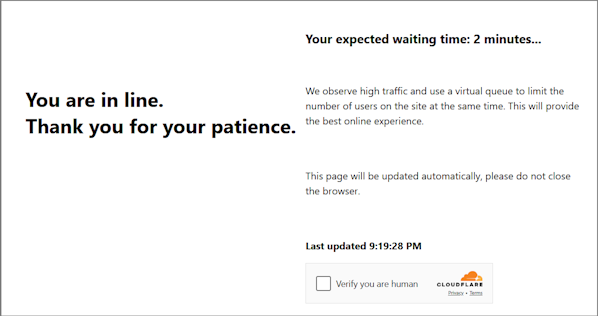
You can also identify this Cloudflare type via the page header:

-
Use your own proxies for this task.
-
After solving, you will receive special cookies to add to your browser.
Request parameters
IMPORTANT: retrieve htmlPageBase64 immediately before creating the task to avoid errors during solving (see the example of obtaining htmlPageBase64 below).
type<string>requiredTurnstileTask
websiteURL<string>requiredThe URL of the page containing the check
websiteKey<string>requiredCloudflare key. Any string may be provided, for example: xxxxxx.
cloudflareTaskType<string>requiredwait_room
htmlPageBase64<string>requiredBase64-encoded HTML page containing <title>Waiting Room powered by Cloudflare</title>
Example to get htmlPageBase64:
var serializer = new XMLSerializer();
var fullHtml = serializer.serializeToString(document);

var htmlBase64 = btoa(unescape(encodeURIComponent(fullHtml)));
console.log(htmlBase64);
userAgent<string>requiredBrowser User-Agent. Use the current value supported by CapMonster Cloud: userAgentPlaceholder
You can get the latest value at: https://capmonster.cloud/api/useragent/actual.
proxyType<string>requiredhttp - regular HTTP/HTTPS proxy;
https - use if http doesn’t work (required for some custom proxies);
socks4 - SOCKS4 proxy;
socks5 - SOCKS5 proxy.
proxyAddress<string>requiredProxy IP address (IPv4/IPv6). Not allowed:
- Transparent proxies
- Local machine proxies
proxyPort<integer>requiredProxy port.
proxyLogin<string>requiredProxy login.
proxyPassword<string>requiredProxy password.
Create task method
https://api.capmonster.cloud/createTask
Request example
{
  "clientKey": "API_KEY",
  "task": {
    "type": "TurnstileTask",
    "websiteURL": "https://yourwebsite.com/page-with-cf-waitroom",
    "websiteKey": "xxxxxxxxxx",
    "cloudflareTaskType": "wait_room",
    "htmlPageBase64": "PCFET0NUWVBFIGh0...vYm9keT48L2h0bWw+",
    "userAgent": "userAgentPlaceholder",
    "proxyType": "your-proxy-type",
    "proxyAddress": "your-proxy-address",
    "proxyPort": 1234,
    "proxyLogin": "your-proxy-login",
    "proxyPassword": "your-proxy-password"
  }
}
Response example
{
  "errorId":0,
  "taskId":407533072
}
Get task result method
Use the getTaskResult method to retrieve the Waiting Room solution. Depending on system load, the response can take between 5 and 20 seconds.
https://api.capmonster.cloud/getTaskResult
Request example
{
  "clientKey": "API_KEY",
  "taskId": 407533072
}
Response example
{
  "errorId": 0,
  "status": "ready",
  "solution": {
    "cf_clearance": "1tarGvbY2_ZhQdYxpSBloao.FoOn9VtcJtmb_IQ_hCE-1761217338-1.2.1.1-vyVPoLYIGX0VCJomVuLjF7n0kdM0PXaPjpDsRcohxGr7hb2CE7WfcHpmQZ70goqEjdWxPsDhSVaKNTz9opxWguiNdWEEq_.SceWXIqfP7tnEb69f3bP0mixNqcWy_5P_9INpoAEqr1k7aYU0r45PT4gPr5pwHxedVySyLRdoBXIJasdTE52YOQ3NPdGWTwQ_3h2n_wYqqIvf0kCSAvimRrmsgZxomlyejwqPI6ZHi.w"
  }
}
| Property | Type | Description |
|---|---|---|
| cf_clearance | String | Special Cloudflare cookies that you can set in your browser |
Use the SDK library
- JavaScript / TypeScript
- Python
- C#
Show code (for browser)
// https://github.com/CapMonsterCloud/capmonster-nodejs-captcha-solver

import {
CapMonsterCloudClientFactory,
ClientOptions,
TurnstileRequest
} from "@zennolab_com/capmonstercloud-client";

document.addEventListener("DOMContentLoaded", async () => {

const API_KEY = "YOUR_API_KEY"; // Specify your CapMonster Cloud API key

const client = CapMonsterCloudClientFactory.Create(
  new ClientOptions({ clientKey: API_KEY })
);

// Cloudflare Waiting Room can only be solved using your own proxy
const proxy = {
  proxyType: "http",
  proxyAddress: "123.45.67.89",
  proxyPort: 8080,
  proxyLogin: "username",
  proxyPassword: "password",
};

const turnstileRequest = new TurnstileRequest({
  websiteURL: "https://yourwebsite.com/page-with-waiting-room",
  websiteKey: "xxxxxxxxxx",
  cloudflareTaskType: "wait_room",
  proxy,
  htmlPageBase64: "your_html_page_base64",
  userAgent: "userAgentPlaceholder",
});

// You can check your balance if necessary
const balance = await client.getBalance();
console.log("Balance:", balance);

const result = await client.Solve(turnstileRequest);
console.log("Solution:", result.solution);
});
Show code (Node.js)
// https://github.com/CapMonsterCloud/capmonster-nodejs-captcha-solver

const {
  CapMonsterCloudClientFactory,
  ClientOptions,
  TurnstileRequest,
} = require("@zennolab_com/capmonstercloud-client");

const API_KEY = "YOUR_API_KEY"; // Specify your CapMonster Cloud API key

async function solveTurnstileWaitRoom() {
  const client = CapMonsterCloudClientFactory.Create(
    new ClientOptions({ clientKey: API_KEY }),
  );

  // Cloudflare Waiting Room can only be solved using your own proxy
  const proxy = {
    proxyType: "http",
    proxyAddress: "123.45.67.89",
    proxyPort: 8080,
    proxyLogin: "username",
    proxyPassword: "password",
  };

  const turnstileRequest = new TurnstileRequest({
    websiteURL: "https://yourwebsite.com/page-with-waiting-room",
    websiteKey: "xxxxxxxxxx",
    cloudflareTaskType: "wait_room",
    proxy,
    htmlPageBase64: "your_html_page_base64",
    userAgent: "userAgentPlaceholder",
  });

  // You can check your balance if necessary
  const balance = await client.getBalance();
  console.log("Balance:", balance);

  const result = await client.Solve(turnstileRequest);
  console.log("Solution:", result.solution);
}

solveTurnstileWaitRoom().catch(console.error);
Show code
# https://github.com/CapMonsterCloud/capmonster-python-captcha-solver

import asyncio

from capmonstercloudclient import CapMonsterClient, ClientOptions
from capmonstercloudclient.requests import TurnstileRequest
from capmonstercloudclient.requests.proxy_info import ProxyInfo

API_KEY = "YOUR_API_KEY"  # Specify your CapMonster Cloud API key


async def main():
    client = CapMonsterClient(
        options=ClientOptions(api_key=API_KEY)
    )

    # Cloudflare wait_room can only be solved using your own proxy
    proxy = ProxyInfo(
        proxyType="http",
        proxyAddress="123.45.67.89",
        proxyPort=8080,
        proxyLogin="username",
        proxyPassword="password",
    )

    turnstile_request = TurnstileRequest(
        websiteURL="https://yourwebsite.com/page-with-waiting-room",
        websiteKey="xxxxxxxx",
        cloudflareTaskType="wait_room",
        proxy=proxy,
        htmlPageBase64="your_html_page_base64",
        userAgent="userAgentPlaceholder",
    )

    # You can check your balance if necessary
    balance = await client.get_balance()
    print("Balance:", balance)

    result = await client.solve_captcha(turnstile_request)
    print("Solution:", result)


asyncio.run(main())
Show code
// https://github.com/CapMonsterCloud/capmonster-dotnet-captcha-solver

using System;
using System.Threading.Tasks;
using Zennolab.CapMonsterCloud;
using Zennolab.CapMonsterCloud.Requests;

class Program
{
    static async Task Main(string[] args)
    {
        // Specify your CapMonster Cloud API key
        var clientOptions = new ClientOptions
        {
            ClientKey = "YOUR_API_KEY"
        };

        var cmCloudClient = CapMonsterCloudClientFactory.Create(clientOptions);

        // Cloudflare Waiting Room can only be solved using your own proxy
        var turnstileRequest = new TurnstileRequest
        {
            WebsiteUrl = "https://yourwebsite.com/page-with-waiting-room",
            WebsiteKey = "xxxxxxxx",
            CloudflareTaskType = "wait_room",
            HtmlPageBase64 = "your_html_page_base64",
            UserAgent = "userAgentPlaceholder",

            Proxy = new ProxyContainer(
                "123.45.67.89",
                8080,
                ProxyType.Http,
                "username",
                "password"
            )
        };

        // You can check your balance if necessary
        var balance = await cmCloudClient.GetBalanceAsync();
        Console.WriteLine("Balance: " + balance);

        var turnstileResult = await cmCloudClient.SolveAsync(turnstileRequest);
        Console.WriteLine("Solution: " + turnstileResult.Solution.Clearance);
    }
}