DataDome
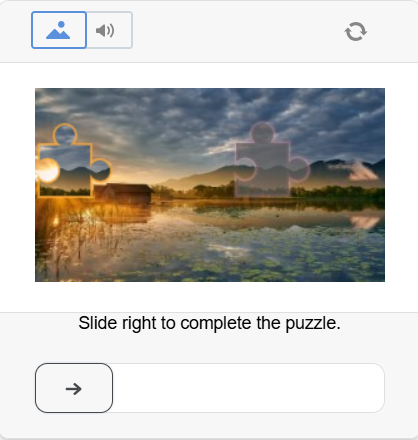
This type of captcha usually requires the user to solve a puzzle by moving a slider for verification.
-
Use your own proxies to perform this task.
-
If your proxy uses IP-based authorization, you must whitelist the address 65.21.190.34.
-
After solving, you will receive special cookies that must be added to the browser.
Request parameters
IMPORTANT: some parameter values are dynamic — they change with each render of the page using DataDome.
Extract them immediately before creating the task to avoid errors during solving.
See examples of parameter extraction in the sections How to find datadomeCookie and Examples of automatic DataDome solving.
Before creating a task, check the value of the t parameter in the DataDome object or the generated captchaUrl:
-
t=fe– you can proceed with task creation; -
t=bv– the IP address or proxy has been blocked by DataDome.
If t=bv is returned, change the proxy and retrieve fresh parameters. For detailed code examples, see DataDome automatic solving examples.
type<string>requiredCustomTask
class<string>requiredDataDome
websiteURL<string>requiredThe main page URL where the captcha is solved.
captchaUrl (inside metadata)<string>requiredA CAPTCHA URL containing the latest dynamic parameters. It usually has the following format:
https://geo.captcha-delivery.com/captcha/?initialCid=...&hash=...&cid=...&t=fe&referer=...&s=...
Submit the URL only after checking the t parameter.
datadomeCookie (inside metadata)<string>requiredYour DataDome cookies. Can be obtained from the page using document.cookie (if cookies do not have the HttpOnly flag), in the request header Set-Cookie: "datadome=...", or directly from the HTML code initialCid (see examples on how to find datadomeCookie).
datadomeVersion (inside metadata)<string>optionalDataDome solving method version. If set to "new", the updated solving method is used with support for both i.js and c.js scripts (see details below). If the parameter is not specified, the legacy solving method is applied, which supports only i.js.
proxyType<string>requiredhttp - standard http/https proxy;
https - use this only if "http" does not work (required for some custom proxies);
socks4 - socks4 proxy;
socks5 - socks5 proxy.
proxyAddress<string>requiredIPv4/IPv6 proxy address. Not allowed:
- transparent proxies (where the client IP is visible);
- proxies on local machines.
proxyPort<integer>requiredProxy port.
proxyLogin<string>requiredProxy server login.
proxyPassword<string>requiredProxy server password.
userAgent<string>optionalBrowser User-Agent. Use the current value supported by CapMonster Cloud: userAgentPlaceholder
You can get the latest value at: https://capmonster.cloud/api/useragent/actual.
Create task method
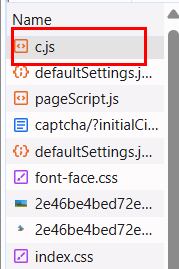
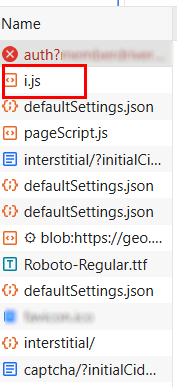
During page loading, DataDome may use one of two scripts: c.js or i.js.
Before solving, check which script is loaded (DevTools → Network / HTML).
Option with c.js:
Option with i.js:
https://api.capmonster.cloud/createTask
Request example
{
  "clientKey": "API_KEY",
  "task": {
    "type": "CustomTask",
    "class": "DataDome",
    "websiteURL": "https://yourwebsite.com/page-with-datadome",
    "userAgent": "userAgentPlaceholder",
    "metadata": {
      "captchaUrl": "https://geo.captcha-delivery.com/interstitial/?initialCid=AHrlqAAAAAMA9UvsL58YLqIAXNLFPg%3D%3D&hash=C0705ACD75EBF650A07FF8291D3528&cid=7sfa5xUfDrR4bQTp1c2mhtiD7jj9TXExcQypjdNAxKVFyIi1S9tE0~_mqLa2EFpOuzxKcZloPllsNHjNnqzD9HmBA4hEv7SsEyPYEidCBvjZEaDyfRyzefFfolv0lAHM&referer=https%3A%2F%2Fwww.example.com.au%2F&s=6522&b=978936&dm=cm",
      "datadomeCookie": "datadome=cookie-value",
      "datadomeVersion": "new"
    },
    "proxyType": "your-proxy-type",
    "proxyAddress": "your-proxy-address",
    "proxyPort": 1234,
    "proxyLogin": "your-proxy-login",
    "proxyPassword": "your-proxy-password"
  }
}
Response example
{
  "errorId":0,
  "taskId":407533072
}
Get task result method
Use the getTaskResult method to get the solved DataDome captcha.
https://api.capmonster.cloud/getTaskResult
Request example
{
  "clientKey":"API_KEY",
  "taskId": 407533072
}
Response example
{
  "errorId": 0,
  "status": "ready",
  "solution": {
    "domains": {
      "www.example.com": {
        "cookies": {
          "datadome": "P1w0VnjFcTFslfps0J4FaPpY_QPbPBW4MeYxj4LW~pztIfJiSSuBPr8oQTUHzdrfgv137FbOBd3kCUOOgny7LhIkhm5e1qdtzYM4s2e46U_qfERK4KiCy22MOSIDsDyh"
        },
        "localStorage": null
      }
    },
    "url": null,
    "fingerprint": null,
    "headers": null,
    "data": null
  }
}
How to find datadomeCookie
Using Developer Tools
Option 1:
-
Open the DataDome-protected site in a browser (Chrome, Firefox).
-
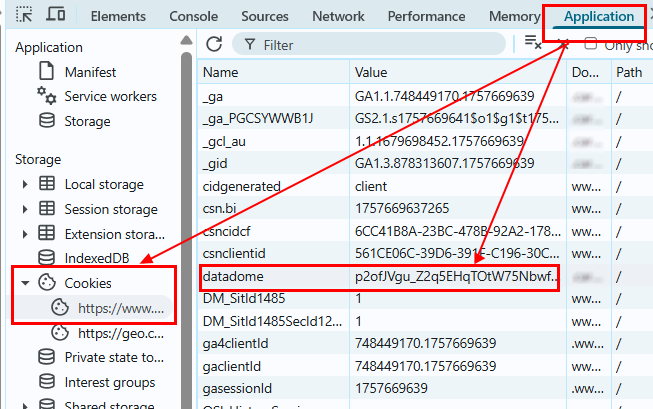
Press F12 → go to the Application tab → Cookies.
-
Find the domain of the site (e.g., www.example.com).
Among the cookies, look for the datadome key — this is the required datadomeCookie.
Option 2:
-
Open the site where the DataDome captcha triggers.
-
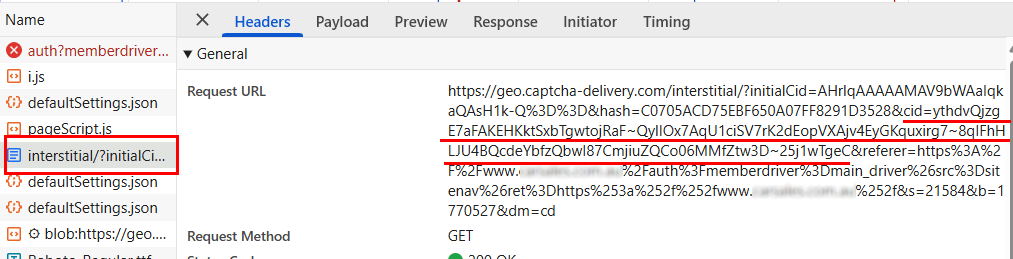
Go to DevTools → Network, reload the page, and find the request loading the page with
initialCid.
Example URL:
https://geo.captcha-delivery.com/interstitial/?initialCid=...&hash=...&cid=...
or:
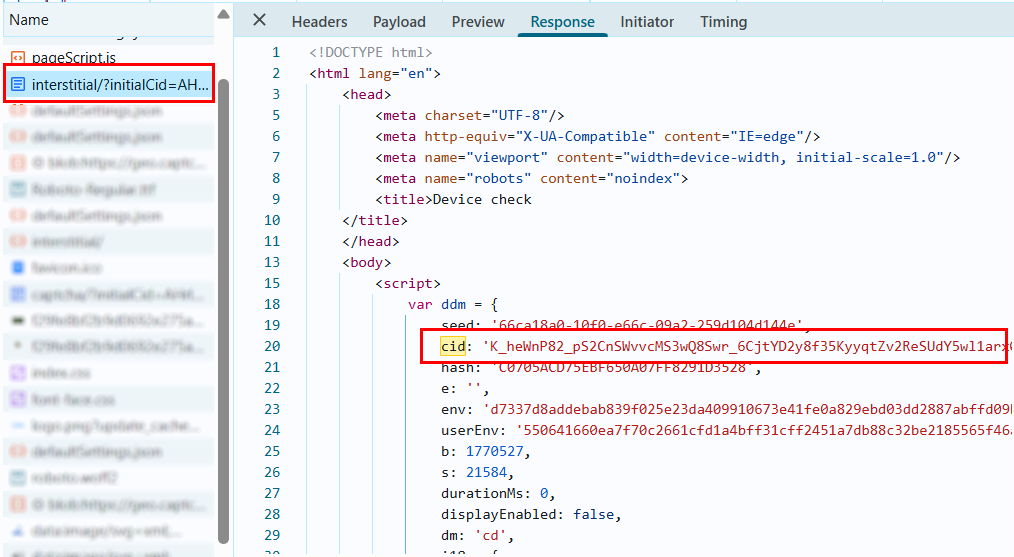
- Open the Response of this request. In the HTML code, find the object:
var ddm = { ... };
- Inside this object, locate the
cidparameter. Its value is the currentdatadomeCookie.
Option 3:
-
Open the site where the DataDome captcha triggers.
-
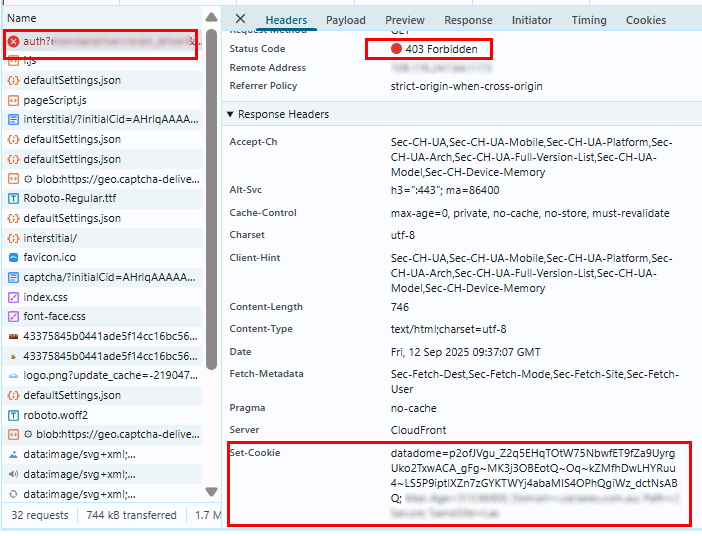
Go to DevTools → Network, reload the page, and find a request with 403 status.
-
Go to the Headers → Response Headers tab. In the headers, find
Set-Cookie:and copy the value of thedatadomeparameter (datadome=<value>).
Examples of automatic DataDome solving
The examples below are provided for informational purposes and to demonstrate the general logic.
Since websites differ in protection mechanisms, request structures, and parameters, these solutions may require additional adaptation and testing for a specific site.
- Node.js
- Python
Show code (Node.js + Playwright)
// npm install cheerio playwright @zennolab_com/capmonstercloud-client
// npx playwright install chromium

const cheerio = require("cheerio");
const { chromium } = require("playwright");

const {
  CapMonsterCloudClientFactory,
  ClientOptions,
  DataDomeRequest,
} = require("@zennolab_com/capmonstercloud-client");

const API_KEY = "YOUR_API_KEY"; // Enter your CapMonster Cloud API key

const PAGE_URL = "https://example.com/"; // Enter the URL of the page with DataDome

const USER_AGENT = "userAgentPlaceholder";

const BASE_HEADERS = {
  accept:
    "text/html,application/xhtml+xml,application/xml;q=0.9,image/avif,image/webp,image/apng,*/*;q=0.8",
  "accept-language": "en-US,en;q=0.9",
  "cache-control": "no-cache",
  pragma: "no-cache",
  "sec-ch-ua":
    '"Chromium";v="155", "Google Chrome";v="155", ";Not A Brand";v="99"',
  "sec-ch-ua-mobile": "?0",
  "sec-ch-ua-platform": '"Windows"',
  "sec-fetch-dest": "document",
  "sec-fetch-mode": "navigate",
  "sec-fetch-site": "none",
  "sec-fetch-user": "?1",
  "upgrade-insecure-requests": "1",
};

const PROXY = {
  proxyType: "http",
  proxyAddress: "127.0.0.1",
  proxyPort: 8080,
  proxyLogin: "proxy_login",
  proxyPassword: "proxy_password",
};

/**
 * Extract DataDome parameters from the page HTML.
 *
 * @param {string} html
 */
function extractDD(html) {
  const $ = cheerio.load(html);

  for (const script of $("script").toArray()) {
    const text = $(script).html();

    if (text && text.includes("var dd=")) {
      try {
        const raw = text.split("var dd=")[1].split(";")[0].replace(/'/g, '"');

        return JSON.parse(raw);
      } catch {
        return null;
      }
    }
  }

  return null;
}

/**
 * Build the DataDome CAPTCHA URL using the parameters
 * obtained from the page.
 *
 * @param {any} dd
 */
function buildCaptchaUrl(dd) {
  const params = new URLSearchParams({
    initialCid: dd.cid,
    hash: dd.hsh,
    cid: dd.cookie,
    t: dd.t,
    referer: PAGE_URL,
    s: dd.s,
    dm: "cd",
  });

  if (dd.e) {
    params.append("e", dd.e);
  }

  return `https://${dd.host}/captcha/?${params.toString()}`;
}

(async () => {
  // Configure the proxy for the browser.
  // The browser and the CapMonster Cloud task must use the same proxy.
  const proxyConfig = {
    server: `http://${PROXY.proxyAddress}:${PROXY.proxyPort}`,
    username: PROXY.proxyLogin,
    password: PROXY.proxyPassword,
  };

  // Launch Chromium with the specified proxy.
  const browser = await chromium.launch({
    headless: false,
    proxy: proxyConfig,
  });

  // Create a browser context with the specified User-Agent and HTTP headers.
  const context = await browser.newContext({
    userAgent: USER_AGENT,
    extraHTTPHeaders: BASE_HEADERS,
  });

  const page = await context.newPage();

  // Open the protected page.
  await page.goto(PAGE_URL, {
    waitUntil: "domcontentloaded",
  });

  // Get the page HTML and extract DataDome parameters.
  const html = await page.content();

  const dd = extractDD(html);

  if (!dd) {
    throw new Error("DataDome parameters were not found.");
  }

  // Check whether the proxy has been blocked by DataDome.
  if (dd.t === "bv") {
    throw new Error("Proxy blocked by DataDome.");
  }

  // Build the complete CAPTCHA URL for the task.
  const captchaUrl = buildCaptchaUrl(dd);

  // Create the CapMonster Cloud client.
  const client = CapMonsterCloudClientFactory.Create(
    new ClientOptions({
      clientKey: API_KEY,
    }),
  );

  // Check the current account balance.
  const balance = await client.getBalance();

  console.log("Balance:", balance);

  // Create the DataDome task for CapMonster Cloud.
  const request = new DataDomeRequest({
    _class: "DataDome",
    websiteURL: PAGE_URL,
    userAgent: USER_AGENT,
    proxy: PROXY,
    metadata: {
      captchaUrl,
      datadomeCookie: `datadome=${dd.cookie}`,
      datadomeVersion: "new",
    },
  });

  console.log("Sending DataDome task for solving...");

  // Send the task to CapMonster Cloud and wait for the result.
  const result = await client.Solve(request);

  console.dir(result, { depth: null });

  // =====================================
  // EXTRACT COOKIES FROM THE
  // CAPMONSTER CLOUD RESPONSE
  // =====================================

  const domains = result?.solution?.domains ?? {};

  const allCookies = [];

  // Convert cookies from the CapMonster Cloud response
  // into the format accepted by Playwright.
  for (const [domain, data] of Object.entries(domains)) {
    const cookies = data?.cookies ?? {};

    for (const [name, value] of Object.entries(cookies)) {
      allCookies.push({
        name,
        value,
        domain: ".example.com", // Replace with the required domain
        path: "/",
        secure: true,
        sameSite: "Lax",
      });
    }
  }

  if (!allCookies.length) {
    throw new Error("CapMonster Cloud did not return any cookies.");
  }

  // ===============================
  // APPLY COOKIES IN PLAYWRIGHT
  // ===============================

  // Get cookies from the current browser context.
  const existingCookies = await context.cookies();

  // Remove existing DataDome cookies
  // to prevent conflicts with the new solution.
  const filtered = existingCookies.filter((c) => {
    const name = c.name.toLowerCase();

    return !name.includes("datadome");
  });

  await context.clearCookies();

  // Restore the remaining cookies from the current session.
  if (filtered.length) {
    await context.addCookies(filtered);
  }

  console.log("Old DataDome cookies removed.");

  // Add cookies received from CapMonster Cloud.
  await context.addCookies(allCookies);

  console.log("CapMonster Cloud cookies applied:", allCookies);

  // ===============================
  // RELOAD THE PAGE
  // WITH THE NEW COOKIES
  // ===============================

  // Send the received cookies along with the original HTTP headers.
  await context.setExtraHTTPHeaders({
    ...BASE_HEADERS,
    cookie: allCookies.map((c) => `${c.name}=${c.value}`).join("; "),
  });

  // Reload the page with the solved DataDome cookies.
  await page.reload({
    waitUntil: "domcontentloaded",
  });

  console.log("Page reloaded with the received DataDome cookies.");

  await page.waitForTimeout(10000);

  await browser.close();
})().catch(console.error);
Show code (Python + Playwright)
# pip install playwright beautifulsoup4 capmonstercloudclient
# playwright install chromium

import json
import asyncio
from urllib.parse import urlencode

from bs4 import BeautifulSoup
from playwright.async_api import async_playwright

from capmonstercloudclient import CapMonsterClient, ClientOptions
from capmonstercloudclient.requests import DataDomeCustomTaskRequest

API_KEY = "YOUR_CAPMONSTER_API_KEY"  # Enter your CapMonster Cloud API key
PAGE_URL = "https://example.com/"  # Enter the URL of the page with DataDome
USER_AGENT = (
    "userAgentPlaceholder"
)

BASE_HEADERS = {
    "accept": (
        "text/html,application/xhtml+xml,application/xml;q=0.9,"
        "image/avif,image/webp,image/apng,*/*;q=0.8"
    ),
    "accept-language": "en-US,en;q=0.9",
    "cache-control": "no-cache",
    "pragma": "no-cache",
    "sec-ch-ua": '"Chromium";v="155", "Google Chrome";v="155", ";Not A Brand";v="99"',
    "sec-ch-ua-mobile": "?0",
    "sec-ch-ua-platform": '"Windows"',
    "sec-fetch-dest": "document",
    "sec-fetch-mode": "navigate",
    "sec-fetch-site": "none",
    "sec-fetch-user": "?1",
    "upgrade-insecure-requests": "1",
}

PROXY = {
    "proxyType": "http",
    "proxyAddress": "YOUR_PROXY_ADDRESS",
    "proxyPort": 12345,
    "proxyLogin": "YOUR_PROXY_LOGIN",
    "proxyPassword": "YOUR_PROXY_PASSWORD",
}

def extract_dd(html: str):
    """
    Extract DataDome parameters from the page HTML.

    :param html: Page HTML
    """
    soup = BeautifulSoup(html, "html.parser")

    for script in soup.find_all("script"):
        text = script.string or script.get_text()

        if text and "var dd=" in text:
            try:
                raw = text.split("var dd=")[1].split(";")[0].replace("'", '"')
                return json.loads(raw)
            except Exception:
                return None

    return None

def build_captcha_url(dd):
    """
    Build the DataDome CAPTCHA URL using the parameters
    obtained from the page.

    :param dd: DataDome parameters
    """
    params = {
        "initialCid": dd.get("cid"),
        "hash": dd.get("hsh"),
        "cid": dd.get("cookie"),
        "t": dd.get("t"),
        "referer": PAGE_URL,
        "s": dd.get("s"),
        "dm": "cd",
    }

    if dd.get("e"):
        params["e"] = dd.get("e")

    return f"https://{dd.get('host')}/captcha/?{urlencode(params)}"

def normalize_result(result):
    if isinstance(result, dict):
        return result

    if hasattr(result, "model_dump"):
        return result.model_dump()

    if hasattr(result, "dict"):
        return result.dict()

    return result

def extract_datadome_cookies(result):
    result = normalize_result(result)

    print("Solution result:")
    print(json.dumps(result, indent=2, default=str))

    # =====================================
    # EXTRACT COOKIES FROM THE
    # CAPMONSTER CLOUD RESPONSE
    # =====================================

    solution = result.get("solution", result) if isinstance(result, dict) else result

    domains = {}

    if isinstance(solution, dict):
        domains = solution.get("domains") or {}

    all_cookies = []

    # Convert cookies from the CapMonster Cloud response
    # into the format accepted by Playwright.
    for domain, data in domains.items():
        cookies = data.get("cookies", {}) if isinstance(data, dict) else {}

        for name, value in cookies.items():
            all_cookies.append({
                "name": name,
                "value": value,
                "domain": ".example.com",  # Replace with the required domain
                "path": "/",
                "secure": True,
                "sameSite": "Lax",
            })

    return all_cookies

async def main():
    # Configure the browser proxy.
    # The browser and the CapMonster Cloud task must use the same proxy.
    proxy_config = {
        "server": f"http://{PROXY['proxyAddress']}:{PROXY['proxyPort']}",
        "username": PROXY["proxyLogin"],
        "password": PROXY["proxyPassword"],
    }

    async with async_playwright() as p:
        # Launch Chromium with the specified proxy.
        browser = await p.chromium.launch(
            headless=False,
            proxy=proxy_config,
        )

        # Create a browser context with the specified User-Agent and HTTP headers.
        context = await browser.new_context(
            user_agent=USER_AGENT,
            extra_http_headers=BASE_HEADERS,
        )

        page = await context.new_page()

        # Open the protected page.
        await page.goto(
            PAGE_URL,
            wait_until="domcontentloaded",
        )

        # Get the page HTML and extract DataDome parameters.
        html = await page.content()

        dd = extract_dd(html)

        if not dd:
            raise Exception("DataDome parameters were not found.")

        # Check whether the proxy has been blocked by DataDome.
        if dd.get("t") == "bv":
            raise Exception("Proxy blocked by DataDome.")

        # Build the complete CAPTCHA URL for the task.
        captcha_url = build_captcha_url(dd)

        # Create the CapMonster Cloud client.
        client = CapMonsterClient(
            options=ClientOptions(
                api_key=API_KEY,
            )
        )

        # Check the current account balance.
        balance = await client.get_balance()

        print("Balance:", balance)

        # Create the DataDome task for CapMonster Cloud.
        request = DataDomeCustomTaskRequest(
            _class="DataDome",
            websiteUrl=PAGE_URL,
            userAgent=USER_AGENT,
            proxy=PROXY,
            metadata={
                "captchaUrl": captcha_url,
                "datadomeCookie": f"datadome={dd.get('cookie')}",
                "datadomeVersion": "new",
            },
        )

        print("Sending DataDome task for solving...")

        # Send the task to CapMonster Cloud and wait for the result.
        result = await client.solve_captcha(request)

        all_cookies = extract_datadome_cookies(result)

        if not all_cookies:
            raise Exception("CapMonster Cloud did not return any cookies.")

        # ===============================
        # APPLY COOKIES IN PLAYWRIGHT
        # ===============================

        # Get cookies from the current browser context.
        existing_cookies = await context.cookies()

        # Remove existing DataDome cookies
        # to prevent conflicts with the new solution.
        filtered = [
            c for c in existing_cookies
            if "datadome" not in c.get("name", "").lower()
        ]

        await context.clear_cookies()

        # Restore the remaining cookies from the current session.
        if filtered:
            await context.add_cookies(filtered)

        print("Old DataDome cookies removed.")

        # Add cookies received from CapMonster Cloud.
        await context.add_cookies(all_cookies)

        print("CapMonster Cloud cookies applied:", all_cookies)

        # ===============================
        # RELOAD THE PAGE
        # WITH THE NEW COOKIES
        # ===============================

        # Send the received cookies along with the original HTTP headers.
        await context.set_extra_http_headers({
            **BASE_HEADERS,
            "cookie": "; ".join(
                f"{cookie['name']}={cookie['value']}" for cookie in all_cookies
            ),
        })

        # Reload the page with the solved DataDome cookies.
        await page.reload(
            wait_until="domcontentloaded",
        )

        print("Page reloaded with the received DataDome cookies.")

        await page.wait_for_timeout(10000)
        await browser.close()

asyncio.run(main())
Use SDK library
- JavaScript / TypeScript
- Python
- C#
Show code (for browser)
// https://github.com/CapMonsterCloud/capmonster-nodejs-captcha-solver

import {
  CapMonsterCloudClientFactory,
  ClientOptions,
  DataDomeRequest
} from "@zennolab_com/capmonstercloud-client";

document.addEventListener("DOMContentLoaded", async () => {

  const API_KEY = "YOUR_API_KEY"; // Specify your CapMonster Cloud API key

  const client = CapMonsterCloudClientFactory.Create(
    new ClientOptions({ clientKey: API_KEY })
  );

  // DataDome can only be solved using your own proxy
  const proxy = {
    proxyType: "http",
    proxyAddress: "123.45.67.89",
    proxyPort: 8080,
    proxyLogin: "username",
    proxyPassword: "password",
  };

  const datadomeRequest = new DataDomeRequest({
    websiteURL: "https://yourwebsite.com/page-with-datadome",
    userAgent: "userAgentPlaceholder",
    proxy,
    metadata: {
      captchaUrl: "your-captcha-url",
      datadomeVersion: "new",
      datadomeCookie: "your-datadome-cookie",
    },
  });

  // You can check your balance if necessary
  const balance = await client.getBalance();
  console.log("Balance:", balance);

  const result = await client.Solve(datadomeRequest);
  console.log("Solution:", result.solution);
});
Show code (Node.js)
// https://github.com/CapMonsterCloud/capmonster-nodejs-captcha-solver

const {
  CapMonsterCloudClientFactory,
  ClientOptions,
  DataDomeRequest,
} = require("@zennolab_com/capmonstercloud-client");

const API_KEY = "YOUR_API_KEY"; // Specify your CapMonster Cloud API key

async function solveDataDome() {
  const client = CapMonsterCloudClientFactory.Create(
    new ClientOptions({ clientKey: API_KEY }),
  );

  // DataDome can only be solved using your own proxy
  const proxy = {
    proxyType: "http",
    proxyAddress: "123.45.67.89",
    proxyPort: 8080,
    proxyLogin: "username",
    proxyPassword: "password",
  };

  const datadomeRequest = new DataDomeRequest({
    websiteURL: "https://yourwebsite.com/page-with-datadome",
    userAgent: "userAgentPlaceholder",
    proxy,
    metadata: {
      captchaUrl: "your-captcha-url",
      datadomeVersion: "new",
      datadomeCookie: "your-datadome-cookie",
    },
  });

  // You can check your balance if necessary
  const balance = await client.getBalance();
  console.log("Balance:", balance);

  const result = await client.Solve(datadomeRequest);
  console.log("Solution:", result.solution);
}

solveDataDome().catch(console.error);
Show code
# https://github.com/CapMonsterCloud/capmonster-python-captcha-solver

import asyncio

from capmonstercloudclient import CapMonsterClient, ClientOptions
from capmonstercloudclient.requests import DataDomeCustomTaskRequest
from capmonstercloudclient.requests.proxy_info import ProxyInfo

API_KEY = "YOUR_API_KEY"  # Specify your CapMonster Cloud API key


async def solve_datadome():
    client = CapMonsterClient(
        options=ClientOptions(api_key=API_KEY)
    )

    # DataDome can only be solved using your own proxy
    proxy = ProxyInfo(
        proxyType="http",
        proxyAddress="123.45.67.89",
        proxyPort=8080,
        proxyLogin="username",
        proxyPassword="password",
    )

    datadome_request = DataDomeCustomTaskRequest(
        websiteUrl="https://yourwebsite.com/page-with-datadome",
        userAgent="userAgentPlaceholder",
        proxy=proxy,
        metadata={
            "captchaUrl": "your-captcha-url",
            "datadomeVersion": "new",
            "datadomeCookie": "your-datadome-cookie",
        },
    )

    # You can check your balance if necessary
    balance = await client.get_balance()
    print("Balance:", balance)

    result = await client.solve_captcha(datadome_request)
    print("Solution:", result)


asyncio.run(solve_datadome())
// https://github.com/CapMonsterCloud/capmonster-dotnet-captcha-solver

using System;
using System.Threading.Tasks;
using Zennolab.CapMonsterCloud;
using Zennolab.CapMonsterCloud.Requests;

class Program
{
    static async Task Main(string[] args)
    {
        // Specify your CapMonster Cloud API key
        var clientOptions = new ClientOptions
        {
            ClientKey = "YOUR_API_KEY"
        };

        var cmCloudClient = CapMonsterCloudClientFactory.Create(clientOptions);

        // DataDome can only be solved using your own proxy
        var datadomeRequest = new DataDomeCustomTaskRequest(
            "your-datadome-cookie",
            "your-captcha-url",
            "new"
        )
        {
            WebsiteUrl = "https://yourwebsite.com/page-with-datadome",
            UserAgent = "userAgentPlaceholder",

            Proxy = new ProxyContainer(
                "123.45.67.89",
                8080,
                ProxyType.Http,
                "username",
                "password"
            )
        };

        // You can check your balance if necessary
        var balance = await cmCloudClient.GetBalanceAsync();
        Console.WriteLine("Balance: " + balance);

        var datadomeResult =
            await cmCloudClient.SolveAsync(datadomeRequest);

        Console.WriteLine("Solution: " + datadomeResult.Solution);
    }
}