Hunt Captcha
Hunt CAPTCHA is an anti-bot system that analyzes user behavior and launches an interactive challenge when suspicious activity is detected.
Task examples
Below are examples of Hunt CAPTCHA variants supported by CapMonster Cloud:
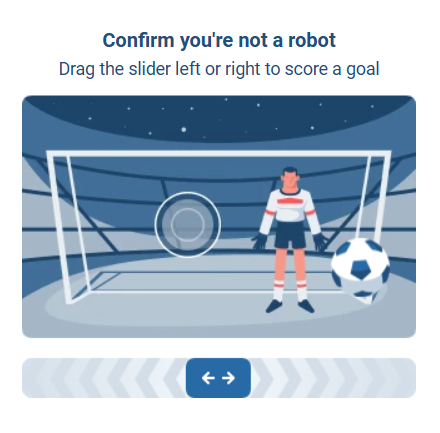
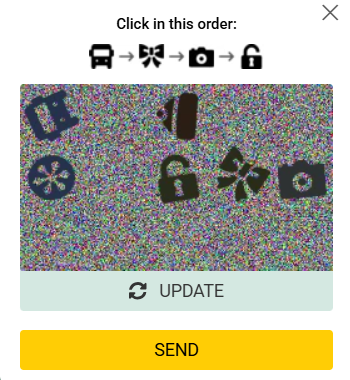
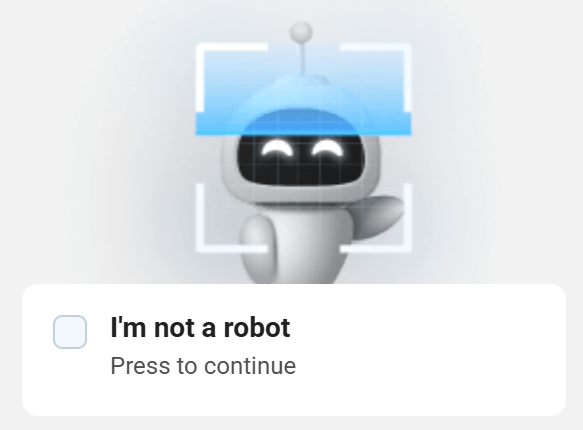
CapMonster Cloud supports:
- X-HD generation;
- CAPTCHA solving via
meta.token; - CAPTCHA solving via
widgetUrl.
For this task, use your own proxies.
Choosing a scenario
| Scenario | Parameters in metadata | Result |
|---|---|---|
| X-HD generation | apiGetLib | X-HD |
Solving via meta.token | apiGetLib, data | CAPTCHA solution token |
Solving via widgetUrl | apiGetLib, widgetUrl | CAPTCHA solution token |
Use widgetUrl when the full widget URL is available on the page. In this scenario, you do not need to obtain X-HD or meta.token.
If widgetUrl is unavailable, first generate X-HD, obtain meta.token from the website, and then create a task with the data parameter (see Hunt CAPTCHA solving example using data for details).
Request parameters
IMPORTANT: Some parameter values are dynamic and change every time the page with Hunt is rendered.
Extract them immediately before creating the task to avoid solving errors. For automatic parameter extraction examples, see How to obtainwidgetUrland Hunt CAPTCHA solving example usingdata.
type<string>requiredCustomTask
class<string>requiredHUNT
websiteURL<string>requiredFull URL of the page where Hunt CAPTCHA is used.
apiGetLib (inside metadata)<string>requiredFull URL of the api.js file.
Example:
https://example.com/hd-api/external/apps/<app-hash>/api.js
Find the request to api.js in the Network tab of DevTools. Search for hd-api or api.js.
data (inside metadata)<string>optionalThe meta.token value received from the website.
Important: send this parameter only when solving CAPTCHA via meta.token. Do not use it together with widgetUrl.
widgetUrl (inside metadata)<string>optionalFull URL of the Hunt CAPTCHA widget.
Example:
https://captcha.example.com/widget?hash=<widget-hash>
Important: send the complete URL, including the domain, path, and query parameters. Do not use it together with data.
userAgent<string>optionalBrowser User-Agent. Use the current value supported by CapMonster Cloud: userAgentPlaceholder
You can get the latest value at: https://capmonster.cloud/api/useragent/actual.
proxyType<string>requiredhttp - regular HTTP/HTTPS proxy;
https - use if http doesn’t work (required for some custom proxies);
socks4 - SOCKS4 proxy;
socks5 - SOCKS5 proxy.
proxyAddress<string>requiredProxy IP address (IPv4/IPv6). Not allowed:
- Transparent proxies
- Local machine proxies
proxyPort<integer>requiredProxy port.
proxyLogin<string>requiredProxy login.
proxyPassword<string>requiredProxy password.
Create task method
Use the createTask method:
https://api.capmonster.cloud/createTask
X-HD generation
Send only apiGetLib inside metadata.
Request example
{
  "clientKey": "API_KEY",
  "task": {
    "type": "CustomTask",
    "class": "HUNT",
    "websiteURL": "https://yourwebsite.com/page-with-hunt",
    "metadata": {
      "apiGetLib": "https://example.com/hd-api/external/apps/<app-hash>/api.js"
    },
    "userAgent": "userAgentPlaceholder",
    "proxyType": "your-proxy-type",
    "proxyAddress": "your-proxy-address",
    "proxyPort": 1234,
    "proxyLogin": "your-proxy-login",
    "proxyPassword": "your-proxy-password"
  }
}
Response example
{
  "errorId": 0,
  "taskId": 407533072
}
Solving via meta.token
Use this scenario if the widgetUrl parameter is unavailable.
Step 1. Get X-HD
- Create a task with only
apiGetLib. - Get X-HD from the
getTaskResultresponse.
Step 2. Get meta.token
Pass the received X-HD in a request to the target website, for example, when requesting an SMS code.
-f3f729be80407dcfa979c939fcfb300a.png)
-1-feced69f9da880f442fb82a0d025775d.png)
If the website requires CAPTCHA verification, it will return a response similar to the following:
{
  "errors": [
    {
      "code": "113",
      "title": "Captcha error"
    }
  ],
  "meta": {
    "token": "SITE_META_TOKEN"
  }
}
-cb52653b917e55094fa4dbc891cd1746.png)
Step 3. Solve the CAPTCHA
Create a new task and pass:
apiGetLib;- the received
meta.tokenin thedataparameter.
Request example
{
  "clientKey": "API_KEY",
  "task": {
    "type": "CustomTask",
    "class": "HUNT",
    "websiteURL": "https://example.com/page-with-hunt",
    "metadata": {
      "apiGetLib": "https://example.com/hd-api/external/apps/<app-hash>/api.js",
      "data": "SITE_META_TOKEN"
    },
    "userAgent": "userAgentPlaceholder",
    "proxyType": "your-proxy-type",
    "proxyAddress": "your-proxy-address",
    "proxyPort": 1234,
    "proxyLogin": "your-proxy-login",
    "proxyPassword": "your-proxy-password"
  }
}
Response example
{
  "errorId": 0,
  "taskId": 407533072
}
Solving via widgetUrl
Use this scenario when the full Hunt CAPTCHA widget URL is available on the page.
You do not need to obtain X-HD or meta.token.
How to obtain widgetUrl
- Open the page with Hunt CAPTCHA.
- Open DevTools and go to the Network tab.
- Perform the action that triggers the CAPTCHA.
- Find the request by searching for
widgetorhash. - Copy the complete Request URL value.
- Send it in
widgetUrl(insidemetadata).
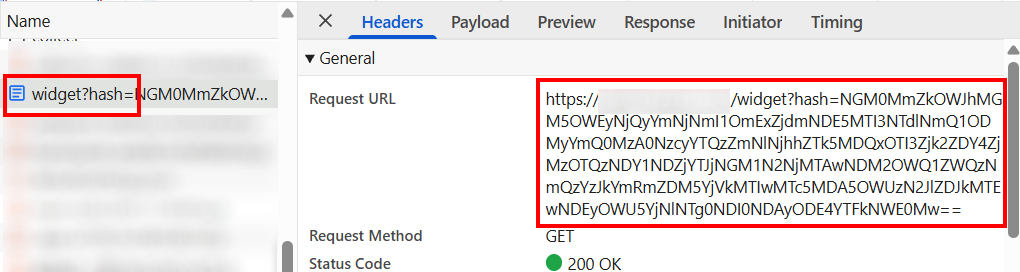
Obtain the current widgetUrl in the same session immediately before creating the task.
Do not send only the hash value: the service requires the full URL.
Request example
{
  "clientKey": "API_KEY",
  "task": {
    "type": "CustomTask",
    "class": "HUNT",
    "websiteURL": "https://example.com/page-with-hunt",
    "metadata": {
      "apiGetLib": "https://example.com/hd-api/external/apps/<app-hash>/api.js",
      "widgetUrl": "https://captcha.example.com/widget?hash=<widget-hash>"
    },
    "userAgent": "userAgentPlaceholder",
    "proxyType": "your-proxy-type",
    "proxyAddress": "your-proxy-address",
    "proxyPort": 1234,
    "proxyLogin": "your-proxy-login",
    "proxyPassword": "your-proxy-password"
  }
}
Response example
{
  "errorId": 0,
  "taskId": 407533072
}
Get task result method
Use the getTaskResult method to obtain the X-HD fingerprint or the Hunt CAPTCHA solution:
https://api.capmonster.cloud/getTaskResult
Request example
{
  "clientKey": "API_KEY",
  "taskId": 407533072
}
Response example
{
  "errorId": 0,
  "status": "ready",
  "solution": {
    "data": {
      "token": "6IyDCCpDdSK...YGs1Wug/z/kLNSpjewI="
    }
  }
}
The value of solution.data.token depends on the scenario:
- for X-HD generation, it contains X-HD;
- when solving via
data, it contains the CAPTCHA solution token; - when solving via
widgetUrl, it contains the CAPTCHA solution token.
Working with cookies
The target website may use special cookies to manage the session. If they are missing or are not sent with requests, the server may reject the request or require another verification.
Example of cookies received from the website:
platform_type=desktop; typeBetNames=full; _glhf=1234567890; coefview=0; visit=1-123abc012345d1be726746568edc62d9; fast_coupon=true;
v3fr=1; lng=en; flaglng=en; SESSION=12a3aea8cdcfdbb9e7df8ee99b526a84; auid=ab0dW2mqlz1Tjo2AAwplAg==; ggru=195; che_g=12abcede-691f-c7b2-d1e8-8488bc557d98
General workflow for cookies:
-
First, open the website page or send a GET request to the required page. This allows the server to initialize the user session and set the required cookies.
-
The server sends cookies in the
Set-Cookieresponse header. These cookies may contain a session identifier, security parameters, and anti-bot data. -
Save the received cookies because they are used to identify the client in subsequent requests.
-
In subsequent API requests, send the cookies back to the server in the
Cookieheader so that the server can associate the request with the same session. -
All requests must be sent within the same session using the same IP address (or proxy) and User-Agent. Otherwise, the server may consider the request suspicious and require another verification.
-
Some cookies may be created on the client side, for example by JavaScript on the page. During automation or testing, you may need to extract these cookies from the browser or generate them in a similar way.
Hunt CAPTCHA solving example using data
Below is a complete example of solving Hunt CAPTCHA using X-HD and meta.token. Use it when widgetUrl is unavailable.
The code demonstrates how to:
- obtain initial cookies when opening the website page;
- generate additional cookies that may be created on the client side;
- create a fingerprint (X-HD) through CapMonster Cloud, which the website uses to verify requests;
- send a request to the website API to initiate an action, such as sending an SMS;
- send the received data to the CAPTCHA-solving service;
- send the final API request with the required parameters after receiving the solution.
Use current HTTP headers (see the HTTP headers documentation for details) and a valid User-Agent.
- JavaScript
- Python
Show code (Node.js)
import { gotScraping } from "got-scraping";
import crypto from "crypto";

/* ================= CONFIG (recommended to store in .env) ================= */
// CapMonster Cloud API settings, target website settings, and user data

const API_KEY = "YOUR_API_KEY"; // Your CapMonster Cloud API key
const SOLVER_URL = "https://api.capmonster.cloud";

const BASE_URL = "https://example.com"; // Base URL of the website
const API_GET_LIB =
  "https://example.com/hd-api/external/apps/a1047eab1035d58682a53557e0b2a75edbfd15fd/api.js"; // Website api.js

const PHONE = "91123456789"; // Phone number for registration (without country code)
const COUNTRY_CODE = "54"; // Country code

const UA = "userAgentPlaceholder"; // User-Agent for requests

/* ================= PROXY SETTINGS ================= */

const PROXY_HOST = "proxyAddress";
const PROXY_PORT = 8080;
const PROXY_USER = "proxyLogin";
const PROXY_PASS = "proxyPassword";

const PROXY = `http://${PROXY_USER}:${PROXY_PASS}@${PROXY_HOST}:${PROXY_PORT}`;

/* ================= HEADERS ================= */
// Headers for HTTP requests
// htmlHeaders — for page GET requests
// apiHeaders — for website API requests

const htmlHeaders = {
  accept:
    "text/html,application/xhtml+xml,application/xml;q=0.9,image/avif,image/webp,image/apng,*/*;q=0.8,application/signed-exchange;v=b3;q=0.7",
  "accept-encoding": "gzip, deflate, br, zstd",
  "accept-language": "en-US,en;q=0.9,ru;q=0.8",
  "cache-control": "no-cache",
  pragma: "no-cache",
  priority: "u=0, i",
  "sec-ch-ua": `"Not:A-Brand";v="99", "Google Chrome";v="155", "Chromium";v="155"`,
  "sec-ch-ua-mobile": "?0",
  "sec-ch-ua-platform": `"Windows"`,
  "sec-fetch-dest": "document",
  "sec-fetch-mode": "navigate",
  "sec-fetch-site": "none",
  "sec-fetch-user": "?1",
  "upgrade-insecure-requests": "1",
  "user-agent": UA,
};

const apiHeaders = {
  accept: "application/vnd.api+json",
  "accept-encoding": "gzip, deflate, br, zstd",
  "accept-language": "en-US,en;q=0.9,ru;q=0.8",
  "cache-control": "no-cache",
  pragma: "no-cache",
  priority: "u=1, i",
  "content-type": "application/vnd.api+json",
  origin: BASE_URL,
  referer: BASE_URL + "/", // Current referer from the website
  "sec-ch-ua": `"Not:A-Brand";v="99", "Google Chrome";v="155", "Chromium";v="155"`,
  "sec-ch-ua-mobile": "?0",
  "sec-ch-ua-platform": `"Windows"`,
  "sec-fetch-dest": "empty",
  "sec-fetch-mode": "cors",
  "sec-fetch-site": "same-origin",
  "user-agent": UA,
  "x-requested-with": "XMLHttpRequest",
};

/* ================= UTILS ================= */
// Utility functions

const delay = (ms) => new Promise((r) => setTimeout(r, ms));

function randomString(len = 20) {
  const chars =
    "ABCDEFGHIJKLMNOPQRSTUVWXYZabcdefghijklmnopqrstuvwxyz0123456789";
  let result = "";
  for (let i = 0; i < len; i++) {
    result += chars[Math.floor(Math.random() * chars.length)];
  }
  return result;
}

/* ================= CAPMONSTER CLOUD ================= */
// Create a task and wait for the CAPTCHA solution

async function createTask(task) {
  const { body } = await gotScraping.post(`${SOLVER_URL}/createTask`, {
    json: { clientKey: API_KEY, task },
    responseType: "json",
  });

  if (body.errorId !== 0)
    throw new Error("createTask error: " + JSON.stringify(body));

  return body.taskId;
}

async function waitResult(taskId) {
  while (true) {
    const { body } = await gotScraping.post(`${SOLVER_URL}/getTaskResult`, {
      json: { clientKey: API_KEY, taskId },
      responseType: "json",
    });

    if (body.status === "ready")
      return body.solution?.token || body.solution?.data?.token;

    await delay(3000);
  }
}

/* ================= MAIN FLOW ================= */
// Main automated registration flow with CAPTCHA

(async () => {
  try {
    // ---------------- STEP 1: Get cookies ----------------
    console.log("STEP 1 — Getting cookies...");

    const base = await gotScraping.get(
      BASE_URL + "/registration?type=phone_reg", // Replace with the current registration page URL from the website
      {
        headers: htmlHeaders,
        proxyUrl: PROXY,
      },
    );

    // Save cookies received from the server
    let cookies = (base.headers["set-cookie"] || [])
      .map((c) => c.split(";")[0])
      .join("; ");

    // Generate additional cookies created on the client side
    const che_g = crypto.randomUUID();
    const ggru = randomString();

    cookies += `; che_g=${che_g}`;
    cookies += `; ggru=${ggru}`;

    console.log("Cookies:", cookies);

    // ---------------- STEP 2: Create fingerprint ----------------
    console.log("\nSTEP 2 — Creating fingerprint...");

    const fingerprintTaskId = await createTask({
      type: "CustomTask",
      class: "HUNT",
      websiteURL: BASE_URL + "/",
      userAgent: UA,
      metadata: { apiGetLib: API_GET_LIB },
      proxyType: "http",
      proxyAddress: PROXY_HOST,
      proxyPort: PROXY_PORT,
      proxyLogin: PROXY_USER,
      proxyPassword: PROXY_PASS,
    });

    const xhd = await waitResult(fingerprintTaskId);
    console.log("X-HD:", xhd);

    // ---------------- STEP 3: Send SMS request ----------------
    console.log("\nSTEP 3 — Trigger SMS...");

    const smsResp = await gotScraping.post(
      BASE_URL + "/web-api/api/web/registration/v2/sms", // Replace with the current API endpoint from the website
      {
        headers: { ...apiHeaders, cookie: cookies, "x-hd": xhd },
        json: {
          data: { attributes: { phone: PHONE, country_code: COUNTRY_CODE } },
        },
        proxyUrl: PROXY,
        responseType: "json",
      },
    );

    const metaToken = smsResp.body?.meta?.token;
    if (!metaToken) {
      console.log("SMS response:", smsResp.body);
      throw new Error("meta.token not received");
    }

    console.log("meta.token:", metaToken);

    // ---------------- STEP 4: Solve CAPTCHA ----------------
    console.log("\nSTEP 4 — Solving Hunt captcha...");

    const solveTaskId = await createTask({
      type: "CustomTask",
      class: "HUNT",
      websiteURL: BASE_URL + "/",
      userAgent: UA,
      metadata: { apiGetLib: API_GET_LIB, data: metaToken },
      proxyType: "http",
      proxyAddress: PROXY_HOST,
      proxyPort: PROXY_PORT,
      proxyLogin: PROXY_USER,
      proxyPassword: PROXY_PASS,
    });

    const captchaToken = await waitResult(solveTaskId);
    console.log("Captcha token:", captchaToken);

    // ---------------- STEP 5: Send final request ----------------
    console.log("\nSTEP 5 — Sending final request...");

    const finalResp = await gotScraping.post(
      BASE_URL + "/api/web/registration/v2/sms", // Replace with the current API endpoint from the website
      {
        headers: { ...apiHeaders, cookie: cookies, "x-hd": xhd },
        body: JSON.stringify({
          data: {
            attributes: {
              phone: PHONE,
              country_code: parseInt(COUNTRY_CODE),
              captcha: captchaToken,
            },
          },
        }),
        proxyUrl: PROXY,
      },
    );

    console.log("\nFINAL RESPONSE HEADERS:", finalResp.headers);
    console.log("\nFINAL RESPONSE BODY:", finalResp.body);
  } catch (err) {
    console.error("\nFATAL ERROR:");
    console.error(err);
  }
})();
Show code
import requests
import uuid
import random
import string
import time

# ================= CONFIG (recommended to store in .env) =================
# CapMonster Cloud API settings, website settings, and user data

API_KEY = "YOUR_CAPMONSTER_API_KEY"  # Replace with your CapMonster Cloud API key
SOLVER_URL = "https://api.capmonster.cloud"

BASE_URL = "https://example.com"  # Website base URL
API_GET_LIB = "https://example.com/hd-api/external/apps/c1e24d5857463de4393e3f1489b00ebd4495da64/api.js"  # Replace with the current api.js URL from the website

PHONE = "9102345678"  # Registration phone number (without country code)
COUNTRY_CODE = "7"  # Country code

UA = "userAgentPlaceholder"  # User-Agent

# ================= PROXY SETTINGS =================

PROXY_HOST = "proxyAdress"
PROXY_PORT = 8080
PROXY_LOGIN = "proxyLogin"
PROXY_PASSWORD = "proxyPassword"

PROXY = f"http://{PROXY_LOGIN}:{PROXY_PASSWORD}@{PROXY_HOST}:{PROXY_PORT}"

proxies = {
    "http": PROXY,
    "https": PROXY
}

# ================= HEADERS =================
# Headers for HTTP requests
# html_headers — for standard page GET requests
# api_headers — for website API requests

html_headers = {
    "accept": "text/html,application/xhtml+xml,application/xml;q=0.9,image/avif,image/webp,image/apng,*/*;q=0.8",
    "accept-encoding": "gzip, deflate, br, zstd",
    "accept-language": "en-US,en;q=0.9,ru;q=0.8",
    "cache-control": "no-cache",
    "pragma": "no-cache",
    "priority": "u=0, i",
    "sec-ch-ua": '"Not:A-Brand";v="99", "Google Chrome";v="155", "Chromium";v="155"',
    "sec-ch-ua-mobile": "?0",
    "sec-ch-ua-platform": '"Windows"',
    "sec-fetch-dest": "document",
    "sec-fetch-mode": "navigate",
    "sec-fetch-site": "none",
    "sec-fetch-user": "?1",
    "upgrade-insecure-requests": "1",
    "user-agent": UA
}

api_headers = {
    "accept": "application/vnd.api+json",
    "accept-encoding": "gzip, deflate, br, zstd",
    "accept-language": "en-US,en;q=0.9,ru;q=0.8",
    "cache-control": "no-cache",
    "pragma": "no-cache",
    "priority": "u=1, i",
    "content-type": "application/vnd.api+json",
    "origin": BASE_URL,
    "referer": BASE_URL + "/en", # Replace with the current referer from the website
    "sec-ch-ua": '"Not:A-Brand";v="99", "Google Chrome";v="155", "Chromium";v="155"',
    "sec-ch-ua-mobile": "?0",
    "sec-ch-ua-platform": '"Windows"',
    "sec-fetch-dest": "empty",
    "sec-fetch-mode": "cors",
    "sec-fetch-site": "same-origin",
    "user-agent": UA,
    "x-requested-with": "XMLHttpRequest"
}

# ================= UTILS =================
# Utility functions

def delay(ms):
    """Pause in milliseconds"""
    time.sleep(ms / 1000)

def random_string(length=20):
    """Generate a random string (letters and digits)"""
    chars = string.ascii_letters + string.digits
    return ''.join(random.choice(chars) for _ in range(length))

# ================= CAPMONSTER CLOUD =================
# CapMonster Cloud functions (create a task and wait for the CAPTCHA solution)

def create_task(task):
    """Create a task in CapMonster Cloud"""
    r = requests.post(
        SOLVER_URL + "/createTask",
        json={
            "clientKey": API_KEY,
            "task": task
        }
    )

    data = r.json()

    if data["errorId"] != 0:
        raise Exception("createTask error: " + str(data))

    return data["taskId"]

def wait_result(task_id):
    """Wait for the task result"""
    while True:
        r = requests.post(
            SOLVER_URL + "/getTaskResult",
            json={
                "clientKey": API_KEY,
                "taskId": task_id
            }
        )
        data = r.json()

        if data["status"] == "ready":
            solution = data.get("solution", {})
            return solution.get("token") or solution.get("data", {}).get("token")

        delay(3000)

# ================= SESSION =================
# Create a requests session to preserve cookies between requests

session = requests.Session()

# ================= MAIN =================
# Main automated registration flow with CAPTCHA

try:

    # ---------------- STEP 1: Get cookies ----------------
    print("STEP 1 — Getting cookies")

    r = session.get(
        BASE_URL + "/en/registration?type=phone", # Replace with the current registration page URL from the website
        headers=html_headers,
        proxies=proxies
    )

    # Save cookies received from the server
    cookies = "; ".join([f"{c.name}={c.value}" for c in session.cookies])

    # Generate additional cookies created on the client side
    che_g = str(uuid.uuid4())
    ggru = random_string()
    cookies += f"; che_g={che_g}"
    cookies += f"; ggru={ggru}"

    print("Cookies:", cookies)

    # ---------------- STEP 2: Create fingerprint ----------------
    print("\nSTEP 2 — Creating fingerprint")

    fingerprint_task = create_task({
        "type": "CustomTask",
        "class": "HUNT",
        "websiteURL": BASE_URL + "/en/",
        "userAgent": UA,
        "metadata": {
            "apiGetLib": API_GET_LIB
        },
        "proxyType": "http",
        "proxyAddress": PROXY_HOST,
        "proxyPort": PROXY_PORT,
        "proxyLogin": PROXY_LOGIN,
        "proxyPassword": PROXY_PASSWORD
    })

    # Obtain the result (X-HD) required by the website API
    xhd = wait_result(fingerprint_task)
    print("X-HD:", xhd)

    # ---------------- STEP 3: Send SMS request ----------------
    print("\nSTEP 3 — Trigger SMS")

    sms_resp = session.post(
        BASE_URL + "/web-api/api/web/registration/v2/sms", # Replace with the current API endpoint from the website
        headers={**api_headers, "cookie": cookies, "x-hd": xhd},
        json={
            "data": {
                "attributes": {
                    "phone": PHONE,
                    "country_code": COUNTRY_CODE
                }
            }
        },
        proxies=proxies
    )

    print("Status:", sms_resp.status_code)

    try:
        sms_data = sms_resp.json()
    except:
        print("Server returned non JSON:")
        print(sms_resp.text)
        raise Exception("Invalid JSON response")

    meta_token = sms_data.get("meta", {}).get("token")
    if not meta_token:
        print("SMS response:", sms_data)
        raise Exception("meta.token not received")

    print("meta.token:", meta_token)

    # ---------------- STEP 4: Solve CAPTCHA ----------------
    print("\nSTEP 4 — Solving captcha")

    solve_task = create_task({
        "type": "CustomTask",
        "class": "HUNT",
        "websiteURL": BASE_URL + "/en/",
        "userAgent": UA,
        "metadata": {
            "apiGetLib": API_GET_LIB,
            "data": meta_token
        },
        "proxyType": "http",
        "proxyAddress": PROXY_HOST,
        "proxyPort": PROXY_PORT,
        "proxyLogin": PROXY_LOGIN,
        "proxyPassword": PROXY_PASSWORD
    })

    captcha_token = wait_result(solve_task)
    print("Captcha token:", captcha_token)

    # ---------------- STEP 5: Send final request ----------------
    print("\nSTEP 5 — Final request")

    final = session.post(
        BASE_URL + "/web-api/api/web/registration/v2/sms", # Replace with the current API endpoint from the website
        headers={**api_headers, "cookie": cookies, "x-hd": xhd},
        json={
            "data": {
                "attributes": {
                    "phone": PHONE,
                    "country_code": int(COUNTRY_CODE),
                    "captcha": captcha_token
                }
            }
        },
        proxies=proxies
    )

    print("\nFINAL STATUS:", final.status_code)

    try:
        print(final.json())
    except:
        print(final.text)

except Exception as e:
    print("\nFATAL ERROR")
    print(e)
Use the SDK library
- JavaScript / TypeScript
- Node.js
- Python
- C#
Generating the X-HD parameter
// https://github.com/CapMonsterCloud/capmonster-nodejs-captcha-solver

import {
  CapMonsterCloudClientFactory,
  ClientOptions,
  HuntRequest
} from "@zennolab_com/capmonstercloud-client";

document.addEventListener("DOMContentLoaded", async () => {

  const API_KEY = "YOUR_API_KEY"; // Specify your CapMonster Cloud API key

  const client = CapMonsterCloudClientFactory.Create(
    new ClientOptions({ clientKey: API_KEY })
  );

  // Your own proxy is required to solve HUNT
  const proxy = {
    proxyType: "http",
    proxyAddress: "123.45.67.89",
    proxyPort: 8080,
    proxyLogin: "username",
    proxyPassword: "password",
  };

  const huntRequest = new HuntRequest({
    websiteURL: "https://yourwebsite.com/page-with-hunt",
    userAgent: "userAgentPlaceholder",
    metadata: {
      apiGetLib: "your-api-get-lib-url",
    },
    proxy,
  });

  // You can check your balance if necessary
  const balance = await client.getBalance();
  console.log("Balance:", balance);

  const result = await client.Solve(huntRequest);
  console.log("Solution:", result.solution);
});
Solving CAPTCHA
// https://github.com/CapMonsterCloud/capmonster-nodejs-captcha-solver

import {
  CapMonsterCloudClientFactory,
  ClientOptions,
  HuntRequest
} from "@zennolab_com/capmonstercloud-client";

document.addEventListener("DOMContentLoaded", async () => {

  const API_KEY = "YOUR_API_KEY"; // Specify your CapMonster Cloud API key

  const client = CapMonsterCloudClientFactory.Create(
    new ClientOptions({ clientKey: API_KEY })
  );

  // Your own proxy is required to solve HUNT
  const proxy = {
    proxyType: "http",
    proxyAddress: "123.45.67.89",
    proxyPort: 8080,
    proxyLogin: "username",
    proxyPassword: "password",
  };

  const huntRequest = new HuntRequest({
    websiteURL: "https://yourwebsite.com/page-with-hunt",
    userAgent: "userAgentPlaceholder",
    metadata: {
      apiGetLib: "your-api-get-lib-url",
      data: "your-site-meta-token",
    },
    proxy,
  });

  // You can check your balance if necessary
  const balance = await client.getBalance();
  console.log("Balance:", balance);

  const result = await client.Solve(huntRequest);
  console.log("Solution:", result.solution);
});
Generating the X-HD parameter
// https://github.com/CapMonsterCloud/capmonster-nodejs-captcha-solver

const {
  CapMonsterCloudClientFactory,
  ClientOptions,
  HuntRequest,
} = require("@zennolab_com/capmonstercloud-client");

const API_KEY = "YOUR_API_KEY"; // Specify your CapMonster Cloud API key

async function solveHunt() {
  const client = CapMonsterCloudClientFactory.Create(
    new ClientOptions({ clientKey: API_KEY }),
  );

  // Your own proxy is required to solve HUNT
  const proxy = {
    proxyType: "http",
    proxyAddress: "123.45.67.89",
    proxyPort: 8080,
    proxyLogin: "username",
    proxyPassword: "password",
  };

  const huntRequest = new HuntRequest({
    websiteURL: "https://yourwebsite.com/page-with-hunt",
    userAgent: "userAgentPlaceholder",
    metadata: {
      apiGetLib: "your-api-get-lib-url",
    },
    proxy,
  });

  // You can check your balance if necessary
  const balance = await client.getBalance();
  console.log("Balance:", balance);

  const result = await client.Solve(huntRequest);
  console.log("Solution:", result.solution);
}

solveHunt().catch(console.error);
Solving CAPTCHA
// https://github.com/CapMonsterCloud/capmonster-nodejs-captcha-solver

const {
  CapMonsterCloudClientFactory,
  ClientOptions,
  HuntRequest,
} = require("@zennolab_com/capmonstercloud-client");

const API_KEY = "YOUR_API_KEY"; // Specify your CapMonster Cloud API key

async function solveHunt() {
  const client = CapMonsterCloudClientFactory.Create(
    new ClientOptions({ clientKey: API_KEY }),
  );

  // Your own proxy is required to solve HUNT
  const proxy = {
    proxyType: "http",
    proxyAddress: "123.45.67.89",
    proxyPort: 8080,
    proxyLogin: "username",
    proxyPassword: "password",
  };

  const huntRequest = new HuntRequest({
    websiteURL: "https://yourwebsite.com/page-with-hunt",
    userAgent: "userAgentPlaceholder",
    metadata: {
      apiGetLib: "your-api-get-lib-url",
      data: "your-site-meta-token",
    },
    proxy,
  });

  // You can check your balance if necessary
  const balance = await client.getBalance();
  console.log("Balance:", balance);

  const result = await client.Solve(huntRequest);
  console.log("Solution:", result.solution);
}

solveHunt().catch(console.error);
Generating the X-HD parameter
# https://github.com/CapMonsterCloud/capmonster-python-captcha-solver

import asyncio

from capmonstercloudclient import CapMonsterClient, ClientOptions
from capmonstercloudclient.requests import HuntCustomTaskRequest
from capmonstercloudclient.requests.proxy_info import ProxyInfo

API_KEY = "YOUR_API_KEY"  # Specify your CapMonster Cloud API key


async def solve_hunt():
    client = CapMonsterClient(
        options=ClientOptions(api_key=API_KEY)
    )

    # Your own proxy is required to solve HUNT
    proxy = ProxyInfo(
        proxyType="http",
        proxyAddress="123.45.67.89",
        proxyPort=8080,
        proxyLogin="username",
        proxyPassword="password",
    )

    hunt_request = HuntCustomTaskRequest(
        websiteUrl="https://yourwebsite.com/page-with-hunt",
        userAgent="userAgentPlaceholder",
        metadata={
            "apiGetLib": "https://example.com/hd-api/external/apps/<app-hash>/api.js",
        },
        proxy=proxy,
    )

    # You can check your balance if necessary
    balance = await client.get_balance()
    print("Balance:", balance)

    result = await client.solve_captcha(hunt_request)
    print("Solution:", result)


asyncio.run(solve_hunt())
Solving CAPTCHA
# https://github.com/CapMonsterCloud/capmonster-python-captcha-solver

import asyncio

from capmonstercloudclient import CapMonsterClient, ClientOptions
from capmonstercloudclient.requests import HuntCustomTaskRequest
from capmonstercloudclient.requests.proxy_info import ProxyInfo

API_KEY = "YOUR_API_KEY"  # Specify your CapMonster Cloud API key


async def solve_hunt():
    client = CapMonsterClient(
        options=ClientOptions(api_key=API_KEY)
    )

    # Your own proxy is required to solve HUNT
    proxy = ProxyInfo(
        proxyType="http",
        proxyAddress="123.45.67.89",
        proxyPort=8080,
        proxyLogin="username",
        proxyPassword="password",
    )

    hunt_request = HuntCustomTaskRequest(
        websiteUrl="https://yourwebsite.com/page-with-hunt",
        userAgent="userAgentPlaceholder",
        metadata={
            "apiGetLib": "https://example.com/hd-api/external/apps/<app-hash>/api.js",
            "data": "your-site-meta-token",
        },
        proxy=proxy,
    )

    # You can check your balance if necessary
    balance = await client.get_balance()
    print("Balance:", balance)

    result = await client.solve_captcha(hunt_request)
    print("Solution:", result)


asyncio.run(solve_hunt())
Generating the X-HD parameter
// https://github.com/CapMonsterCloud/capmonster-dotnet-captcha-solver

using System;
using System.Threading.Tasks;
using Newtonsoft.Json;
using Zennolab.CapMonsterCloud;
using Zennolab.CapMonsterCloud.Requests;

class Program
{
    static async Task Main(string[] args)
    {
        // Specify your CapMonster Cloud API key
        var clientOptions = new ClientOptions
        {
            ClientKey = "YOUR_API_KEY"
        };

        var cmCloudClient = CapMonsterCloudClientFactory.Create(clientOptions);

        // Your own proxy is required to solve HUNT
        var huntRequest = new HuntCustomTaskRequest(
            "https://example.com/hd-api/external/apps/<app-hash>/api.js"
        )
        {
            WebsiteUrl = "https://yourwebsite.com/page-with-hunt",
            UserAgent = "userAgentPlaceholder",

            Proxy = new ProxyContainer(
                "123.45.67.89",
                8080,
                ProxyType.Http,
                "username",
                "password"
            )
        };

        // You can check your balance if necessary
        var balance = await cmCloudClient.GetBalanceAsync();
        Console.WriteLine("Balance: " + balance);

        var huntResult = await cmCloudClient.SolveAsync(huntRequest);

        Console.WriteLine("Solution:");
        Console.WriteLine(
            JsonConvert.SerializeObject(
                huntResult.Solution,
                Formatting.Indented
            )
        );
    }
}
Solving CAPTCHA
// https://github.com/CapMonsterCloud/capmonster-dotnet-captcha-solver

using System;
using System.Threading.Tasks;
using Newtonsoft.Json;
using Zennolab.CapMonsterCloud;
using Zennolab.CapMonsterCloud.Requests;

class Program
{
    static async Task Main(string[] args)
    {
        // Specify your CapMonster Cloud API key
        var clientOptions = new ClientOptions
        {
            ClientKey = "YOUR_API_KEY"
        };

        var cmCloudClient = CapMonsterCloudClientFactory.Create(clientOptions);

        // Your own proxy is required to solve HUNT
        var huntRequest = new HuntCustomTaskRequest(
            "https://example.com/hd-api/external/apps/<app-hash>/api.js",
            "your-site-meta-token"
        )
        {
            WebsiteUrl = "https://yourwebsite.com/page-with-hunt",
            UserAgent = "userAgentPlaceholder",

            Proxy = new ProxyContainer(
                "123.45.67.89",
                8080,
                ProxyType.Http,
                "username",
                "password"
            )
        };

        // You can check your balance if necessary
        var balance = await cmCloudClient.GetBalanceAsync();
        Console.WriteLine("Balance: " + balance);

        var huntResult = await cmCloudClient.SolveAsync(huntRequest);

        Console.WriteLine("Solution:");
        Console.WriteLine(
            JsonConvert.SerializeObject(
                huntResult.Solution,
                Formatting.Indented
            )
        );
    }
}