MTCaptcha
CapMonster Cloud uses built-in proxies by default — their cost is already included in the service. You only need to specify your own proxies in cases where the website does not accept the token or access to the built-in services is restricted.
If you are using a proxy with IP authorization, make sure to whitelist the address 65.21.190.34.
Request parameters
type<string>requiredMTCaptchaTask
websiteURL<string>requiredThe URL of the page where the captcha is solved.
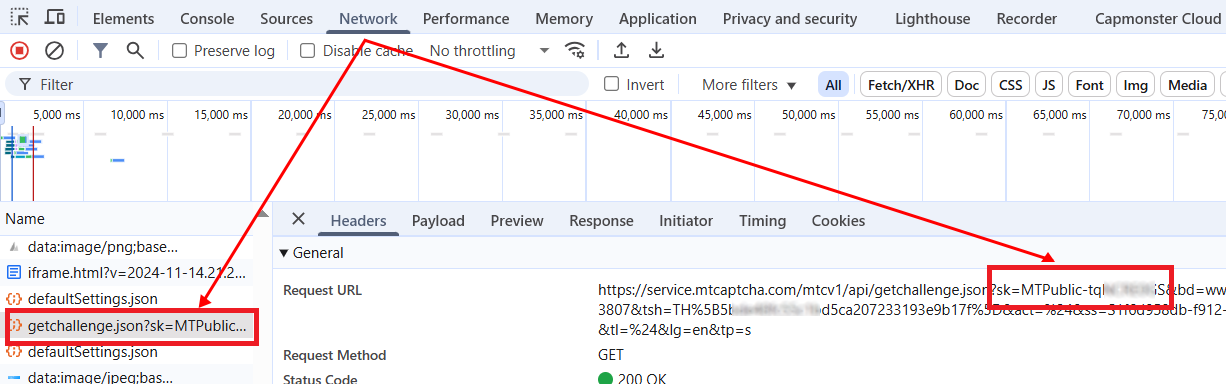
websiteKey<string>requiredThe MTCaptcha key, passed in the request parameters as sk (see the example below for instructions on how to find it).
It typically has the following format: MTPublic-abCDEFJAB.
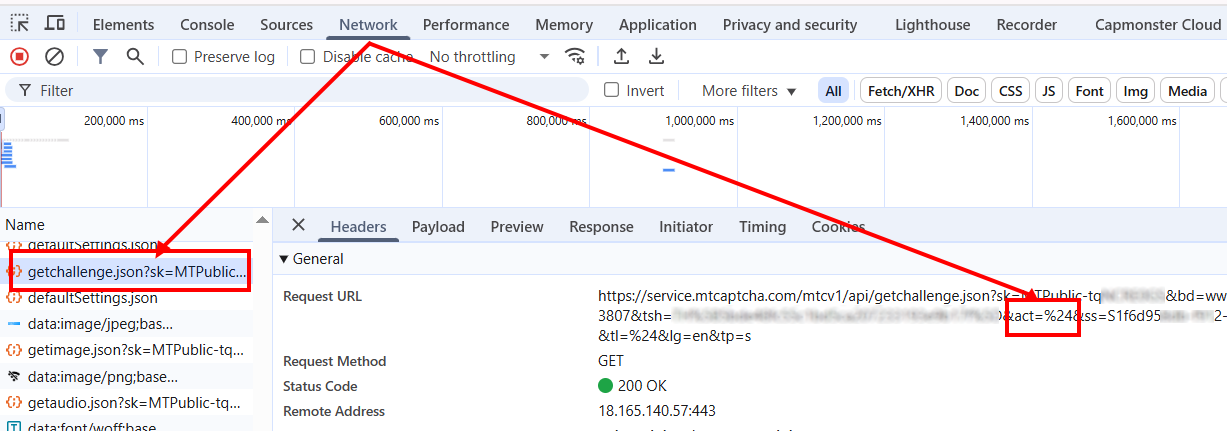
pageAction<string>optionalThe action parameter is passed in the request as act and displayed when validating the token.
Include it in the request only if its value differs from the default - %24.
Example in HTML:
<script>
var mtcaptchaConfig = {
      "sitekey": "MTPublic-abCDEFJAB",
      "action": "login"
};
</script>
isInvisible<bool>optionaltrue if the captcha is invisible, i.e., has a hidden confirmation field. If bot suspicion occurs, an additional verification is triggered.
userAgent<string>optionalBrowser User-Agent. Use the current value supported by CapMonster Cloud: userAgentPlaceholder
You can get the latest value at: https://capmonster.cloud/api/useragent/actual.
proxyType<string>optionalhttp - regular http/https proxy;
https - try this option only if "http" does not work (required for some custom proxies);
socks4 - socks4 proxy;
socks5 - socks5 proxy.
proxyAddress<string>optionalProxy IPv4/IPv6 IP address. Not allowed:
- use of transparent proxies (where the client IP is visible);
- use of proxies on local machines.
proxyPort<integer>optionalProxy port.
proxyLogin<string>optionalProxy server login.
proxyPassword<string>optionalProxy server password.
Create task method
- MTCaptchaTask (without proxy)
- MTCaptchaTask (with proxy)
https://api.capmonster.cloud/createTask
Request example
{
  "clientKey": "API_KEY",
  "task":
  {
    "type": "MTCaptchaTask",
    "websiteURL": "https://yourwebsite.com/page-with-mtcaptcha",
    "websiteKey": "your-website-key",
    "isInvisible": false,
    "pageAction": "your-page-action"
  }
}
Response example
{
  "errorId":0,
  "taskId":407533077
}
https://api.capmonster.cloud/createTask
Request example
{
  "clientKey": "API_KEY",
  "task":
  {
    "type": "MTCaptchaTask",
    "websiteURL": "https://yourwebsite.com/page-with-mtcaptcha",
    "websiteKey": "your-website-key",
    "isInvisible": false,
    "pageAction": "your-page-action",
    "proxyType": "your-proxy-type",
    "proxyAddress": "your-proxy-address",
    "proxyPort": 1234,
    "proxyLogin": "your-proxy-login",
    "proxyPassword": "your-proxy-password"
  }
}
Response example
{
  "errorId":0,
  "taskId":407533077
}
Get task result method
Use the getTaskResult method to get the solution for the MTCaptcha captcha.
https://api.capmonster.cloud/getTaskResult
Request example
{
  "clientKey": "API_KEY",
  "taskId": 407533077
}
Response example
{
  "errorId": 0,
  "errorCode": null,
  "errorDescription": null,
  "solution": {
    "token": "v1(155506dc,c8c2e356,MTPublic-abCDEFJAB,70f03532a53...5FSDA**)"
  },
  "status": "ready"
}
How to find CAPTCHA parameters
websiteKey
This parameter can be found in the Network tab of Developer Tools.
Look for requests starting, for example, with getchallenge.json — the sk parameter corresponds to websiteKey.
pageAction
The same request contains the pageAction parameter: the needed value is passed as act.
By default, it equals %24; if the value differs (e.g., ..&act=login&...), specify it when creating the task.
Use the SDK library
- JavaScript / TypeScript
- Python
- C#
Show code (for browser)
// https://github.com/CapMonsterCloud/capmonster-nodejs-captcha-solver

import {
  CapMonsterCloudClientFactory,
  ClientOptions,
  MTCaptchaRequest
} from "@zennolab_com/capmonstercloud-client";

document.addEventListener("DOMContentLoaded", async () => {

  const API_KEY = "YOUR_API_KEY"; // Specify your CapMonster Cloud API key

  const client = CapMonsterCloudClientFactory.Create(
    new ClientOptions({ clientKey: API_KEY })
  );

  // Basic example without proxy
  // CapMonster Cloud automatically uses its own proxies
  let mtcaptchaRequest = new MTCaptchaRequest({
    websiteURL: "https://yourwebsite.com/page-with-mtcaptcha",
    websiteKey: "your-website-key",
    isInvisible: false,
    pageAction: "login",
  });

  // Example using your proxy
  // Uncomment this block if you want to use your own proxy
  /*
  const proxy = {
    proxyType: "http",
    proxyAddress: "123.45.67.89",
    proxyPort: 8080,
    proxyLogin: "username",
    proxyPassword: "password",
  };

  mtcaptchaRequest = new MTCaptchaRequest({
    websiteURL: "https://yourwebsite.com/page-with-mtcaptcha",
    websiteKey: "your-website-key",
    isInvisible: false,
    pageAction: "login",
    proxy,
    userAgent: "userAgentPlaceholder",
  });
  */

  // You can check your balance if necessary
  const balance = await client.getBalance();
  console.log("Balance:", balance);

  const result = await client.Solve(mtcaptchaRequest);
  console.log("Solution:", result.solution);
});
Show code (Node.js)
// https://github.com/CapMonsterCloud/capmonster-nodejs-captcha-solver

const {
  CapMonsterCloudClientFactory,
  ClientOptions,
  MTCaptchaRequest,
} = require("@zennolab_com/capmonstercloud-client");

const API_KEY = "YOUR_API_KEY"; // Specify your CapMonster Cloud API key

async function solveMTCaptcha() {
  const client = CapMonsterCloudClientFactory.Create(
    new ClientOptions({ clientKey: API_KEY }),
  );

  // Basic example without proxy
  // CapMonster Cloud automatically uses its own proxies
  let mtcaptchaRequest = new MTCaptchaRequest({
    websiteURL: "https://yourwebsite.com/page-with-mtcaptcha",
    websiteKey: "your-website-key",
    isInvisible: false,
    pageAction: "login",
  });

  // Example using your proxy
  // Uncomment this block if you want to use your own proxy
  /*
  const proxy = {
    proxyType: "http",
    proxyAddress: "123.45.67.89",
    proxyPort: 8080,
    proxyLogin: "username",
    proxyPassword: "password",
  };

  mtcaptchaRequest = new MTCaptchaRequest({
    websiteURL: "https://yourwebsite.com/page-with-mtcaptcha",
    websiteKey: "your-website-key",
    isInvisible: false,
    pageAction: "login",
    proxy,
    userAgent: "userAgentPlaceholder",
  });
  */

  // You can check your balance if necessary
  const balance = await client.getBalance();
  console.log("Balance:", balance);

  const result = await client.Solve(mtcaptchaRequest);
  console.log("Solution:", result.solution);
}

solveMTCaptcha().catch(console.error);
Show code
# https://github.com/CapMonsterCloud/capmonster-python-captcha-solver

import asyncio

from capmonstercloudclient import CapMonsterClient, ClientOptions
from capmonstercloudclient.requests import MTCaptchaRequest
# Import ProxyInfo if you plan to use your own proxy
from capmonstercloudclient.requests.proxy_info import ProxyInfo

API_KEY = "YOUR_API_KEY"  # Specify your CapMonster Cloud API key


async def solve_mtcaptcha():
    client = CapMonsterClient(
        options=ClientOptions(api_key=API_KEY)
    )

    # Basic example without proxy
    # CapMonster Cloud automatically uses its own proxies
    mtcaptcha_request = MTCaptchaRequest(
        websiteUrl="https://yourwebsite.com/page-with-mtcaptcha",
        websiteKey="your-website-key",
        isInvisible=False,
        pageAction="login",
    )

    # Example using your proxy
    # Uncomment this block if you want to use your own proxy
    """
    proxy = ProxyInfo(
        proxyType="http",
        proxyAddress="123.45.67.89",
        proxyPort=8080,
        proxyLogin="username",
        proxyPassword="password",
    )

    mtcaptcha_request = MTCaptchaRequest(
        websiteUrl="https://yourwebsite.com/page-with-mtcaptcha",
        websiteKey="your-website-key",
        isInvisible=False,
        pageAction="login",
        proxy=proxy,
        userAgent="userAgentPlaceholder",
    )
    """

    # You can check your balance if necessary
    balance = await client.get_balance()
    print("Balance:", balance)

    result = await client.solve_captcha(mtcaptcha_request)
    print("Solution:", result)


asyncio.run(solve_mtcaptcha())
Show code
// https://github.com/CapMonsterCloud/capmonster-dotnet-captcha-solver

using System;
using System.Threading.Tasks;
using Zennolab.CapMonsterCloud;
using Zennolab.CapMonsterCloud.Requests;

class Program
{
    static async Task Main(string[] args)
    {
        // Specify your CapMonster Cloud API key
        var clientOptions = new ClientOptions
        {
            ClientKey = "YOUR_API_KEY"
        };

        var cmCloudClient = CapMonsterCloudClientFactory.Create(clientOptions);

        // Basic example without proxy
        // CapMonster Cloud automatically uses its own proxies
        var mtcaptchaRequest = new MTCaptchaTaskRequest
        {
            WebsiteUrl = "https://yourwebsite.com/page-with-mtcaptcha",
            WebsiteKey = "your-website-key",
            Invisible = false,
            PageAction = "login",
            UserAgent = "userAgentPlaceholder"
        };

        // Example using your proxy
        // Uncomment this block if you want to use your own proxy
        /*
        mtcaptchaRequest = new MTCaptchaTaskRequest
        {
            WebsiteUrl = "https://yourwebsite.com/page-with-mtcaptcha",
            WebsiteKey = "your-website-key",
            Invisible = false,
            PageAction = "login",
            UserAgent = "userAgentPlaceholder",

            Proxy = new ProxyContainer(
                "123.45.67.89",
                8080,
                ProxyType.Http,
                "username",
                "password"
            )
        };
        */

        // You can check your balance if necessary
        var balance = await cmCloudClient.GetBalanceAsync();
        Console.WriteLine("Balance: " + balance);

        var mtcaptchaResult = await cmCloudClient.SolveAsync(mtcaptchaRequest);
        Console.WriteLine("Solution: " + mtcaptchaResult.Solution.Value);
    }
}