Alibaba Cloud Captcha
Task examples
Below are examples of Alibaba Captcha task types that are currently supported by the CapMonster Cloud service:
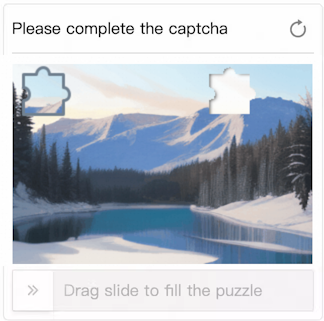
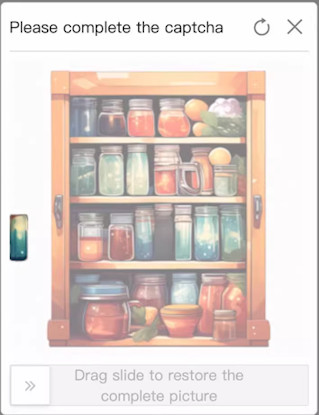
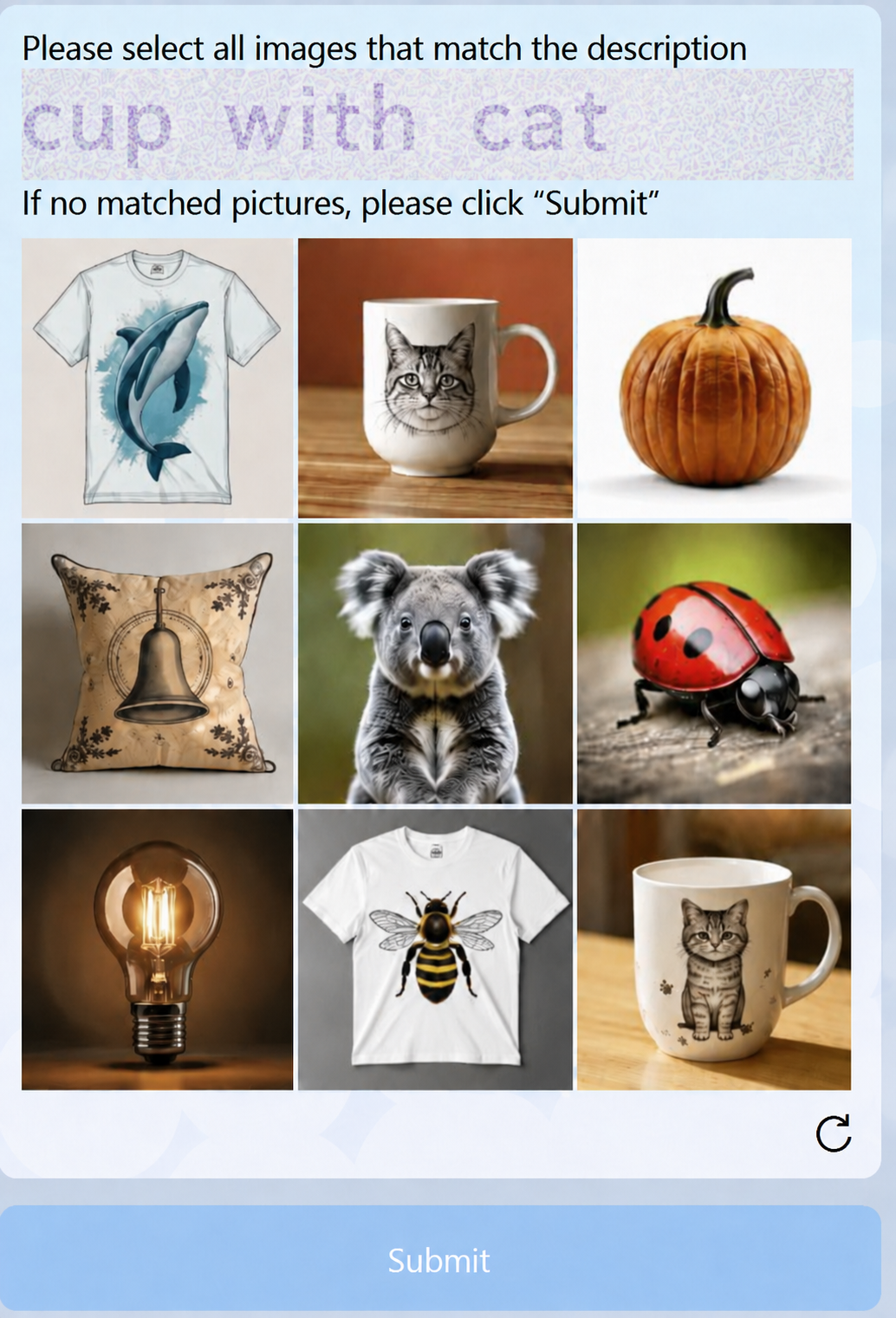
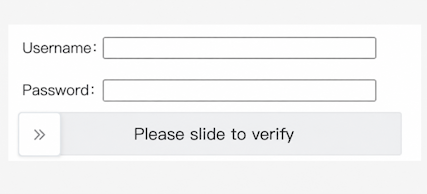
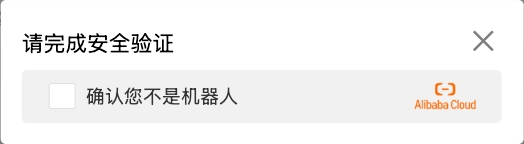
TRACELESS — invisible verification
CapMonster Cloud also supports Alibaba CAPTCHA TRACELESS — a background check with no visible challenge that analyzes browser and device data, as well as user behavior.
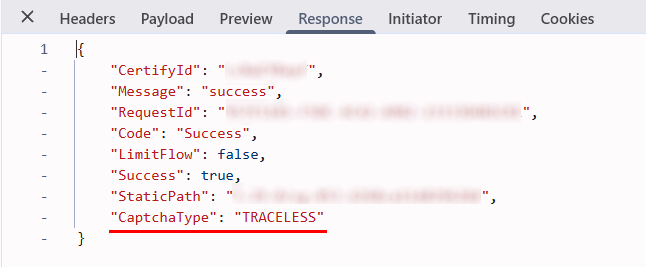
You can identify this type by "CaptchaType": "TRACELESS" in the response to the CAPTCHA loading request in the Network tab of your browser’s developer tools.
CapMonster Cloud uses built-in proxies by default – their cost is already included in the service. You only need to specify your own proxies in cases where the website does not accept the token or access to the built-in services is restricted.
If you are using a proxy with IP authorization, make sure to whitelist the address 65.21.190.34.
Request parameters
type<string>requiredCustomTask
class<string>requiredalibaba
websiteURL<string>requiredFull URL of the page with the CAPTCHA.
sceneId (inside metadata)<string>requiredThe captcha scenario identifier, passed in the following format: "sceneId":"1ww7426c" – the value is provided as an example.
Use your own value. Instructions for obtaining it are provided in the corresponding section.
prefix (inside metadata)<string>requiredCAPTCHA initialization parameter, passed in the URL of the request used to load the task text on the page.
For example, if the URL looks like: https://dlw3kug.captcha-open.example.aliyuncs.com/, then the value of the prefix parameter corresponds to the subdomain – dlw3kug.
Some websites require additional parameters:
Specify these parameters only if they are present on the website (see more details in the section Working with websites that include extended parameters).
userId (inside metadata)<string>optionalA unique identifier of the user or session on the website side.
Example: HpadJlQnz2zSKcSmjXBaqQvjYUvP4jMJIk/ZwGNDNiM=
userUserId (inside metadata)<string>optionalAn additional (secondary) user identifier.
Example: /uSXKkVFuuwxXA21/MpXGxpLStWBEup1B3jjlMUWwNE=
verifyType (inside metadata)<string>optionalThe version or type of the CAPTCHA verification mechanism.
Example: 1.0
region (inside metadata)<string>optionalThe server or data center region through which the CAPTCHA is processed.
Example: sgp
Important: the region value affects the type of token returned: with region: cn, a WEB# token (VOVCI2) is returned; with region: sgp, an SG_WEB# token (U0dfV0VCIZ) is returned.
UserCertifyId (inside metadata)<string>optionalA unique verification ID associated with the current CAPTCHA session.
Example: 0a03e59417757735511105780e2a5e
apiGetLib (inside metadata)<string>optionalA link to the CAPTCHA JS library used by the website. The value is generated on the client side and may change dynamically on each page render.
Example: https://o.example.com/captcha-frontend/aliyunCaptcha/AliyunCaptcha.js?t=2041
punishUrl (inside metadata)<string>optionalFull URL of the verification page obtained from the target website.
Use this parameter for websites where Alibaba returns a separate /punish URL for verification. Pass the full URL, including its query parameters.
Example: https://example.com:443//api/example/testlogin/_____tmd_____/punish?x5secdata=xgf6888e6c4d5d8115ka6bba95967ab87aa13767f97ccadf409d1782833032a-388365139a1244837524abakc3dafclick33ba7696f04104647438bcba5be532d2833__bx__example.com:443/api/example/testlogin/&x5step=2&action=captchaclick&pureCaptcha=
For instructions on obtaining the URL, see How to find all required parameters for task creation → punishUrl.
cookieRequired (inside metadata)<boolean>optionalReturns cookies together with the CAPTCHA solution.
Use true for websites with Alibaba WAF if cookies are required after successful verification.
The presence of the ssxmod_itna and ssxmod_itna2 cookies indicates that the website uses Alibaba WAF rather than a regular CAPTCHA.
For details, see How to distinguish Alibaba WAF from Alibaba CAPTCHA.
By default, this parameter is not used.
userAgent<string>optionalBrowser User-Agent. Use the current value supported by CapMonster Cloud: userAgentPlaceholder
You can get the latest value at: https://capmonster.cloud/api/useragent/actual.
proxyType<string>optionalhttp - standard http/https proxy;
https - try this if "http" doesn't work (needed for some custom proxies);
socks4 - socks4 proxy;
socks5 - socks5 proxy.
proxyAddress<string>optionalIP address of the proxy (IPv4/IPv6). Not allowed:
- using transparent proxies (those exposing the client IP);
- using local machine proxies.
proxyPort<integer>optionalProxy port.
proxyLogin<string>optionalProxy login.
proxyPassword<string>optionalProxy password.
How to distinguish Alibaba WAF from Alibaba CAPTCHA
The presence of the ssxmod_itna and ssxmod_itna2 cookies indicates that the website uses Alibaba WAF. These cookies are absent when a regular Alibaba CAPTCHA is used.
To check for these cookies, open Developer Tools → Application → Cookies and select the website's domain.
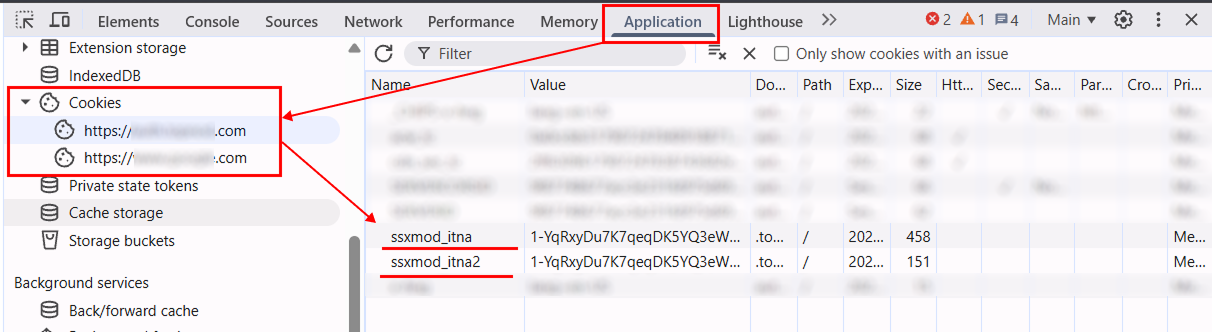
If the website uses Alibaba WAF and cookies are needed for subsequent requests, pass cookieRequired: true in the metadata object when creating the task.
Create task method
Standard variant (without additional parameters)
- CustomTask (without proxy)
- CustomTask (with proxy)
https://api.capmonster.cloud/createTask
Request example
{
  "clientKey": "API_KEY",
  "task": {
    "type": "CustomTask",
    "class": "alibaba",
    "websiteURL": "https://www.example.com",
    "userAgent": "userAgentPlaceholder",
    "metadata": {
      "sceneId": "your-scene-id",
      "prefix": "your-prefix"
    }
  }
}
Response example
{
  "errorId": 0,
  "taskId": 407533077
}
https://api.capmonster.cloud/createTask
Request example
{
  "clientKey": "API_KEY",
  "task": {
    "type": "CustomTask",
    "class": "alibaba",
    "websiteURL": "https://www.example.com",
    "userAgent": "userAgentPlaceholder",
    "metadata": {
      "sceneId": "your-scene-id",
      "prefix": "your-prefix"
    },
    "proxyType": "your-proxy-type",
    "proxyAddress": "your-proxy-address",
    "proxyPort": 1234,
    "proxyLogin": "your-proxy-login",
    "proxyPassword": "your-proxy-password"
  }
}
Response example
{
  "errorId": 0,
  "taskId": 407533077
}
Option with extended parameters (userId, userUserId, verifyType, etc.):
- CustomTask (without proxy)
- CustomTask (with proxy)
https://api.capmonster.cloud/createTask
Request example
{
  "clientKey": "API_KEY",
  "task": {
    "type": "CustomTask",
    "class": "alibaba",
    "websiteURL": "https://www.example.com",
    "userAgent": "userAgentPlaceholder",
    "metadata": {
      "sceneId": "your-scene-id",
      "prefix": "your-prefix",
      "userId": "your-user-id",
      "userUserId": "your-user-user-id",
      "verifyType": "your-verify-type",
      "region": "your-region",
      "UserCertifyId": "your-user-certify-id",
      "apiGetLib": "https://o.example.com/captcha-frontend/aliyunCaptcha/AliyunCaptcha.js?t=2041"
    }
  }
}
Response example
{
  "errorId": 0,
  "taskId": 407533077
}
https://api.capmonster.cloud/createTask
Request example
{
  "clientKey": "API_KEY",
  "task": {
    "type": "CustomTask",
    "class": "alibaba",
    "websiteURL": "https://www.example.com",
    "userAgent": "userAgentPlaceholder",
    "metadata": {
      "sceneId": "your-scene-id",
      "prefix": "your-prefix",
      "userId": "your-user-id",
      "userUserId": "your-user-user-id",
      "verifyType": "your-verify-type",
      "region": "your-region",
      "UserCertifyId": "your-user-certify-id",
      "apiGetLib": "https://o.example.com/captcha-frontend/aliyunCaptcha/AliyunCaptcha.js?t=2041"
    },
    "proxyType": "your-proxy-type",
    "proxyAddress": "your-proxy-address",
    "proxyPort": 1234,
    "proxyLogin": "your-proxy-login",
    "proxyPassword": "your-proxy-password"
  }
}
Response example
{
  "errorId": 0,
  "taskId": 407533077
}
Option with punishUrl
On some websites protected by Alibaba, verification is triggered through a separate /punish URL. In this case, pass the obtained URL in the punishUrl parameter (inside metadata).
Alibaba Punish may use verification methods such as selecting matching images or a slider.
- CustomTask (without proxy)
- CustomTask (with proxy)
https://api.capmonster.cloud/createTask
Request example
{
  "clientKey": "API_KEY",
  "task": {
    "type": "CustomTask",
    "class": "alibaba",
    "websiteURL": "https://www.example.com",
    "userAgent": "userAgentPlaceholder",
    "metadata": {
      "punishUrl": "https://example.com/_____tmd_____/punish?x5secdata=your-x5secdata&x5step=2"
    }
  }
}
Response example
{
  "errorId": 0,
  "taskId": 407533077
}
https://api.capmonster.cloud/createTask
Request example
{
  "clientKey": "API_KEY",
  "task": {
    "type": "CustomTask",
    "class": "alibaba",
    "websiteURL": "https://www.example.com",
    "userAgent": "userAgentPlaceholder",
    "metadata": {
      "punishUrl": "https://example.com/_____tmd_____/punish?x5secdata=your-x5secdata&x5step=2"
    },
    "proxyType": "your-proxy-type",
    "proxyAddress": "your-proxy-address",
    "proxyPort": 1234,
    "proxyLogin": "your-proxy-login",
    "proxyPassword": "your-proxy-password"
  }
}
Response example
{
  "errorId": 0,
  "taskId": 407533077
}
Option with cookie return (cookieRequired)
For some websites using Alibaba WAF, cookies must be obtained after the CAPTCHA is successfully solved. These cookies are then used in subsequent requests.
To enable this, add the following parameter to the metadata object:
{
  "cookieRequired": true
}
- CustomTask (without proxy)
- CustomTask (with proxy)
https://api.capmonster.cloud/createTask
Request example
{
  "clientKey": "API_KEY",
  "task": {
    "type": "CustomTask",
    "class": "alibaba",
    "websiteURL": "https://example.com",
    "userAgent": "userAgentPlaceholder",
    "metadata": {
      "prefix": "your-prefix",
      "sceneId": "your-scene-id",
      "userId": "your-user-id",
      "userUserId": "your-user-user-id",
      "verifyType": "1.0",
      "region": "your-region",
      "UserCertifyId": "your-user-certify-id",
      "apiGetLib": "https://o.example.com/captcha-frontend/aliyunCaptcha/AliyunCaptcha.js?t=2041",
      "cookieRequired": true
    }
  }
}
Response example
{
  "errorId": 0,
  "taskId": 407533077
}
https://api.capmonster.cloud/createTask
Request example
{
  "clientKey": "API_KEY",
  "task": {
    "type": "CustomTask",
    "class": "alibaba",
    "websiteURL": "https://example.com",
    "userAgent": "userAgentPlaceholder",
    "metadata": {
      "prefix": "your-prefix",
      "sceneId": "your-scene-id",
      "userId": "your-user-id",
      "userUserId": "your-user-user-id",
      "verifyType": "1.0",
      "region": "your-region",
      "UserCertifyId": "your-user-certify-id",
      "apiGetLib": "https://o.example.com/captcha-frontend/aliyunCaptcha/AliyunCaptcha.js?t=2041",
      "cookieRequired": true
    },
    "proxyType": "your-proxy-type",
    "proxyAddress": "your-proxy-address",
    "proxyPort": 1234,
    "proxyLogin": "your-proxy-login",
    "proxyPassword": "your-proxy-password"
  }
}
Response example
{
  "errorId": 0,
  "taskId": 407533077
}
Get task result method
Use the getTaskResult method to obtain the Alibaba CAPTCHA solution.
https://api.capmonster.cloud/getTaskResult
Request example
{
  "clientKey": "API_KEY",
  "taskId": 407533077
}
Response example
{
  "errorId": 0,
  "errorCode": null,
  "errorDescription": null,
  "status": "ready",
  "solution": {
    "data": {
      "tokens": "{\"sceneId\":\"1ww7426c4\",\"certifyId\":\"kBjCxX2W2c\",\"deviceToken\":\"U0dfV0VCIzM3...wOGJkMjY=\",\"data\":\"JRMnX3B...EUQdCpLkqSj7THYNf3dn\"}"
    }
  }
}
The region value passed in metadata when creating the task affects the format of the returned deviceToken:
region: cn–WEB#token (VOVCI2);region: sgp–SG_WEB#token (U0dfV0VCIZ).
If "cookieRequired": true was specified in the request, the response additionally contains cookies grouped by domain. This also applies to tasks with punishUrl. Use cookies from the solution.domains object in subsequent requests to the corresponding domain together with the CAPTCHA solution.
Response example
{
  "errorId": 0,
  "errorCode": null,
  "errorDescription": null,
  "status": "ready",
  "solution": {
    "domains": {
      "example.com": {
        "cookies": {
          "arms_uid": "23906d34-14da-4ddb-b651-b4d72d5376e1",
          "sca": "ec12103d",
          "atpsida": "b8cd8cc0185b...1196_1",
          "cna": "vJsNIxNBKGMCAax0zMDiXVu1",
          "cbc": "T2gAde24vOm4...wkkwYA=",
          "x5sec": "7b2274223a...227d",
          "tfstk": "gPEnRZi0vyuB...ECvCA."
        }
      }
    }
  }
}
How to find all required parameters for task creation
sceneId
sceneId can be obtained after successfully solving the CAPTCHA once:
- Solve the CAPTCHA manually on the website.
- Open DevTools → Network tab.
- Find the request sent after successful verification (for example: verify, check, validate).
- In Payload or Response, locate the
sceneId(CaptchaSceneIdorsId) parameter.
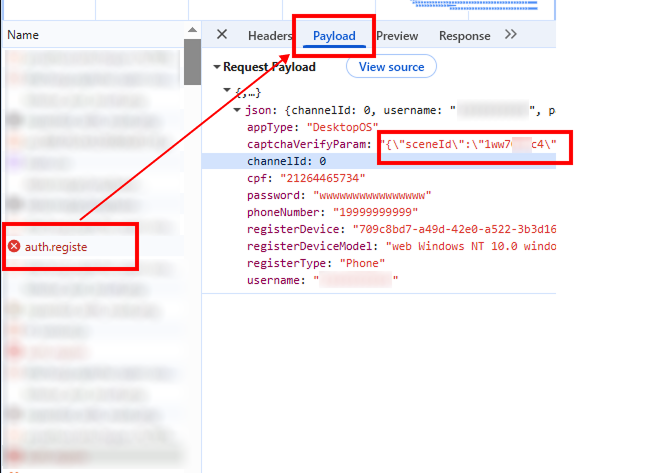
This parameter can also be found using search across network requests:
- Open the page with the CAPTCHA, then go to DevTools → Network tab.
- Search (Ctrl + F) for
sceneIdorCaptchaSceneId.
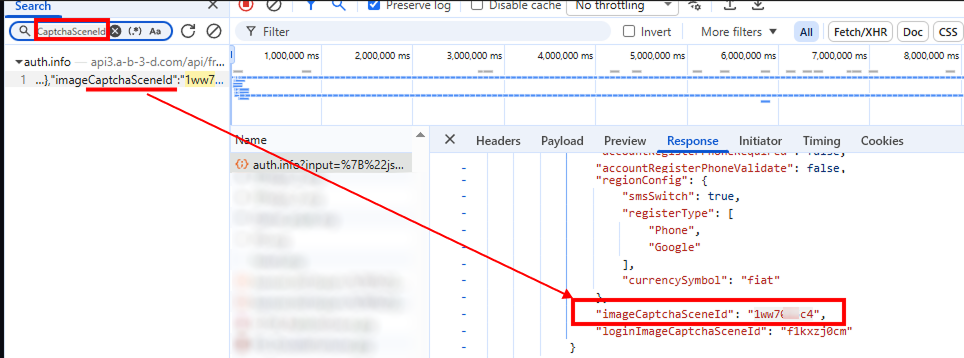
prefix
prefix can be obtained from the request URL used on the website to load the CAPTCHA task text:
- Open the page with the CAPTCHA.
- Find the request related to loading the task (usually via DevTools → Network).
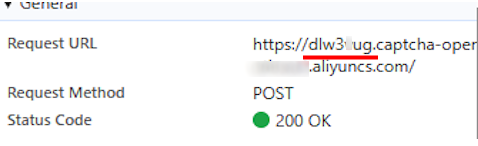
punishUrl
punishUrl is the Alibaba verification URL returned when protection is triggered on the target website.
You can usually obtain this URL from a network request whose response contains the following error:
FAIL_SYS_USER_VALIDATE
Obtaining it through DevTools
- Open the target page and perform the action that triggers Alibaba verification.
- Open DevTools → Network.
- Find the request sent when the protection is triggered. You can use the response containing the
FAIL_SYS_USER_VALIDATEerror as a reference. - Open the request and go to the Preview tab. In the response, find the
datafield – it contains the verification URL to use aspunishUrl.
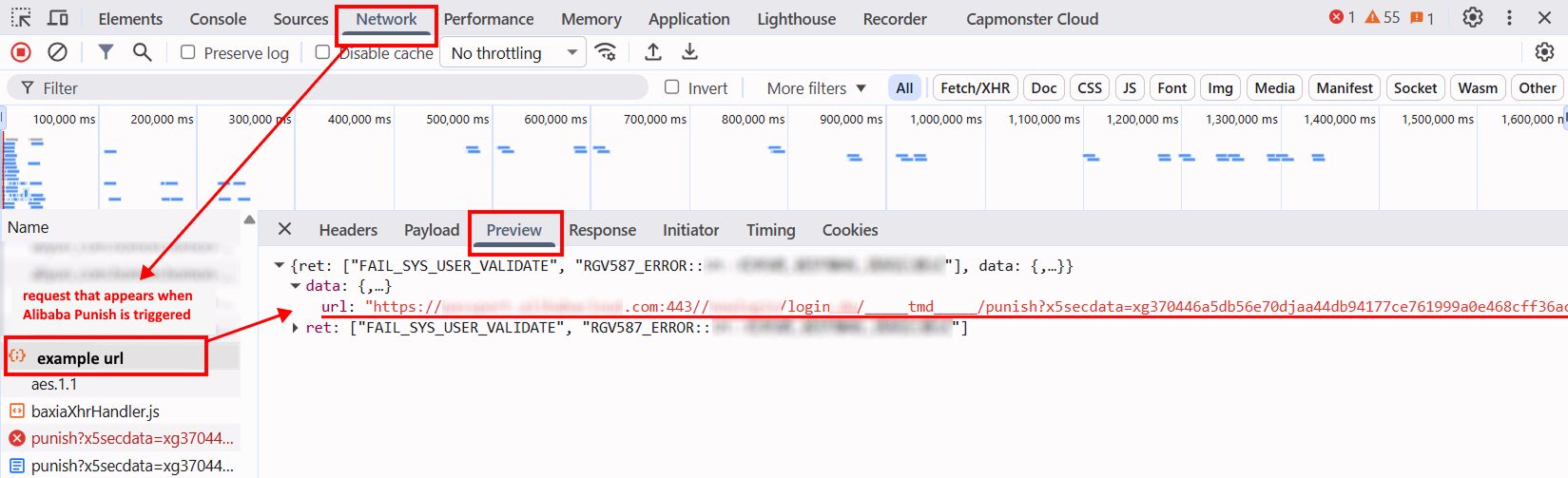
- You can also find the target URL in the Response tab.
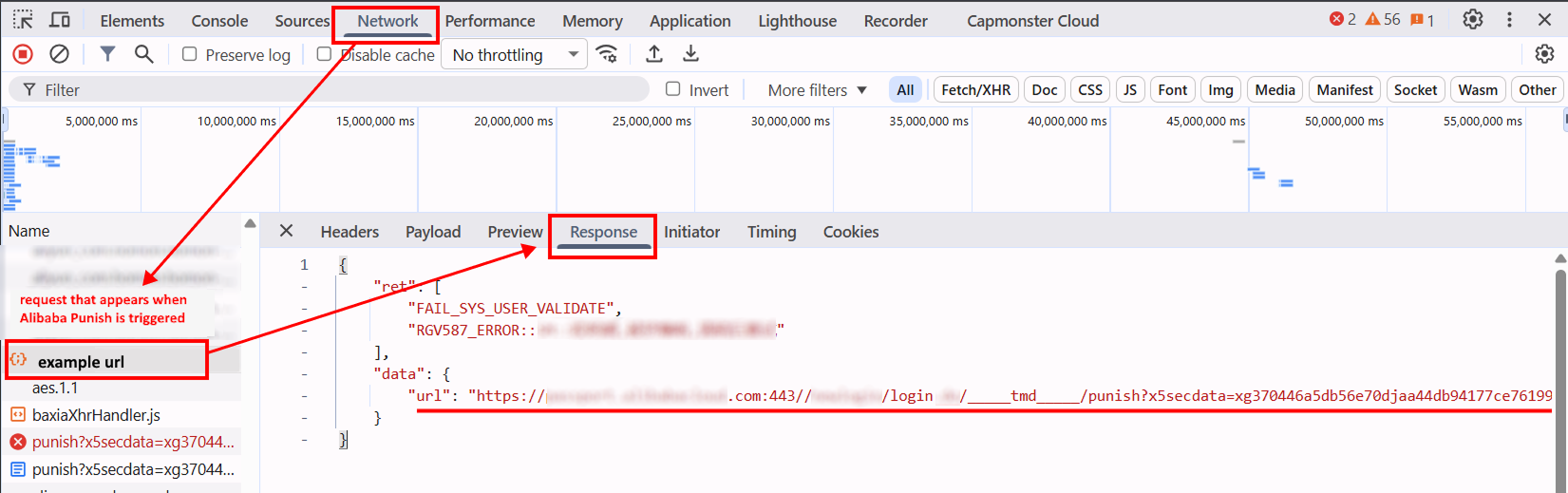
- Copy the full URL and pass it in the
punishUrlparameter (insidemetadata) when creating the task.
The resulting URL must contain the port (for example, 443), the _____tmd_____/punish path, and the x5secdata, x5step, action, and pureCaptcha parameters.
URL format:
https://example.com:443//api/example/testlogin/_____tmd_____/punish?x5secdata=xgf6888e6c4d5d8115ka6bba95967ab87aa13767f97ccadf409d1782833032a-388365139a1244837524abakc3dafclick33ba7696f04104647438bcba5be532d2833__bx__example.com:443/api/example/testlogin/&x5step=2&action=captchaclick&pureCaptcha=
Automatic retrieval of punishUrl
You can also obtain punishUrl programmatically in one of the following ways:
- via HTTP requests – if the API URL, method, headers, and other request parameters are known;
- via Playwright – if you need to track the request directly in the browser.
In some cases, an intermediate URL containing x5secdata and x5step is returned first, and after it is processed, the final punishUrl with the action and pureCaptcha parameters is returned.
For HTTP requests, use the parameters of the actual request made by the target website. In the browser scenario, specify the required page and perform the action that triggers Alibaba Punish.
The examples demonstrate the general approach to obtaining punishUrl. Replace URLs, headers, and other values with the current data from the target website.
- JavaScript (Node.js)
- Python
Show code (via HTTP requests)
const USER_AGENT =
"userAgentPlaceholder";
const TIMEOUT = 30000;
/* ================= REQUEST SETTINGS ================= */
// All values below are provided as examples
// Specify the parameters of the actual request made by the target website
// Add additional headers such as origin, referer, and accept-language if needed
const REQUEST_CONFIG = {
pageUrl: "https://example.com/login",
url: "https://api.example.com/login?fromSite=example&appName=example-app",
method: "POST",
// Request query parameters, for example: login, email,
// phone number, or other values
params: {
value: "example"
},
headers: {
accept: "application/json, text/plain, */*",
"content-type": "application/json",
"user-agent": USER_AGENT,
origin: "https://example.com",
referer: "https://example.com/login",
},
};
/* ================= GENERAL LOGIC ================= */
function isPunishUrl(url) {
return typeof url === "string" && url.includes("_____tmd_____/punish");
}
function hasParam(url, name) {
try {
return new URL(url).searchParams.has(name);
} catch {
return false;
}
}
function isFinalPunishUrl(url) {
return (
isPunishUrl(url) &&
["x5secdata", "x5step", "action", "pureCaptcha"].every((name) =>
hasParam(url, name),
)
);
}
function cookiesToHeader(cookies = {}) {
return Object.entries(cookies)
.map(([name, value]) => `${name}=${value}`)
.join("; ");
}
function extractFromHtml(html, baseUrl) {
const match = html.match(
/(?:["']url["']\s*:\s*["']([^"']+)["'])|(https?:\/\/[^\s"'<>]+\/_____tmd_____\/punish\?[^\s"'<>]+)/i,
);
if (!match) {
return null;
}
const value = (match[1] || match[2])
.replace(/\\\//g, "/")
.replace(/&/g, "&")
.replace(/=|=/gi, "=");
try {
const url = new URL(value, baseUrl).href;
return isPunishUrl(url) ? url : null;
} catch {
return null;
}
}
async function extractPunishUrl(response) {
const text = await response.text();
try {
const url = JSON.parse(text)?.data?.url;
if (isPunishUrl(url)) {
return url;
}
} catch {}
return extractFromHtml(text, response.url);
}
async function sendRequest(config) {
const url = new URL(config.url);
for (const [name, value] of Object.entries(config.params || {})) {
if (value != null) {
url.searchParams.set(name, value);
}
}
const headers = {
...(config.headers || {}),
};
const cookie = cookiesToHeader(config.cookies);
if (cookie) {
headers.cookie = cookie;
}
const method = (config.method || "GET").toUpperCase();
const options = {
method,
headers,
signal: AbortSignal.timeout(TIMEOUT),
};
if (method !== "GET" && method !== "HEAD") {
if (config.json != null) {
options.body = JSON.stringify(config.json);
} else if (config.data != null) {
options.body = config.data;
}
}
const response = await fetch(url, options);
if (!response.ok) {
throw new Error(`HTTP ${response.status} ${response.statusText}`);
}
return response;
}
async function resolvePunishUrl(response, config, maxSteps = 3) {
const visited = new Set();
for (let step = 0; step < maxSteps; step++) {
const punishUrl = await extractPunishUrl(response);
if (!punishUrl) {
throw new Error("punishUrl was not found in the response");
}
if (visited.has(punishUrl)) {
throw new Error("A repeated punishUrl was detected");
}
visited.add(punishUrl);
if (isFinalPunishUrl(punishUrl)) {
return punishUrl;
}
const headers = {
accept: "text/html,application/xhtml+xml,application/xml;q=0.9,*/*;q=0.8",
"user-agent": USER_AGENT,
referer: config.pageUrl,
};
const cookie = cookiesToHeader(config.cookies);
if (cookie) {
headers.cookie = cookie;
}
response = await fetch(punishUrl, {
headers,
signal: AbortSignal.timeout(TIMEOUT),
});
if (!response.ok) {
throw new Error(`HTTP ${response.status} ${response.statusText}`);
}
}
throw new Error("Failed to obtain the final punishUrl");
}
async function main() {
try {
const response = await sendRequest(REQUEST_CONFIG);
const punishUrl = await resolvePunishUrl(response, REQUEST_CONFIG);
console.log("Final punishUrl:");
console.log(punishUrl);
} catch (error) {
console.error("Failed to obtain punishUrl:");
console.error(error.message);
}
}
main();
Show code (via Playwright)
const { chromium } = require("playwright");

// Page where Alibaba Punish is used
const PAGE_URL = "https://example.com/";

const TIMEOUT = 180000;

function isPunishUrl(url) {
  return (
    typeof url === "string" &&
    url.includes("_____tmd_____/punish")
  );
}

function hasParam(url, name) {
  try {
    return new URL(url).searchParams.has(name);
  } catch {
    return false;
  }
}

function isFinalPunishUrl(url) {
  return (
    isPunishUrl(url) &&
    hasParam(url, "x5secdata") &&
    hasParam(url, "x5step") &&
    hasParam(url, "action") &&
    hasParam(url, "pureCaptcha")
  );
}

function addHttpsPort(url) {
  if (
    typeof url !== "string" ||
    !url.startsWith("https://")
  ) {
    return url;
  }

  if (/^https:\/\/[^/]+:\d+(?:\/|$)/i.test(url)) {
    return url;
  }

  return url.replace(
    /^https:\/\/([^/]+)/i,
    "https://$1:443"
  );
}

function waitForPunishUrl(page) {
  return new Promise((resolve, reject) => {
    let finalPunishUrl = null;

    const timer = setTimeout(() => {
      cleanup();

      reject(
        new Error(
          "Final punishUrl was not found"
        )
      );
    }, TIMEOUT);

    function cleanup() {
      clearTimeout(timer);

      page.off("request", onRequest);
      page.off("response", onResponse);
    }

    function processUrl(url) {
      if (
        finalPunishUrl ||
        !isFinalPunishUrl(url)
      ) {
        return;
      }

      finalPunishUrl =
        addHttpsPort(url);

      cleanup();
      resolve(finalPunishUrl);
    }

    function onRequest(request) {
      processUrl(
        request.url()
      );
    }

    function onResponse(response) {
      processUrl(
        response.url()
      );
    }

    page.on("request", onRequest);
    page.on("response", onResponse);
  });
}

async function main() {
  const browser = await chromium.launch({
    headless: false,
  });

  const context =
    await browser.newContext();

  const page =
    await context.newPage();

  const punishUrlPromise =
    waitForPunishUrl(page);

  await page.goto(
    PAGE_URL,
    {
      waitUntil: "domcontentloaded",
    }
  );

  console.log(
    "Perform the action on the page that triggers Alibaba verification"
  );

  try {
    const punishUrl =
      await punishUrlPromise;

    console.log(
      "Final punishUrl:"
    );

    console.log(punishUrl);
  } catch (error) {
    console.error(
      "Failed to obtain punishUrl:"
    );

    console.error(
      error.message
    );
  }

  await browser.close();
}

main().catch(console.error);
Show code (via HTTP requests)
import re
from urllib.parse import urljoin
import requests
USER_AGENT = "userAgentPlaceholder"
TIMEOUT = 30
# ================= REQUEST SETTINGS =================
# All values below are provided as examples
# Specify the parameters of the actual request made by the target website
# Add additional headers such as origin, referer, and accept-language if needed
REQUEST_CONFIG = {
"page_url": "https://example.com/login",
"url": "https://api.example.com/login?fromSite=example&appName=example-app",
"method": "POST",
# Request query parameters, for example: login, email,
# phone number, or other values
"params": {
"value": "example",
},
"headers": {
"accept": "application/json, text/plain, */*",
"content-type": "application/json",
"user-agent": USER_AGENT,
"origin": "https://example.com",
"referer": "https://example.com/login",
},
}
# ================= GENERAL LOGIC =================
def is_punish_url(url):
return (
isinstance(url, str)
and "_____tmd_____/punish" in url
)
def has_param(url, name):
return bool(
isinstance(url, str)
and re.search(
rf"(?:[?&]){re.escape(name)}(?:=|&|$)",
url,
)
)
def is_final_punish_url(url):
return (
is_punish_url(url)
and all(
has_param(url, name)
for name in (
"x5secdata",
"x5step",
"action",
"pureCaptcha",
)
)
)
def cookies_to_header(cookies=None):
return "; ".join(
f"{name}={value}"
for name, value in (cookies or {}).items()
)
def extract_from_html(html, base_url):
match = re.search(
r'''(?:["']url["']\s*:\s*["']([^"']+)["'])'''
r'''|(https?://[^\s"'<>]+/_____tmd_____/punish\?[^\s"'<>]+)''',
html,
flags=re.IGNORECASE,
)
if not match:
return None
value = (
(match.group(1) or match.group(2))
.replace("\\/", "/")
.replace("&", "&")
.replace("=", "=")
.replace("=", "=")
)
url = urljoin(base_url, value)
return url if is_punish_url(url) else None
def extract_punish_url(response):
text = response.text
try:
data = response.json()
url = data.get("data", {}).get("url")
if is_punish_url(url):
return url
except (ValueError, AttributeError):
pass
return extract_from_html(
text,
response.url,
)
def send_request(config):
headers = dict(
config.get("headers", {})
)
cookie = cookies_to_header(
config.get("cookies")
)
if cookie:
headers["cookie"] = cookie
response = requests.request(
method=config.get("method", "GET"),
url=config["url"],
params=config.get("params"),
headers=headers,
json=config.get("json"),
data=config.get("data"),
timeout=TIMEOUT,
)
response.raise_for_status()
return response
def resolve_punish_url(
response,
config,
max_steps=3,
):
visited = set()
for _ in range(max_steps):
punish_url = extract_punish_url(
response
)
if not punish_url:
raise RuntimeError(
"punishUrl was not found in the response"
)
if punish_url in visited:
raise RuntimeError(
"A repeated punishUrl was detected"
)
visited.add(punish_url)
if is_final_punish_url(punish_url):
return punish_url
headers = {
"accept": (
"text/html,application/xhtml+xml,"
"application/xml;q=0.9,*/*;q=0.8"
),
"user-agent": USER_AGENT,
"referer": config["page_url"],
}
cookie = cookies_to_header(
config.get("cookies")
)
if cookie:
headers["cookie"] = cookie
response = requests.get(
punish_url,
headers=headers,
timeout=TIMEOUT,
)
response.raise_for_status()
raise RuntimeError(
"Failed to obtain the final punishUrl"
)
def main():
try:
response = send_request(
REQUEST_CONFIG
)
punish_url = resolve_punish_url(
response,
REQUEST_CONFIG,
)
print("Final punishUrl:")
print(punish_url)
except Exception as error:
print("Failed to obtain punishUrl:")
print(error)
if __name__ == "__main__":
main()
Show code (via Playwright)
import re
import time
from playwright.sync_api import sync_playwright

# Page where Alibaba Punish is used
PAGE_URL = "https://example.com/"

TIMEOUT = 180

def is_punish_url(url):
    return (
        isinstance(url, str)
        and "_____tmd_____/punish" in url
    )

def has_param(url, name):
    return bool(
        isinstance(url, str)
        and re.search(
            rf"(?:[?&]){re.escape(name)}(?:=|&|$)",
            url,
        )
    )

def is_final_punish_url(url):
    return (
        is_punish_url(url)
        and has_param(url, "x5secdata")
        and has_param(url, "x5step")
        and has_param(url, "action")
        and has_param(url, "pureCaptcha")
    )

def find_punish_url(data):
    if isinstance(data, str):
        return data if is_final_punish_url(data) else None

    if isinstance(data, dict):
        for value in data.values():
            url = find_punish_url(value)
            if url:
                return url

    if isinstance(data, list):
        for value in data:
            url = find_punish_url(value)
            if url:
                return url

    return None

def main():
    with sync_playwright() as playwright:
        browser = playwright.chromium.launch(
            headless=False
        )

        context = browser.new_context()
        page = context.new_page()

        final_punish_url = {"value": None}

        def process_url(url):
            if (
                not final_punish_url["value"]
                and is_final_punish_url(url)
            ):
                final_punish_url["value"] = url

        def process_response(response):
            process_url(response.url)

            if final_punish_url["value"]:
                return

            try:
                url = find_punish_url(
                    response.json()
                )

                if url:
                    final_punish_url["value"] = url
            except:
                pass

        context.on(
            "request",
            lambda request: process_url(request.url),
        )

        context.on(
            "response",
            process_response,
        )

        page.goto(
            PAGE_URL,
            wait_until="domcontentloaded",
        )

        print(
            "Perform the action on the page "
            "that triggers Alibaba verification"
        )

        start = time.time()

        while (
            not final_punish_url["value"]
            and time.time() - start < TIMEOUT
        ):
            page.wait_for_timeout(500)

        if final_punish_url["value"]:
            print("Final punishUrl:")
            print(final_punish_url["value"])
        else:
            print("Final punishUrl was not found")

        browser.close()

if __name__ == "__main__":
    main()
Working with websites that include extended parameters
Extracting and preparing captcha parameters
This section describes the general process of extracting required parameters, solving the captcha, and re-submitting the authentication request on the target website.
- Initial authentication request:
POST https://example.com/api/v2/auths/signin
User credentials are sent:
{
"password": "hashed_password"
}
Examples of headers are provided in the section Examples of automatic captcha solving.
- Server response detection. The server may return two types of responses:
- 2.1 Standard JSON (no captcha required):
{
  "success": false,
  "data": {
    "code": "Bad_Request",
    "details": "The email or password provided is incorrect..."
  }
}
This means that no captcha is required and the request is processed normally.
- 2.2 Captcha response (the server returns an HTML page instead of JSON):
<!doctype html>
<meta charset="UTF-8">
<meta name="aliyun_waf_aa" content="...">
<meta name="aliyun_waf_bb" content="...">
...
- Inside the page there is an object with the following data:
var requestInfo = {
  data,
  region,
  sceneId,
  token,
  traceid,
  type,
  userId,
  userUserId
}
From this object, extract the following parameters used for captcha solving:
userIduserUserIdverifyType(corresponds totype)regionUserCertifyId(corresponds totraceid)
Important: additionally, you must store the authentication values
tokenandtraceid. They are used in subsequent authentication requests asu_atokenandu_asigrespectively.
- Example of generating the captcha JS library URL:
this.currentDate = new Date()

this.AliyunGeneratedDynamicJS =
  `https://o.example.com/captcha-frontend/aliyunCaptcha/AliyunCaptcha.js?t=${
    this.currentDate.getFullYear() +
    (this.currentDate.getMonth() + 1) +
    this.currentDate.getDate() +
    this.currentDate.getHours()
  }`
- Building
metadataand the captcha solving request.
These data are sent to our captcha solving service:
Important: all values shown are provided for example purposes only. Replace them with the actual values for your project before use.
{
  "metadata": {
    "sceneId": "1ww7426c4",
    "prefix": "dlw3kug",
    "userId": "HpadJlQnz2zSKcSmjXBaqQvjYUvP4jMJIk/ZwGNDNiM=",
    "userUserId": "/uSXKkVFuuwxXA21/MpXGxpLStWBEup1B3jjlMUWwNE=",
    "verifyType": "1.0",
    "region": "your-region",
    "UserCertifyId": "0a03e59417757735511105780e2a5e",
    "apiGetLib": "https://o.example.com/captcha-frontend/aliyunCaptcha/AliyunCaptcha.js?t=2041"
  }
}
- Captcha solution retrieval and re-sending the authentication request using previously saved
u_atokenandu_asigparameters:
POST https://example.com/api/v2/auths/signin?u_atoken=...&u_asig=...&u_aref=undefined
If the captcha is solved successfully, the server returns the authentication result (see step 2.1).
Examples of automatic captcha solving
The examples are for demonstration purposes only and illustrate the general logic of working with your website using Alibaba Cloud Captcha protection. In real-world projects, the code may require adaptation depending on the specific website, its requests, and headers.
Important data (API keys, proxy settings, etc.) should be stored in .env files or environment variables.
- JavaScript
- Python
Show code (Node.js)
import "dotenv/config";
import fs from "fs";
import { gotScraping } from "got-scraping";
function parse(text, start, end, isJson = true) {
const startIndex = text.indexOf(start);
if (startIndex === -1) return null;
const contentStart = startIndex + start.length;
const endIndex = text.indexOf(end, contentStart);
if (endIndex === -1) return null;
let extracted = text.substring(contentStart, endIndex).trim();
extracted = extracted.replace(/\n/g, "").trim();
let jsonStr = extracted
.replace(/(['"])?([a-zA-Z0-9_]+)(['"])?:/g, '"$2":')
.replace(/'/g, '"');
try {
return isJson ? JSON.parse(jsonStr) : jsonStr;
} catch (err) {
console.error("Failed to parse JSON:", err.message);
console.error("Parse attempt:", jsonStr);
return null;
}
}
function buildProxyLine(proxyUrl) {
if (!proxyUrl) return undefined;
const parts = proxyUrl.split(":");
// Handling format protocol:ip:port (3 parts)
if (parts.length === 3) {
const [protocol, ip, port] = parts;
return { proxyLine: `${protocol}://${ip}:${port}`, protocol, ip, port };
}
// Handling format protocol:username:password:ip:port (5 parts)
if (parts.length === 5) {
const [protocol, username, password, ip, port] = parts;
return {
proxyLine: `${protocol}://${username}:${password}@${ip}:${port}`,
protocol,
ip,
port,
username,
password,
};
}
// Invalid format
return undefined;
}
const proxyUrl =
process.env.proxyUrl || "http:username:password:127.0.0.1:9029"; // Replace with your proxy or set in .env file
const proxyLine = buildProxyLine(proxyUrl);
const delay = (ms) => new Promise((res) => setTimeout(res, ms));
class Worker {
constructor() {
this.providerVendorSolverUrl = "https://api.capmonster.cloud";
this.API_KEY = process.env.apiKey || "YOUR_API_KEY"; // Replace with your CapMonster Cloud API key
this.currentDate = new Date();
// Dynamic captcha JS library URL generation
`https://o.example.com/captcha-frontend/aliyunCaptcha/AliyunCaptcha.js?t=${
this.currentDate.getFullYear() +
(this.currentDate.getMonth() + 1) +
this.currentDate.getDate() +
this.currentDate.getHours()
}`;
this.websiteUrl = "https://example.com/auth"; // Replace with captcha page URL
this.userAgent =
"userAgentPlaceholder";
}
async executor() {
console.log(`Fetching captcha parameters....`);
const RequireAuthorizationResponses =
await this.getAuthorizationResponses();
console.log("Captcha pages successfully received");
const requireParamsCaptchas = await this.requireParamsCaptchasData(
RequireAuthorizationResponses,
);
console.log(`Captcha parameters: `, requireParamsCaptchas);
const AlibabaSolvedResult = await this.requireAlibabaSolverResponse(
requireParamsCaptchas,
);
console.log(
`Captcha solving result: `,
AlibabaSolvedResult?.solution?.data?.tokens,
);
const RequireAuthorizationResponsesAfterCaptchaBypass =
await this.sendAuthrozationsRequest();
console.log(RequireAuthorizationResponsesAfterCaptchaBypass);
}
async sendAuthrozationsRequest() {
const response = await gotScraping.post(
`https://example.com/api/v2/auths/signin?u_atoken=${this.AuthorizationParams.u_atoken}&u_asig=${this.AuthorizationParams.u_asig}&u_aref=undefined`,
{
body: JSON.stringify({
password:
"e2577eeb61dc2197dfe94816d731f2941ccd0b66de8dc97aacb377bfe8476970",
}),
headers: {
Accept: "application/json, text/plain, */*",
"Accept-Encoding": "gzip, deflate, br, zstd",
"Accept-Language": "en-US,en;q=0.9",
"Content-Type": "application/json",
Origin: "https://example.com",
Pragma: "no-cache",
Referer: "https://example.com/auth",
Timezone: "Thu Apr 09 2026 23:29:23 GMT+0300",
"User-Agent":
"userAgentPlaceholder",
Version: "0.2.36",
"X-Request-Id": "2b4a7a52-d273-4049-a826-156aae856fe5",
"bx-v": "2.5.36",
"sec-ch-ua":
'"Chromium";v="155", "Not-A.Brand";v="24", "Google Chrome";v="155"',
"sec-ch-ua-mobile": "?0",
"sec-ch-ua-platform": '"Windows"',
source: "web",
},
},
);
return response.body;
}
async getAuthorizationResponses() {
const response = await gotScraping.post(
`https://example.com/api/v2/auths/signin`, // Replace with actual auth URL that triggers captcha
{
body: JSON.stringify({
password:
"e2577eeb61dc2197dfe94816d731f2941ccd0b66de8dc97aacb377bfe8476970",
}),
headers: {
Accept: "application/json, text/plain, */*",
"Accept-Encoding": "gzip, deflate, br, zstd",
"Accept-Language": "en-US,en;q=0.9",
"Content-Type": "application/json",
Origin: "https://example.com", // Replace with actual Origin
Pragma: "no-cache",
Referer: "https://example.com/auth", // Replace with actual Referer
Timezone: "Thu Apr 09 2026 23:29:23 GMT+0300",
"User-Agent":
"userAgentPlaceholder",
Version: "0.2.36",
"X-Request-Id": "2b4a7a52-d273-4049-a826-156aae856fe5",
"bx-v": "2.5.36",
"sec-ch-ua":
'"Chromium";v="155", "Not-A.Brand";v="24", "Google Chrome";v="155"',
"sec-ch-ua-mobile": "?0",
"sec-ch-ua-platform": '"Windows"',
source: "web",
},
},
);
if (response.body.includes("requestInfo")) {
console.log("Captcha response received successfully:");
fs.writeFileSync("./baseResponse.txt", response.body);
console.log(response.body.substring(0, 150));
return response.body;
}
console.log(response.body);
return await this.getAuthorizationResponses();
}
async requireAlibabaSolverResponse(captchaMetadataParams) {
let cmReqData = {
type: "CustomTask",
class: "alibaba",
websiteURL: this.websiteUrl,
websiteKey: "customTask",
userAgent: this.userAgent,
};
if (captchaMetadataParams) {
cmReqData.metadata = captchaMetadataParams;
}
const response = await gotScraping.post(
`${this.providerVendorSolverUrl}/createTask`,
{
body: JSON.stringify({ clientKey: this.API_KEY, task: cmReqData }),
headers: {
"Content-Type": "application/json",
},
},
);
let JSON_responseData = JSON.parse(response.body);
if (JSON_responseData.errorId) throw new Error("JSON.TaskId.error");
let taskId = JSON_responseData.taskId;
let responseData;
while (true) {
let cmTaskRes = { clientKey: this.API_KEY, taskId: taskId };
let task_response = await gotScraping.post(
`${this.providerVendorSolverUrl}/getTaskResult`,
{
body: JSON.stringify(cmTaskRes),
headers: {
"Content-Type": "application/json",
},
},
);
let JSON_responseDataTaskResponse = JSON.parse(task_response.body);
if (JSON_responseDataTaskResponse.status !== "processing") {
responseData = JSON_responseDataTaskResponse;
break;
}
await delay(5000);
}
return responseData;
}
async requireParamsCaptchasData(responsesCaptchaPage) {
const JsonData = parse(
responsesCaptchaPage,
':none">var requestInfo = ',
";",
true,
);
// Save authorization parameters for later use in retry login request
this.AuthorizationParams = {
u_atoken: JsonData.token,
u_asig: JsonData.traceid,
};
return {
prefix: "57d98d02303c01e7d2f7814c75224396",
sceneId: JsonData.sceneId,
userId: JsonData.userId,
userUserId: JsonData.userUserId,
verifyType: "1.0",
region: JsonData.region,
UserCertifyId: JsonData.traceid,
apiGetLib: this.AliyunGeneratedDynamicJS,
};
}
}
new Worker().executor();
Show code
import os
import json
import time
import re
import requests
from datetime import datetime
def parse(text, start, end, is_json=True):
start_index = text.find(start)
if start_index == -1:
return None
content_start = start_index + len(start)
end_index = text.find(end, content_start)
if end_index == -1:
return None
extracted = text[content_start:end_index].strip()
extracted = extracted.replace("\n", "").strip()
json_str = re.sub(r"(['\"])?([a-zA-Z0-9_]+)(['\"])?:", r'"\2":', extracted)
json_str = json_str.replace("'", '"')
try:
return json.loads(json_str) if is_json else json_str
except Exception as e:
print("Failed to parse JSON:", str(e))
print("Parse attempt:", json_str)
return None
def build_proxy(proxy_url: str):
"""
Supported formats:
protocol:ip:port
protocol:username:password:ip:port
"""
if not proxy_url:
return None
parts = proxy_url.split(":")
if len(parts) == 3:
protocol, ip, port = parts
proxy_line = f"{protocol}://{ip}:{port}"
return {
"http": proxy_line,
"https": proxy_line,
}
if len(parts) == 5:
protocol, username, password, ip, port = parts
proxy_line = f"{protocol}://{username}:{password}@{ip}:{port}"
return {
"http": proxy_line,
"https": proxy_line,
}
return None
class Worker:
def __init__(self):
self.provider_vendor_solver_url = "https://api.capmonster.cloud"
self.api_key = os.getenv("API_KEY", "YOUR_API_KEY") # Replace with your CapMonster Cloud API key
now = datetime.now()
self.aliyun_generated_dynamic_js = (
# Dynamic captcha JS library URL generation
"https://o.example.com/captcha-frontend/aliyunCaptcha/AliyunCaptcha.js?"
f"t={now.year}{now.month}{now.day}{now.hour}"
)
self.website_url = "https://example.com/auth" # Replace with captcha page URL
self.user_agent = (
"userAgentPlaceholder"
)
self.authorization_params = {}
# ===================== PROXY =====================
proxy_url = os.getenv(
"proxyUrl",
"http:username:password:127.0.0.1:9029" # Replace with your proxy or set in .env file
)
self.proxies = build_proxy(proxy_url)
self.session = requests.Session()
# attach proxy to session (IMPORTANT)
if self.proxies:
self.session.proxies.update(self.proxies)
self.headers = {
"Accept": "application/json, text/plain, */*",
"Accept-Encoding": "gzip, deflate, br, zstd",
"Accept-Language": "en-US,en;q=0.9",
"Content-Type": "application/json",
"Origin": "https://example.com", # Replace with actual Origin
"Pragma": "no-cache",
"Referer": "https://example.com/auth", # Replace with actual Referer
"Timezone": "Thu Apr 09 2026 23:29:23 GMT+0300",
"User-Agent": self.user_agent,
"Version": "0.2.36",
"X-Request-Id": "2b4a7a52-d273-4049-a826-156aae856fe5",
"bx-v": "2.5.36",
"sec-ch-ua": '"Chromium";v="155", "Not-A.Brand";v="24", "Google Chrome";v="155"',
"sec-ch-ua-mobile": "?0",
"sec-ch-ua-platform": '"Windows"',
"source": "web",
}
def executor(self):
print("Fetching captcha parameters....")
captcha_page = self.get_authorization_responses()
print("Captcha pages successfully received")
captcha_params = self.require_params_captchas_data(captcha_page)
print("Captcha parameters:", captcha_params)
solved = self.require_alibaba_solver_response(captcha_params)
print("Captcha solving result:", solved)
final_response = self.send_authorization_request()
print(final_response)
def get_authorization_responses(self):
url = "https://example.com/api/v2/auths/signin" # Replace with actual auth URL that triggers captcha
payload = {
"password": "e2577eeb61dc2197dfe94816d731f2941ccd0b66de8dc97aacb377bfe8476970",
}
while True:
response = self.session.post(
url,
headers=self.headers,
data=json.dumps(payload),
)
text = response.text
if "requestInfo" in text:
print("Captcha response successfully received")
with open("baseResponse.txt", "w", encoding="utf-8") as f:
f.write(text)
print(text[:150])
return text
print("no captcha -> retry")
def require_params_captchas_data(self, html):
json_data = parse(html, ':none">var requestInfo = ', ";", True)
# Save authorization parameters for later use in retry login request
self.authorization_params = {
"u_atoken": json_data["token"],
"u_asig": json_data["traceid"],
}
return {
"prefix": "57d98d02303c01e7d2f7814c75224396",
"sceneId": json_data["sceneId"],
"userId": json_data["userId"],
"userUserId": json_data["userUserId"],
"verifyType": "1.0",
"region": json_data["region"],
"UserCertifyId": json_data["traceid"],
"apiGetLib": self.aliyun_generated_dynamic_js,
}
def require_alibaba_solver_response(self, metadata):
task_payload = {
"clientKey": self.api_key,
"task": {
"type": "CustomTask",
"class": "alibaba",
"websiteURL": self.website_url,
"websiteKey": "customTask",
"userAgent": self.user_agent,
"metadata": metadata,
},
}
response = requests.post(
f"{self.provider_vendor_solver_url}/createTask",
json=task_payload,
)
data = response.json()
if data.get("errorId"):
raise Exception("Task creation error")
task_id = data["taskId"]
while True:
result = requests.post(
f"{self.provider_vendor_solver_url}/getTaskResult",
json={"clientKey": self.api_key, "taskId": task_id},
).json()
if result["status"] != "processing":
return result
time.sleep(5)
def send_authorization_request(self):
url = (
"https://example.com/api/v2/auths/signin"
f"?u_atoken={self.authorization_params['u_atoken']}"
f"&u_asig={self.authorization_params['u_asig']}"
"&u_aref=undefined"
)
payload = {
"password": "e2577eeb61dc2197dfe94816d731f2941ccd0b66de8dc97aacb377bfe8476970",
}
response = self.session.post(
url,
headers=self.headers,
data=json.dumps(payload),
)
return response.text
if __name__ == "__main__":
Worker().executor()
Use the SDK library
- JavaScript / TypeScript
- Python
- C#
Show code (for browser)
// https://github.com/CapMonsterCloud/capmonster-nodejs-captcha-solver

import {
  CapMonsterCloudClientFactory,
  ClientOptions,
  AlibabaRequest
} from "@zennolab_com/capmonstercloud-client";

document.addEventListener("DOMContentLoaded", async () => {

  const API_KEY = "YOUR_API_KEY"; // Specify your CapMonster Cloud API key

  const client = CapMonsterCloudClientFactory.Create(
    new ClientOptions({ clientKey: API_KEY })
  );

  // Basic example without proxy
  // CapMonster Cloud automatically uses its own proxies
  let alibabaRequest = new AlibabaRequest({
    websiteURL: "https://yourwebsite.com/page-with-alibaba",
    userAgent: "userAgentPlaceholder",
    metadata: {
      sceneId: "your-scene-id",
      prefix: "your-prefix",
    },
  });

  // Example using your proxy
  // Uncomment this block if you want to use your own proxy
  /*
  const proxy = {
    proxyType: "http",
    proxyAddress: "123.45.67.89",
    proxyPort: 8080,
    proxyLogin: "username",
    proxyPassword: "password",
  };

  alibabaRequest = new AlibabaRequest({
    websiteURL: "https://yourwebsite.com/page-with-alibaba",
    userAgent: "userAgentPlaceholder",
    metadata: {
      sceneId: "your-scene-id",
      prefix: "your-prefix",
    },
    proxy,
  });
  */

  // You can check your balance if necessary
  const balance = await client.getBalance();
  console.log("Balance:", balance);

  const result = await client.Solve(alibabaRequest);
  console.log("Solution:", result.solution);
});
Show code (Node.js)
// https://github.com/CapMonsterCloud/capmonster-nodejs-captcha-solver

const {
  CapMonsterCloudClientFactory,
  ClientOptions,
  AlibabaRequest,
} = require("@zennolab_com/capmonstercloud-client");

const API_KEY = "YOUR_API_KEY"; // Specify your CapMonster Cloud API key

async function solveAlibaba() {
  const client = CapMonsterCloudClientFactory.Create(
    new ClientOptions({ clientKey: API_KEY }),
  );

  // Basic example without proxy
  // CapMonster Cloud automatically uses its own proxies
  let alibabaRequest = new AlibabaRequest({
    websiteURL: "https://yourwebsite.com/page-with-alibaba",
    userAgent: "userAgentPlaceholder",
    metadata: {
      sceneId: "your-scene-id",
      prefix: "your-prefix",
    },
  });

  // Example using your proxy
  // Uncomment this block if you want to use your own proxy
  /*
  const proxy = {
    proxyType: "http",
    proxyAddress: "123.45.67.89",
    proxyPort: 8080,
    proxyLogin: "username",
    proxyPassword: "password",
  };

  alibabaRequest = new AlibabaRequest({
    websiteURL: "https://yourwebsite.com/page-with-alibaba",
    userAgent: "userAgentPlaceholder",
    metadata: {
      sceneId: "your-scene-id",
      prefix: "your-prefix",
    },
    proxy,
  });
  */

  // You can check your balance if necessary
  const balance = await client.getBalance();
  console.log("Balance:", balance);

  const result = await client.Solve(alibabaRequest);
  console.log("Solution:", result.solution);
}

solveAlibaba().catch(console.error);
Show code
# https://github.com/CapMonsterCloud/capmonster-python-captcha-solver

import asyncio

from capmonstercloudclient import CapMonsterClient, ClientOptions
from capmonstercloudclient.requests import AlibabaCustomTaskRequest
# Import ProxyInfo if you plan to use your own proxy
from capmonstercloudclient.requests.proxy_info import ProxyInfo

API_KEY = "YOUR_API_KEY"  # Specify your CapMonster Cloud API key


async def solve_alibaba():
    client = CapMonsterClient(
        options=ClientOptions(api_key=API_KEY)
    )

    # Basic example without proxy
    # CapMonster Cloud automatically uses its own proxies
    alibaba_request = AlibabaCustomTaskRequest(
        websiteUrl="https://yourwebsite.com/page-with-alibaba",
        userAgent="userAgentPlaceholder",
        metadata={
            "sceneId": "your-scene-id",
            "prefix": "your-prefix",
        },
    )

    # Example using your proxy
    # Uncomment this block if you want to use your own proxy
    """
    proxy = ProxyInfo(
        proxyType="http",
        proxyAddress="123.45.67.89",
        proxyPort=8080,
        proxyLogin="username",
        proxyPassword="password",
    )

    alibaba_request = AlibabaCustomTaskRequest(
        websiteUrl="https://yourwebsite.com/page-with-alibaba",
        userAgent="userAgentPlaceholder",
        metadata={
            "sceneId": "your-scene-id",
            "prefix": "your-prefix",
        },
        proxy=proxy,
    )
    """

    # You can check your balance if necessary
    balance = await client.get_balance()
    print("Balance:", balance)

    result = await client.solve_captcha(alibaba_request)
    print("Solution:", result)


asyncio.run(solve_alibaba())
Show code
// https://github.com/CapMonsterCloud/capmonster-dotnet-captcha-solver

using System;
using System.Threading.Tasks;
using Newtonsoft.Json;
using Zennolab.CapMonsterCloud;
using Zennolab.CapMonsterCloud.Requests;

class Program
{
    static async Task Main(string[] args)
    {
        // Specify your CapMonster Cloud API key
        var clientOptions = new ClientOptions
        {
            ClientKey = "YOUR_API_KEY"
        };

        var cmCloudClient = CapMonsterCloudClientFactory.Create(clientOptions);

        // Basic example without proxy
        // CapMonster Cloud automatically uses its own proxies
        var alibabaRequest = new AlibabaCustomTaskRequest(
            "your-scene-id",
            "your-prefix"
        )
        {
            WebsiteUrl = "https://yourwebsite.com/page-with-alibaba",
            UserAgent = "userAgentPlaceholder"
        };

        // Example using your proxy
        // Uncomment this block if you want to use your own proxy
        /*
        alibabaRequest = new AlibabaCustomTaskRequest(
            "your-scene-id",
            "your-prefix"
        )
        {
            WebsiteUrl = "https://yourwebsite.com/page-with-alibaba",
            UserAgent = "userAgentPlaceholder",

            Proxy = new ProxyContainer(
                "123.45.67.89",
                8080,
                ProxyType.Http,
                "username",
                "password"
            )
        };
        */

        // You can check your balance if necessary
        var balance = await cmCloudClient.GetBalanceAsync();
        Console.WriteLine("Balance: " + balance);

        var alibabaResult = await cmCloudClient.SolveAsync(alibabaRequest);

        Console.WriteLine("Solution:");
        Console.WriteLine(
            JsonConvert.SerializeObject(
                alibabaResult.Solution,
                Formatting.Indented
            )
        );
    }
}