bills_audio

Using proxy servers is not required for this task.
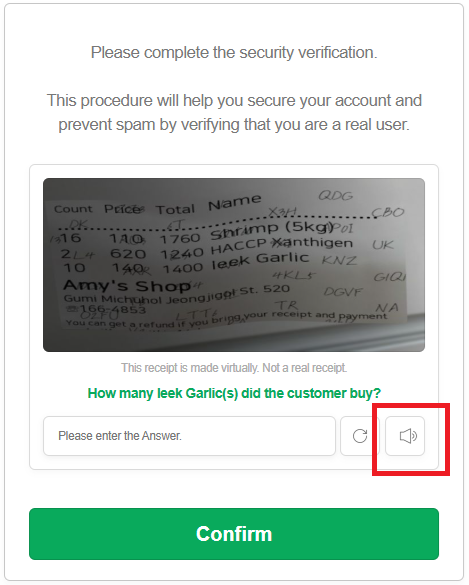
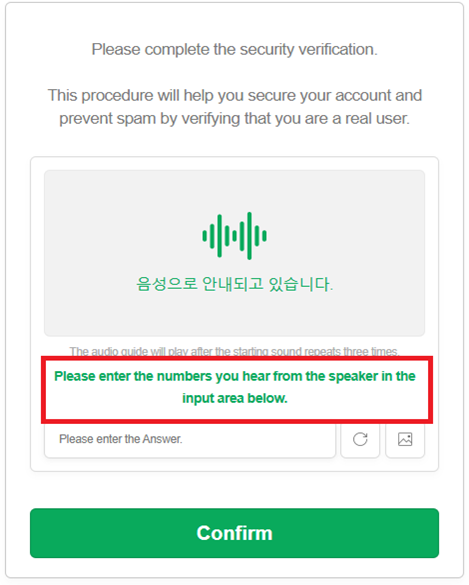
The bills_audio audio captcha is an audio version of the “receipt captcha”, where generated images or data simulate receipts and may contain digits, amounts, and dates. In this type of task, the user is asked to listen to an audio file and verify the correct input based on the information heard. This format may look like the following:
Request parameters
IMPORTANT: obtain the base64 audio directly before creating the task to avoid errors during solving (see section Obtaining audio and converting to Base64).
type<string>requiredComplexImageTask
class<string>requiredrecognition
imagesBase64<array>requiredBase64-encoded audio wrapped in an array.
Example: ["UklGRnjuAwBXQVZFZm10...f/2f/9/6z/vf8MAAAA"]
Task (inside metadata)<string>requiredTask name: "bills_audio"
PayloadType (inside metadata)<string>requiredType of data sent in the task: "Audio"
Create task method
https://api.capmonster.cloud/createTask
Request example
{
    "clientKey": "API_KEY",
    "task": {
        "type": "ComplexImageTask",
        "class": "recognition",
        "imagesBase64": [
            "UklGRnjuAwBXQVZFZm10...f/2f/9/6z/vf8MAAAA"
        ],
        "metadata": {
            "Task": "bills_audio",
            "PayloadType": "Audio"
        }
    }
}
Response example
{
    "errorId": 0,
    "taskId": 143998457
}
Get task result method
https://api.capmonster.cloud/getTaskResult
Request example
{
    "clientKey": "API_KEY",
    "taskId": 143998457
}
Response example:
The result contains digits from the audio:
{
  "solution": {
      "answer": [6, 8, 4, 1, 2, 3],
      "metadata": {"AnswerType": "Text"}
  },
  "cost": 0.0008,
  "status": "ready",
  "errorId": 0,
  "errorCode": null,
  "errorDescription": null
}
Obtaining audio and converting to Base64
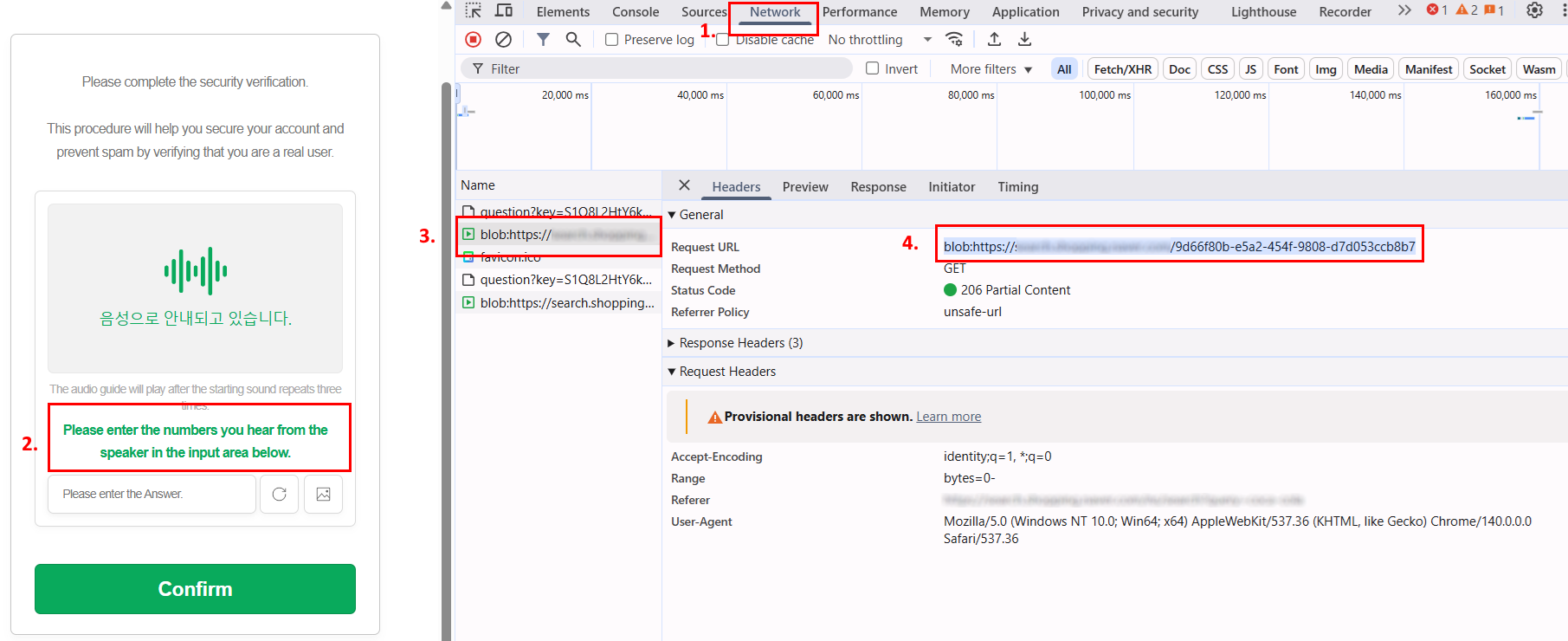
- Open the captcha page and launch DevTools, then go to the Network tab.
- Activate the audio mode of the captcha by clicking the corresponding button.
- In the request list, find an address like:
blob:https://example.com/3be79ac6-1b3d-43ef-9a8a-7ad8877b3606 - Copy this URL and open it in the browser address bar — the captcha audio file in .wav format will open.
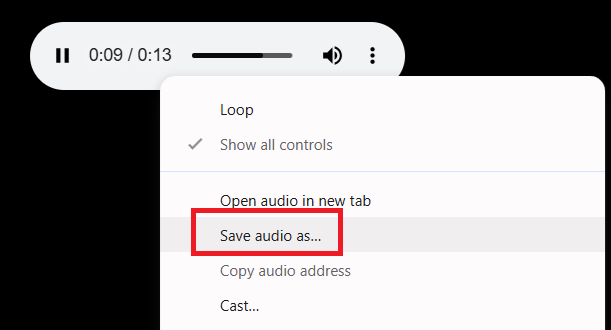
- Save the file and convert the .wav file to Base64 using any convenient method — for example, with Node.js:
const fs = require("fs");

// Path to the source .wav file
const filePath = "C:\\Users\\User\\Downloads\\file-acbe-4fb3-9f8e-f989ba6c7fde.wav";

const fileBuffer = fs.readFileSync(filePath);

// Convert to Base64
const base64 = fileBuffer.toString("base64");

// Save Base64 string to a text file
fs.writeFileSync("output.txt", base64);

console.log("File successfully converted to Base64 and saved as output.txt");
- Use the resulting Base64 string in the CapMonster Cloud task request.
Use the SDK library
- JavaScript / TypeScript
- Python
Show code (for browser)
// https://github.com/CapMonsterCloud/capmonster-nodejs-captcha-solver

import {
  CapMonsterCloudClientFactory,
  ClientOptions,
  ComplexImageTaskRecognitionRequest
} from "@zennolab_com/capmonstercloud-client";

document.addEventListener("DOMContentLoaded", async () => {

  const API_KEY = "YOUR_API_KEY"; // Specify your CapMonster Cloud API key

  const client = CapMonsterCloudClientFactory.Create(
    new ClientOptions({ clientKey: API_KEY })
  );

  // Proxies are not required for ComplexImageTaskRecognitionRequest
  const billsAudioRequest = new ComplexImageTaskRecognitionRequest({
    imagesBase64: ["your_audio_base64"],
    metaData: {
      Task: "bills_audio",
      PayloadType: "Audio",
    },
  });

  // You can check your balance if necessary
  const balance = await client.getBalance();
  console.log("Balance:", balance);

  const result = await client.Solve(billsAudioRequest);
  console.log("Solution:", result.solution);
});
Show code (Node.js)
// https://github.com/CapMonsterCloud/capmonster-nodejs-captcha-solver

const {
  CapMonsterCloudClientFactory,
  ClientOptions,
  ComplexImageTaskRecognitionRequest,
} = require("@zennolab_com/capmonstercloud-client");

const API_KEY = "YOUR_API_KEY"; // Specify your CapMonster Cloud API key

async function solveBillsAudio() {
  const client = CapMonsterCloudClientFactory.Create(
    new ClientOptions({ clientKey: API_KEY }),
  );
  // Proxies are not required for ComplexImageTaskRecognitionRequest
  const billsAudioRequest = new ComplexImageTaskRecognitionRequest({
    imagesBase64: ["your_audio_base64"],
    metaData: {
      Task: "bills_audio",
      PayloadType: "Audio",
    },
  });

  // You can check your balance if necessary
  const balance = await client.getBalance();
  console.log("Balance:", balance);

  const result = await client.Solve(billsAudioRequest);
  console.log("Solution:", result.solution);
}

solveBillsAudio().catch(console.error);
Show code
# https://github.com/CapMonsterCloud/capmonster-python-captcha-solver

import asyncio

from capmonstercloudclient import CapMonsterClient, ClientOptions
from capmonstercloudclient.requests import RecognitionComplexImageTaskRequest

API_KEY = "YOUR_API_KEY"  # Specify your CapMonster Cloud API key


async def solve_bills_audio():
    client = CapMonsterClient(
        options=ClientOptions(api_key=API_KEY)
    )

    # Proxies are not required for RecognitionComplexImageTaskRequest
    bills_audio_request = RecognitionComplexImageTaskRequest(
        imagesBase64=[
            "your_audio_base64"
        ],
        metadata={
            "Task": "bills_audio",
            "PayloadType": "Audio",
        },
    )

    # You can check your balance if necessary
    balance = await client.get_balance()
    print("Balance:", balance)

    result = await client.solve_captcha(bills_audio_request)
    print("Solution:", result)


asyncio.run(solve_bills_audio())