GeeTest

-
CapMonster Cloud 默认通过内置代理工作——这些代理已包含在费用内。仅当网站不接受令牌或对内置服务的访问受限时,才需要指定您自己的代理。
-
暂不支持带有 IP 授权的代理。
对象结构
对于 GeeTest V3:
-
gt、challenge和geetestApiServerSubdomain参数可以在 GeeTest 初始化的 JavaScript 代码中传递,例如在initGeetest函数中。 -
某些参数也可能出现在页面的 HTML 代码或网络请求中。对于 GeeTest V3,必须在 CAPTCHA 初始化之前获取
challenge值。

对于 GeeTest V4,gt 参数中传递的是 captcha_id 的值。

GeeTest V3
任务示例
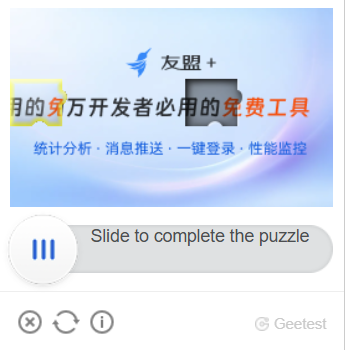
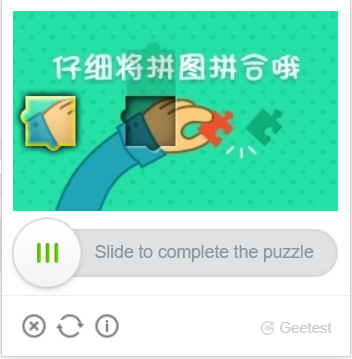
以下是 CapMonster Cloud 当前支持的 GeeTest V3 任务类型示例:

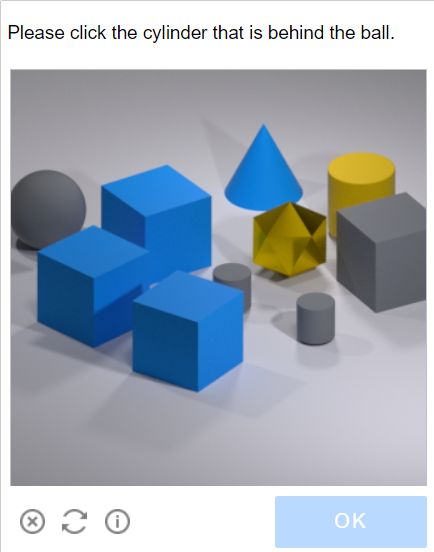
请求参数
重要提示:GeeTest V3 中的
challenge参数是动态的。
请在创建每个任务之前、且在页面上的 CAPTCHA 初始化之前获取新的值。CAPTCHA 加载后,之前获取的challenge将失效。
type<string>requiredGeeTestTask
websiteURL<string>required初始化验证码的页面地址。正确的 URL 通常会在向 https://api-na.geetest.com/gettype.php 发起请求时,通过 Referer 请求头传递。例如,您可能位于 https://example.com#login 页面,但实际上验证码的初始化是在 https://example.com 页面上执行的。
gt<string>required域名的 GeeTest 标识密钥 gt。这是一个静态值,很少更新。
challenge<string>required only for V3动态密钥。创建每个任务之前,都必须获取新的 challenge 值。
重要: 请在页面上的 CAPTCHA 初始化之前获取 challenge。
如果 CAPTCHA 已经加载,获取到的值将失效。向 CapMonster Cloud API 发送该值时,将返回错误 ERROR_INVALID_TASK,并提示参数无效。
version<integer>required3
geetestApiServerSubdomain<string>optionalGeetest API 服务器的子域名(必须不同于 api.geetest.com)。
可选参数。某些网站可能需要。
geetestGetLib<string>optional用于在页面上显示验证码的脚本路径。
可选参数。某些网站可能需要。
请以字符串形式发送 JSON。
userAgent<string>optional浏览器 User-Agent。请使用 CapMonster Cloud 当前支持的值:userAgentPlaceholder
可通过以下地址获取最新值:https://capmonster.cloud/api/useragent/actual。
proxyType<string>optionalhttp - 常规的 HTTP/HTTPS 代理;
https - 仅当 "http" 不起作用时尝试此选项(某些自定义代理需要);
socks4 - socks4 代理;
socks5 - socks5 代理。
proxyAddress<string>optional代理IPv4/IPv6地址。禁止使用:
- 透明代理(客户端IP可见);
- 本地机器代理。
proxyPort<integer>optional代理端口。
proxyLogin<string>optional代理服务器登录名。
proxyPassword<string>optional代理服务器密码。
创建任务
- GeeTestTask(无代理)
- GeeTestTask(使用代理时)
https://api.capmonster.cloud/createTask
请求示例
{
  "clientKey": "API_KEY",
  "task": {
    "type": "GeeTestTask",
    "websiteURL": "https://yourwebsite.com/page-with-geetest",
    "gt": "gt-value",
    "challenge": "challenge-value",
    "version": 3,
    "geetestApiServerSubdomain": "example.api.geetest.com"

  }
}
响应示例
{
  "errorId":0,
  "taskId":407533072
}
https://api.capmonster.cloud/createTask
请求示例
{
  "clientKey": "API_KEY",
  "task": {
    "type": "GeeTestTask",
    "websiteURL": "https://yourwebsite.com/page-with-geetest",
    "gt": "gt-value",
    "challenge": "challenge-value",
    "version": 3,
    "geetestApiServerSubdomain": "example.api.geetest.com",
    "userAgent": "userAgentPlaceholder",
    "proxyType": "your-proxy-type",
    "proxyAddress": "your-proxy-address",
    "proxyPort": 1234,
    "proxyLogin": "your-proxy-login",
    "proxyPassword": "your-proxy-password"
  }
}
响应示例
{
  "errorId":0,
  "taskId":407533072
}
使用 getTaskResult 方法获取 GeeTest 识别结果。根据系统负载,您将在 10 到 30 秒内收到响应。
Get task result
https://api.capmonster.cloud/getTaskResult
请求示例
{
  "clientKey":"API_KEY",
  "taskId": 407533072
}
响应示例
{
  "errorId": 0,
  "status": "ready",
  "solution": {
    "challenge": "0f759dd1ea6c4wc76cedc2991039ca4f23",
    "validate": "6275e26419211d1f526e674d97110e15",
    "seccode": "510cd9735583edcb158601067195a5eb|jordan"
  }
}
| 属性 | 类型 | 描述 |
|---|---|---|
| challenge | String | 在目标网站上提交表单时需要全部三个参数。 |
| validate | String | |
| seccode | String |
如何查找创建任务所需的所有参数
手动方式
- 在浏览器中打开显示 GeeTest V3 的网站。
- 打开开发者工具(DevTools),然后切换到 Network 选项卡。
- 重新加载页面,以记录从页面加载开始时产生的网络请求。
- 找到发送到目标网站服务器的请求,其响应中包含 GeeTest 参数,包括
gt和challenge。
必须在 CAPTCHA 初始化之前 获取 challenge 值,也就是在发送如下 GeeTest 请求之前:
https://api.geetest.com/gettype.php?gt=...
在 CAPTCHA 初始化之前,网站可能会先从自己的服务器获取 GeeTest 参数。要找到当前有效的 challenge 值,请检查发送到目标网站域名的请求及其响应。
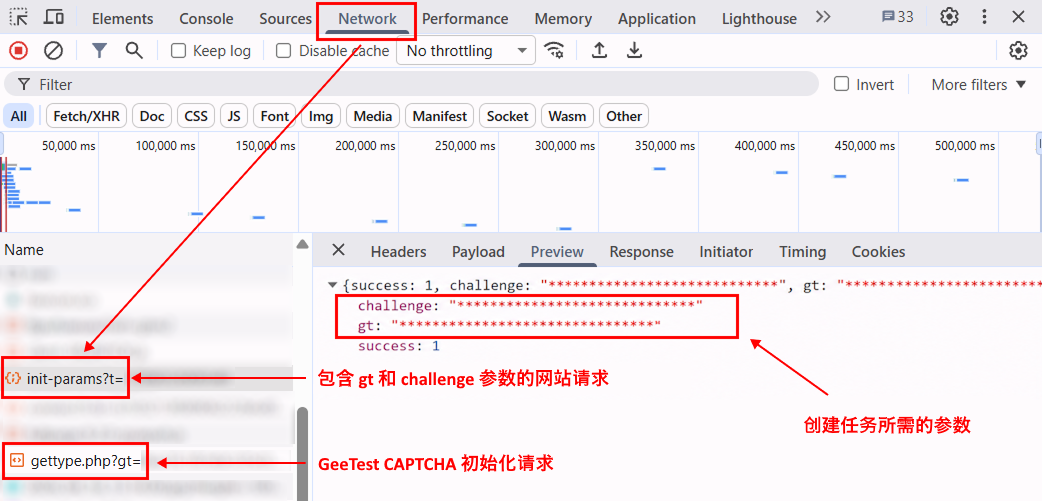
在某些情况下,网站会对从自身服务器获取的数据进行加密,因此 challenge 值可能不会以明文形式出现在响应中。此时,可以从 GeeTest 请求参数中获取该值,例如:
https://api.geetest.com/get.php?gt=...
和/或:
https://api.geevisit.com/ajax.php?gt=...
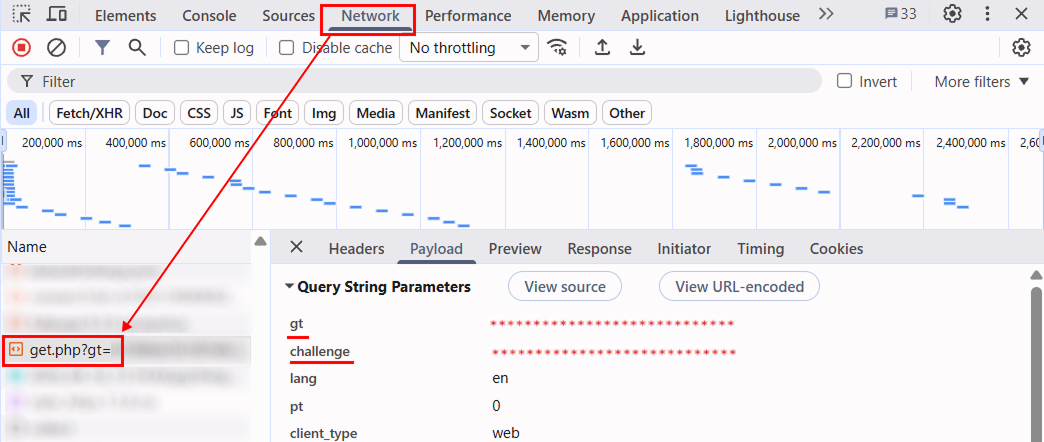
使用此方式时,需要从请求中获取参数,并在请求发送之前 阻止对 GeeTest API 的请求。如果请求已经发送并且 CAPTCHA 已加载,则该请求中使用的 challenge 值将失效。
获取当前有效的 gt 和 challenge 值后,使用它们在 CapMonster Cloud 中创建 GeeTest V3 任务。
自动方式
GeeTest V3 参数可以通过两种方式自动获取。请根据目标网站的实现方式选择合适的方法。
从网站服务器响应中获取参数
如果网站服务器以明文形式返回 gt 和 challenge,请在创建任务之前再次发送相应请求。
例如:
https://example.com/api/v1/captcha/gee-test/init-params
- JavaScript
- Python
- C#
显示代码(浏览器内)
async function getGeeTestV3Params() {
  // 将 URL 替换为您网站实际使用的请求,
  // 该请求的响应中应返回 gt 和 challenge。
  // 如果请求包含动态参数,
  // 请在发送请求前动态生成这些参数。
  const timestamp = Date.now();

  const response = await fetch(
    `https://example.com/api/v1/captcha/gee-test/init-params?t=${timestamp}`
  );

  if (!response.ok) {
    throw new Error(`Request failed: ${response.status}`);
  }

  const data = await response.json();

  const gt = data.gt;
  const challenge = data.challenge;

  if (!gt || !challenge) {
    throw new Error("无法获取 gt 或 challenge");
  }

  console.log({ gt, challenge });

  return { gt, challenge };
}

getGeeTestV3Params().catch(console.error);
显示代码(Node.js)
async function getGeeTestV3Params() {
  // 将 URL 替换为您网站实际使用的请求,
  // 该请求的响应中应返回 gt 和 challenge。
  // 如果请求包含动态参数,
  // 请在发送请求前动态生成这些参数。
  const timestamp = Date.now();

  const response = await fetch(
    `https://example.com/api/v1/captcha/gee-test/init-params?t=${timestamp}`
  );

  if (!response.ok) {
    throw new Error(`Request failed: ${response.status}`);
  }

  const data = await response.json();

  const gt = data.gt;
  const challenge = data.challenge;

  if (!gt || !challenge) {
    throw new Error("无法获取 gt 或 challenge");
  }

  console.log({ gt, challenge });

  return { gt, challenge };
}

getGeeTestV3Params().catch(console.error);
显示代码
import time

import requests


def get_geetest_v3_params():
    # 将 URL 替换为您网站实际使用的请求,
    # 该请求的响应中应返回 gt 和 challenge。
    # 如果请求包含动态参数,
    # 请在发送请求前动态生成这些参数。
    timestamp = int(time.time() * 1000)

    response = requests.get(
        "https://example.com/api/v1/captcha/gee-test/init-params",
        params={
            "t": timestamp,
        },
    )
    response.raise_for_status()

    data = response.json()

    gt = data.get("gt")
    challenge = data.get("challenge")

    if not gt or not challenge:
        raise ValueError("无法获取 gt 或 challenge")

    print({
        "gt": gt,
        "challenge": challenge,
    })

    return gt, challenge


get_geetest_v3_params()
显示代码
using System;
using System.Net.Http;
using System.Threading.Tasks;
using Newtonsoft.Json.Linq;

class Program
{
    static async Task GetGeeTestV3Params()
    {
        using var client = new HttpClient();

        // 将 URL 替换为您网站实际使用的请求,
        // 该请求的响应中应返回 gt 和 challenge。
        // 如果请求包含动态参数,
        // 请在发送请求前动态生成这些参数。
        var timestamp = DateTimeOffset.UtcNow.ToUnixTimeMilliseconds();

        var url =
            $"https://example.com/api/v1/captcha/gee-test/init-params?t={timestamp}";

        var response = await client.GetAsync(url);

        response.EnsureSuccessStatusCode();

        var content = await response.Content.ReadAsStringAsync();
        var data = JObject.Parse(content);

        var gt = data["gt"]?.ToString();
        var challenge = data["challenge"]?.ToString();

        if (string.IsNullOrEmpty(gt) || string.IsNullOrEmpty(challenge))
        {
            throw new Exception("无法获取 gt 或 challenge");
        }

        Console.WriteLine($"GT: {gt}");
        Console.WriteLine($"Challenge: {challenge}");
    }

    static async Task Main()
    {
        await GetGeeTestV3Params();
    }
}
从 GeeTest 请求中获取参数
如果网站服务器响应中的 challenge 值不是以明文形式提供,请从相应的 GeeTest 请求中获取该值:
https://api.geetest.com/get.php?gt=...&challenge=...
或:
https://api.geevisit.com/ajax.php?gt=...&challenge=...
从查询参数中获取 gt 和 challenge,并在请求发送之前阻止该请求。
- JavaScript / TypeScript
- Python
显示代码(Playwright)
import { chromium } from "playwright";

async function getGeeTestV3Params(pageUrl) {
  const browser = await chromium.launch({ headless: false });
  const context = await browser.newContext();

  let params = null;

  await context.route("**/*", async (route) => {
    const requestUrl = route.request().url();

    if (
      requestUrl.includes("api.geetest.com/get.php") ||
      requestUrl.includes("api.geevisit.com/ajax.php")
    ) {
      const url = new URL(requestUrl);

      const gt = url.searchParams.get("gt");
      const challenge = url.searchParams.get("challenge");

      if (gt && challenge && !params) {
        params = { gt, challenge };
        console.log(params);
      }

      await route.abort();
      return;
    }

    await route.continue();
  });

  const page = await context.newPage();
  await page.goto(pageUrl);

  await page.waitForTimeout(5000);
  await browser.close();

  if (!params) {
    throw new Error("无法获取 gt 和 challenge");
  }

  return params;
}

getGeeTestV3Params(
  "https://example.com/page-with-geetest"
).catch(console.error);
显示代码(Playwright)
import asyncio
from urllib.parse import urlparse, parse_qs

from playwright.async_api import async_playwright


async def get_geetest_v3_params(page_url):
    params = {}

    async with async_playwright() as p:
        browser = await p.chromium.launch(headless=False)
        context = await browser.new_context()

        async def handle_route(route):
            request_url = route.request.url

            if (
                "api.geetest.com/get.php" in request_url
                or "api.geevisit.com/ajax.php" in request_url
            ):
                query = parse_qs(urlparse(request_url).query)

                gt = query.get("gt", [None])[0]
                challenge = query.get("challenge", [None])[0]

                if gt and challenge and not params:
                    params["gt"] = gt
                    params["challenge"] = challenge
                    print(params)

                await route.abort()
                return

            await route.continue_()

        await context.route("**/*", handle_route)

        page = await context.new_page()
        await page.goto(page_url)

        await asyncio.sleep(5)
        await browser.close()

    if not params:
        raise RuntimeError("无法获取 gt 和 challenge")

    return params


asyncio.run(
    get_geetest_v3_params(
        "https://example.com/page-with-geetest"
    )
)
使用 SDK 库
- JavaScript / TypeScript
- Python
- C#
显示代码(浏览器)
// https://github.com/CapMonsterCloud/capmonster-nodejs-captcha-solver

import {
  CapMonsterCloudClientFactory,
  ClientOptions,
  GeeTestRequest
} from "@zennolab_com/capmonstercloud-client";

document.addEventListener("DOMContentLoaded", async () => {

  const API_KEY = "YOUR_API_KEY"; // 请指定您的 CapMonster Cloud API 密钥

  const client = CapMonsterCloudClientFactory.Create(
    new ClientOptions({ clientKey: API_KEY })
  );

  // 不使用代理的基础示例
  // CapMonster Cloud 会自动使用自己的代理
  let geetestRequest = new GeeTestRequest({
    websiteURL: "https://yourwebsite.com/page-with-geetest",
    gt: "your-gt-value",
    challenge: "your-challenge-value",
    version: 3,
  });

  // 使用您自己的代理的示例
  // 如果您想使用自己的代理,请取消注释此代码块
  /*
  const proxy = {
    proxyType: "https",
    proxyAddress: "123.45.67.89",
    proxyPort: 8080,
    proxyLogin: "username",
    proxyPassword: "password",
  };

  geetestRequest = new GeeTestRequest({
    websiteURL: "https://yourwebsite.com/page-with-geetest",
    gt: "your-gt-value",
    challenge: "your-challenge-value",
    version: 3,
    proxy,
    userAgent: "userAgentPlaceholder",
  });
  */

  // 如有需要,可以检查余额
  const balance = await client.getBalance();
  console.log("Balance:", balance);

  const result = await client.Solve(geetestRequest);
  console.log("Solution:", result.solution);
});
显示代码(Node.js)
// https://github.com/CapMonsterCloud/capmonster-nodejs-captcha-solver

const {
  CapMonsterCloudClientFactory,
  ClientOptions,
  GeeTestRequest,
} = require("@zennolab_com/capmonstercloud-client");

const API_KEY = "YOUR_API_KEY"; // 请指定您的 CapMonster Cloud API 密钥

async function solveGeeTest() {
  const client = CapMonsterCloudClientFactory.Create(
    new ClientOptions({ clientKey: API_KEY }),
  );

  // 不使用代理的基础示例
  // CapMonster Cloud 会自动使用自己的代理
  let geetestRequest = new GeeTestRequest({
    websiteURL: "https://yourwebsite.com/page-with-geetest",
    gt: "your-gt-value",
    challenge: "your-challenge-value",
    version: 3,
  });

  // 使用您自己的代理的示例
  // 如果您想使用自己的代理,请取消注释此代码块
  /*
  const proxy = {
    proxyType: "https",
    proxyAddress: "123.45.67.89",
    proxyPort: 8080,
    proxyLogin: "username",
    proxyPassword: "password",
  };

  geetestRequest = new GeeTestRequest({
    websiteURL: "https://yourwebsite.com/page-with-geetest",
    gt: "your-gt-value",
    challenge: "your-challenge-value",
    version: 3,
    proxy,
    userAgent: "userAgentPlaceholder",
  });
  */

  // 如有需要,可以检查余额
  const balance = await client.getBalance();
  console.log("Balance:", balance);

  const result = await client.Solve(geetestRequest);
  console.log("Solution:", result.solution);
}

solveGeeTest().catch(console.error);
显示代码
# https://github.com/CapMonsterCloud/capmonster-python-captcha-solver

import asyncio

from capmonstercloudclient import CapMonsterClient, ClientOptions
from capmonstercloudclient.requests import GeetestRequest
# 如果您计划使用自己的代理,请导入 ProxyInfo
from capmonstercloudclient.requests.proxy_info import ProxyInfo

API_KEY = "YOUR_API_KEY"  # 请指定您的 CapMonster Cloud API 密钥


async def solve_geetest():
    client = CapMonsterClient(
        options=ClientOptions(api_key=API_KEY)
    )

    # 不使用代理的基础示例
    # CapMonster Cloud 会自动使用自己的代理
    geetest_request = GeetestRequest(
        websiteUrl="https://yourwebsite.com/page-with-geetest",
        gt="your-gt-value",
        challenge="your-challenge-value",
        version=3,
    )

    # 使用您自己的代理的示例
    # 如果您想使用自己的代理,请取消注释此代码块
    """
    proxy = ProxyInfo(
        proxyType="https",
        proxyAddress="123.45.67.89",
        proxyPort=8080,
        proxyLogin="username",
        proxyPassword="password",
    )

    geetest_request = GeetestRequest(
        websiteUrl="https://yourwebsite.com/page-with-geetest",
        gt="your-gt-value",
        challenge="your-challenge-value",
        version=3,
        userAgent="userAgentPlaceholder",
        proxy=proxy,
    )
    """

    # 如有需要,可以检查余额
    balance = await client.get_balance()
    print("Balance:", balance)

    result = await client.solve_captcha(geetest_request)
    print("Solution:", result)


asyncio.run(solve_geetest())
显示代码
// https://github.com/CapMonsterCloud/capmonster-dotnet-captcha-solver

using System;
using System.Threading.Tasks;
using Zennolab.CapMonsterCloud;
using Zennolab.CapMonsterCloud.Requests;

class Program
{
    static async Task Main(string[] args)
    {
        // 请指定您的 CapMonster Cloud API 密钥
        var clientOptions = new ClientOptions
        {
            ClientKey = "YOUR_API_KEY"
        };

        var cmCloudClient = CapMonsterCloudClientFactory.Create(clientOptions);

        // 不使用代理的基础示例
        // CapMonster Cloud 会自动使用自己的代理
        var geetestRequest = new GeeTestRequest
        {
            WebsiteUrl = "https://yourwebsite.com/page-with-geetest",
            Gt = "your-gt-value",
            Challenge = "your-challenge-value",
            Version = 3
        };

        // 使用您自己的代理的示例
        // 如果您想使用自己的代理,请取消注释此代码块
        /*
        geetestRequest = new GeeTestRequest
        {
            WebsiteUrl = "https://yourwebsite.com/page-with-geetest",
            Gt = "your-gt-value",
            Challenge = "your-challenge-value",
            Version = 3,
            UserAgent = "userAgentPlaceholder",

            Proxy = new ProxyContainer(
                "123.45.67.89",
                8080,
                ProxyType.Http,
                "username",
                "password"
            )
        };
        */

        // 如有需要,可以检查余额
        var balance = await cmCloudClient.GetBalanceAsync();
        Console.WriteLine("Balance: " + balance);

        var geetestResult = await cmCloudClient.SolveAsync(geetestRequest);

        Console.WriteLine($"""
Solution:
  Challenge: {geetestResult.Solution.Challenge}
  Validate:  {geetestResult.Solution.Validate}
  SecCode:   {geetestResult.Solution.SecCode}
""");
    }
}
GeeTest V4
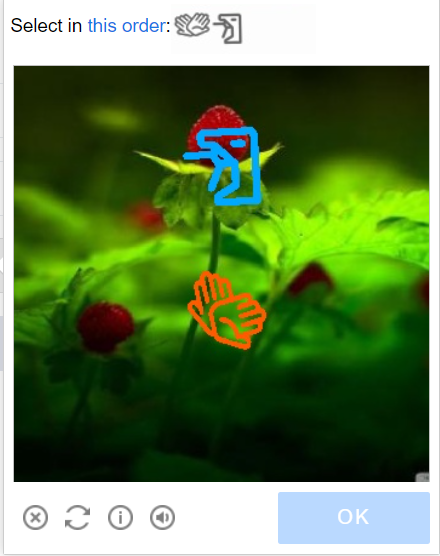
可能的验证码变体
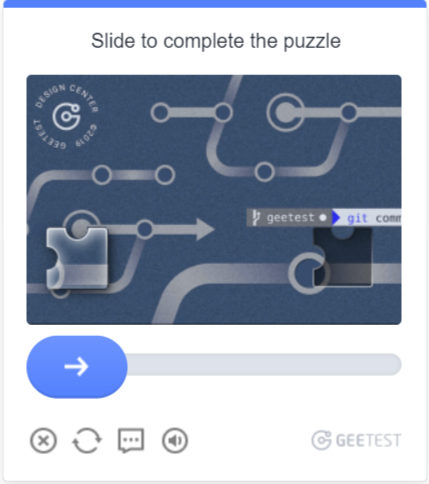
请求参数
type<string>requiredGeeTestTask
websiteURL<string>required解决验证码的页面地址。
gt<string>required域名的 GeeTest 标识密钥——参数 captcha_id。
version<integer>required4
geetestApiServerSubdomain<string>optionalGeetest API 服务器的子域名(必须不同于 api.geetest.com)。
可选参数。某些网站可能需要。
geetestGetLib<string>optional用于在页面上显示验证码的脚本路径。
可选参数。某些网站可能需要。
请以字符串形式发送 JSON。
initParameters<object>optional版本 4 的附加参数,与 "riskType" 一起使用(例如 slide)。
userAgent<string>optional浏览器 User-Agent。请使用 CapMonster Cloud 当前支持的值:userAgentPlaceholder
可通过以下地址获取最新值:https://capmonster.cloud/api/useragent/actual。
proxyType<string>optionalhttp - 常规的 HTTP/HTTPS 代理;
https - 仅当 "http" 不起作用时尝试此选项(某些自定义代理需要);
socks4 - socks4 代理;
socks5 - socks5 代理。
proxyAddress<string>optionalIPv4/IPv6 代理 IP 地址。不允许使用:
- 使用主机名;
- 使用透明代理(可以看到客户端 IP);
- 使用本地机器上的代理。
proxyPort<integer>optional代理端口。
proxyLogin<string>optional代理服务器登录名。
proxyPassword<string>optional代理服务器密码。
Create task method
- GeeTestTask(无代理)
- GeeTestTask (using proxy)
https://api.capmonster.cloud/createTask
请求示例
{
  "clientKey": "API_KEY",
  "task": {
    "type": "GeeTestTask",
    "websiteURL": "https://yourwebsite.com/page-with-geetest",
    "gt": "captcha-id-value",
    "version": 4,
    "initParameters": {
      "riskType": "risk-type-value"
    }
  }
}
响应示例
{
  "errorId":0,
  "taskId":407533072
}
https://api.capmonster.cloud/createTask
请求示例
{
  "clientKey": "API_KEY",
  "task": {
    "type": "GeeTestTask",
    "websiteURL": "https://yourwebsite.com/page-with-geetest",
    "gt": "captcha-id-value",
    "version": 4,
    "initParameters": {
      "riskType": "risk-type-value"
    },
    "proxyType": "your-proxy-type",
    "proxyAddress": "your-proxy-address",
    "proxyPort": 1234,
    "proxyLogin": "your-proxy-login",
    "proxyPassword": "your-proxy-password",
    "userAgent": "userAgentPlaceholder"
  }
}
响应示例
{
  "errorId":0,
  "taskId":407533072
}
使用 getTaskResult 方法获取 GeeTest 识别结果。根据系统负载,您将在 10 到 30 秒内收到响应。
获取任务结果方法
https://api.capmonster.cloud/getTaskResult
请求示例
{
  "clientKey":"API_KEY",
  "taskId": 407533072
}
响应示例
{
  "errorId": 0,
  "status": "ready",
  "solution": {
    "captcha_id": "f5c2ad5a8a3cf37192d8b9c039950f79",
    "lot_number": "bcb2c6ce2f8e4e9da74f2c1fa63bd713",
    "pass_token": "edc7a17716535a5ae624ef4707cb6e7e478dc557608b068d202682c8297695cf",
    "gen_time": "1683794919",
    "captcha_output": "XwmTZEJCJEnRIJBlvtEAZ662T...[cut]...SQ3fX-MyoYOVDMDXWSRQig56"
  }
}
| 属性 | 类型 | 描述 |
|---|---|---|
| captcha_id | String | 在目标网站提交表单时,这五个参数都是必需的。 input[name=captcha_id] input[name=lot_number] input[name=pass_token] input[name=gen_time] input[name=captcha_output] |
| lot_number | String | |
| pass_token | String | |
| gen_time | String | |
| captcha_output | String |
如何查找任务创建所需的所有参数
手动方式
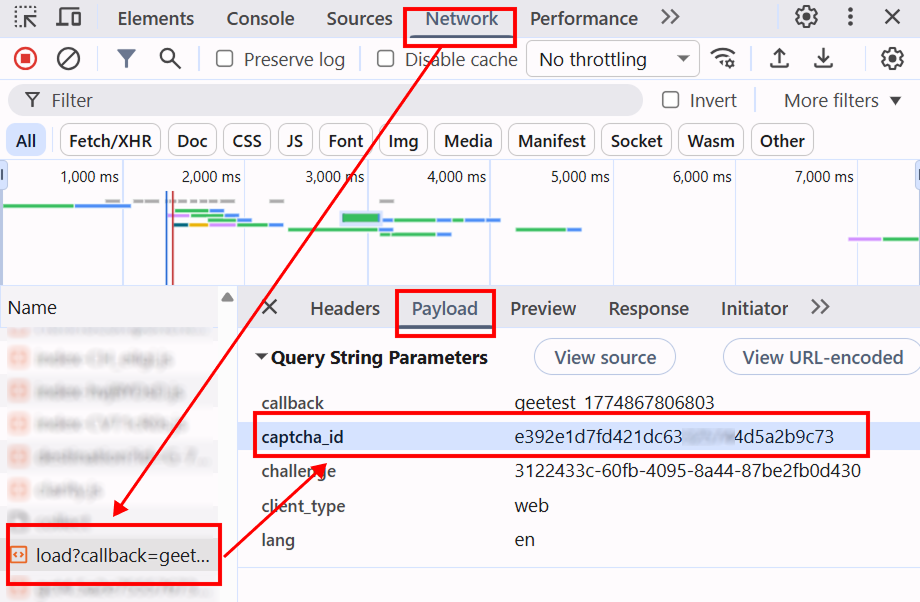
- 在浏览器中打开显示验证码的网站。
- 打开开发者工具(DevTools),切换到 Network 选项卡。
- 刷新页面(F5),以捕获所有网络请求。
- 在搜索框(Filter)中输入
load或captcha,以快速找到所需请求。 - 找到类似
load?callback=...的请求 —— 通常其中包含验证码参数。 - 点击该请求,并打开 Payload 选项卡以查看所需数据。
自动方法
一种方便的自动化获取所有必要参数的方式。 某些参数每次页面加载时都会重新生成,因此需要通过浏览器(普通或无头模式,如使用Playwright)提取它们。 由于动态参数值的有效期很短,获取后必须立即解决验证码。
提供的代码片段是用于熟悉参数提取的基本示例。具体实现将取决于验证码页面、其结构及使用的HTML元素/选择器。
- JavaScript
- Python
- C#
显示代码(浏览器中运行)
(function() {
  function getQueryParams(url) {
    const params = new URLSearchParams(new URL(url).search);
    const captchaId = params.get('captcha_id');
    const riskType = params.get('risk_type');
    return { captchaId, riskType };
  }

  const observer = new PerformanceObserver((list) => {
    const entries = list.getEntriesByType('resource');
    entries.forEach((entry) => {
      if (entry.name.includes('https://gcaptcha4.geetest.com/load?')) {
        const { captchaId, riskType } = getQueryParams(entry.name);
        if (captchaId) {
          console.log('GeeTest v4 detected (via PerformanceObserver):');
          console.log({ captchaId, riskType });
        }
      }
    });
  });

  observer.observe({ type: 'resource', buffered: true });
})();
显示代码(Node.js)
import { chromium } from "playwright";

async function detectGeeTestV4(pageUrl) {
  const result = { version: null, data: {} };

  const browser = await chromium.launch({ headless: false });
  const context = await browser.newContext();
  const page = await context.newPage();

  page.on("response", async (response) => {
    const url = response.url();

    if (url.includes("https://gcaptcha4.geetest.com/load?")) {
      const urlParams = new URLSearchParams(url.split("?")[1]);
      const captchaId = urlParams.get("captcha_id");
      const riskType = urlParams.get("risk_type");

      if (captchaId && !result.version) {
        result.version = "v4";
        result.data = {
          captchaId: captchaId,
          riskType: riskType,
        };

        console.log("GeeTest v4 detected:");
        console.log(result.data);
      }
    }
  });

  await page.goto(pageUrl, { waitUntil: "networkidle" });
  await page.waitForTimeout(20000);

  if (!result.version) {
    console.log("error");
  }

  await browser.close();
  return result;
}

detectGeeTestV4("https://example.com").then((result) => {
  console.log(result);
});
显示代码
import asyncio
from playwright.async_api import async_playwright
from urllib.parse import urlparse, parse_qs

async def detect_geetest_v4(page_url):
    result = {"version": None, "data": {}}

    async with async_playwright() as p:
        browser = await p.chromium.launch(headless=False)
        context = await browser.new_context()
        page = await context.new_page()

        async def on_request(request):
            url = request.url
            if "https://gcaptcha4.geetest.com/load?" in url:
                query = parse_qs(urlparse(url).query)
                captcha_id = query.get("captcha_id", [None])[0]
                risk_type = query.get("risk_type", [None])[0]

                if captcha_id and not result["version"]:
                    result["version"] = "v4"
                    result["data"] = {
                        "captchaId": captcha_id,
                        "riskType": risk_type
                    }

                    print("GeeTest v4 detected:")
                    print(result["data"])

        context.on("request", on_request)

        await page.goto(page_url, wait_until="networkidle")
        await asyncio.sleep(10)

        if not result["version"]:
            print("error")

        await browser.close()
        return result

asyncio.run(detect_geetest_v4("https://www.example.com"))
显示代码
using System;
using System.Threading.Tasks;
using Microsoft.Playwright;
using System.Web;

class Program
{
    public static async Task Main(string[] args)
    {
        using var playwright = await Playwright.CreateAsync();
        var browser = await playwright.Chromium.LaunchAsync(new BrowserTypeLaunchOptions
        {
            Headless = false
        });

        var context = await browser.NewContextAsync();
        var page = await context.NewPageAsync();

        bool detected = false;

        page.Request += (_, request) =>
        {
            var url = request.Url;

            if (url.Contains("https://gcaptcha4.geetest.com/load?"))
            {
                var uri = new Uri(url);
                var queryParams = HttpUtility.ParseQueryString(uri.Query);
                var captchaId = queryParams.Get("captcha_id");
                var riskType = queryParams.Get("risk_type");

                if (!string.IsNullOrEmpty(captchaId) && !detected)
                {
                    detected = true;

                    Console.WriteLine("GeeTest v4 detected:");
                    Console.WriteLine($"CaptchaId: {captchaId}");
                    Console.WriteLine($"RiskType: {riskType}");
                }
            }
        };

        await page.GotoAsync("https://www.example.com/", new PageGotoOptions
        {
            WaitUntil = WaitUntilState.NetworkIdle
        });

        await Task.Delay(10000);

        await browser.CloseAsync();
    }
}
使用 SDK 库
- JavaScript / TypeScript
- Python
- C#
显示代码(浏览器)
// https://github.com/CapMonsterCloud/capmonster-nodejs-captcha-solver

import {
  CapMonsterCloudClientFactory,
  ClientOptions,
  GeeTestRequest
} from "@zennolab_com/capmonstercloud-client";

document.addEventListener("DOMContentLoaded", async () => {

  const API_KEY = "YOUR_API_KEY"; // 请指定您的 CapMonster Cloud API 密钥

  const client = CapMonsterCloudClientFactory.Create(
    new ClientOptions({ clientKey: API_KEY })
  );

  // 不使用代理的基础示例
  // CapMonster Cloud 会自动使用自己的代理
  let geetestRequest = new GeeTestRequest({
    websiteURL: "https://yourwebsite.com/page-with-geetest",
    gt: "your-gt-value",
    version: "4",
    initParameters: {
      riskType: "your-risk-type",
    },
  });

  // 使用您自己的代理的示例
  // 如果您想使用自己的代理,请取消注释此代码块
  /*
  const proxy = {
    proxyType: "https",
    proxyAddress: "123.45.67.89",
    proxyPort: 8080,
    proxyLogin: "username",
    proxyPassword: "password",
  };

  geetestRequest = new GeeTestRequest({
    websiteURL: "https://yourwebsite.com/page-with-geetest",
    gt: "your-gt-value",
    version: "4",
    initParameters: {
      riskType: "your-risk-type",
    },
    proxy,
  });
  */

  // 如有需要,可以检查余额
  const balance = await client.getBalance();
  console.log("Balance:", balance);

  const result = await client.Solve(geetestRequest);
  console.log("Solution:", result.solution);
});
显示代码(Node.js)
// https://github.com/CapMonsterCloud/capmonster-nodejs-captcha-solver

const {
  CapMonsterCloudClientFactory,
  ClientOptions,
  GeeTestRequest,
} = require("@zennolab_com/capmonstercloud-client");

const API_KEY = "YOUR_API_KEY"; // 请指定您的 CapMonster Cloud API 密钥

async function solveGeeTest() {
  const client = CapMonsterCloudClientFactory.Create(
    new ClientOptions({ clientKey: API_KEY }),
  );

  // 不使用代理的基础示例
  // CapMonster Cloud 会自动使用自己的代理
  let geetestRequest = new GeeTestRequest({
    websiteURL: "https://yourwebsite.com/page-with-geetest",
    gt: "your-gt-value",
    version: "4",
    initParameters: {
      riskType: "your-risk-type",
    },
  });

  // 使用您自己的代理的示例
  // 如果您想使用自己的代理,请取消注释此代码块
  /*
  const proxy = {
    proxyType: "https",
    proxyAddress: "123.45.67.89",
    proxyPort: 8080,
    proxyLogin: "username",
    proxyPassword: "password",
  };

  geetestRequest = new GeeTestRequest({
    websiteURL: "https://yourwebsite.com/page-with-geetest",
    gt: "your-gt-value",
    version: "4",
    initParameters: {
      riskType: "your-risk-type",
    },
    proxy,
  });
  */

  // 如有需要,可以检查余额
  const balance = await client.getBalance();
  console.log("Balance:", balance);

  const result = await client.Solve(geetestRequest);
  console.log("Solution:", result.solution);
}

solveGeeTest().catch(console.error);
显示代码
# https://github.com/CapMonsterCloud/capmonster-python-captcha-solver

import asyncio

from capmonstercloudclient import CapMonsterClient, ClientOptions
from capmonstercloudclient.requests import GeetestRequest
# 如果您计划使用自己的代理,请导入 ProxyInfo
from capmonstercloudclient.requests.proxy_info import ProxyInfo

API_KEY = "YOUR_API_KEY"  # 请指定您的 CapMonster Cloud API 密钥


async def solve_geetest():
    client = CapMonsterClient(
        options=ClientOptions(api_key=API_KEY)
    )

    # 不使用代理的基础示例
    # CapMonster Cloud 会自动使用自己的代理
    geetest_request = GeetestRequest(
        websiteUrl="https://yourwebsite.com/page-with-geetest",
        gt="your-gt-value",
        version="4",
        initParameters={
            "riskType": "your-risk-type",
        },
    )

    # 使用您自己的代理的示例
    # 如果您想使用自己的代理,请取消注释此代码块
    """
    proxy = ProxyInfo(
        proxyType="https",
        proxyAddress="123.45.67.89",
        proxyPort=8080,
        proxyLogin="username",
        proxyPassword="password",
    )

    geetest_request = GeetestRequest(
        websiteUrl="https://yourwebsite.com/page-with-geetest",
        gt="your-gt-value",
        version="4",
        initParameters={
            "riskType": "your-risk-type",
        },
        proxy=proxy,
        userAgent="userAgentPlaceholder",
    )
    """

    # 如有需要,可以检查余额
    balance = await client.get_balance()
    print("Balance:", balance)

    result = await client.solve_captcha(geetest_request)
    print("Solution:", result)


asyncio.run(solve_geetest())
显示代码
// https://github.com/CapMonsterCloud/capmonster-dotnet-captcha-solver

using System;
using System.Collections.Generic;
using System.Threading.Tasks;
using Zennolab.CapMonsterCloud;
using Zennolab.CapMonsterCloud.Requests;

class Program
{
    static async Task Main(string[] args)
    {
        // 请指定您的 CapMonster Cloud API 密钥
        var clientOptions = new ClientOptions
        {
            ClientKey = "YOUR_API_KEY"
        };

        var cmCloudClient = CapMonsterCloudClientFactory.Create(clientOptions);

        // 不使用代理的基础示例
        // CapMonster Cloud 会自动使用自己的代理
        var geetestRequest = new GeeTestRequest
        {
            WebsiteUrl = "https://yourwebsite.com/page-with-geetest",
            Gt = "your-gt-value",
            Version = 4,
            InitParameters = new Dictionary<string, string>
            {
                { "riskType", "your-risk-type" }
            }
        };

        // 使用您自己的代理的示例
        // 如果您想使用自己的代理,请取消注释此代码块
        /*
        geetestRequest = new GeeTestRequest
        {
            WebsiteUrl = "https://yourwebsite.com/page-with-geetest",
            Gt = "your-gt-value",
            Version = 4,
            InitParameters = new Dictionary<string, string>
            {
                { "riskType", "your-risk-type" }
            },

            Proxy = new ProxyContainer(
                "123.45.67.89",
                8080,
                ProxyType.Http,
                "username",
                "password"
            )
        };
        */

        // 如有需要,可以检查余额
        var balance = await cmCloudClient.GetBalanceAsync();
        Console.WriteLine("Balance: " + balance);

        var geetestResult = await cmCloudClient.SolveAsync(geetestRequest);

        Console.WriteLine($"""
Solution:
  CaptchaId:     {geetestResult.Solution.CaptchaId}
  LotNumber:     {geetestResult.Solution.LotNumber}
  PassToken:     {geetestResult.Solution.PassToken}
  GenTime:       {geetestResult.Solution.GenTime}
  CaptchaOutput: {geetestResult.Solution.CaptchaOutput}
""");
    }
}
app.gal**.com 上的 GeeTest 解决方案特点
本节内容 仅适用于 app.gal**.com 网站上的 GeeTest 验证码。这些值不应在其他网站上使用。
何时使用 challenge 字段?
对于 app.gal**.com 网站,需要根据执行的操作指定 challenge 字段的值。如果未指定该字段,则默认使用 AddTypedCredentialItems,但这并不适用于所有场景。
challenge 可选值列表:
app.gal**.com 网站上的操作 | challenge 值 |
|---|---|
| 发送邮箱验证码 | SendEmailCode |
| 确认操作(例如登录) | SendVerifyCode |
| 领取奖励 | ClaimUserTask |
| 打开神秘盒子 | OpenMysteryBox |
| 在 GGShop 购买 | BuyGGShop |
| 准备购买抽奖票 | PrepareBuyGGRaffleTickets |
| 添加凭据 | AddTypedCredentialItems |
| 创建报告工单 | CreateReportTicket |
| 参加活动 | PrepareParticipate |
| 更新凭据数据 | RefreshCredentialValue |
| 同步数据 | SyncCredentialValue |
| 社交登录 | GetSocialAuthUrl |
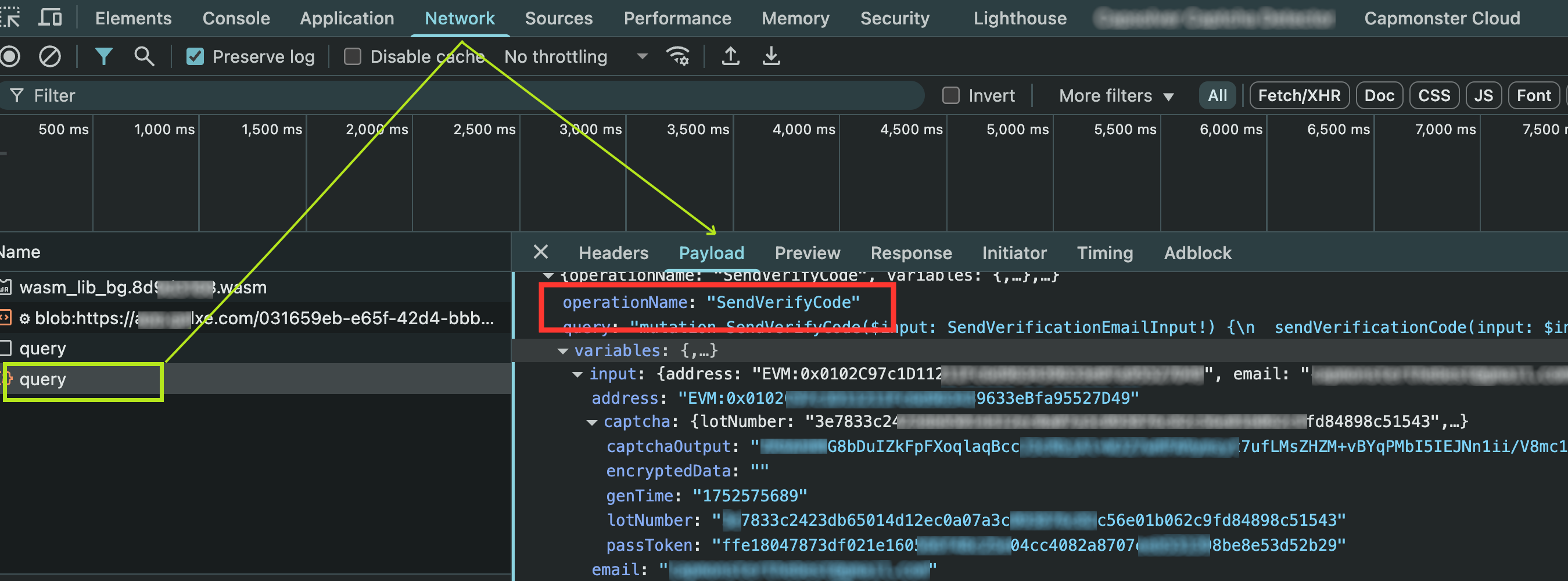
challenge的值必须与 DevTools 的网络请求(Network标签)中看到的operationName一致。
提交任务示例
{
  "type": "GeeTestTask",
  "websiteURL": "https://app.gal**.com/accountSetting/social",
  "gt": "244bcb8b9846215df5af4c624a750db4",
  "challenge": "SendVerifyCode",
  "version": 3
}
注意:gal**.com 的 GT key 始终为
244bcb8b9846215df5af4c624a750db4。可以将该值保持为默认。
响应示例
{
  "errorId": 0,
  "errorCode": null,
  "errorDescription": null,
  "solution": {
    "lot_number": "e0c84aab60867ad1316f8606d31ab58d2a54d8a4ca8e78b9339abd8ea62967cb",
    "captcha_output": "7DlZW2dul...cbEA5uIbwg==",
    "pass_token": "ce024389a0926e0d1081792c83e0c46f882084e45e95afa0e148fd03aed3ae10",
    "gen_time": "1753158042",
    "encryptedData": ""
  },
  "status": "ready"
}
encryptedData 字段在网站端通常为空,因为客户端逻辑会忽略它。虽然该值通过 WebAssembly 返回,但在实际中并未使用。