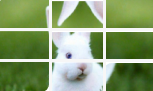
betpunch_3x3_rotate
CapMonster Cloud MCP
还可以使用 CapMonster Cloud MCP 检测并解决 CAPTCHA
注意!
此任务不需要使用代理服务器。
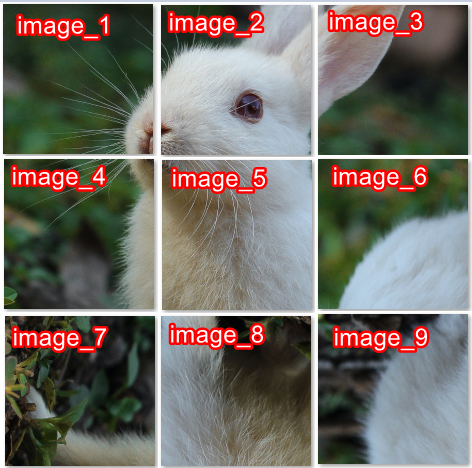
请求必须包含九张图片。图片必须按以下顺序提供。
请求参数
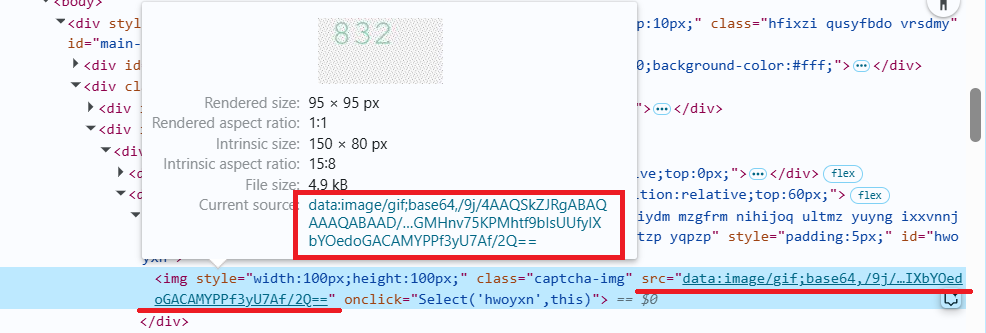
重要提示:在创建任务之前请直接获取 base64 图片,以避免在解题过程中出现错误(参见章节 如何获取 base64)。
type<string>requiredComplexImageTask
class<string>requiredrecognition
imagesBase64<array>requiredbase64 编码的图像数组(不包含 data:image/png;base64, 前缀)。
Task(位于 metadata 中)<string>required任务名称:betpunch_3x3_rotate
创建任务方法
POST
https://api.capmonster.cloud/createTask
请求示例
{
  "clientKey": "API_KEY",
  "task": {
    "type": "ComplexImageTask",
    "class": "recognition",
    "imagesBase64": [
      "image_1_Base64",
      "image_2_Base64",
      "image_3_Base64",
      "image_4_Base64",
      "image_5_Base64",
      "image_6_Base64",
      "image_7_Base64",
      "image_8_Base64",
      "image_9_Base64",
    ],
    "metadata": {
      "Task": "betpunch_3x3_rotate"
    }
  }
}
响应示例
{
  "errorId":0,
  "taskId":407533072
}
获取任务结果方法
POST
https://api.capmonster.cloud/getTaskResult
请求示例
{
  "clientKey":"API_KEY",
  "taskId": 407533072
}
响应示例
"answer":[X,X,X,X,X,X,X,X,X],其中 X 是每张图像对应的 1 到 4 之间的整数值。4 表示无需旋转图像;1–3 表示图像需要逆时针旋转的次数。
{
  "errorId":0,
  "status":"ready",
  "errorCode":null,
  "errorDescription":null,
  "solution":
  {
    "answer":[4,4,4,4,4,3,1,2,2],
    "metadata":{"AnswerType":"NumericArray"}
  }
}
如何获取 Base64
页面中的图片可以以 URL 形式存在,也可以已经被编码为 Base64 格式。要找到所需的值,请在验证码图片上右键,选择 检查(Inspect),然后仔细查看 Elements(元素) 面板或网络请求 —— 在那里你可以找到图片 URL 或已编码的内容。
- 在浏览器中打开显示验证码的网站。
- 右键点击验证码元素并选择 检查(Inspect)。
使用 SDK 库
- JavaScript / TypeScript
- Python
- C#
显示代码(浏览器)
// https://github.com/CapMonsterCloud/capmonster-nodejs-captcha-solver

import {
  CapMonsterCloudClientFactory,
  ClientOptions,
  ComplexImageTaskRecognitionRequest
} from "@zennolab_com/capmonstercloud-client";

document.addEventListener("DOMContentLoaded", async () => {

  const API_KEY = "YOUR_API_KEY"; // 指定您的 CapMonster Cloud API 密钥

  const client = CapMonsterCloudClientFactory.Create(
    new ClientOptions({ clientKey: API_KEY })
  );

  // ComplexImageTaskRecognitionRequest 不需要代理
  const betpunchRequest = new ComplexImageTaskRecognitionRequest({
    imagesBase64: [
      "your_image_1_base64",
      "your_image_2_base64",
      "your_image_3_base64",
      "your_image_4_base64",
      "your_image_5_base64",
      "your_image_6_base64",
      "your_image_7_base64",
      "your_image_8_base64",
      "your_image_9_base64",
    ],
    metaData: {
      Task: "betpunch_3x3_rotate",
    },
  });

  // 如有需要,可以检查余额
  const balance = await client.getBalance();
  console.log("Balance:", balance);

  const result = await client.Solve(betpunchRequest);
  console.log("Solution:", result.solution);
});
显示代码(Node.js)
// https://github.com/CapMonsterCloud/capmonster-nodejs-captcha-solver

const {
  CapMonsterCloudClientFactory,
  ClientOptions,
  ComplexImageTaskRecognitionRequest,
} = require("@zennolab_com/capmonstercloud-client");

const API_KEY = "YOUR_API_KEY"; // 指定您的 CapMonster Cloud API 密钥

async function solveBetpunch3x3Rotate() {
  const client = CapMonsterCloudClientFactory.Create(
    new ClientOptions({ clientKey: API_KEY }),
  );

  // ComplexImageTaskRecognitionRequest 不需要代理
  const betpunchRequest = new ComplexImageTaskRecognitionRequest({
    imagesBase64: [
      "your_image_1_base64",
      "your_image_2_base64",
      "your_image_3_base64",
      "your_image_4_base64",
      "your_image_5_base64",
      "your_image_6_base64",
      "your_image_7_base64",
      "your_image_8_base64",
      "your_image_9_base64",
    ],
    metaData: {
      Task: "betpunch_3x3_rotate",
    },
  });

  // 如有需要,可以检查余额
  const balance = await client.getBalance();
  console.log("Balance:", balance);

  const result = await client.Solve(betpunchRequest);
  console.log("Solution:", result.solution);
}

solveBetpunch3x3Rotate().catch(console.error);
显示代码
# https://github.com/CapMonsterCloud/capmonster-python-captcha-solver

import asyncio

from capmonstercloudclient import CapMonsterClient, ClientOptions
from capmonstercloudclient.requests import RecognitionComplexImageTaskRequest

API_KEY = "YOUR_API_KEY"  # 指定您的 CapMonster Cloud API 密钥


async def solve_betpunch_3x3_rotate():
    client = CapMonsterClient(
        options=ClientOptions(api_key=API_KEY)
    )

    # RecognitionComplexImageTaskRequest 不需要代理
    betpunch_request = RecognitionComplexImageTaskRequest(
        imagesBase64=[
            "your_image_1_base64",
            "your_image_2_base64",
            "your_image_3_base64",
            "your_image_4_base64",
            "your_image_5_base64",
            "your_image_6_base64",
            "your_image_7_base64",
            "your_image_8_base64",
            "your_image_9_base64",
        ],
        metadata={
            "Task": "betpunch_3x3_rotate",
        },
    )

    # 如有需要,可以检查余额
    balance = await client.get_balance()
    print("Balance:", balance)

    result = await client.solve_captcha(betpunch_request)
    print("Solution:", result)


asyncio.run(solve_betpunch_3x3_rotate())
显示代码
// https://github.com/CapMonsterCloud/capmonster-dotnet-captcha-solver

using System;
using System.Threading.Tasks;
using Newtonsoft.Json;
using Zennolab.CapMonsterCloud;
using Zennolab.CapMonsterCloud.Requests;

class Program
{
    static async Task Main(string[] args)
    {
        const string API_KEY = "YOUR_API_KEY"; // 指定您的 CapMonster Cloud API 密钥

        var clientOptions = new ClientOptions
        {
            ClientKey = API_KEY
        };

        var cmCloudClient = CapMonsterCloudClientFactory.Create(clientOptions);

        // RecognitionComplexImageTaskRequest 不需要代理
        var betpunchRequest = new RecognitionComplexImageTaskRequest
        {
            ImagesBase64 = new[]
            {
                "your_image_1_base64",
                "your_image_2_base64",
                "your_image_3_base64",
                "your_image_4_base64",
                "your_image_5_base64",
                "your_image_6_base64",
                "your_image_7_base64",
                "your_image_8_base64",
                "your_image_9_base64"
            },

            Metadata = new RecognitionComplexImageTaskRequest.RecognitionMetadata
            {
                Task = "betpunch_3x3_rotate"
            }
        };

        // 如有需要,可以检查余额
        var balance = await cmCloudClient.GetBalanceAsync();
        Console.WriteLine("Balance: " + balance);

        var result = await cmCloudClient.SolveAsync(betpunchRequest);

        Console.WriteLine("Solution:");
        Console.WriteLine(
            JsonConvert.SerializeObject(
                result.Solution,
                Formatting.Indented
            )
        );
    }
}