Basilisk - FaucetPay Captcha
CapMonster Cloud uses built-in proxies by default — their cost is already included in the service. You only need to specify your own proxies in cases where the website does not accept the token or access to the built-in services is restricted.
If you are using a proxy with IP authorization, make sure to whitelist the address 65.21.190.34.
Request parameters
type<string>requiredCustomTask
class<string>requiredBasilisk
websiteURL<string>requiredThe address of the main page where the captcha is solved.
websiteKey<string>requiredCan be found in the HTML code in the attribute data-sitekey of the captcha container
or in the payload of a POST request to
https://basiliskcaptcha.com/challenge/check-site in the field site_key.
Example: b7890hre6cf2544b2759c19fb2600897
userAgent<string>optionalBrowser User-Agent. Use the current value supported by CapMonster Cloud: userAgentPlaceholder
You can get the latest value at: https://capmonster.cloud/api/useragent/actual.
proxyType<string>optional- http — standard http/https proxy
- https — try this if "http" doesn't work (needed for some custom proxies)
- socks4 — socks4 proxy
- socks5 — socks5 proxy
proxyAddress<string>optionalIP address of the proxy (IPv4/IPv6). Not allowed:
- transparent proxies (those exposing the client IP)
- local machine proxies
proxyPort<integer>optionalProxy port.
proxyLogin<string>optionalProxy login.
proxyPassword<string>optionalProxy password.
Create task method
- CustomTask (without proxy)
- CustomTask (with proxy)
https://api.capmonster.cloud/createTask
Request example
{
  "clientKey": "API_KEY",
  "task": {
    "type": "CustomTask",
    "class": "Basilisk",
    "websiteURL": "https://domain.io/account/register",
    "websiteKey": "your-website-key",
    "userAgent": "userAgentPlaceholder"
  }
}
Response example
{
  "errorId": 0,
  "taskId": 407533072
}
https://api.capmonster.cloud/createTask
Request example
{
  "clientKey": "API_KEY",
  "task": {
    "type": "CustomTask",
    "class": "Basilisk",
    "websiteURL": "https://domain.io/account/register",
    "websiteKey": "your-website-key",
    "userAgent": "userAgentPlaceholder",
    "proxyType": "your-proxy-type",
    "proxyAddress": "your-proxy-address",
    "proxyPort": 1234,
    "proxyLogin": "your-proxy-login",
    "proxyPassword": "your-proxy-password"
  }
}
Response example
{
  "errorId": 0,
  "taskId": 407533072
}
Get task result method
Use the method getTaskResult, to get the Basilisk solution.
https://api.capmonster.cloud/getTaskResult
Request example
{
  "clientKey":"API_KEY",
  "taskId": 407533072
}
Response example
{
  "errorId": 0,
  "status": "ready",
  "solution": {
    "data": {
      "captcha_response": "5620301f30daf284b829fba66fa9b3d0"
    },
    "headers": {
      "User-Agent": "userAgentPlaceholder"
    }
  }
}
How to find all required parameters for task creation
Manually
- Open your website where the captcha appears in the browser.
- Right-click on the captcha element and select Inspect.
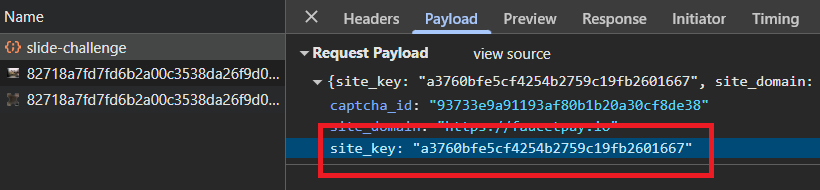
websiteKey
In the Network tab, filter requests using keywords related to captchas, such as site_key. These requests will contain the site_key parameter – a value used to identify the website during the captcha solving process:
Automatically
To automate parameter extraction, you can retrieve them via a browser (regular or headless, e.g., using Playwright) or directly from HTTP requests. Since dynamic parameter values are short-lived, it is recommended to use them immediately after retrieval.
The provided code snippets are basic examples for learning how to extract the required parameters. The exact implementation will depend on your captcha page, its structure, and the HTML elements and selectors used.
- JavaScript
- Python
- C#
Show code (for browser)
// Look for an element with the data-sitekey attribute
const captchaElement = document.querySelector('[data-sitekey]');

// Extract the sitekey value
if (captchaElement) {
  const siteKey = captchaElement.getAttribute('data-sitekey');
  console.log('Found site-key:', siteKey);
} else {
  console.log('site-key not found');
}
Show code (Node.js)
import { chromium } from 'playwright';

async function extractSiteKey() {
  const browser = await chromium.launch({ headless: true });
  const page = await browser.newPage();

  const url = 'https://example.com';
  await page.goto(url);

  // Look for an element with the data-sitekey attribute
  const captchaElement = await page.$('[data-sitekey]');

  // Extract the sitekey value
  if (captchaElement) {
    const siteKey = await captchaElement.getAttribute('data-sitekey');
    console.log('Found site-key:', siteKey);
  } else {
    console.log('site-key not found');
  }

  await browser.close();
}

extractSiteKey();
Show code
import asyncio
from playwright.async_api import async_playwright

async def main():
    async with async_playwright() as p:
        browser = await p.chromium.launch(headless=False)
        page = await browser.new_page()

        url = 'https://example.com/captcha-page'
        await page.goto(url)

        # Look for an element with the data-sitekey attribute
        captcha_element = await page.query_selector('[data-sitekey]')

        # Extract the sitekey value if the element is found
        if captcha_element:
            site_key = await captcha_element.get_attribute('data-sitekey')
            print('Found site-key:', site_key)
        else:
            print('site-key not found')

        await browser.close()

asyncio.run(main())
Show code
using System;
using System.Threading.Tasks;
using Microsoft.Playwright;

class Program
{
    static async Task Main(string[] args)
    {
        string url = "https://example.com/captcha-page";

        using var playwright = await Playwright.CreateAsync();
        var browser = await playwright.Chromium.LaunchAsync(new BrowserTypeLaunchOptions {
        Headless = false });
        var page = await browser.NewPageAsync();

        await page.GotoAsync(url);

        // Look for an element with the data-sitekey attribute
        var captchaElement = await page.QuerySelectorAsync("[data-sitekey]");

        // Extract the sitekey value if the element is found
        if (captchaElement != null)
        {
            var siteKey = await captchaElement.GetAttributeAsync("data-sitekey");
            Console.WriteLine("Found site-key: " + siteKey);
        }
        else
        {
            Console.WriteLine("site-key not found");
        }

        await browser.CloseAsync();
    }
}
Use the SDK library
- JavaScript / TypeScript
- Python
- C#
Show code (for browser)
// https://github.com/CapMonsterCloud/capmonster-nodejs-captcha-solver

import {
  CapMonsterCloudClientFactory,
  ClientOptions,
  BasiliskRequest
} from "@zennolab_com/capmonstercloud-client";

document.addEventListener("DOMContentLoaded", async () => {

  const API_KEY = "YOUR_API_KEY"; // Specify your CapMonster Cloud API key

  const client = CapMonsterCloudClientFactory.Create(
    new ClientOptions({ clientKey: API_KEY })
  );

  // Basic example without proxy
  // CapMonster Cloud automatically uses its own proxies
  let basiliskRequest = new BasiliskRequest({
    websiteURL: "https://yourwebsite.com/page-with-basilisk",
    websiteKey: "your-website-key",
  });

  // Example using your proxy
  // Uncomment this block if you want to use your own proxy
  /*
  const proxy = {
    proxyType: "http",
    proxyAddress: "123.45.67.89",
    proxyPort: 8080,
    proxyLogin: "username",
    proxyPassword: "password",
  };

  basiliskRequest = new BasiliskRequest({
    websiteURL: "https://yourwebsite.com/page-with-basilisk",
    websiteKey: "your-website-key",
    proxy,
    userAgent: "userAgentPlaceholder",
  });
  */

  // You can check your balance if necessary
  const balance = await client.getBalance();
  console.log("Balance:", balance);

  const result = await client.Solve(basiliskRequest);
  console.log("Solution:", result.solution);
});
Show code (Node.js)
// https://github.com/CapMonsterCloud/capmonster-nodejs-captcha-solver

const {
  CapMonsterCloudClientFactory,
  ClientOptions,
  BasiliskRequest,
} = require("@zennolab_com/capmonstercloud-client");

const API_KEY = "YOUR_API_KEY"; // Specify your CapMonster Cloud API key

async function solveBasilisk() {
  const client = CapMonsterCloudClientFactory.Create(
    new ClientOptions({ clientKey: API_KEY }),
  );

  // Basic example without proxy
  // CapMonster Cloud automatically uses its own proxies
  let basiliskRequest = new BasiliskRequest({
    websiteURL: "https://yourwebsite.com/page-with-basilisk",
    websiteKey: "your-website-key",
  });

  // Example using your proxy
  // Uncomment this block if you want to use your own proxy
  /*
  const proxy = {
    proxyType: "http",
    proxyAddress: "123.45.67.89",
    proxyPort: 8080,
    proxyLogin: "username",
    proxyPassword: "password",
  };

  basiliskRequest = new BasiliskRequest({
    websiteURL: "https://yourwebsite.com/page-with-basilisk",
    websiteKey: "your-website-key",
    proxy,
    userAgent: "userAgentPlaceholder",
  });
  */

  // You can check your balance if necessary
  const balance = await client.getBalance();
  console.log("Balance:", balance);

  const result = await client.Solve(basiliskRequest);
  console.log("Solution:", result.solution);
}

solveBasilisk().catch(console.error);
Show code
# https://github.com/CapMonsterCloud/capmonster-python-captcha-solver

import asyncio

from capmonstercloudclient import CapMonsterClient, ClientOptions
from capmonstercloudclient.requests import BasiliskCustomTaskRequest
# Import ProxyInfo if you plan to use your own proxy
from capmonstercloudclient.requests.proxy_info import ProxyInfo

API_KEY = "YOUR_API_KEY"  # Specify your CapMonster Cloud API key


async def solve_basilisk():
    client = CapMonsterClient(
        options=ClientOptions(api_key=API_KEY)
    )

    # Basic example without proxy
    # CapMonster Cloud automatically uses its own proxies
    basilisk_request = BasiliskCustomTaskRequest(
        websiteUrl="https://yourwebsite.com/page-with-basilisk",
        websiteKey="your-website-key",
    )

    # Example using your proxy
    # Uncomment this block if you want to use your own proxy
    """
    proxy = ProxyInfo(
        proxyType="http",
        proxyAddress="123.45.67.89",
        proxyPort=8080,
        proxyLogin="username",
        proxyPassword="password",
    )

    basilisk_request = BasiliskCustomTaskRequest(
        websiteUrl="https://yourwebsite.com/page-with-basilisk",
        websiteKey="your-website-key",
        proxy=proxy,
        userAgent="userAgentPlaceholder",
    )
    """

    # You can check your balance if necessary
    balance = await client.get_balance()
    print("Balance:", balance)

    result = await client.solve_captcha(basilisk_request)
    print("Solution:", result)


asyncio.run(solve_basilisk())
Show code
// https://github.com/CapMonsterCloud/capmonster-dotnet-captcha-solver

using System;
using System.Threading.Tasks;
using Zennolab.CapMonsterCloud;
using Zennolab.CapMonsterCloud.Requests;

class Program
{
    static async Task Main(string[] args)
    {
        // Specify your CapMonster Cloud API key
        var clientOptions = new ClientOptions
        {
            ClientKey = "YOUR_API_KEY"
        };

        var cmCloudClient = CapMonsterCloudClientFactory.Create(clientOptions);

        // Basic example without proxy
        // CapMonster Cloud automatically uses its own proxies
        var basiliskRequest = new BasiliskCustomTaskRequest
        {
            WebsiteUrl = "https://yourwebsite.com/page-with-basilisk",
            WebsiteKey = "your-website-key"
        };

        // Example using your proxy
        // Uncomment this block if you want to use your own proxy
        /*
        basiliskRequest = new BasiliskCustomTaskRequest
        {
            WebsiteUrl = "https://yourwebsite.com/page-with-basilisk",
            WebsiteKey = "your-website-key",
            UserAgent = "userAgentPlaceholder",

            Proxy = new ProxyContainer(
                "123.45.67.89",
                8080,
                ProxyType.Http,
                "username",
                "password"
            )
        };
        */

        // You can check your balance if necessary
        var balance = await cmCloudClient.GetBalanceAsync();
        Console.WriteLine("Balance: " + balance);

        var basiliskResult = await cmCloudClient.SolveAsync(basiliskRequest);

        Console.WriteLine("Solution Data: " + string.Join(", ", basiliskResult.Solution.Data));
        Console.WriteLine("Solution Headers: " + string.Join(", ", basiliskResult.Solution.Headers));
    }
}